1. Introduction
This manual provides detailed instructions for the setup, operation, and maintenance of your TIMEX Ironman Finisher Adrenaline Digital Watch, model TW5M58000UJ. Please read this manual thoroughly to ensure proper use and to maximize the lifespan of your timepiece.
The TIMEX Ironman Finisher Adrenaline Digital Watch is designed for durability and reliable performance, featuring a digital display, water resistance, and a comfortable polyurethane strap.
2. Watch Components and Buttons
Familiarize yourself with the watch's main components and button functions:

Figure 1: Front view of the TIMEX Ironman Finisher Adrenaline Digital Watch. The display shows the day, date, and time. Buttons are labeled 'SET/RECALL', 'MODE', 'INDIGLO', and 'START/RESET'.
- SET/RECALL Button: Used for setting time/date and recalling stored data.
- MODE Button: Cycles through different watch modes (Time, Chronograph, Timer, Alarm).
- INDIGLO Button: Activates the INDIGLO night-light for illumination in low-light conditions.
- START/RESET Button: Used to start/stop functions in chronograph/timer modes and reset values during setting.
3. Setup and Initial Configuration
3.1. Initial Power On / Battery
Your watch is powered by a CR2016 battery. The watch should be operational upon receipt. If the display is blank or dim, the battery may need replacement. Refer to the 'Maintenance' section for battery information.
3.2. Setting Time and Date
- Press the MODE button repeatedly until you reach the Time Setting mode (often indicated by a flashing digit).
- Press the SET/RECALL button to select the digit you wish to adjust (e.g., hours, minutes, year, month, day).
- Use the START/RESET button to increase the selected value. Hold the button to advance rapidly.
- Continue pressing SET/RECALL to move to the next setting and START/RESET to adjust.
- Once all settings are correct, press the MODE button to exit the setting mode and return to the normal time display.
4. Operating Instructions
4.1. Navigating Modes
Press the MODE button to cycle through the watch's various functions:
- Time Mode: Displays current time, day, and date.
- Chronograph (Stopwatch) Mode: For measuring elapsed time.
- Timer Mode: For countdown functions.
- Alarm Mode: To set and activate daily alarms.
4.2. Using the Chronograph
- Navigate to Chronograph mode using the MODE button.
- Press START/RESET to begin timing.
- Press START/RESET again to pause timing.
- To reset the chronograph to zero, press and hold START/RESET while it is paused.
4.3. INDIGLO Night-Light
Press the INDIGLO button to illuminate the watch display for a few seconds, enhancing visibility in low-light conditions.
5. Maintenance
5.1. Cleaning Your Watch
To clean your watch, wipe it with a soft, damp cloth. Avoid using harsh chemicals or abrasive materials, as these can damage the watch case or strap.
5.2. Water Resistance
This watch is water resistant up to 50 meters (5 ATM). This means it is suitable for showering, swimming in shallow water, and general water exposure. It is not suitable for diving, snorkeling, or high-impact water sports. Do not press any buttons while the watch is submerged in water, as this can compromise the water resistance seal.
5.3. Battery Replacement
The watch uses a CR2016 battery. When the display becomes dim or the watch stops functioning, the battery may need replacement. It is recommended to have the battery replaced by a qualified watch technician to ensure the water resistance seal is maintained.

Figure 2: Rear view of the watch, indicating the CR2016 battery type and water resistance rating.
6. Troubleshooting
- Watch not displaying time: Check if the battery needs replacement. If recently replaced, ensure it was installed correctly.
- Time is incorrect: Follow the 'Setting Time and Date' instructions in Section 3.2 to reset the time.
- Buttons not responding: Ensure the watch is not in a locked mode (if applicable, refer to specific model features not detailed here). If submerged, allow it to dry completely before attempting to use buttons.
- Fogging under crystal: This may indicate a breach in the water resistance seal. Avoid further water exposure and seek professional service.
7. Specifications
| Feature | Specification |
|---|---|
| Model Number | TW5M58000UJ |
| Case Diameter | 46.5 mm |
| Case Thickness | 10.5 mm |
| Strap/Lug Width | 20 mm |
| Case Material | Resin |
| Band Material Type | Polyurethane (PU) / Silicone |
| Band Color | Green |
| Movement Type | Digital Quartz |
| Water Resistance | 50 meters (5 ATM) |
| Battery Type | CR2016 |
| Item Weight | 90 g |
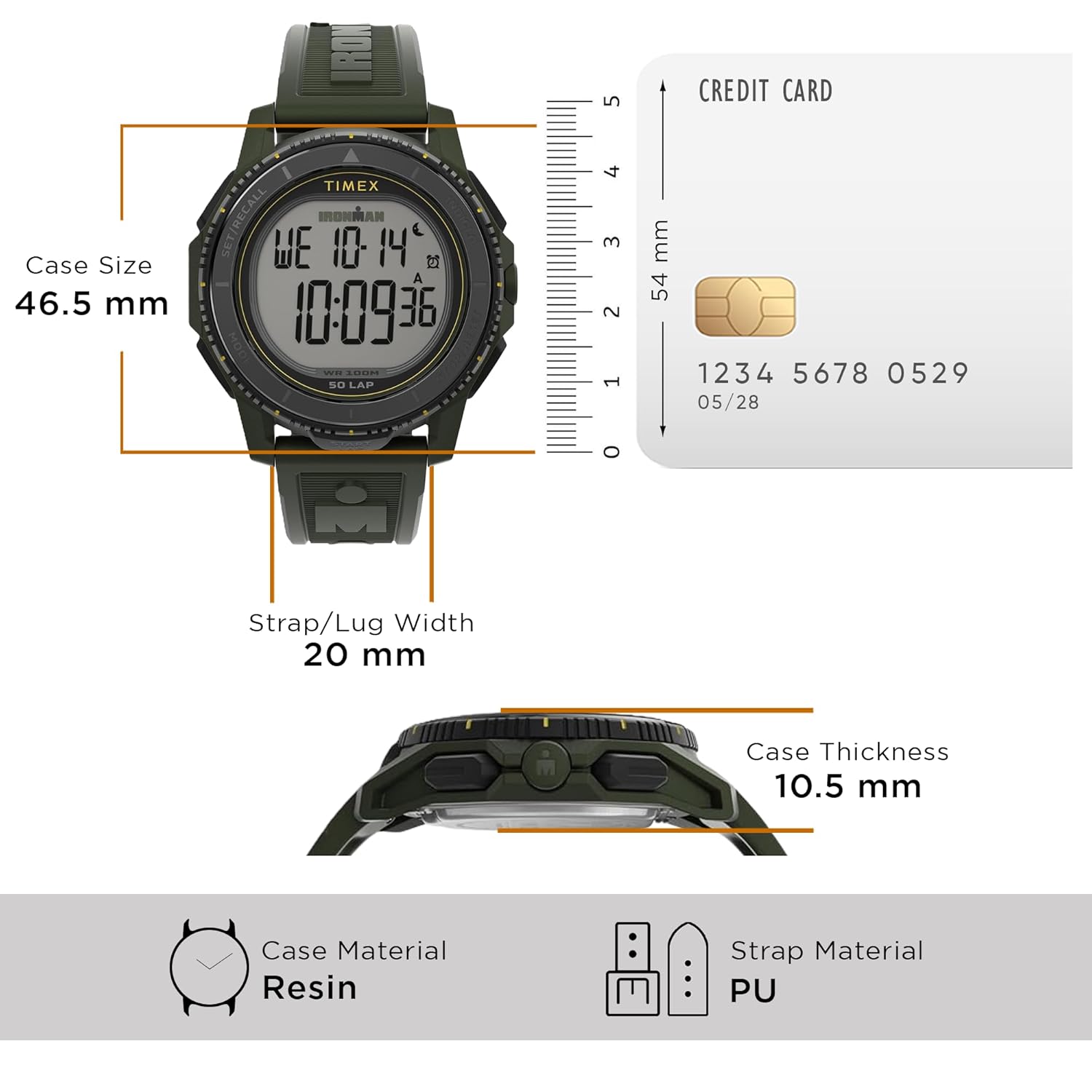
Figure 3: Watch dimensions and material overview.
8. Warranty and Support
8.1. Warranty Information
This TIMEX watch is backed by a one-year manufacturer's warranty covering manufacturing defects from the date of purchase. This warranty does not cover normal wear and tear, battery life, accidental damage, or damage resulting from improper use or unauthorized repairs.
8.2. Customer Support
For warranty claims, technical assistance, or service inquiries, please contact TIMEX customer support through their official website or the retailer where the watch was purchased. Please have your model number (TW5M58000UJ) and proof of purchase available.


