1. Introduction
The BETAFPV Air Brushless Flight Controller is a lightweight 1S All-In-One (AIO) Flight Controller designed for FPV Whoop Quadcopters. It integrates a G473 CPU, 16MB BlackBox, BB51 Bluejay 96K ESC, and OSD chip, offering advanced performance and features for precise control and maneuverability. This manual provides essential information for the proper setup, operation, and maintenance of your flight controller.

Figure 1: Top view of the BETAFPV Air Brushless Flight Controller 4IN1.
2. Safety Precautions
- VTX Power Management: Higher Video Transmitter (VTX) power settings consume more energy and generate increased heat, which can reduce flight time. For indoor use, it is recommended to operate at 25-100mW power to optimize flight duration and minimize heat.
- Motor Wiring: Motor wiring to the flight controller supports soldering connections only. Avoid using terminal plugs for motor connections.
- VTX Antenna Connection: Always connect and install the image transmission antenna before powering on the flight controller. Alternatively, set the VTX transmission power to 0 to prevent potential damage or burnout if the antenna is not connected.
3. Package Contents
Verify that all items are present in the package:
- 1 * Air Brushless Flight Controller - 4IN1 Version
- 1 * Type-C to SH1.0 Adapter
- 1 * SH1.0 4Pin Adapter Cable
- 1 * 5.8g VTX Antenna
- 1 * BT2.0 U Whoop Cable Pigtail | 40mm
- 4 * M1.4*4 Self-tapping Screws
- 4 * Shock Absorbing Ball
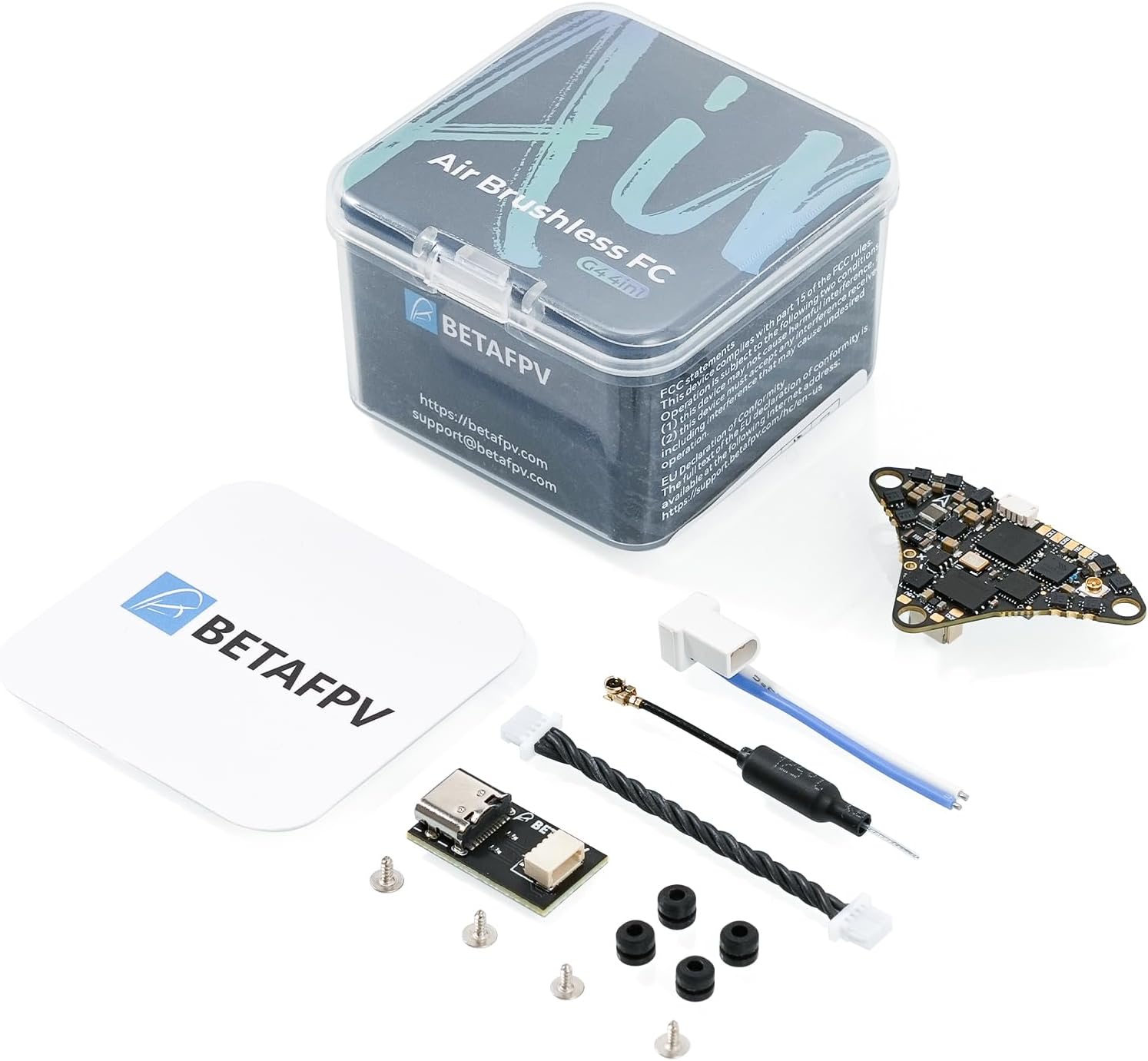
Figure 2: The flight controller and included accessories, demonstrating its lightweight design at 2.99g.
4. Product Features
The BETAFPV Air Brushless Flight Controller incorporates several advanced features:
- G473 Processor: The first 1S FC to utilize the G473 processor, offering a 55% increase in computing speed and faster response times compared to the F411.
- Lightweight and Integrated Design: Weighing only 2.9g (4IN1 Version) with a custom miniature OSD chip.
- External UART Port: Provides additional UART port options for function expansions.
- Integrated VTX: Features an onboard 25-400mW VTX, simplifying installation and reducing weight.
- ICM42688P Gyro: Equipped with an industry-leading ICM42688P gyro, integrated accelerometer, advanced sensor calibration, and filtering algorithms, supporting a sample rate of up to 8K for precise drone control.
- 16MB BlackBox: Offers extensive flight data recording and analysis capabilities for performance optimization and fault diagnosis.
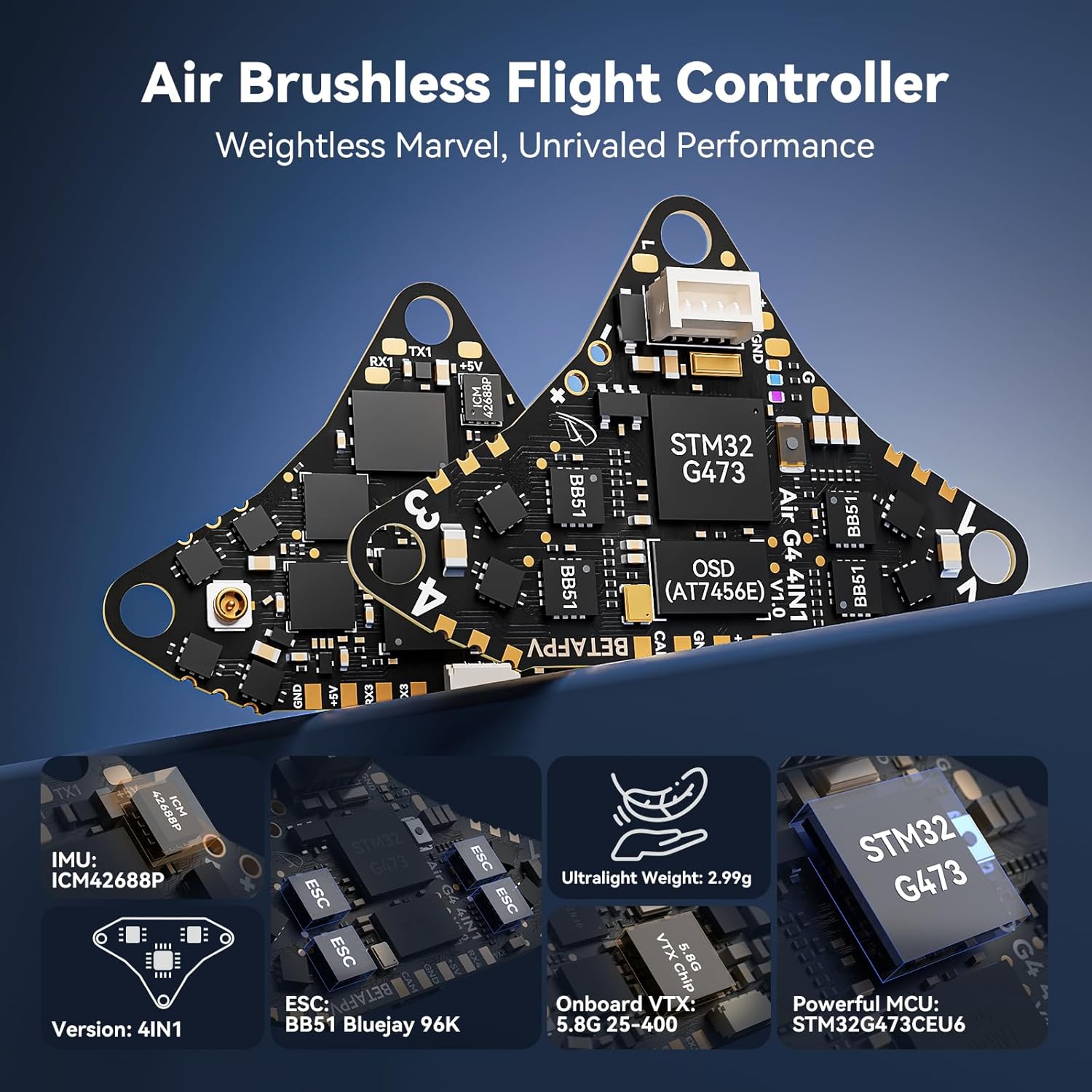
Figure 3: Overview of the flight controller's key features and components.
5. Component Identification
5.1 Top Front View

Figure 4: Top front view with labeled components, including VTX ANT, TX3, RX3, +5V, GND, CAM in, 5.8G VTX Chip, BATT+(1S), Current Sensor, ICM42688P, GD32F310, W25Q128, RX1, and TX1.
5.2 Bottom Front View

Figure 5: Bottom front view with labeled components, including TX4, RX4, +5V, GND, CAM, OSD (AT7456E), FC SWCLK, FC SWDIO, ESC1-4, EFM8BB51, FC BOOT, GND, USB-DM, USB-DP, USB, RGB LED, and STM32G473.
6. Specifications
| Category | Specification |
|---|---|
| Weight | 2.9g (4IN1 Version) |
| Mounting Hole Size | 26mm x 26mm |
| CPU | STM32G473CEU6 (168MHz) |
| Six-Axis Gyro | ICM42688P (SPI connection) |
| Blackbox Memory | 16MB |
| Sensor | Voltage & Current |
| 5V BEC | 5V 3A |
| USB Port | SH1.0 4-Pin |
| Built-in ESC | 5A continuous |
| Integrated Features | FC + ESC + OSD + VTX (4IN1 Version) |
| ESC Input Voltage | 1S |
| FC Firmware | Betaflight_4.5.0_BETAFPVG473 |
| ESC Firmware | A_X_5_96KHz_V0.19.hex for BB51 Bluejay hardware |
| Signal Support | D-shot300, D-shot600 |
| VTX Output Power | 25/100/200/400/PIT |
| VTX Frequency | 5.8GHz 48 channels, Raceband: 5658~5917MHz |
| VTX Channel Selection | SmartAudio2.0 |
| VTX Modulation Type | FM |
| VTX Antenna Port | 50 Ω |
| Operating Temperature | -10℃~+80℃ |
7. Wiring and Connections
Proper wiring is crucial for the functionality and safety of your flight controller. Refer to the diagram below for connecting your receiver, camera, and other peripherals.
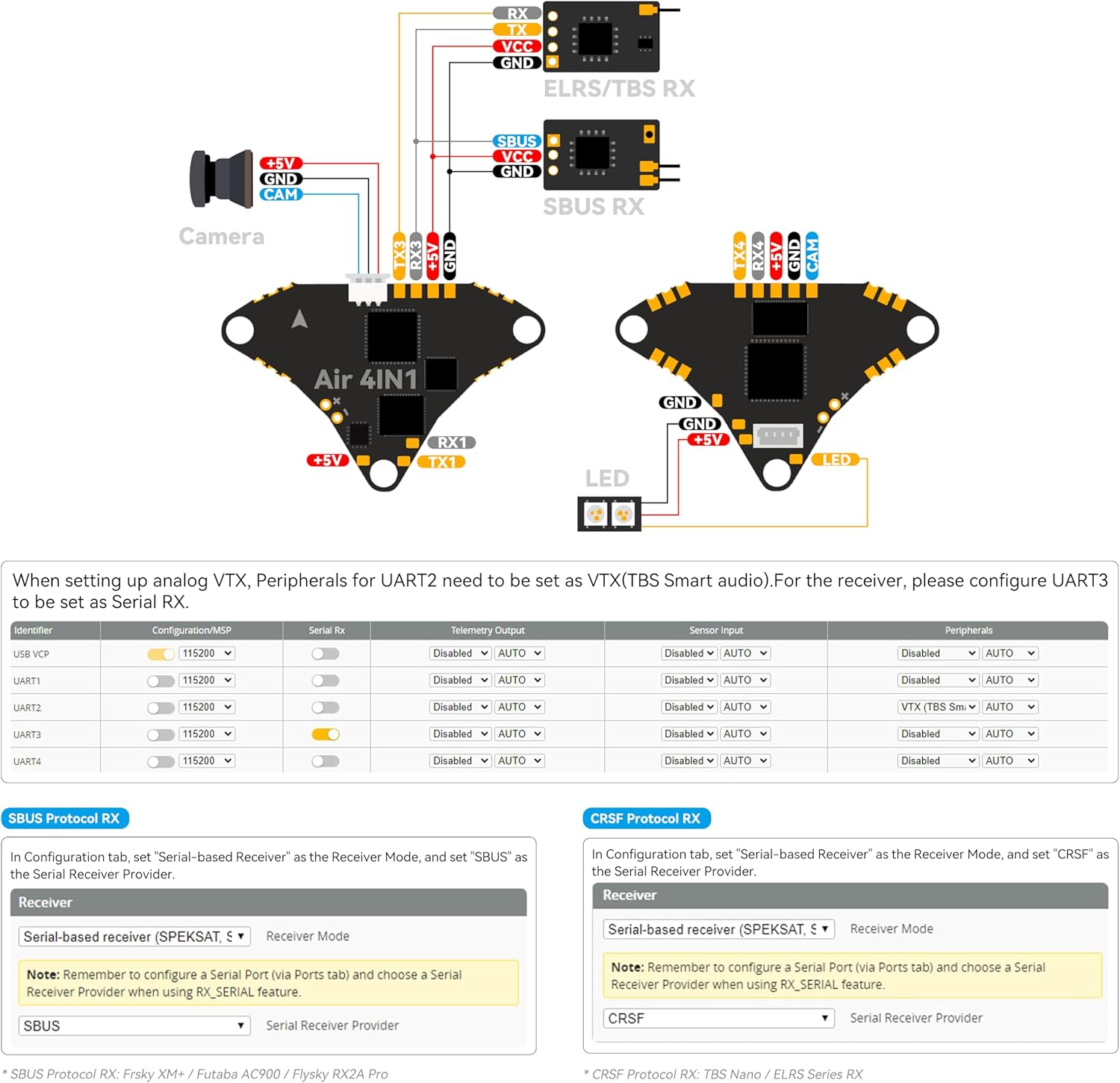
Figure 6: Wiring diagram illustrating connections for USB, camera, ELRS/TBS RX, SBUS RX, and LED.
7.1 Receiver Connection
- For ELRS/TBS receivers, connect to the designated pads as shown in the diagram.
- For SBUS receivers, connect to the SBUS RX pads.
7.2 Camera Connection
- Connect your FPV camera to the CAM in, +5V, and GND pads.
7.3 LED Connection
- Connect external LEDs to the LED, +5V, and GND pads.
8. Betaflight Configuration
The flight controller comes pre-flashed with Betaflight_4.5.0_BETAFPVG473 firmware. For advanced configuration and tuning, connect the flight controller to a computer using the provided Type-C to SH1.0 adapter and a USB cable, then use the Betaflight Configurator software.
8.1 UART Port Configuration
Based on the wiring diagram, specific UART ports are pre-configured or recommended for certain peripherals:
- UART2: For analog VTX, peripherals need to be set as VTX (TBS Smart Audio).
- UART3: For receiver configuration, set as Serial RX.
Ensure that the correct serial receiver protocol (e.g., SBUS, CRSF) is selected in the Betaflight Configuration tab under 'Receiver' mode and 'Serial Receiver Provider'.
9. Operation Guidelines
Once installed and configured, the flight controller manages the drone's flight characteristics. Ensure all connections are secure and the drone is calibrated before flight. Always operate your FPV drone in a safe environment, away from people and obstacles.
10. Maintenance and Care
- Regular Inspection: Periodically check all solder joints and connections for any signs of wear or damage.
- Cleaning: Keep the flight controller free from dust, dirt, and moisture. Use a soft brush or compressed air for cleaning.
- Firmware Updates: Regularly check the BETAFPV website for the latest Betaflight firmware updates to ensure optimal performance and access to new features.
- Storage: Store the flight controller in a dry, cool environment when not in use.
11. Troubleshooting
- No Power/No Lights: Check battery connection and polarity. Ensure the USB cable is properly connected if powering via USB.
- No Video Feed: Verify VTX antenna connection. Check VTX power settings in Betaflight. Ensure camera is properly wired and powered.
- Overheating: If the flight controller becomes excessively hot (above 50-60℃) when powered, especially via USB, disconnect power immediately. This could indicate a faulty component or incorrect wiring. Ensure VTX power is set to a low level (e.g., PIT mode or 25mW) during bench testing.
- Motors Not Spinning: Check motor wiring and ensure ESCs are properly calibrated. Verify motor direction and assignments in Betaflight.
- Connectivity Issues (Betaflight): Ensure correct drivers are installed for the flight controller. Try a different USB port or cable.
12. Support and Warranty
For technical support, firmware downloads, or further assistance, please visit the official BETAFPV website. Information regarding product warranty can typically be found on the manufacturer's website or through your point of purchase.
BETAFPV Official Website: www.betafpv.com


