
1. Introduction
The Autel MaxiSys MS909 is an advanced intelligent diagnostic scan tool designed for comprehensive vehicle diagnostics and maintenance. This manual provides detailed instructions for the proper setup, operation, and maintenance of your MS909 device, ensuring optimal performance and longevity.
The MS909 integrates intelligent diagnostics, ECU programming, and a wide range of maintenance services to assist automotive technicians in efficient vehicle troubleshooting and repair.
2. Product Overview
2.1. What's in the Box
- AUTEL MaxiSYS MS909 Diagnostic Tablet
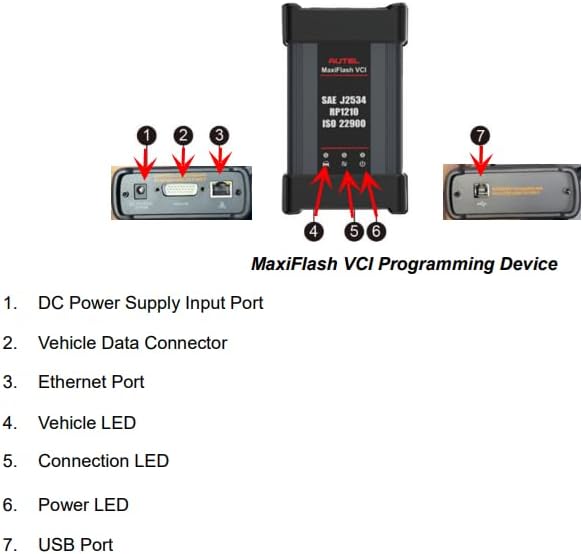
- MaxiFlash VCI/J2534
2.2. Key Features
- Intelligent Diagnostics: Features Topology Mapping, original factory TSB (Technical Service Bulletins), Repair Assist, and Repair Guide for enhanced diagnostic efficiency.
- ECU Programming & Coding: Supports ECU programming for specific BMW and Benz vehicles, allowing for module replacement and hidden function activation.
- Extensive Service Functions: Over 36 maintenance services including Oil Reset, EPB, TPMS, BMS, ABS Bleeding, SAS Calibration, Throttle Adaptation, and IMMO.
- Advanced Protocol Support: Compatible with J2534, D-PDU, RP1210, CAN FD, and DoIP protocols for broad vehicle coverage.
- Bi-Directional Control: Perform active tests on vehicle components to verify functionality.
- Robust Hardware: Equipped with a 9.7-inch touch screen, Android 10.0 OS, octa-core processor, 128GB memory, and a 15000mAH battery.
2.3. Device Components

3. Setup
Follow these steps for the initial setup of your Autel MaxiSys MS909 diagnostic scanner:
- Charge the Tablet: Connect the power adapter to the MS909 tablet and a power outlet. Ensure the tablet is fully charged before first use.
- Power On: Press and hold the Lock/Power button on the tablet to turn it on.
- Initial Configuration: Follow the on-screen prompts to select your language, region, and connect to a Wi-Fi network.
- Register Device: Register your device with Autel to activate warranty and receive software updates. This typically involves creating an Autel ID and entering the device's serial number.
- Update Software: After registration, navigate to the 'Update' application on the tablet to download and install the latest software and vehicle data. Regular updates ensure compatibility with new vehicle models and improved functionalities.
- Connect VCI: Connect the MaxiFlash VCI to the vehicle's OBDII port. The VCI can communicate with the tablet via Bluetooth or USB. Ensure a stable connection for diagnostic operations.
4. Operating Instructions
4.1. Intelligent Diagnostics
The Intelligent Diagnostics feature provides a guided diagnostic process, offering repair tips, relevant technical service bulletins (TSBs), and repair cases. This streamlines the diagnostic workflow.
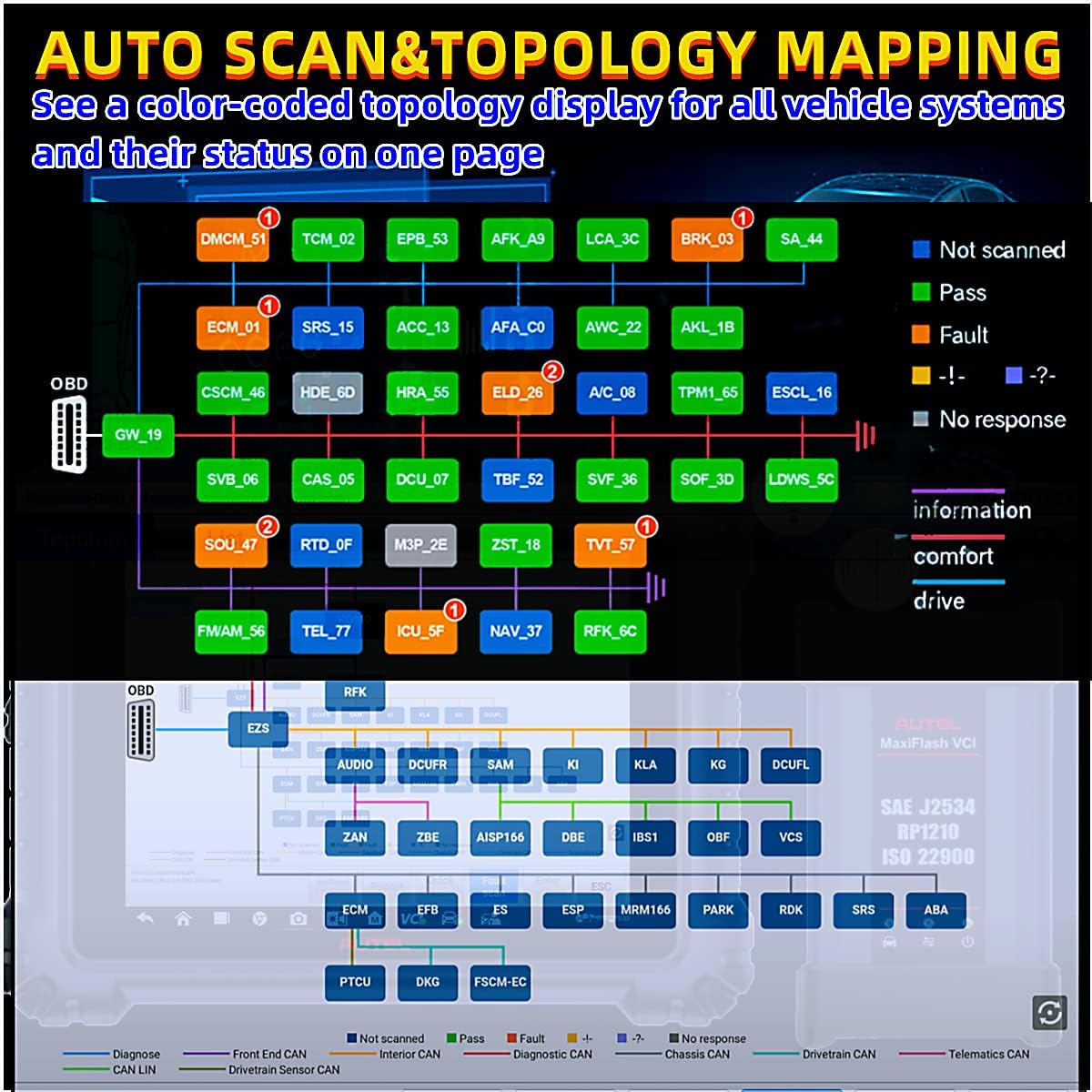
- Topology Mapping: This function visually displays all ECU modules in the vehicle and their communication status. It helps identify system faults and their interconnections quickly.
4.2. ECU Programming & Coding
The MS909 supports advanced ECU programming and coding functionalities:
- ECU Programming: Allows for reprogramming new ECU modules after replacement, ensuring they are correctly matched to the vehicle. This function is available for specific BMW and Benz models.
- ECU Coding: Enables customization of vehicle functions, activation of hidden features, and optimization of vehicle performance.
4.3. Service Functions
The MS909 offers over 36 specialized service functions to perform various maintenance tasks. Access these functions from the 'Service' menu on the tablet.
- Common Services: Oil Reset, Electronic Parking Brake (EPB) Reset, Tire Pressure Monitoring System (TPMS) functions, Battery Management System (BMS) Reset, ABS Bleeding, Steering Angle Sensor (SAS) Calibration, Throttle Adaptation, Injector Coding, Immobilizer (IMMO) functions, Suspension Calibration, Trans Adaptation, Cam Crank Relearn, Power Balance Test, and more.
- VAG Guided Function: For Volkswagen Audi Group (VAG) vehicles, the MS909 provides step-by-step instructions to simplify complex operations.

4.4. Bi-Directional Control (Active Test)
Bi-directional control allows the diagnostic tool to send commands to vehicle systems and components to test their functionality. This helps in quickly pinpointing faulty components.
- Examples: Activating fuel pumps, cycling A/C clutches, rolling windows up/down, testing door lock actuators, and turning headlamps on/off.
4.5. Protocol Support
The Autel MaxiSys MS909 supports a wide array of diagnostic protocols, ensuring compatibility with a broad range of vehicles, including newer models.
- Supported Protocols: J2534, D-PDU, RP1210, CAN FD, and DoIP.
- OE Diagnostic Programs: Compatible with OE diagnostic programs for brands like Land Rover, BMW, Mercedes-Benz, VW, Jaguar, Volvo, and Chrysler.
5. Maintenance
Proper maintenance ensures the longevity and optimal performance of your MaxiSys MS909:
- Software Updates: Regularly check for and install software updates to ensure the latest vehicle coverage and features.
- Cleaning: Use a soft, damp cloth to clean the tablet screen and body. Avoid abrasive cleaners or solvents.
- Storage: Store the device in a cool, dry place, away from direct sunlight and extreme temperatures.
- Battery Care: Avoid fully discharging the battery frequently. Charge the device regularly, even when not in use, to maintain battery health.
- VCI Care: Keep the MaxiFlash VCI clean and ensure its connectors are free from dust and debris.
6. Troubleshooting
If you encounter issues with your Autel MaxiSys MS909, consider the following common troubleshooting steps:
- Device Not Powering On: Ensure the tablet is fully charged. Connect it to the power adapter and allow it to charge for at least 30 minutes before attempting to power it on again.
- VCI Connection Issues: Verify that the MaxiFlash VCI is securely connected to the vehicle's OBDII port and that the tablet's Bluetooth or USB connection to the VCI is active. Check the VCI's indicator lights for status.
- Software Freezing/Crashing: Restart the tablet. Ensure all software updates are installed. If the issue persists, consider performing a factory reset (note: this will erase user data, so back up important information).
- Vehicle Communication Errors: Confirm the vehicle's ignition is on. Check the vehicle's battery voltage. Ensure the correct vehicle make, model, and year are selected in the diagnostic software. Verify the VCI is properly connected.
- Slow Performance: Close unnecessary applications running in the background. Clear cached data if available in settings. Ensure sufficient storage space.
For persistent issues or advanced technical support, please contact Autel customer service.
7. Specifications
| Feature | Specification |
|---|---|
| Brand | Autel |
| Model | MaxiSys MS909 |
| Operating System | Android 10.0 |
| Processor | Octa-core (2.2GHz+1.8GHz) |
| Memory | 128GB |
| Display | 9.7-inch TFT-LCD Capacitive Touch Screen (1536 x 2048 resolution) |
| Battery | 15000mAH 3.8V Lithium Polymer (up to 8 hours continuous use) |
| Connectivity | Wi-Fi, Bluetooth, USB, Ethernet, HDMI |
| Dimensions | 9 x 2 x 12 inches (Tablet) |
| Item Weight | 14.87 pounds |
| Supported Protocols | J2534, D-PDU, RP1210, CAN FD, DoIP |
| UPC | 792499188887 |
8. Warranty and Support
Autel provides a limited warranty for the MaxiSys MS909 diagnostic scanner. Please refer to the warranty card included with your product for specific terms and conditions.
For technical assistance, product inquiries, or warranty claims, please contact Autel customer support through their official website or the contact information provided in your product packaging. Ensure you have your device's serial number ready when contacting support.