
1. Product Overview
The Jadeshay Adjustable DC-DC Converter is a high-performance power supply module designed for precise voltage and current regulation. It functions as both a step-up (boost) and step-down (buck) converter, allowing for flexible output voltage from 0-36V DC from an input range of 6-36V DC. Equipped with a full-screen VA color LCD, it displays voltage, current, and power, providing clear and immediate feedback on its operational status. Its robust design includes an intelligent temperature control fan and multiple protection features to ensure safe and reliable operation.


2. Key Features
- Adjustable Boost/Buck Converter: Converts DC 6-36V input to DC 0-36V output.
- High Power Output: Up to 120W and 6A.
- Full-Screen VA Color LCD: Displays voltage, current, and power simultaneously.
- Intelligent Temperature Control: Features a smart fan and thickened heatsink for efficient heat dissipation.
- Upgraded Plug-in Terminals: Facilitates easy removal and replacement of connections.
- Comprehensive Protection: Includes reverse polarity, backflow, undervoltage, overvoltage, overcurrent, overtemperature, overpower, and timeout protection.
- MPPT Functionality: Supports battery charging with Maximum Power Point Tracking, ideal for solar applications.
- Data Storage: Stores up to 10 groups of settings.
3. Setup and Wiring
Before connecting the converter, ensure all power sources are disconnected. Observe proper polarity to prevent damage to the device and connected equipment.
3.1 Wiring Connections
Connect the input power source to the IN+ (positive) and IN- (negative) terminals. Connect your load or device to the OUT+ (positive) and OUT- (negative) terminals. The upgraded plug-in terminals allow for secure and convenient connections.

3.2 External Temperature Probe Connection
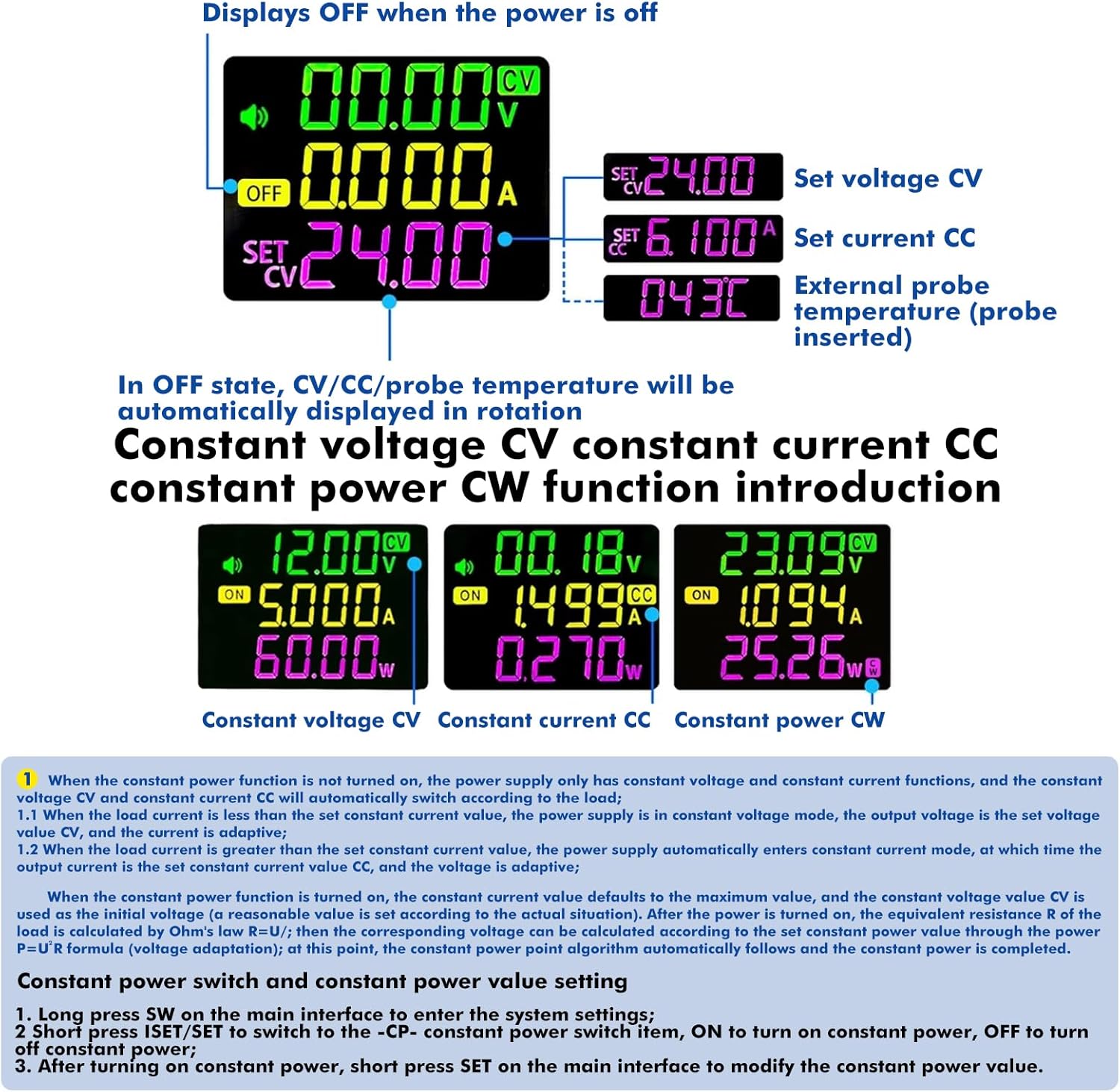
An external NTC temperature probe (10k NTC 3950BNTC) can be connected to the designated interface for over-temperature protection. When connected, the probe's temperature reading will be displayed, and the device can automatically stop charging if over-temperature conditions are detected.

Note: This product does not have reverse polarity protection for battery charging. Reverse polarity of the battery will damage the device. Battery charging requires professional knowledge. Non-professionals should not charge directly to prevent fire and explosion.
4. Operating Instructions
The converter features an intuitive interface with several buttons and an encoder for easy operation.

4.1 Button Functions
- VSET Button:
- Short Press: Set voltage.
- Long Press: Enter or exit the data group interface.
- SW Button:
- Short Press: Switch input and output voltage or shift display.
- Long Press: Enter or exit the system setting interface.
- ISET Button:
- Short Press: Set current.
- Long Press: Enter or exit the data group interface.
- Encoder Button (Rotary Knob):
- Short Press: Switch output power (W), capacity (Ah), energy (Wh), time (h), temperature (°C) / wheel display.
- Long Press: Turn on/off the lock function.
- Power Button:
- Short Press: Turn on/off power output.
- Long Press: Clear capacity (Ah), energy (Wh), and time (h) interface.
4.2 Setting Voltage and Current
- From the main interface, short press the VSET button to enter voltage setting mode. The LCD will show the voltage value blinking.
- Rotate the Encoder to adjust the voltage value.
- Short press the VSET button again to confirm and save the setting.
- To set the current, short press the ISET button and follow the same steps as for voltage setting.

4.3 Display Modes
From the main interface, short press the SW button to toggle between displaying input voltage and output voltage. Short press the Encoder button to cycle through output power (W), capacity (Ah), energy (Wh), time (h), and temperature (°C) displays.
4.4 Data Group Function
The device supports 10 data groups (CD0 to CD9) for saving and recalling settings.
- Long press the VSET button on the main interface to enter the data group interface.
- Use the Encoder to select the desired data group (CD0-CD9).
- Short press VSET/ISET to adjust the voltage and current settings for the selected group.
- Long press VSET/SW or short press the Encoder to load the selected data group.
4.5 Lock Function
To prevent accidental changes, you can lock the set voltage and current. Long press the Encoder button for 2 seconds to activate or deactivate the lock function. A lock symbol will appear on the display when active.
5. Specifications
| Parameter | Value |
|---|---|
| Input Voltage | DC 6 - 36 V |
| Output Voltage | DC 0 - 36 V |
| Output Current | 0 - 6 A |
| Output Power | 120 W |
| Memory Groups | 10 groups |
| Dimensions (L x W x H) | 79mm x 43mm x 50mm (approx.) |
| Model Number | OJJUQVJYL-GSJAY110498-04-0-36V |
6. Maintenance and Care
The Jadeshay converter is designed for durability. To ensure its longevity and optimal performance:
- Keep the device clean and free from dust. Use a soft, dry cloth for cleaning.
- Ensure proper ventilation around the device, especially the heatsink and fan, to allow for efficient heat dissipation.
- Avoid exposing the device to extreme temperatures, humidity, or corrosive environments.
- Regularly check connections for tightness and ensure no wires are frayed or damaged.
7. Troubleshooting
This section addresses common issues and their potential solutions.
| Problem | Possible Cause | Solution |
|---|---|---|
| Device does not power on. | No input power, incorrect wiring, or power button off. | Check input power supply. Verify wiring connections and polarity. Short press the Power button to turn on output. |
| Output voltage/current is unstable or incorrect. | Load too high, incorrect settings, or poor connections. | Ensure load is within specified limits (120W/6A). Re-adjust voltage/current settings. Check all wiring connections. |
| Device shuts down unexpectedly (Over-temperature protection). | Insufficient ventilation, excessive load, or high ambient temperature. | Ensure adequate airflow around the device. Reduce the load. Allow the device to cool down. Consider using an external temperature probe if not already. |
| Display is not working or shows errors. | Internal fault or connection issue. | Power cycle the device. If the issue persists, contact customer support. |
| Buzzer sounds continuously. | Alarm prompt (e.g., over-temperature, over-current). | Check the display for specific error messages. Address the underlying issue (e.g., reduce load, improve ventilation). |
7.1 Protection Features
The converter is equipped with multiple protection mechanisms:
- Reverse Polarity Protection: Protects the device from incorrect input power polarity.
- Backflow Protection: Prevents current from flowing back into the input source.
- Undervoltage Protection: Shuts down if input voltage drops below a safe threshold.
- Overvoltage Protection: Shuts down if output voltage exceeds a safe threshold.
- Overcurrent Protection: Limits or shuts down output if current exceeds set limit.
- Overtemperature Protection: Shuts down if internal temperature becomes too high.
- Overpower Protection: Shuts down if output power exceeds set limit.
- Timeout Protection: Shuts down if operation exceeds a set time limit.
8. Warranty and Support
For warranty information, technical support, or service inquiries, please contact Jadeshay customer service through the retailer where the product was purchased or visit the official Jadeshay website. Please have your model number (OJJUQVJYL-GSJAY110498-04-0-36V) and purchase details ready when contacting support.
© 2025 Jadeshay. All rights reserved.