
FADAKWALT FAD-15959
FADAKWALT Portable Tire Inflator User Manual
Model: FAD-15959
Product Overview
The FADAKWALT Portable Tire Inflator is a versatile and compact air compressor designed for convenient inflation of various items. It features a full touch screen for easy operation, automatic shut-off for hands-free use, and multiple LED light modes for enhanced safety and visibility. This device is ideal for cars, motorcycles, bicycles, and balls, providing precise and efficient inflation wherever you go.
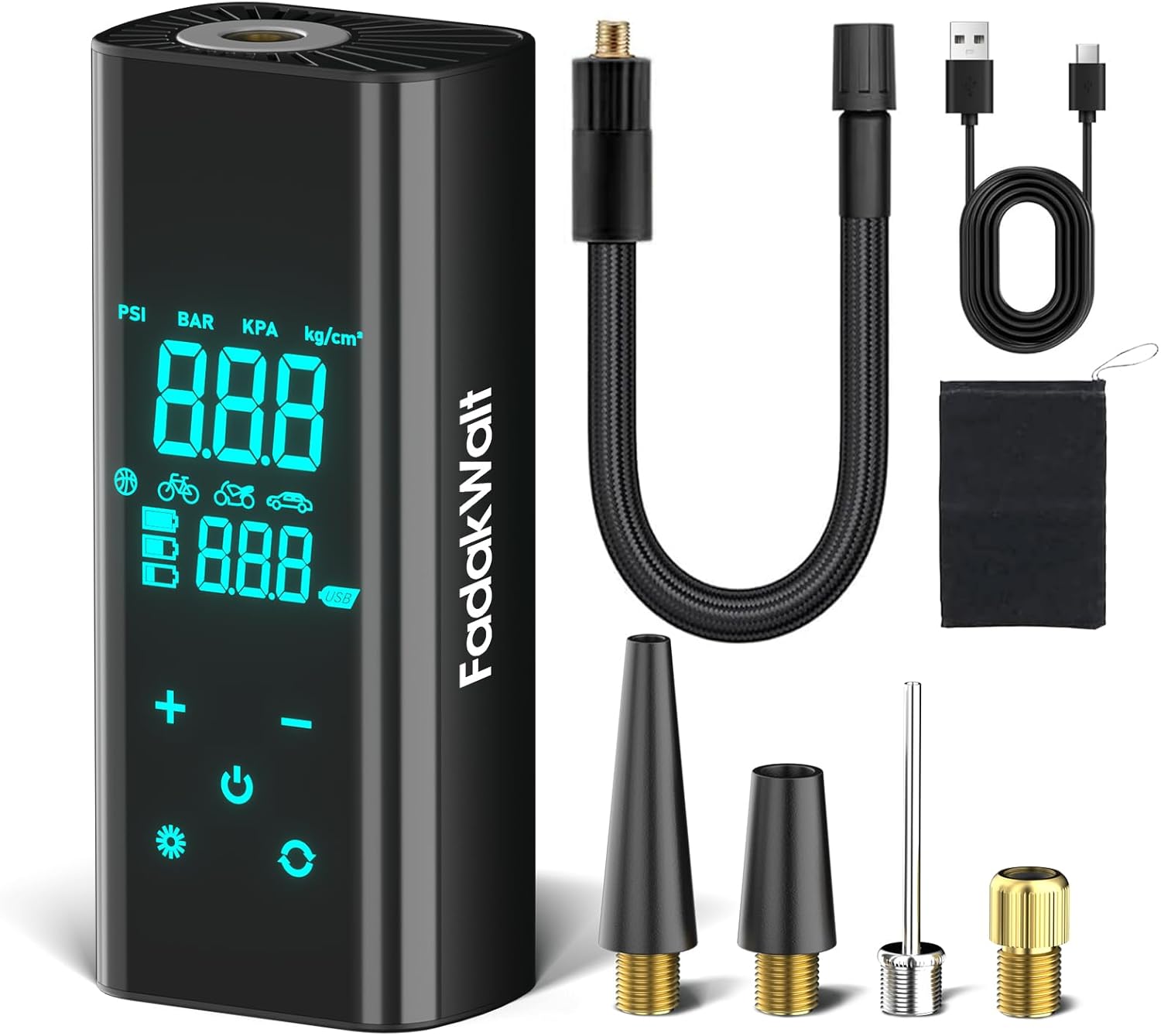
Image: The FADAKWALT Portable Tire Inflator shown with its various accessories, including the inflation hose, charging cable, and different nozzles.
Setup
- Initial Charge: Before first use, fully charge the inflator using the provided Type-C charging cable. The battery indicator on the screen will show charging progress.
- Attach Inflation Hose: Screw the inflation hose securely into the air outlet port at the top of the inflator.
- Power On: Press and hold the power button (usually located on the side or bottom) for 5 seconds to turn on the device. The digital display will illuminate.

Image: A visual guide demonstrating how to connect the hose, power on the device, and navigate the touch screen for inflation.
Operating Instructions
Full Touch Screen Operation
The FADAKWALT Digital Tire Inflator features a responsive full-touch large screen for intuitive control. You can easily adjust pressure, switch modes, and monitor real-time data with simple taps.
- Power Button: Press and hold to turn on/off.
- Mode Selection: Tap the mode icon (car, motorcycle, bicycle, ball, custom) to cycle through preset inflation modes.
- Unit Conversion: Tap the unit icon to switch between PSI, KPA, BAR, and KG/CM².
- Pressure Adjustment: Use the "+" and "–" buttons to set your desired target pressure.
- Start/Stop Inflation: Press the power icon (circle with vertical line) to start or stop the inflation process.
Auto Shut-Off Feature
For hands-free convenience, set your desired pressure using the touch screen. Connect the hose to the item to be inflated, and press the Start button. The inflator will automatically stop once the preset pressure is reached, eliminating the need for constant monitoring.
LED Light Modes
The inflator is equipped with multifunctional LED lights for various situations:
- White LED Light: Touch the light icon once to turn on the white LED, useful for night-time inflation or tire checks.
- Red Strobe Warning Light: Touch the light icon twice in a row to activate the red strobe warning light, ideal for alerting others in low-visibility conditions.
- Red Emergency Light (SOS): Touch the light icon three times in a row to activate the red emergency light (SOS signal), for distress situations.

Image: Illustration of the inflator's LED light functions, including white light, red strobe, and SOS emergency light.
Preset Modes and Units
The inflator offers 5 preset inflation modes and supports 4 pressure units:
- Modes: Car, Motorcycle, Bicycle, Ball, and Custom. Select the appropriate mode for automatic pressure adjustment.
- Units: PSI, KPA, BAR, and KG/CM².

Image: Visual representation of approximate inflation times for different items: car tire (5 minutes), motorcycle tire (1.5 minutes), bicycle tire (1 minute), and ball (30 seconds).
Maintenance
- Cooling Down: To prevent overheating and maintain optimal performance, allow the compressor to cool for 6–10 minutes after inflating up to 2.5 Bar (approximately 36 PSI).
- Storage: Store the inflator in a cool, dry place, away from direct sunlight and extreme temperatures. Use the provided storage bag for protection.
- Cleaning: Wipe the exterior of the device with a soft, damp cloth. Do not use harsh chemicals or abrasive cleaners. Ensure the air intake and exhaust vents are clear of debris.
- Battery Care: For long-term storage, charge the battery to about 50% every 3 months to preserve battery life.
Troubleshooting
- Device Not Turning On: Ensure the battery is charged. Press and hold the power button for 5 seconds.
- Inflator Not Pumping Air: Check that the inflation hose is securely connected to both the inflator and the item. Ensure the target pressure is set above the current pressure.
- Inaccurate Pressure Reading: Ensure the hose connection is tight to prevent air leaks.
- Overheating: If the device feels hot, stop operation and allow it to cool down for 6-10 minutes before resuming. This is normal during extended use.
- Not Suitable for Large Tires: Important: This product is not designed for large tires such as those on trucks, tractors, or oversized SUVs. Attempting to inflate such tires may damage the device or lead to inefficient performance.
Specifications
| Feature | Detail |
|---|---|
| Brand | FADAKWALT |
| Model Name | FAD-15959 |
| Voltage | 7.4 Volts |
| Maximum Power | 40 Watts |
| Maximum Operating Pressure | 150 PSI |
| Air Flow Capacity | 35 LPM |
| Noise Level | 70 dB |
| Item Weight | 1.5 Pounds |
| Product Dimensions | 4.72"L x 2.76"W x 7.08"H |
| Battery Type | Lithium Ion (1 x 12V included) |
| Special Features | Automatic Shut-Off, Cordless, Digital, LCD Display, LED Light |
Warranty Information
The FADAKWALT Portable Tire Inflator comes with a 1-year warranty from the date of purchase. This warranty covers manufacturing defects and malfunctions under normal use. Please retain your proof of purchase for warranty claims.
Customer Support
If you have any questions, concerns, or require assistance with your FADAKWALT Portable Tire Inflator, please do not hesitate to contact our customer support team. We are committed to providing prompt and helpful responses.
For support, please refer to the contact information provided on the product packaging or the official FADAKWALT website.
Ask a question about this manual
Ask about setup, troubleshooting, compatibility, parts, safety, or missing instructions. Manuals+ will review the question and use this page’s manual context to help answer it.