
TORRAS PB6
TORRAS Power Bank User Manual
Model: PB6 | Brand: TORRAS
Introduction
The TORRAS Power Bank with Built-in USB-C Cable is an ultra-slim, portable charging solution designed for fast and efficient power delivery. Featuring a 10,000mAh capacity and 22.5W fast charging capabilities, it is compatible with a wide range of USB-C devices, including iPhone 16/15, Samsung S25 Ultra, and other Android devices. Its integrated USB-C cable doubles as a convenient carrying strap, making it an ideal companion for travel and daily use. Advanced safety features and efficient cooling technology ensure reliable performance.
What's in the Box
- 10000mAh Power Bank
- USB-C Charging Cable
- User Manual
- 18-Month Warranty + Lifetime Support
Product Features
22.5W PD Fast Charging
This compact USB-C portable charger supports two-way fast charging with a 22.5W power bank fast charging output and 20W input. It features an integrated Type-C cable and an additional USB-C port, allowing you to charge two devices simultaneously. With a maximum output of 5V/3A, it's perfect for fast charging in an emergency.

Figure 1: Fast Charging Capabilities. The power bank can boost an iPhone 16 from 0 to 54% in 30 minutes and a Samsung S24 from 0 to 50% in 30 minutes.

Figure 2: Dual Device Charging. The power bank can charge two devices concurrently using its built-in Type-C cable and an additional USB-C port.
Durable & Portable Design
The portable charger with built-in cables serves dual purposes as both a charging cable and a carrying strap, supporting fast charging for all Type-C devices. Crafted from durable rock-climbing rope material, it protects the internal wiring. The integrated 7.09-inch USB-C cable offers convenience and can withstand over 20,000 bends, making it both durable and user-friendly. Note: This product is magnetic but does not support wireless charging.
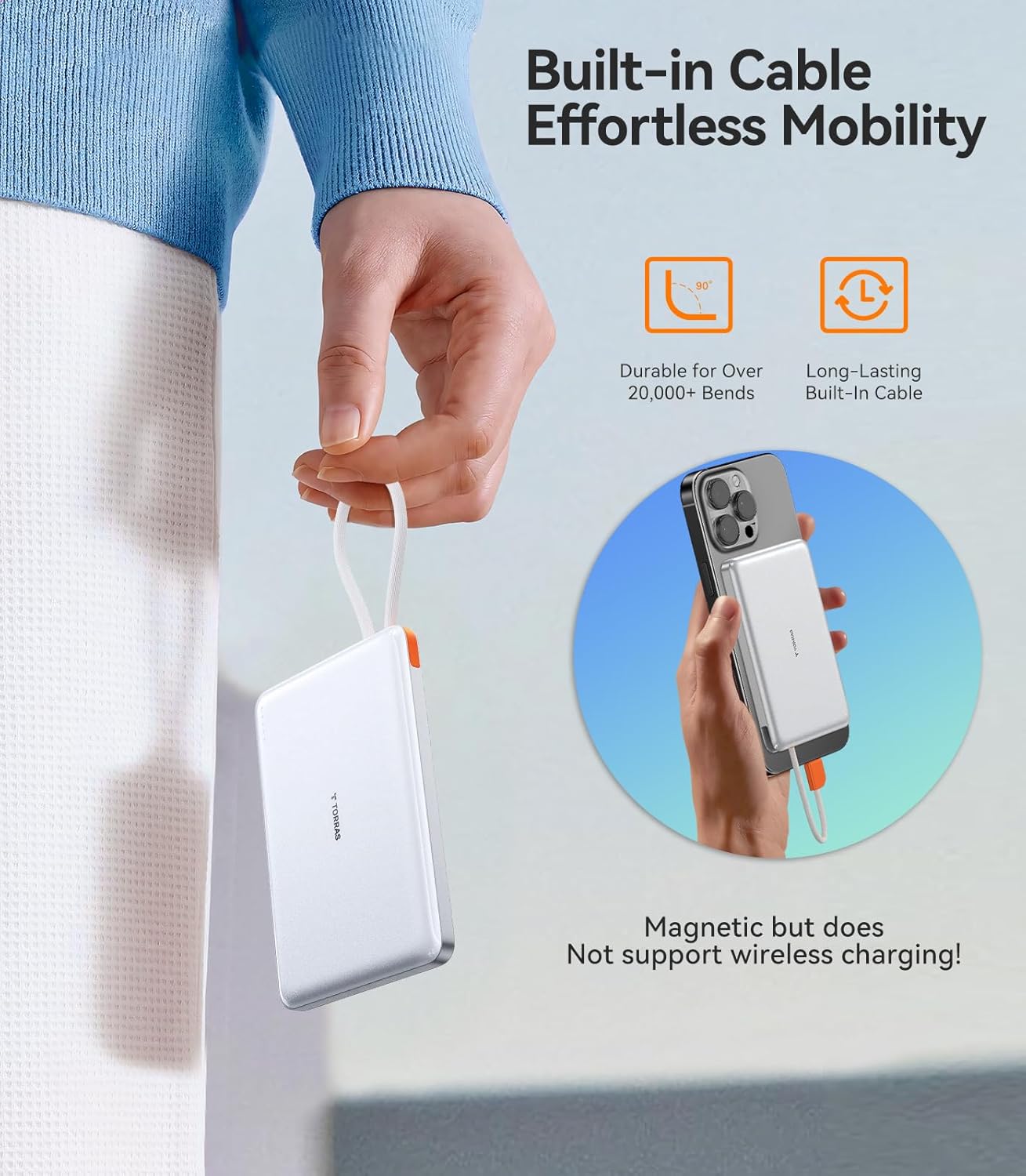
Figure 3: Built-in Cable and Portability. The integrated USB-C cable is durable and doubles as a convenient carrying strap. The power bank is magnetic for secure attachment but does not support wireless charging.

Figure 4: Compact and Lightweight Design. The power bank is ultra-slim and weighs only 4 ounces, making it easy to carry without burden.
Premium Safety & Efficient Cooling
This slim power bank has been certified by both UL and FCC, utilizing cutting-edge graphene technology for exceptional electrical and thermal conductivity. This enhances charging efficiency while reducing heat generation during the charging process. Its aviation-grade cooling shell design effectively manages heat, ensuring stable operation under heavy loads.

Figure 5: Advanced Temperature Control. Graphene material and an aero-grade cooling shell work together to maintain low temperatures during operation, protecting the battery and enhancing efficiency.

Figure 6: Authorized Safety Certifications. The power bank is certified by FCC and UL, ensuring multiple protections against over-heat, over-charge, over-voltage, and short circuits.
Setup
- Unpack: Carefully remove the power bank and all accessories from the packaging.
- Initial Charge: For optimal performance, fully charge the power bank before first use. Connect the included USB-C charging cable to the power bank's USB-C input port and a compatible USB wall adapter (not included). The battery indicator lights will show charging progress.
- Check Battery Level: Press the power button once to check the current battery level indicated by the LED lights on the front of the device.
Operating Instructions
Charging Your Devices
- Using the Built-in USB-C Cable:
- Gently pull out the integrated USB-C cable from its storage slot.
- Connect the USB-C connector to your compatible device (e.g., smartphone, tablet).
- The power bank will automatically begin charging your device. If not, press the power button once.
- Using the Additional USB-C Port:
- Connect your device's charging cable (USB-C to USB-C) to the additional USB-C output port on the power bank.
- Connect the other end of the cable to your device.
- The power bank will automatically begin charging. If not, press the power button once.
- Charging Multiple Devices: You can charge two devices simultaneously by using both the built-in USB-C cable and the additional USB-C port.
Recharging the Power Bank
- Connect the included USB-C charging cable to the power bank's USB-C input port.
- Connect the other end of the USB-C cable to a compatible USB wall adapter (20W input recommended for fast recharging).
- The LED indicator lights will illuminate to show the charging status. All four lights will be solid when fully charged.
Maintenance
- Keep the power bank away from extreme temperatures, direct sunlight, and liquids.
- Do not disassemble or attempt to repair the device yourself.
- Clean the power bank with a soft, dry cloth. Avoid using harsh chemicals or abrasive materials.
- Store in a cool, dry place when not in use for extended periods.
Troubleshooting
| Problem | Possible Cause | Solution |
|---|---|---|
| Power bank not charging device. | Low power bank battery; loose cable connection; incompatible device. | Recharge power bank; ensure cables are securely connected; verify device compatibility. |
| Power bank not recharging. | Faulty charging cable or adapter; loose connection. | Try a different USB-C cable and wall adapter; ensure connections are secure. |
| Slow charging speed. | Using a non-fast charging adapter; device not supporting fast charging; multiple devices charging. | Use a 20W PD compatible wall adapter; ensure device supports fast charging; charge one device at a time for maximum speed. |
| Power bank gets warm during use. | Normal operation during fast charging; heavy load. | This is normal due to graphene cooling technology. If it becomes excessively hot, disconnect and allow to cool. |
Specifications
| Feature | Detail |
|---|---|
| Model Number | PB6 |
| Battery Capacity | 10,000 mAh |
| Output Power | 22.5W (Max) |
| Input Power | 20W (Max) |
| Product Dimensions | 4.33 x 2.64 x 0.59 inches |
| Item Weight | 4 ounces |
| Connector Type | Type-C (USB-C) |
| Color | Glacier White |
| Special Features | Built-in Cable, Fast Charging, Heat Dissipation System, Pocket Size, Slim |
| Certifications | FCC, UL, TUV, DOE, CEC, UN, RoHS |
Warranty and Support
The TORRAS Power Bank comes with an 18-month warranty and lifetime professional support. If you encounter any problems or require assistance, please contact TORRAS customer service. We are committed to providing a satisfactory solution for any issues you may experience.
For further assistance, please visit the official TORRAS website or contact their customer support channels.
Related documentsPB6


Ask a question about this manual
Ask about setup, troubleshooting, compatibility, parts, safety, or missing instructions. Manuals+ will review the question and use this page’s manual context to help answer it.