
1. Introduction
The BSMOOM B04 is a versatile portable device designed to provide emergency jump-starting for vehicles and inflate tires. It features a powerful 6000A peak current for starting various engines and an integrated 150PSI air compressor. This manual provides essential instructions for safe operation, maintenance, and troubleshooting.

Figure 1: BSMOOM B04 Jump Starter and Air Compressor
2. Safety Information
Read all safety warnings and instructions before using this product. Failure to follow these instructions may result in electric shock, fire, and/or serious injury.
- Do not operate the jump starter if it is damaged.
- Keep out of reach of children.
- Do not jump-start a frozen battery.
- Ensure proper polarity when connecting jumper cables (red to positive, black to negative).
- Remove jumper cables immediately after the vehicle starts.
- Do not expose the unit to rain or wet conditions.
- Avoid operating in explosive atmospheres, such as in the presence of flammable liquids, gases, or dust.
- The unit features 10 built-in safety protections including over-charge, over-current, short-circuit, reverse-polarity, low-temp, high-temp, over-voltage, over-load, spark-proof, and reverse-charge.

Figure 2: BSMOOM B04 Safety Protections
3. Package Contents
Verify that all items are present in the package:
- BSMOOM B04 Car Jump Starter
- Heavy-Duty Battery Clamps
- USB-C Charging Cable
- EVA Storage Case
- Inflation Hose
- Multi-Purpose Air Nozzles
- User Manual (this document)
4. Product Overview and Components
Familiarize yourself with the main components and display features of your BSMOOM B04 unit.

Figure 3: BSMOOM B04 LCD Display Features
The 3.4-inch LCD display provides real-time information including battery level, inflator mode, tire pressure, and preset values. It also indicates charging status, USB output status, and temperature warnings.
5. Setup
5.1 Initial Charging
It is recommended to fully charge the BSMOOM B04 unit before its first use to ensure optimal performance and battery longevity. Use the provided USB-C charging cable.
- Connect the USB-C charging cable to the unit's input port.
- Connect the other end of the cable to a suitable USB power adapter (not included).
- The LCD display will show the charging progress.
5.2 Charging Reminders and Maintenance
- Always ensure the unit is charged above 25% before attempting to jump-start a vehicle.
- Recharge the unit every 2-3 months, even if not in use, to activate the battery and maintain its health.
6. Operating Instructions
6.1 Jump Starting a Vehicle
The BSMOOM B04 can jump-start all gas engines and up to 10.0L diesel engines. Ensure the unit has sufficient charge (above 25%).
- Insert the starting cable into the jump starter's output port.
- Connect the red (+) clamp to the positive terminal of the vehicle's battery.
- Connect the black (-) clamp to the negative terminal of the vehicle's battery. The intelligent safety detection cables will light up green when properly connected.
- Start your vehicle's engine.
- Immediately remove the clamps from the vehicle battery once the engine starts.

Figure 4: Jump Starting Procedure
6.2 Using the Air Compressor
The integrated 150PSI air compressor can inflate various items, including car, bike, and motorcycle tires, as well as balls and mattresses.
- Assemble the inflation hose to the unit.
- Connect the hose to the tire valve or appropriate inflatable item using the multi-purpose air nozzles.
- Use the LCD display to preset the desired pressure (PSI, BAR, or KPA) using the '+' and '-' buttons.
- Press the power button to start inflation. The compressor will automatically shut off when the preset pressure is reached.

Figure 5: Tire Inflation with BSMOOM B04
6.3 Using the LED Light
The built-in LED light offers three modes for various situations:
- Normal Illumination: For general lighting.
- SOS Emergency Signal: Flashes a distress signal.
- Strobe Warning: Provides a flashing warning light.
Refer to the unit's buttons for cycling through the light modes.

Figure 6: LED Light Modes
6.4 Using as a Portable Power Bank
The BSMOOM B04 can also serve as a portable power bank with its 26800mAh rechargeable battery, featuring USB-A outputs and a Type-C input/output for charging other electronic devices.
- Connect your device's charging cable to one of the USB output ports on the BSMOOM B04.
- The unit will begin charging your device.
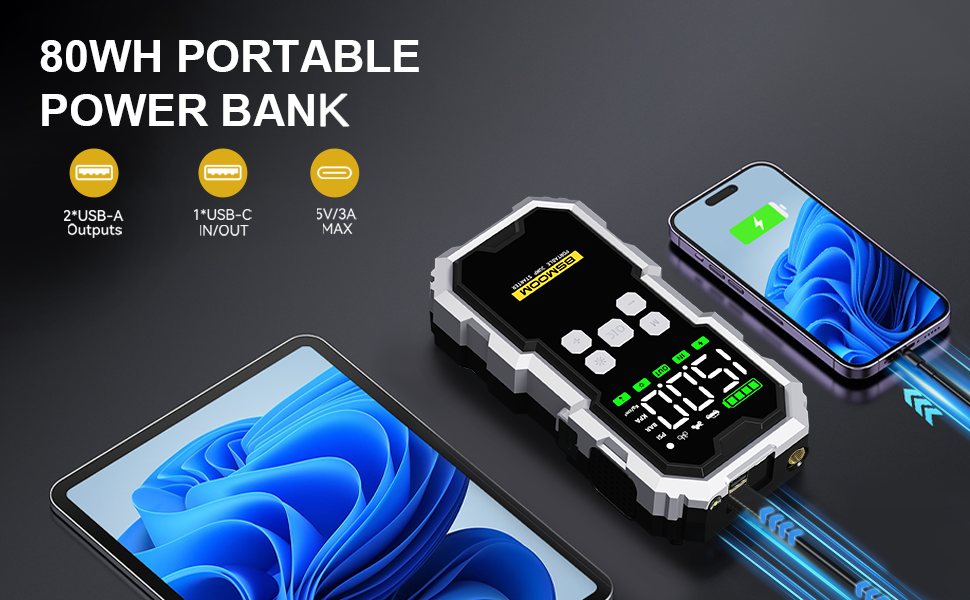
Figure 7: Charging External Devices
7. Maintenance
Proper maintenance ensures the longevity and reliability of your BSMOOM B04 unit.
- Cleaning: Wipe the unit with a dry, soft cloth. Do not use harsh chemicals or abrasive cleaners.
- Storage: Store the unit in its EVA storage case in a cool, dry place, away from direct sunlight and extreme temperatures.
- Battery Care: Recharge the unit every 2-3 months to keep the battery active and prevent deep discharge.
8. Troubleshooting
If you encounter issues with your BSMOOM B04, refer to the following common problems and solutions:
| Problem | Possible Cause | Solution |
|---|---|---|
| Unit does not turn on | Low battery or unit is off. | Charge the unit fully. Press the power button to turn on. |
| Vehicle does not jump-start | Incorrect clamp connection, unit battery too low, or vehicle battery severely damaged. | Ensure clamps are connected correctly (green light on cables). Charge the unit above 25%. Consult a mechanic if vehicle battery is faulty. |
| Air compressor not inflating | Hose not securely connected, incorrect pressure setting, or unit battery low. | Check hose connections. Verify preset pressure. Charge the unit. |
| LCD display shows error | Safety protection activated (e.g., reverse polarity, over-temperature). | Refer to the specific error code on the display and consult the safety section. Disconnect and reconnect correctly. Allow unit to cool if over-temperature. |
9. Specifications
| Feature | Specification |
|---|---|
| Brand | BSMOOM |
| Model | B04 |
| Peak Output Current | 6000 Amps |
| Engine Compatibility | All Gas / Up to 10.0L Diesel |
| Air Compressor Pressure | 150 PSI |
| Battery Capacity | 26800mAh |
| Operating Temperature | -4°F to 140°F (-20°C to 60°C) |
| Product Dimensions (LWT) | 9.84'' x 4.33'' x 6.5'' |
| Item Weight | 2.9 Pounds |
| Charging Port | USB-C (Input/Output) |
| Output Ports | 2x USB-A, 1x USB-C |
| UPC | 764965115345 |

Figure 8: All-Weather Performance
10. Warranty and Support
BSMOOM is committed to product quality and customer satisfaction.
- Warranty: The BSMOOM B04 comes with a 1-year quality assurance warranty from the date of purchase.
- Customer Support: For any inquiries or assistance, please contact BSMOOM customer support, available 24/7. Refer to the product packaging or official website for contact details.
