
1. Introduction
The Irfora YAOREA YR2050 is a high-precision, portable 4-wire milliohm meter designed for accurate resistance measurements. This device is ideal for quick testing of wire length, resistivity, and assessing the quality of power cords for motors and transformers. Its portable design ensures ease of use in various environments.
This meter can test resistances in components such as transformers, motors, and large inductance inductors. Its high accuracy also allows for the detection of resistance in precision current-sense resistors.
2. Safety Information
- Prohibited Measurements: It is strictly prohibited to measure any live parts, such as AC or DC voltage input to the test interface. Doing so may cause severe damage to the instrument and pose a safety risk to the user.
- Battery Internal Resistance: The YR2050 meter cannot measure the internal resistance of batteries. Attempting to do so may yield inaccurate results or damage the device.
- Operating Environment: Use the device within the specified working temperature range of 10 ℃ to 40 ℃.
- Fuse Protection: The device is protected by a 0.5A fuse. Do not attempt to bypass or replace with an incorrect fuse rating.
3. Product Overview and Components
The YAOREA YR2050 Milliohm Meter package includes the following items:
- 1 x YAOREA YR2050 Milliohm Meter
- 1 x Set of Test Clips (Red and Black)
- 1 x USB Charging Cable

The YAOREA YR2050 Milliohm Meter with its display showing a reading, connected to a test object using the included red and black test clips.
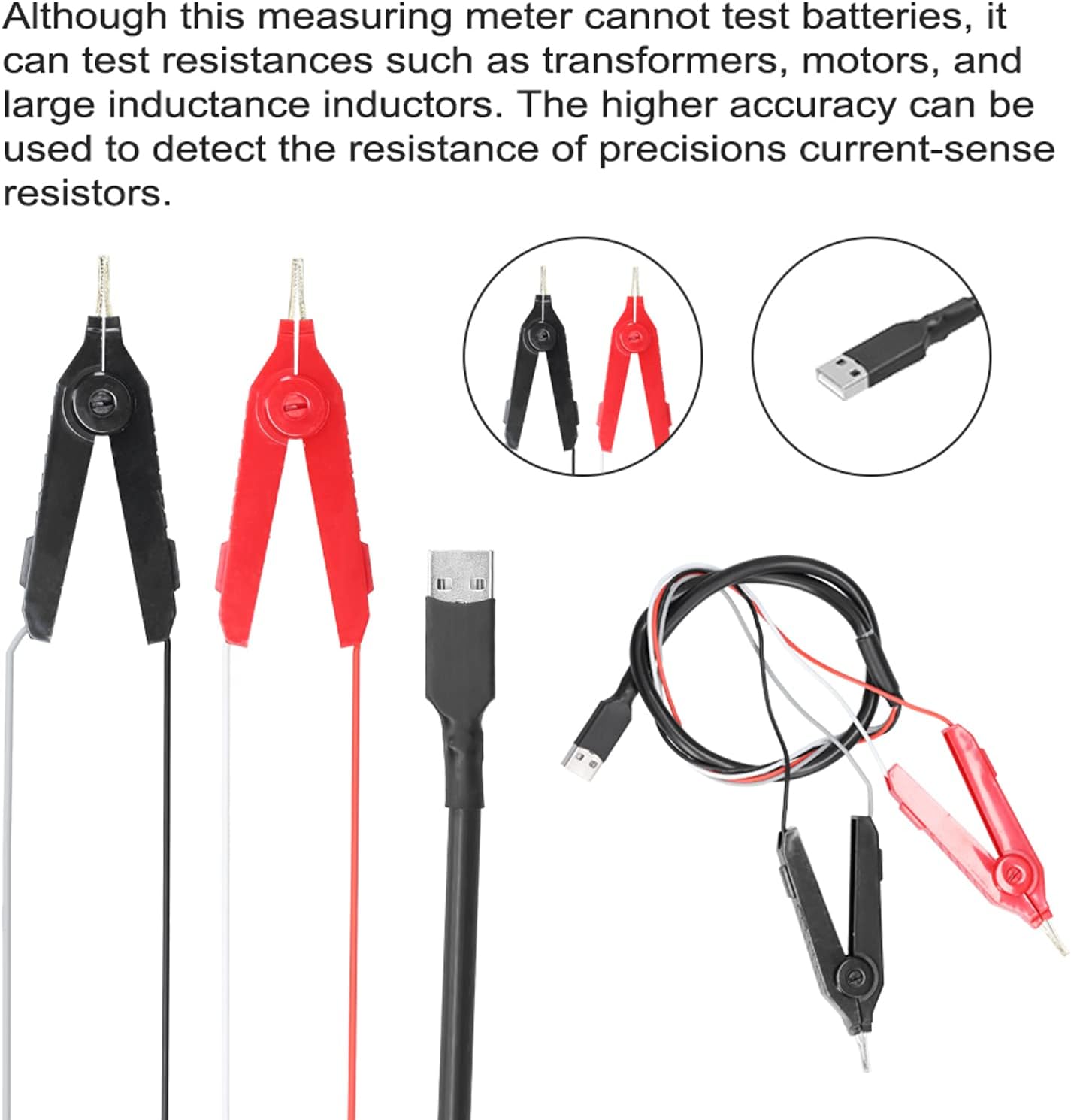
A set of red and black test clips and a USB charging cable, essential accessories for the YAOREA YR2050 Milliohm Meter.
4. Setup
The YAOREA YR2050 comes with a pre-installed 2000 mAh lithium battery. Ensure the device is charged before first use. Connect the USB charging cable to the meter and a suitable USB power source.
4.1 Connecting Test Clips
- Identify the red and black test clips.
- Connect the red test clip to the positive (+) terminal and the black test clip to the negative (-) terminal on the meter's test interface. Ensure a secure connection for accurate readings.
5. Operating Instructions
The YAOREA YR2050 offers various measurement modes for different applications.
5.1 General Resistance Measurement
- Power on the device using the designated power button.
- Select the appropriate measurement range if not in auto-ranging mode. Refer to the button layout image for 'range' selection.
- Connect the test clips to the component or wire you wish to measure. Ensure good contact.
- Read the resistance value displayed on the screen.
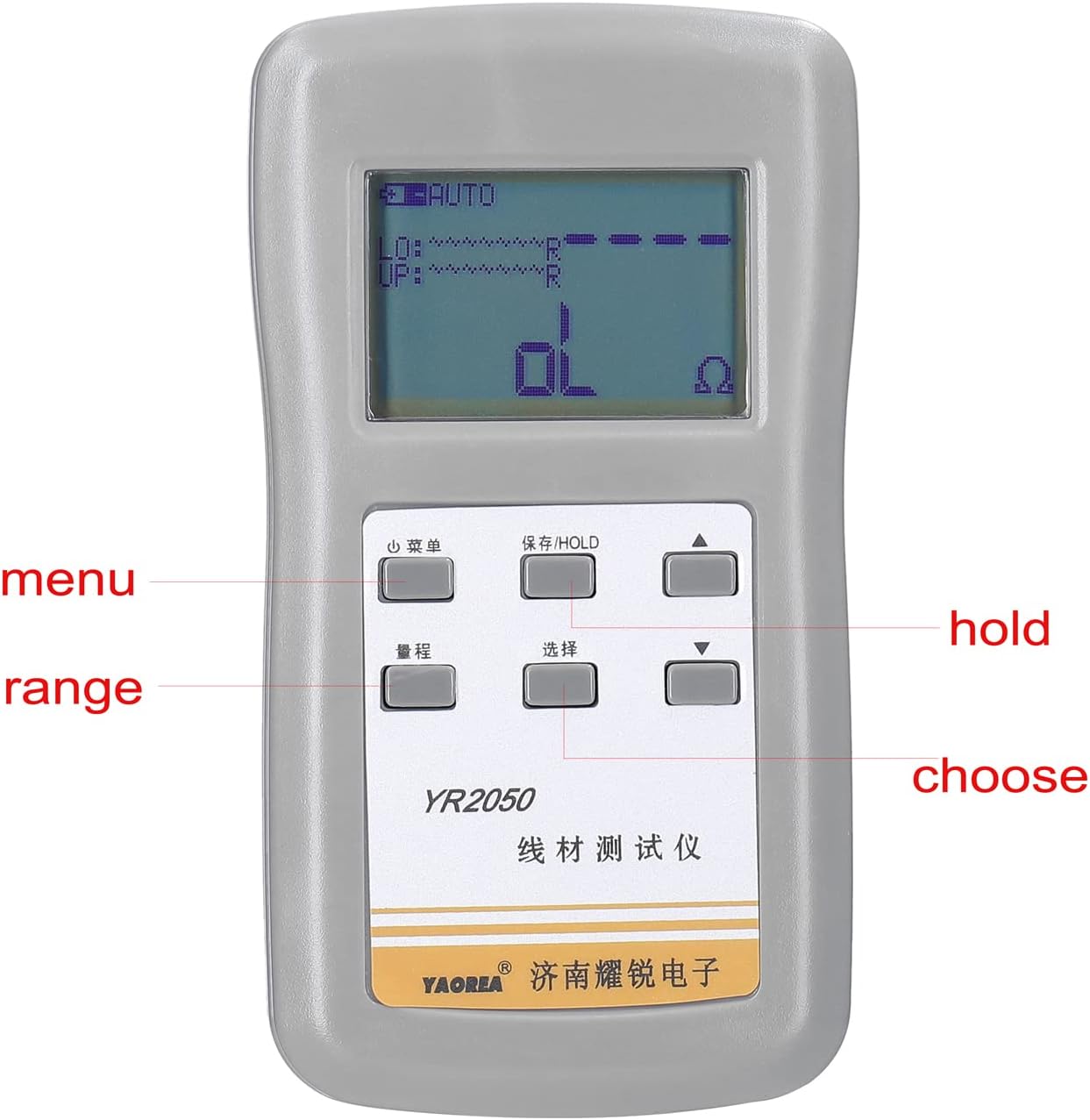
A detailed view of the YAOREA YR2050 Milliohm Meter's interface, highlighting the display and control buttons for menu, range, hold, and selection functions.
5.2 Wire Resistivity Measurement
This function helps determine if the wire material is pure copper by calculating its resistivity.
- Intercept a specific length of the wire to be tested.
- Accurately measure the diameter of the wire to calculate its cross-sectional area.
- Enter the instrument's detection mode for resistivity measurement.
- Input the corresponding parameters (wire length, cross-sectional area) into the device.
- Measure the resistance of the wire using the test clips.
- The device will calculate and display the resistivity, allowing you to determine the wire material's quality.

The YAOREA YR2050 Milliohm Meter in use, showing how to connect to a wire for resistance measurement to determine resistivity and material quality.
5.3 Transformer Winding Qualification Test
This feature allows you to check if a transformer winding meets specified resistance limits.
- Enter the normal mode on the instrument.
- Access the settings to open the upper and lower limits for resistance.
- Input the desired upper and lower resistance limits for the transformer winding.
- Connect the test clips to the transformer winding.
- The device will measure the winding's resistance and indicate if it falls within the set limits, thus determining its qualification.

This image illustrates various applications for the milliohm meter, such as testing resistance in circuit boards, checking transformers, evaluating motors, and measuring large inductors.
6. Maintenance
- Cleaning: Keep the device clean and free from dust and debris. Use a soft, dry cloth for cleaning. Do not use abrasive cleaners or solvents.
- Storage: When not in use, store the meter in a dry place, away from direct sunlight and extreme temperatures. The recommended storage temperature is -20 ℃ to 60 ℃.
- Battery Care: Recharge the battery regularly, even if the device is not in frequent use, to maintain battery health.
- Test Clips: Inspect the test clips periodically for any signs of wear or damage. Replace them if necessary to ensure accurate and safe measurements.
7. Troubleshooting
- No Reading/Erratic Reading:
- Ensure test clips are securely connected to both the meter and the object under test.
- Check if the battery is sufficiently charged.
- Verify that the measurement range is appropriate for the expected resistance value.
- Device Not Powering On:
- Charge the battery for at least 30 minutes.
- Ensure the power button is pressed correctly.
- Damage After Measurement:
- If the device was connected to live voltage (AC/DC), it might be damaged. Refer to the safety information. Such damage is typically not user-repairable.
8. Specifications
| Feature | Specification |
|---|---|
| Model | YR2050 |
| Material | Plastic |
| Resolution | 120000 counts |
| Fuse Current Protection | 0.5A |
| Working Temperature | 10 ℃ ~ 40 ℃ (50 ℉ ~ 104 ℉) |
| Storage Temperature | -20 ℃ ~ 60 ℃ (-4 ℉ ~ 140 ℉) |
| Battery | 1 x Lithium battery, 2000 mAh (included) |
| Product Dimensions | 12 x 6 x 4 cm (4.7 x 2.4 x 1.6 inches) |
| Package Weight | 300 g (10.6 oz) |