1. Introduction
The Havit SK832BT Bluetooth Speaker is engineered to deliver a powerful audio experience with dynamic RGB lighting, all within a portable and durable design. This manual provides essential information on the speaker's features, initial setup, operational guidelines, maintenance tips, and troubleshooting solutions to ensure optimal performance.
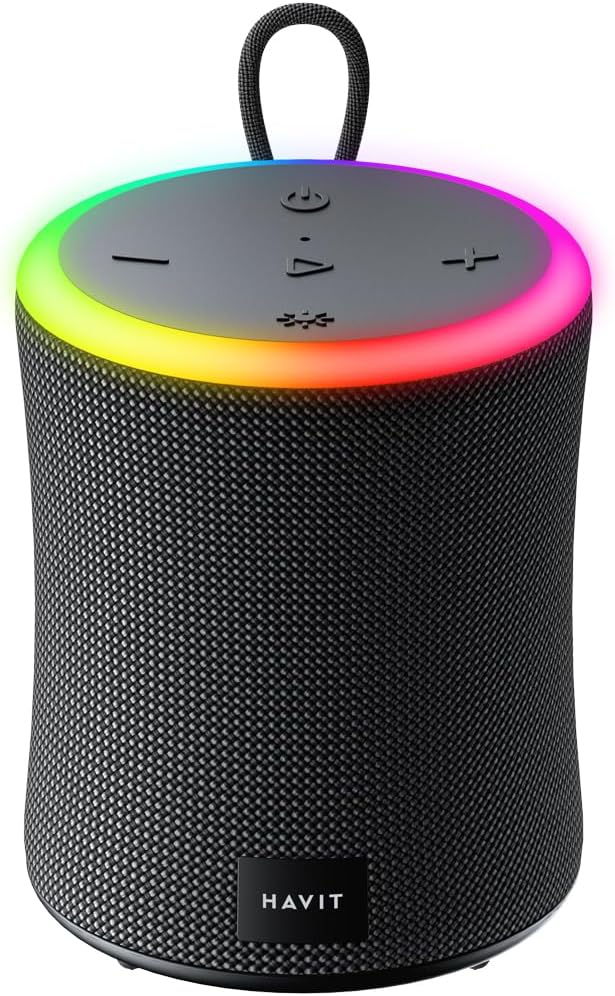
Front view of the Havit SK832BT Bluetooth Speaker, showcasing its cylindrical design and vibrant RGB light ring.
2. Product Overview & Features
The SK832BT speaker combines robust sound with user-friendly features, making it suitable for various environments.

Visual representation of the speaker's core functionalities and specifications.
- Immersive Stereo Sound: Experience rich, stereo sound with powerful bass and crystal-clear highs, delivered by a 10W speaker.
- Vibrant RGB Lighting: A dynamic light ring cycles through various colors, adding a visual element that enhances your music listening experience.
- Waterproof Design (IPX6): Rated IPX6, this speaker is resistant to powerful water jets, making it ideal for outdoor use at the beach, pool, or during camping trips.
- Portable and Compact: Lightweight with a built-in handle, the speaker is designed for easy transportation, allowing you to take your music anywhere.
- Extended Battery Life: The 1800mAh battery provides up to 8 hours of continuous playtime on a single charge.
- Built-in Microphone: Enables convenient hands-free calling directly through the speaker.
- TWS Interconnection: Pair two SK832BT speakers together for a true wireless stereo experience, delivering enhanced sound separation and a wider soundstage.
- Multiple Playback Modes: Supports Bluetooth V5.3, USB, TF (MicroSD) card, and AUX input for versatile audio playback options.

Illustration of the speaker's 10W surround stereo sound capability.

The speaker's top panel displaying a vibrant rainbow light show.

The speaker demonstrating its IPX6 waterproof capability with water splashing.

The speaker attached to a backpack, emphasizing its portable design.

Two speakers connected via TWS, providing a stereo audio experience.
3. Controls and Indicators
Familiarize yourself with the speaker's control panel and ports for seamless operation.

The top control panel of the speaker, showing all functional buttons.

Detailed view of the control buttons and the speaker's textured body.
- Power Button (⏻): Press and hold to turn the speaker On or Off.
- Volume Down Button (-): Short press to decrease volume. Long press for previous track.
- Play/Pause Button (▶): Short press to play or pause audio. Press to answer/end calls. Long press to reject calls.
- Volume Up Button (+): Short press to increase volume. Long press for next track.
- Light Mode Button (☀): Short press to cycle through different RGB light modes.
- Microphone: Built-in for hands-free calling.
- Charging Port (Type-C): Used for charging the speaker.
- AUX Input: 3.5mm port for wired audio connection.
- MicroSD/TF Card Slot: For playing audio directly from a memory card.
- USB Port: For playing audio directly from a USB drive.
4. Setup
4.1. Charging the Speaker
Before first use, fully charge the speaker. Connect the provided Type-C USB cable to the speaker's charging port and the other end to a USB power adapter (DC 5V/1A recommended). The charging indicator light will show charging status and turn off when fully charged. A full charge takes approximately 3.5 hours.
4.2. Powering On/Off
- To turn On: Press and hold the Power button until you hear an audible prompt and the RGB lights illuminate.
- To turn Off: Press and hold the Power button again until the speaker powers down.
4.3. Bluetooth Pairing
- Turn on the Havit SK832BT speaker. It will automatically enter Bluetooth pairing mode, indicated by a flashing light.
- On your mobile device (smartphone, tablet, computer), enable Bluetooth.
- Search for available Bluetooth devices and select "Havit SK832BT" from the list.
- Once connected, you will hear a confirmation sound, and the light indicator will change to a solid color.
4.4. TWS (True Wireless Stereo) Pairing
To pair two SK832BT speakers for stereo sound:
- Ensure both Havit SK832BT speakers are turned off.
- Turn on both speakers simultaneously. They will enter Bluetooth pairing mode.
- On one of the speakers, double-press the Play/Pause button. The speakers will attempt to connect to each other.
- Once successfully paired, you will hear a confirmation sound. One speaker will act as the master (left channel) and the other as the slave (right channel).
- Now, connect your device to the master speaker via Bluetooth as described in section 4.3.
5. Operating Instructions
5.1. Playing Audio
- Bluetooth Mode: After successful pairing, audio from your connected device will play through the speaker.
- AUX Mode: Insert a 3.5mm audio cable into the speaker's AUX port and connect the other end to your audio source. The speaker will automatically switch to AUX mode.
- MicroSD/TF Card Playback: Insert a MicroSD/TF card with audio files into the designated slot. The speaker will automatically detect and play the audio.
- USB Playback: Insert a USB drive with audio files into the USB port. The speaker will automatically detect and play the audio.
5.2. Controlling Playback
- Play/Pause: Short press the Play/Pause button.
- Next Track: Long press the Volume Up (+) button.
- Previous Track: Long press the Volume Down (-) button.
5.3. Adjusting Volume
- Increase Volume: Short press the Volume Up (+) button.
- Decrease Volume: Short press the Volume Down (-) button.
5.4. Managing Calls
- Answer/End Call: Short press the Play/Pause button when a call comes in or during a call.
- Reject Call: Long press the Play/Pause button when a call comes in.
5.5. RGB Light Modes
Short press the Light Mode button (☀) to cycle through the available RGB lighting effects. There are 4 models with different lighting effects, including rainbow colors and colors that change by the beat.

The speaker displaying a blue light effect in a low-light environment.
6. Maintenance
- Cleaning: Use a soft, dry cloth to clean the speaker's surface. For stubborn dirt, a slightly damp cloth can be used, but ensure no water enters the ports. Do not use harsh chemicals or abrasive cleaners.
- Storage: Store the speaker in a cool, dry place away from direct sunlight and extreme temperatures. If storing for an extended period, charge the battery to about 50% to preserve its lifespan.
- Water Resistance: While IPX6 rated, avoid submerging the speaker in water. After exposure to water, ensure all ports are dry before charging or connecting cables.
7. Troubleshooting
- Speaker won't turn on:
- Ensure the battery is charged. Connect the speaker to a power source and try again. - Cannot pair via Bluetooth:
- Make sure the speaker is in pairing mode (flashing light).
- Ensure Bluetooth is enabled on your device.
- Move your device closer to the speaker.
- Clear previous Bluetooth pairings on your device and try searching again.
- If TWS is active, disconnect TWS first, then pair. - No sound or low volume:
- Check the volume level on both the speaker and your connected device.
- Ensure the correct input mode (Bluetooth, AUX, MicroSD, USB) is selected.
- Check if the audio cable (if using AUX) is securely connected. - Poor sound quality:
- Move the speaker closer to your Bluetooth device to reduce interference.
- Ensure there are no obstacles between the speaker and your device.
- Try playing a different audio file or source. - RGB lights not working:
- Short press the Light Mode button to ensure it's not turned off or stuck on a static mode.
8. Specifications
Detailed technical specifications for the Havit SK832BT Bluetooth Speaker:

Comprehensive specifications of the Havit SK832BT speaker.
| Waterproof Rating | IPX6 |
| Bluetooth Version | V5.3 |
| Rated Power | 10W |
| Battery | 3.7V/1800mAh |
| Play Time | 8 hours |
| Charging Time | 3.5 hours |
| Supported Modes | Bluetooth, USB, TF (MicroSD), TWS, Hands-free calls |
| Wireless Working Range | 10m (without obstacles) |
| Input Voltage | DC 5V/1A |
| Speaker Size | 58mm |
| Net Weight | 641g |
| Charging Method | Type-C |
| Product Dimensions | 10.2 x 10.2 x 12.6 cm |
9. Warranty and Support
Havit products are designed and manufactured to the highest quality standards. For information regarding warranty coverage, technical support, or service inquiries, please refer to the warranty card included with your product or visit the official Havit website. Keep your purchase receipt as proof of purchase for any warranty claims.