1. Introduction
Thank you for choosing the Junsun 4Core Car Radio Stereo. This unit is designed to enhance your driving experience with its advanced features, including Android 13, Wireless CarPlay, Android Auto, Bluetooth, WiFi connectivity, and a backup camera. This manual provides detailed instructions for installation, operation, and troubleshooting to ensure optimal performance and user satisfaction. Please read this manual thoroughly before installation and use.
2. Safety Information
- Always ensure the vehicle is parked and the engine is off before attempting any installation or wiring.
- Incorrect wiring can cause damage to the unit or the vehicle's electrical system. If unsure, seek professional assistance.
- Do not operate the unit in a way that distracts you from driving. Always prioritize road safety.
- Keep the unit away from water and excessive moisture.
- Use only specified power cables and accessories.
3. Package Contents
Verify that all items listed below are included in your package:
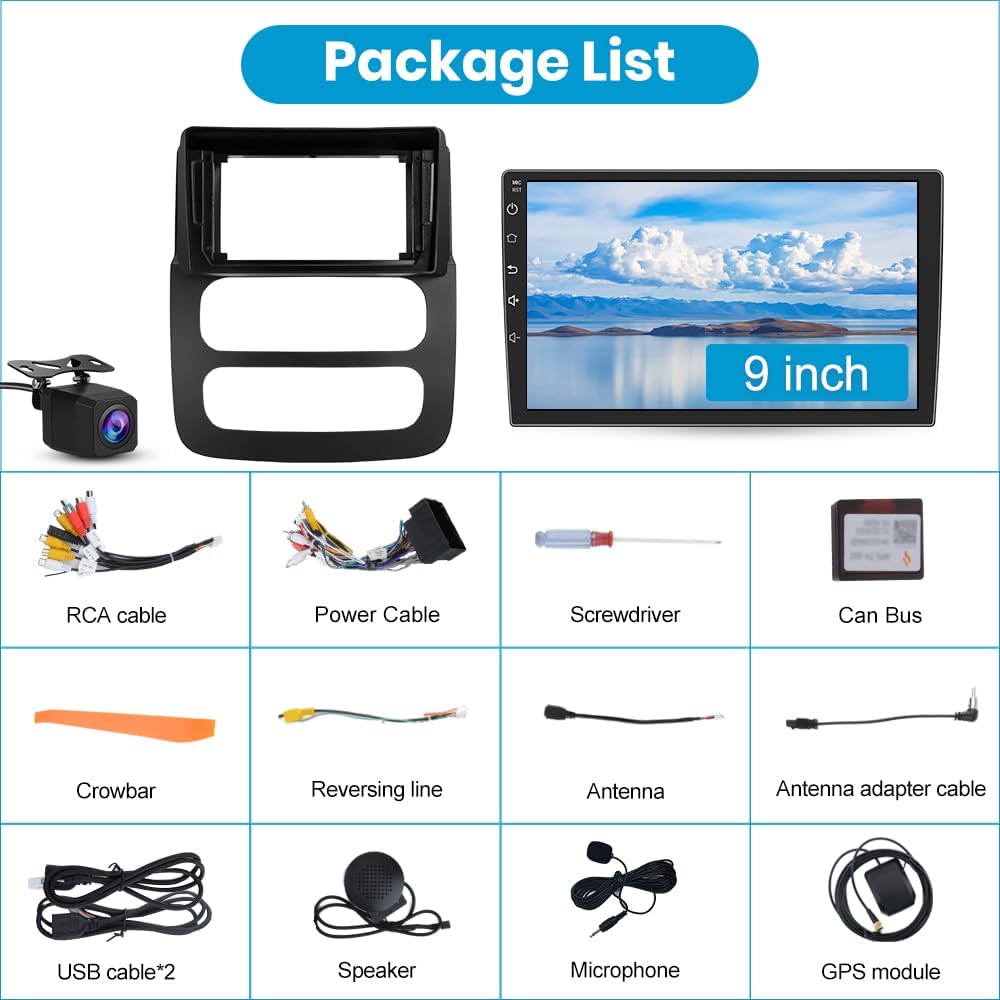
Image: Contents of the Junsun Car Radio Stereo package, including the main unit, wiring harnesses, tools, and accessories.
- Junsun Car Radio Stereo Unit (9-inch display)
- RCA Cable
- Power Cable
- Screwdriver
- Can Bus Module
- Crowbar (for trim removal)
- Reversing Line
- Antenna
- Antenna Adapter Cable
- USB Cables (x2)
- External Speaker
- External Microphone
- GPS Module
- Backup Camera
4. Setup and Installation
4.1 Vehicle Compatibility
This Junsun Car Radio Stereo is specifically designed for Dodge RAM models from 2002 to 2005.

Image: The Junsun Car Radio Stereo seamlessly integrated into the dashboard of a Dodge RAM 2002-2005.
4.2 Wiring Diagram
Refer to the following diagram for proper wiring connections. Ensure all connections are secure before powering on the unit.

Image: Comprehensive wiring diagram illustrating all necessary connections for the car radio stereo system.
- Power Cable: Connect to the vehicle's power harness. Ensure the ACC (accessory) wire receives power. Note: Some Dodge RAM 2002-2005 models may require custom splicing of the ACC wire (typically red) if the unit does not power on directly.
- RCA Cable: For audio output, video input/output, and subwoofer connections.
- Canbus Cable: Connect for steering wheel controls and other vehicle data integration.
- USB Cables: Connect for data transfer and charging.
- Radio Antenna: Connect the included antenna for FM/AM reception.
- GPS Antenna: Mount the GPS module in a location with a clear view of the sky for optimal signal reception.
- Rear Camera Input (10Pin): Connect the backup camera. Important: The reverse trigger wire (often brown, pin three between radio and Canbus module) must be correctly connected to activate the camera when shifting into reverse.
4.3 Initial Power-Up
After all connections are made, turn on your vehicle's ignition. The unit should power on automatically. If it does not, recheck all power connections, especially the ACC wire.

Image: Example of car radio plug and vehicle wiring harness. If your car plug matches this and there's no sound, a different power harness might be needed.
5. Operating Instructions
5.1 Android 13 System
The unit runs on Android 13, providing a familiar smartphone-like interface. You can install and delete applications from the Application Store, similar to a smartphone.

Image: The main screen of the Android 13 operating system on the car stereo.
5.2 Wireless CarPlay & Android Auto
Connect your iPhone or Android phone wirelessly or via USB to access navigation, music, messages, and more directly on the stereo display. This feature supports voice control for hands-free operation.
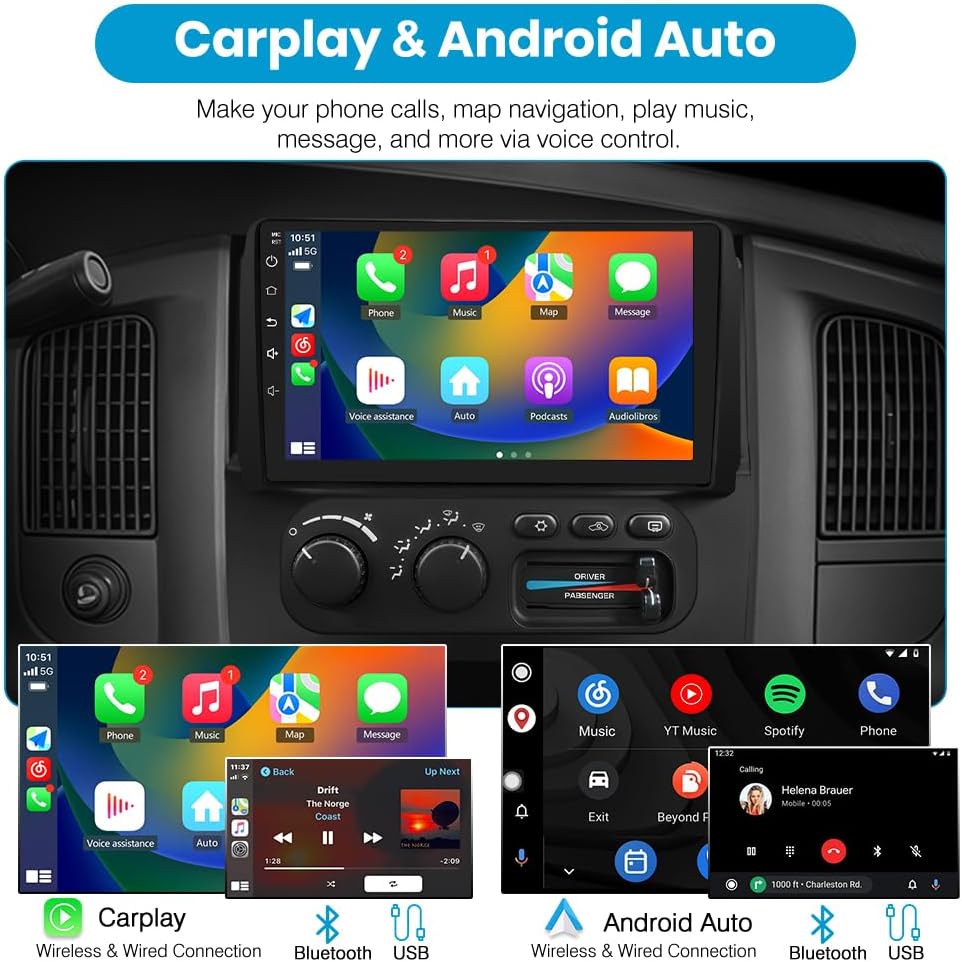
Image: Examples of CarPlay and Android Auto interfaces, demonstrating phone integration for navigation, music, and communication.
5.3 GPS Navigation & WiFi Connectivity
The unit supports online navigation applications. Connect to WiFi to download maps, receive real-time traffic updates, and access other online services. The 5GHz WiFi ensures faster data transmission.

Image: GPS navigation screen and a display of various applications accessible via WiFi connection.
5.4 Bluetooth Functionality
Pair your phone via Bluetooth for hands-free calling and wireless music streaming. The external microphone ensures clear voice pickup during calls.
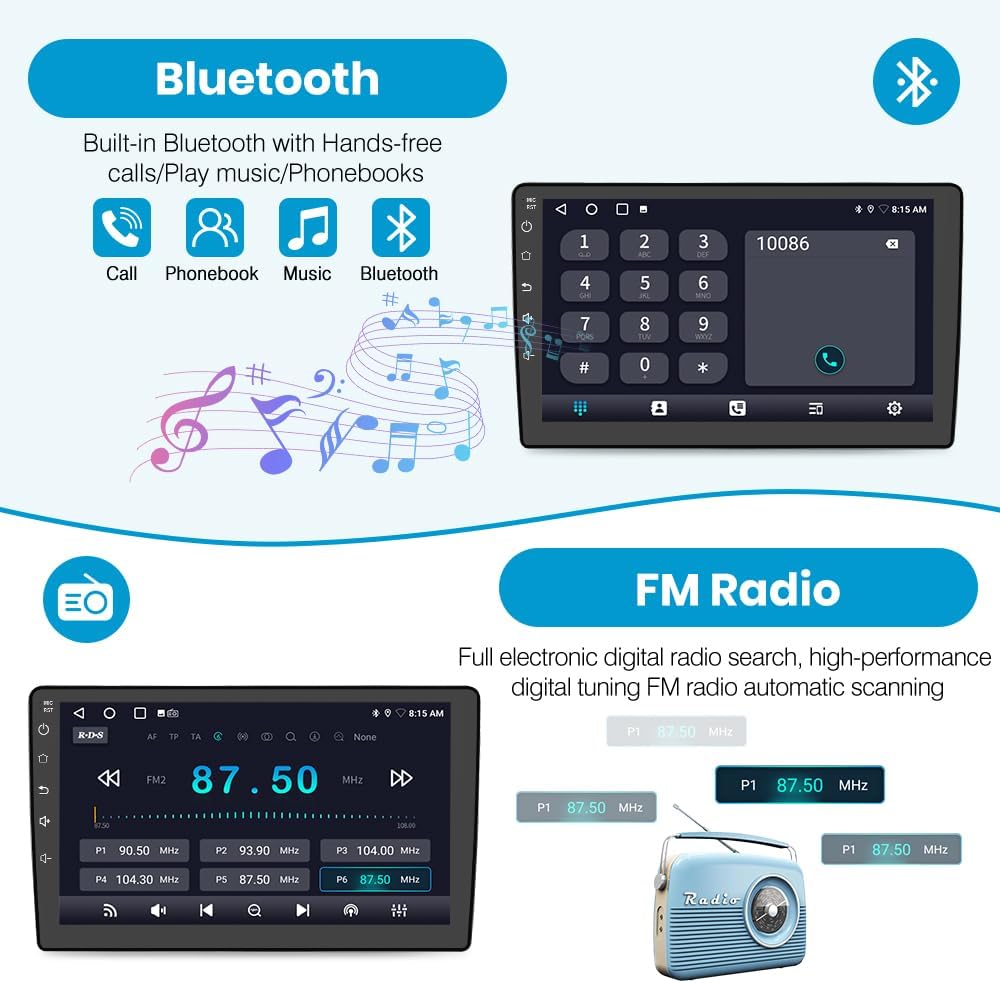
Image: Bluetooth interface showing phone call and music playback options.
5.5 FM/AM Radio
Access FM/AM radio stations with digital tuning. The unit supports automatic and manual station scanning, providing clear access to news, music, and weather broadcasts.

Image: FM radio interface showing frequency display and station presets.
5.6 Steering Wheel Control
Utilize your vehicle's existing steering wheel buttons to control the car radio, including volume adjustment, track changes, and call management. This enhances driving safety and convenience.

Image: Steering wheel control interface for programming and managing functions.
5.7 Backup Camera
The integrated backup camera provides real-time rear views on the display when the vehicle is in reverse, aiding in safer parking and maneuvering. The camera features a 170-degree wide-angle lens for full visibility.

Image: Backup camera view displayed on the car radio screen, showing parking assist lines.
6. Maintenance
- Cleaning: Use a soft, dry cloth to clean the display and unit exterior. Avoid abrasive cleaners or solvents.
- Software Updates: Periodically check for software updates to ensure optimal performance and access to new features. Updates can typically be downloaded via WiFi.
- Environmental Conditions: Avoid exposing the unit to extreme temperatures or direct sunlight for prolonged periods.
7. Troubleshooting
| Problem | Possible Cause | Solution |
|---|---|---|
| Unit does not power on. | Incorrect wiring, especially the ACC (accessory) wire. | Check all power connections. Ensure the ACC wire is receiving 12V when the ignition is on. For Dodge RAM 2002-2005, custom splicing of the ACC wire may be required. |
| Backup camera not displaying. | Reverse trigger wire not connected or incorrectly connected. | Verify the reverse trigger wire (often brown, pin three) is correctly spliced and connected to the vehicle's reverse light signal. |
| No sound after installation. | Incompatible power harness or incorrect speaker wiring. | Ensure the power harness is compatible with your vehicle. Recheck all speaker connections. If the car plug matches the example in Section 4.3 and there's no sound, a different power harness might be needed. |
| Wireless CarPlay/Android Auto not connecting. | Bluetooth or WiFi issues, phone compatibility. | Ensure Bluetooth and WiFi are enabled on your phone and the stereo. Try restarting both devices. Check phone compatibility with CarPlay/Android Auto. |
8. Specifications
- Model: 2+32GB
- Operating System: Android 13
- Display Size: 9 Inches
- Resolution: 1280*720
- Connectivity: Wireless CarPlay, Android Auto, Bluetooth, WiFi (5GHz supported)
- Navigation: GPS (supports online maps)
- Radio: FM/AM with digital display
- Audio Output Mode: Stereo, DSP Sound System (36EQ)
- Special Features: Steering Wheel Control, Backup Camera (170° wide-angle)
- Item Weight: Approximately 4.66 pounds (2.12 Kilograms)
- Package Dimensions: 14.57 x 12.6 x 5.79 inches
9. Warranty Information
This Junsun Car Radio Stereo comes with a 1-year manufacturer's warranty from the date of purchase. This warranty covers defects in materials and workmanship under normal use. It does not cover damage caused by improper installation, accident, misuse, abuse, neglect, or unauthorized modification. Please retain your proof of purchase for warranty claims.
10. Customer Support
For technical assistance, troubleshooting, or warranty inquiries, please contact Junsun Customer Support:
- Email: Junsun-US@outlook.com
- Please provide your product model and purchase details when contacting support.

Image: Junsun Customer Support contact information.