1. Introduction
Thank you for choosing the chiphy 85-inch Full Spectrum LED Grow Light. This product is designed to provide optimal lighting conditions for your indoor plants, supporting all stages of growth from seedling to fruiting. Please read this manual thoroughly before assembly and operation to ensure safe and efficient use.

Image 1.1: The chiphy 85-inch Full Spectrum LED Grow Light in an indoor setting with various plants.
2. Important Safety Instructions
To prevent injury or damage, always follow these basic safety precautions:
- Read all instructions before using the appliance.
- Do not operate the light with a damaged cord or plug. If damaged, contact customer support.
- Do not expose the light to water or moisture. This product is for indoor use only.
- Ensure the light is placed on a stable, level surface to prevent tipping.
- Do not disassemble or modify the product. Unauthorized modifications may void the warranty and pose safety risks.
- Unplug the light from the power outlet before cleaning or performing any maintenance.
- Keep out of reach of children and pets.
3. Package Contents
Verify that all components are present in the package:
- 1x 40W Grow Lamp Head
- Multiple Aluminum Poles (for height adjustment)
- 1x Grow Lamp Base
- 1x Power Adapter
- 1x User Manual (this document)
4. Assembly Instructions
Follow these steps to assemble your chiphy Grow Light:
- Attach the Base: Securely screw the lowest aluminum pole into the Grow Lamp Base. Ensure it is tightened to prevent wobbling.
- Connect Poles: Connect the remaining aluminum poles by screwing them together clockwise. You can use fewer poles to achieve a shorter height (22", 38", 54", 69", or 85").
- Install Lamp Head: Screw the 40W Grow Lamp Head onto the top of the assembled pole.
- Connect Power: Plug the power adapter into the designated port on the lamp pole, then plug the adapter into a standard electrical outlet.

Image 4.1: Exploded view of the grow light components and assembly points.

Image 4.2: Illustration of the grow light's adjustable height feature, accommodating different plant sizes.
5. Operating Instructions
The chiphy Grow Light features intuitive touch controls and various settings to optimize plant growth.
5.1 Power On/Off
Tap the power button on the touch control panel located on the pole to turn the light on or off.
5.2 Brightness Adjustment
The light offers 10 dimmable brightness settings (1% to 100%). Use the '+' and '-' buttons on the control panel to increase or decrease the light intensity. The 1% setting functions as a night light.
5.3 Full Spectrum Lighting
This grow light provides a full spectrum, sun-like 4000K color temperature, suitable for all plant growth stages including seedling, growing, flowering, and fruiting.

Image 5.1: Full spectrum light supporting all stages of plant development.
5.4 Timer Function
The light includes a basic timer function. Refer to the control panel for specific timer options (e.g., 45 minutes). Note that this built-in timer is limited. For extended or custom timing, consider using a smart plug.
5.5 Smart Plug Compatibility
The chiphy Grow Light is compatible with smart plugs (not included). Using a smart plug allows for app control and custom timer schedules, enabling you to automate the light cycle for your plants even when you are away.

Image 5.2: The grow light is compatible with smart plugs for enhanced control.
5.6 Memory Function
The light retains the last brightness setting used when turned off and on, providing convenience for consistent plant care.
6. Maintenance
Proper maintenance ensures the longevity and optimal performance of your grow light.
6.1 Cleaning
- Always unplug the light before cleaning.
- Wipe the aluminum LED panel and pole with a soft, dry cloth.
- Do not use abrasive cleaners, solvents, or harsh chemicals, as these can damage the finish or electronic components.
6.2 Heat Dissipation
The grow light features an all-aluminum integrated LED panel for excellent heat dissipation, extending its lifespan. Ensure the lamp head is not obstructed to allow for proper airflow.
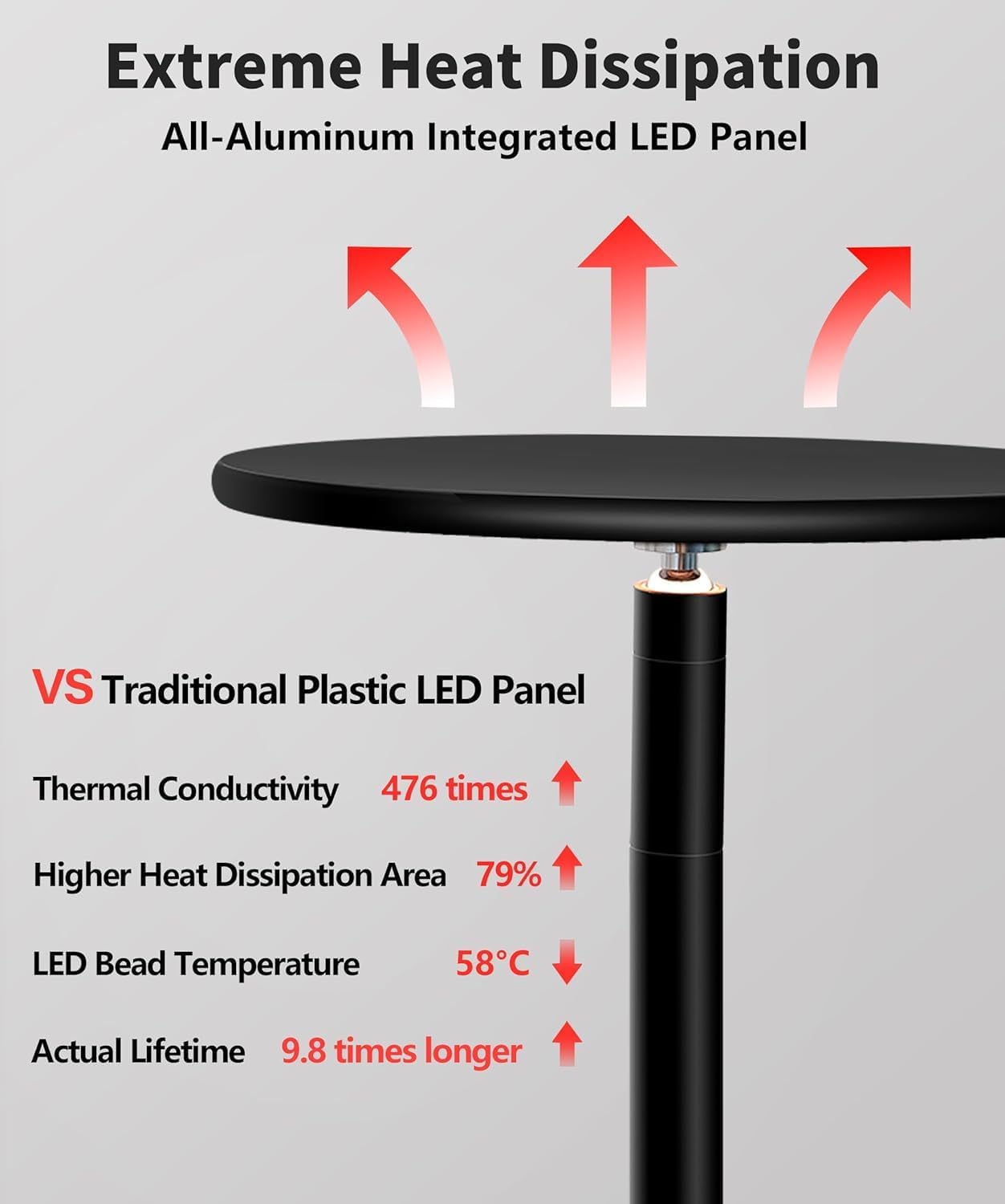
Image 6.1: The aluminum design ensures efficient heat dissipation for extended product life.
7. Troubleshooting
If you encounter issues with your grow light, refer to the following common problems and solutions:
| Problem | Possible Cause | Solution |
|---|---|---|
| Light does not turn on. | No power, loose connection, faulty adapter. | Check power outlet, ensure all connections are secure. Try a different outlet. |
| Light flickers or dims unexpectedly. | Unstable power supply, loose connection. | Ensure stable power. Check connections. If using a smart plug, ensure it is functioning correctly. |
| Touch controls are unresponsive. | Power issue, temporary malfunction. | Unplug the light for 30 seconds, then plug it back in. Ensure hands are clean and dry when using controls. |
| Light gets too hot. | Obstructed ventilation, prolonged use at maximum brightness. | Ensure the lamp head is not covered. While the aluminum design aids heat dissipation, prolonged use at maximum brightness can generate heat. This is normal, but avoid touching the lamp head directly. |
If the problem persists after trying these solutions, please contact chiphy customer support for assistance.
8. Specifications
| Feature | Detail |
|---|---|
| Brand | chiphy |
| Model Name | Grow Lamps |
| Power Source | Corded Electric |
| Wattage | 40 watts |
| Light Output Maximum | 4400 Lumens |
| Color Temperature | 4000 Kelvin (Sun-Like Full Spectrum) |
| Brightness Levels | 10 (1% to 100% dimmable) |
| Height Adjustable | 22'', 38'', 54'', 69'', 85'' |
| Control Method | Touch Control |
| Material | Aluminum, Cast Iron |
| Product Dimensions | 9.4"D x 9.4"W x 85"H (Maximum) |
| Item Weight | 8.69 Pounds |
| Indoor/Outdoor Usage | Indoor Only |
9. Warranty and Support
chiphy products are manufactured with quality and care. For warranty information or technical support, please refer to the contact details provided with your purchase or visit the official chiphy website. Please have your model number (Grow Lamps) and purchase date available when contacting support.
For additional information and products, visit the chiphy Store on Amazon.


