
Introduction
Thank you for purchasing the Basike Y6 Wireless Headphones (Model: FON20420-Y6). This manual provides comprehensive instructions for the proper use, setup, and maintenance of your device. Please read this manual thoroughly before operation and retain it for future reference.
Product Features
- High-Fidelity Transmission: Wireless 5.3+EDR for reduced interference and extended device range.
- Modern and Comfortable Design: Immersive sound quality for an enhanced audio experience.
- High-Performance Battery: Up to 30 hours of uninterrupted music playback.
- Active Noise Cancellation (ANC): Enjoy your audio without external noise, and make clear calls.
- Premium Materials: Portable, lightweight, soft earcups, and no sound leakage.
- 3D Surround Sound: Enhanced musical possibilities and high-quality audio.
- Adjustable Headband: Flexible headband with side adjustments for a comfortable and unique fit.
Package Contents
The Basike Y6 headphone package includes the following items:
- Basike Y6 Bluetooth Headphones
- Charging Cable (USB Type-C)
- User Manual
Product Overview & Controls
Familiarize yourself with the physical features and controls of your Basike Y6 headphones.

Figure 1: Basike Y6 Headphones highlighting adjustable length, 3D rotation, and foldable design for portability and comfort.
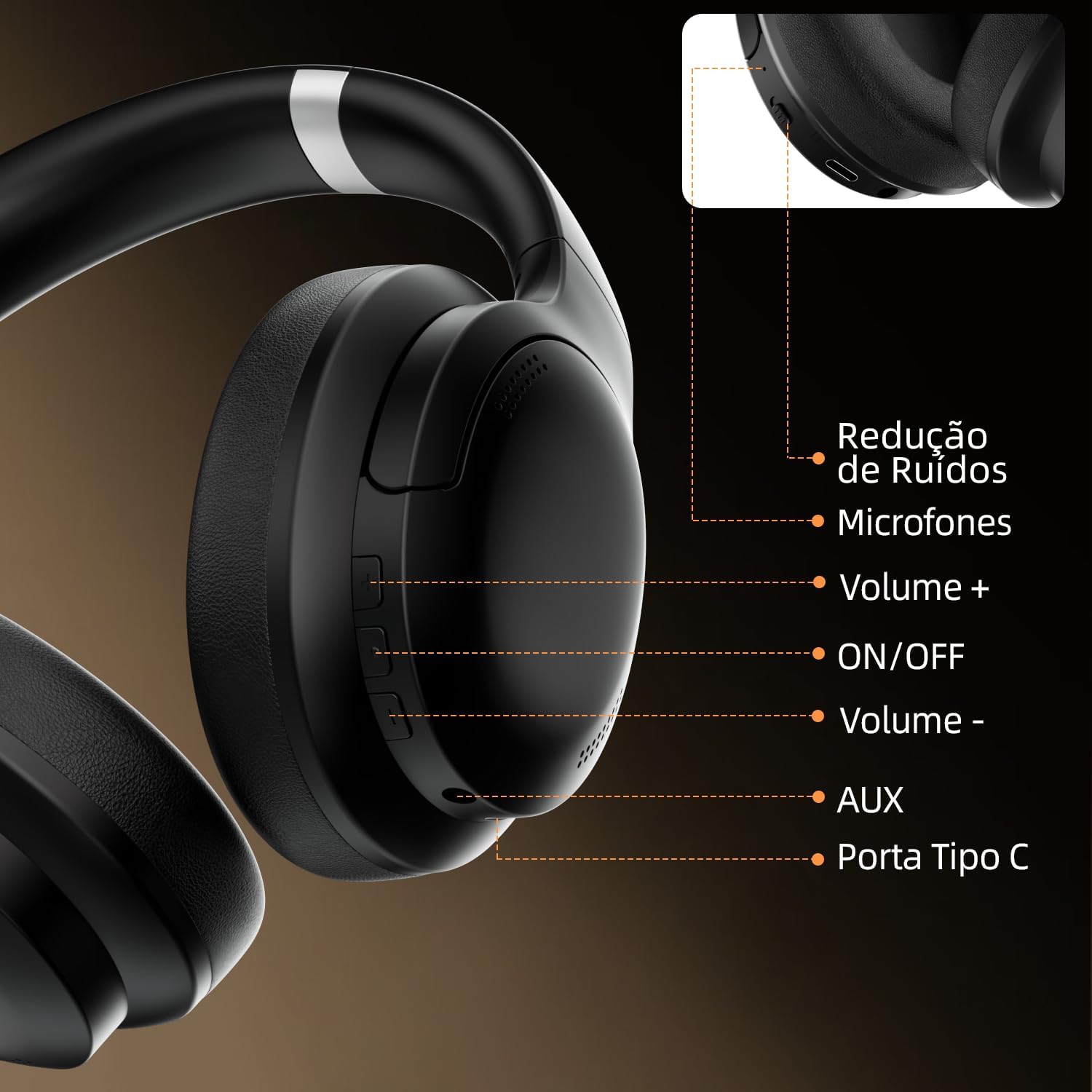
Figure 2: Detailed view of the Basike Y6 Headphone controls, including the noise reduction switch, microphones, volume up/down buttons, power ON/OFF button, AUX port, and USB Type-C charging port.
Specifications
| Feature | Detail |
|---|---|
| Brand | Basike |
| Model Number | FON20420-Y6 |
| Bluetooth Version | 5.3 + EDR |
| Working Voltage | DC 3.7V |
| Charging Power | DC 5V/220mA |
| Speaker Frequency | 20Hz - 20kHz |
| Charging Time | Approximately 2.5 hours |
| Playback Time | Up to 30 hours |
| Supported Formats | MP3/WAV |
| Microphone Sensitivity | -32dB |
| ANC Rate | 20dB + 2 |
| Working Range | 10 meters |
| Impedance | 32 Ohms |
| Weight | 220 Grams |
| Noise Control | Adaptive Noise Cancellation |
| Special Features | Noise Cancellation, Adjustable Headband, Surround Sound, Sweatproof |
| Compatible Devices | Mobile phones, Desktops, Laptops, Tablets |
Setup
1. Charging the Headphones
- Connect the provided USB Type-C charging cable to the charging port on the headphones (refer to Figure 2).
- Connect the other end of the cable to a USB power adapter (DC 5V/220mA, not included) or a computer's USB port.
- The indicator light will illuminate during charging and turn off or change color once fully charged.
- A full charge takes approximately 2.5 hours and provides up to 30 hours of playback.
2. Bluetooth Pairing
- Ensure the headphones are fully charged.
- Press and hold the Power ON/OFF button (refer to Figure 2) for a few seconds until the indicator light flashes blue and red, indicating pairing mode.
- On your device (smartphone, tablet, laptop), enable Bluetooth and search for available devices.
- Select "Basike Y6" from the list of found devices.
- Once connected, the indicator light will typically show a steady blue light or flash blue slowly.
- If prompted for a password, enter "0000".
Operating Instructions
1. Power On/Off
- Power On: Press and hold the Power ON/OFF button until the indicator light turns on.
- Power Off: Press and hold the Power ON/OFF button until the indicator light turns off.
2. Music Playback
- Play/Pause: Press the Power ON/OFF button once.
- Volume Up: Press the Volume + button.
- Volume Down: Press the Volume - button.
- Next Track: Press and hold the Volume + button.
- Previous Track: Press and hold the Volume - button.
3. Call Management
- Answer/End Call: Press the Power ON/OFF button once.
- Reject Call: Press and hold the Power ON/OFF button for 2 seconds.
- Redial Last Number: Double-press the Power ON/OFF button.
4. Active Noise Cancellation (ANC)
- To activate or deactivate ANC, use the dedicated Noise Reduction switch (refer to Figure 2).
- When ANC is active, the headphones will reduce ambient noise for a more immersive audio experience.
5. Wired Connection (AUX Mode)
- Insert a 3.5mm audio cable (not included) into the AUX port on the headphones (refer to Figure 2) and connect the other end to your audio source.
- The headphones will automatically switch to AUX mode. Bluetooth functions will be disabled.
Maintenance
- Clean the headphones regularly with a soft, dry cloth.
- Avoid using abrasive cleaners or solvents.
- Store the headphones in a cool, dry place when not in use.
- Do not expose the headphones to extreme temperatures, humidity, or direct sunlight.
- Avoid dropping or subjecting the headphones to strong impacts.
- Keep the charging port free of dust and debris.
Troubleshooting
| Problem | Possible Solution |
|---|---|
| Headphones do not power on. | Ensure the headphones are fully charged. |
| Cannot pair with a device. | Ensure headphones are in pairing mode (flashing blue/red). Turn off and on Bluetooth on your device. Move closer to the device. |
| No sound or low volume. | Check volume levels on both headphones and the connected device. Ensure headphones are properly paired. |
| ANC not working effectively. | Ensure the ANC switch is in the ON position. Adjust headphone fit for a better seal around the ears. |
| Intermittent connection. | Move closer to the connected device. Avoid obstacles between the headphones and the device. Reduce interference from other wireless devices. |
Warranty and Support
The Basike Y6 headphones come with a 1-year warranty from the date of purchase. This warranty covers manufacturing defects under normal use. Basike is not responsible for damages caused by improper use of the product or use with an incompatible electrical device.
For technical support, warranty claims, or any questions regarding your Basike Y6 headphones, please contact Basike customer service through the retailer where the product was purchased or visit the official Basike website for contact information.