
Introduction
This manual provides comprehensive instructions for the proper use, setup, operation, and maintenance of your Kingwell OTC Rechargeable Bluetooth Hearing Aids. Please read this manual thoroughly before using the device to ensure optimal performance and safety. These hearing aids are designed for adults with mild to moderate hearing loss (up to 80 dB).

Image: Kingwell Melodia Hearing Aids, highlighting key features.
Safety Information
Please observe the following safety precautions:
- Do not expose the hearing aids or charging case to extreme temperatures, humidity, or direct sunlight.
- Keep the device out of reach of children and pets. Small parts may pose a choking hazard.
- Use only the provided charging cable and case. Using unauthorized accessories may damage the device and void the warranty.
- If you experience discomfort, pain, or irritation while using the hearing aids, discontinue use and consult a medical professional.
- Do not attempt to modify or repair the device yourself. Contact customer support for assistance.
- The device is IP54-rated for sweat and splash resistance. It is not designed for submersion in water.
Legal Disclaimer:
Statements regarding dietary supplements have not been evaluated by the FDA and are not intended to diagnose, treat, cure, or prevent any disease or health condition. This product is an OTC hearing aid designed to amplify sound for individuals with perceived mild to moderate hearing impairment.
Package Contents
Verify that all items are present in your package:
- Kingwell Melodia Hearing Aid × 2
- Charger Case × 1
- Cleaning Cloth × 1
- Varying Eartips × 6 sets (Vented and Non-Vented, S/M/L sizes)
- USB-C Charging Cable × 1
- User Manual × 1 (this document)

Image: Contents of the Kingwell Melodia Hearing Aids package.
Product Overview
The Kingwell Melodia Hearing Aids are designed to provide clear and natural sound with advanced features for an enhanced listening experience.
Key Features:
- Authentic Sound Quality: Equipped with 8k extended bandwidth and vocal detection for natural sound processing.
- Robust Noise Management: Features an advanced 32 DSP chip and algorithms for up to 20dB noise cancellation, separating noise from speech.
- Trio-link Bluetooth-Enabled: Allows seamless switching between conversation, phone Bluetooth, and audio Bluetooth modes for hands-free calls and media streaming across devices.
- User-Friendly App: The myKingwell App provides personalized control over volume, noise reduction, and access to professional guidance.
- Long-lasting Battery Life: Offers up to 9 hours of continuous use and 35 hours with the portable charging case.
- Comfortable & Chic Design: Sleek, modern design with professional-grade earplugs and IP54 sweat and splash resistance.
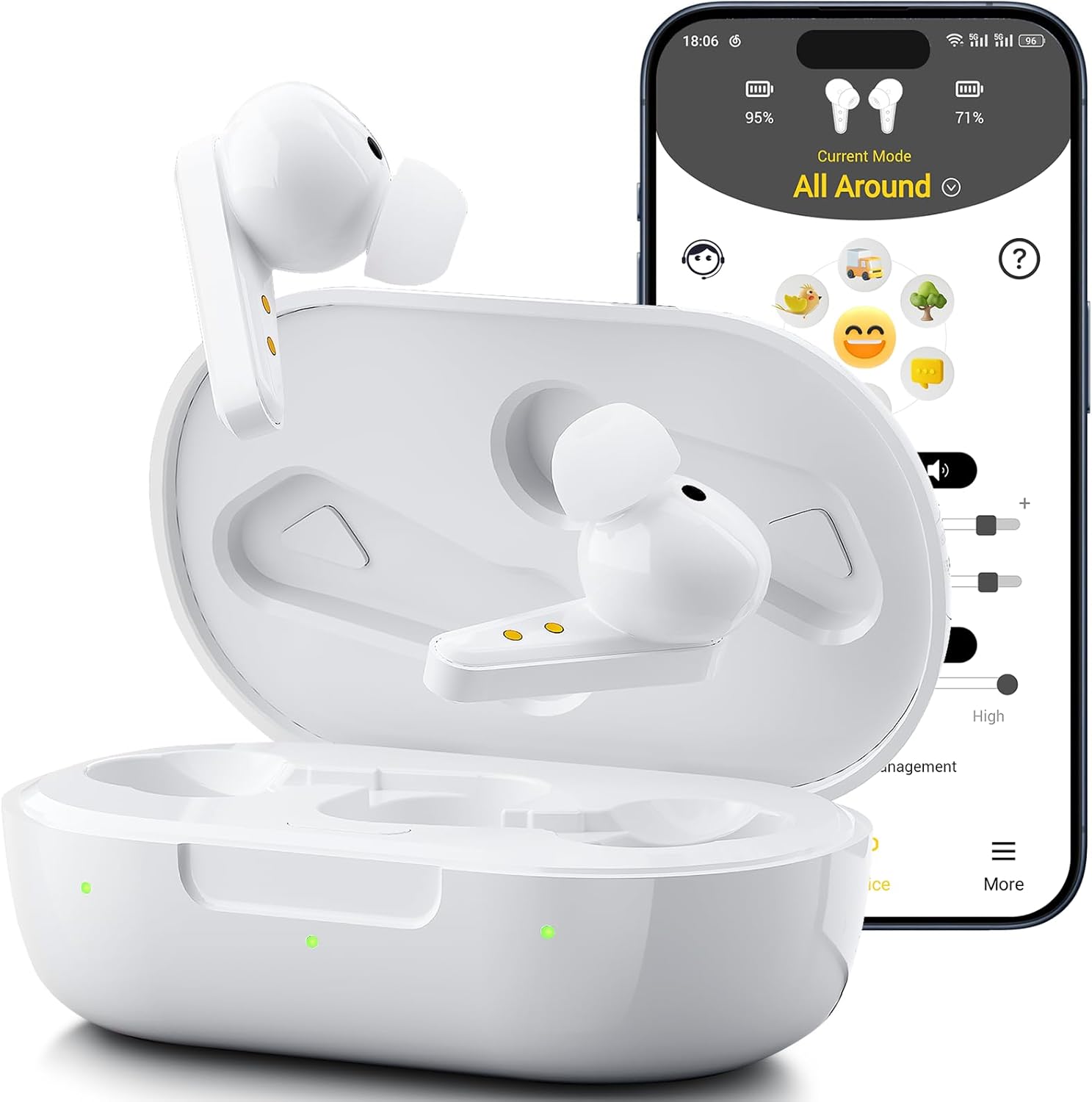
Image: Kingwell Melodia Hearing Aids and the myKingwell App.

Image: Authentic Sound Quality demonstration.

Image: Robust Noise Management technology.
Setup
1. Charging the Hearing Aids and Case
Before first use, fully charge the hearing aids and the charging case.
- Place the hearing aids into the charging case. Ensure they are correctly seated.
- Connect the USB-C charging cable to the charging case and a power source (e.g., USB wall adapter, computer USB port).
- The indicator lights on the case will show the charging status. A full charge for the hearing aids takes approximately 1.5 hours. The case provides up to 3 full charges for the hearing aids, extending usage to 35 hours.

Image: Charging the Kingwell Hearing Aids and Case.
2. Selecting and Attaching Eartips
Choosing the correct eartip size is crucial for comfort and optimal sound quality. Experiment with the provided vented and non-vented eartips (S, M, L sizes) to find the best fit for your ears.
- Gently pull off the pre-installed eartip.
- Select an eartip size that feels comfortable and creates a good seal in your ear canal without causing pressure.
- Press the new eartip firmly onto the hearing aid nozzle until it clicks into place.

Image: Eartip selection for comfortable and customizable fit.
3. Powering On and Wearing the Hearing Aids
Follow these steps to power on your hearing aids and wear them correctly:
- Open the Lid: Open the charging case lid. The indicator lights on the case will illuminate, indicating the hearing aids are active.
- Change Eartips (if needed): Ensure the best suitable eartips are attached for your comfort and hearing.
- Put on Hearing Aids: Gently insert each hearing aid into your ear canal, rotating slightly to ensure a secure and comfortable fit.
- Hear Prompt: You will hear a "bubble-like" prompt, indicating successful boot-up.

Image: Steps to power on and wear the hearing aids.
Operating Instructions
1. myKingwell App
The myKingwell App provides full control over your hearing experience. Download it from the App Store (iOS) or Google Play Store (Android).
- Download & Install: Search for "myKingwell" in your device's app store.
- Pairing: Open the app and follow the on-screen instructions to pair your hearing aids via Bluetooth.
- Features:
- Conduct a hearing test for personalized settings.
- Adjust volume levels for each hearing aid (L/R).
- Control noise reduction settings (None, Moderate, High).
- Monitor battery levels.
- Switch between different sound modes.
- Access assistance and guidance.

Image: MyKingwell App interface for easy control.

Image: MyKingwell App in use, available on App Store and Google Play.
2. Bluetooth Connectivity (Trio-link)
The Trio-link feature allows seamless connection to various devices for calls, music, and conversations.
- Ensure Bluetooth is enabled on your smartphone, tablet, or computer.
- Open the myKingwell App or go to your device's Bluetooth settings.
- Select "Kingwell Melodia" from the list of available devices to pair.
- Once paired, you can effortlessly switch between conversation, phone Bluetooth (for calls), and audio Bluetooth (for music/media) modes.

Image: Trio-link Bluetooth-Enabled for seamless connectivity.

Image: Stay Effortlessly Connected via Bluetooth.

Image: Wide compatibility with iOS, Android, PC, Music, TVs, and Phone Calls.
3. Sound Modes and Usage Scenarios
The myKingwell App allows you to select various sound modes optimized for different environments and activities.
- All Around Mode: General listening for everyday situations.
- Streaming Mode: Optimized for listening to music or other audio content.
- Noise Mode: Enhances speech clarity in noisy environments.
- Phone Call Mode: Dedicated mode for clear phone conversations.

Image: Various sound modes for different scenarios.

Image: Rediscover the Joy in Music.

Image: Engaging in Conversations.

Image: Noise Cancelling Calls.
Maintenance
1. Cleaning
- Regularly clean your hearing aids and eartips to prevent wax buildup and maintain hygiene.
- Use the provided cleaning cloth to gently wipe the surface of the hearing aids.
- Remove the eartips and clean them with a soft, damp cloth. Ensure they are completely dry before reattaching.
- Do not use harsh chemicals, solvents, or abrasive materials for cleaning.
2. Storage
- When not in use, store the hearing aids in their charging case to protect them from dust, moisture, and physical damage.
- Store the charging case and hearing aids in a cool, dry place, away from direct sunlight and extreme temperatures.
3. Water Resistance
The Kingwell Melodia Hearing Aids are IP54-rated, meaning they are protected against dust ingress and splashing water from any direction. This rating does not mean they are waterproof. Do not submerge them in water.

Image: Sweat and Splash-Resistant (IP54 rated).
Troubleshooting
If you encounter issues with your Kingwell hearing aids, refer to the table below for common problems and solutions.
| Problem | Possible Cause | Solution |
|---|---|---|
| No sound or weak sound | Low battery, clogged eartip, incorrect volume setting, hearing aid not powered on. | Charge the hearing aids. Clean the eartips. Adjust volume via the app. Ensure hearing aids are powered on. |
| Feedback/Whistling sound | Improper eartip fit, eartip too small, hearing aid not inserted correctly, earwax buildup. | Try a larger eartip. Reinsert the hearing aid firmly. Clean your ears or consult a doctor for earwax removal. |
| Cannot connect to Bluetooth | Bluetooth off on device, hearing aids not in pairing mode, interference. | Ensure Bluetooth is on. Restart hearing aids and device. Move closer to the device. Forget and re-pair the device in Bluetooth settings. |
| App not responding | App crash, outdated app version, phone issues. | Close and reopen the app. Check for app updates. Restart your smartphone. |
| Short battery life | Not fully charged, high volume/noise reduction settings, aging battery. | Ensure full charge. Reduce volume or noise reduction if not needed. Contact support if battery degradation is suspected. |
If the problem persists after trying these solutions, please contact Kingwell customer support.
Specifications
| Feature | Detail |
|---|---|
| Model Number | Melodia |
| Product Dimensions | 3.3 x 1.95 x 1.21 inches (charging case); 2.59 ounces (total weight) |
| Batteries | 2 Lithium Polymer batteries required (built-in) |
| Continuous Usage | Up to 9 hours (hearing aids) |
| Usage with Charging Case | Up to 35 hours |
| Charging Time | Approx. 1.5 hours for full charge |
| Noise Cancellation | Up to 20dB with 32 DSP chip |
| Water Resistance Rating | IP54 (Sweat and Splash-Resistant) |
| Manufacturer | LYRATONE TECHNOLOGIES,INC. |
| Date First Available | December 19, 2024 |

Image: Cutting-edge Technology and Frequency Response.
Warranty and Support
Kingwell is committed to providing high-quality products and excellent customer service. For any questions, concerns, or technical assistance, please contact us:
- Email Support: support@kingwellhearing.com (24/7 assistance)
- Live Chat/Online Support: Visit kingwellhearing.com (Available Wednesday to Sunday, 8 am to 5 pm EST)
Kingwell offers a 30-day hearing trial and personalized optimization guidance through the myKingwell app and dedicated service team.

Image: Contact Kingwell for support.