
WELLFOR MCA1224-BL
WELLFOR 12 x 24 Inch Bathroom Medicine Cabinet Instruction Manual
Model: MCA1224-BL
Introduction
This manual provides detailed instructions for the safe installation, operation, and maintenance of your WELLFOR 12 x 24 inch Bathroom Medicine Cabinet. Please read this manual thoroughly before beginning installation or use, and retain it for future reference.
Important Safety Information
WARNING: Failure to follow these safety instructions may result in injury or damage to the product.
- Always unplug and turn off power to the area before installing or maintaining the cabinet.
- Use appropriate safety gear, including gloves and eye protection, during installation.
- Be aware of potential pinch points and hazards during use and maintenance, especially with moving parts like hinges.
- Always follow the manufacturer's instructions for safe installation and use.
- Ensure the mounting surface is structurally sound and capable of supporting the cabinet's weight.
Package Contents
Verify that all components are present before beginning installation:
- Medicine Cabinet with Mirror
- Adjustable Glass Shelves (2)
- Mounting Hardware (screws, anchors, etc.)
- Installation Instructions (this manual)
Product Dimensions
The WELLFOR medicine cabinet measures:
- Width: 12 inches
- Height: 24 inches
- Depth: 4 5/8 inches (4.625 inches)
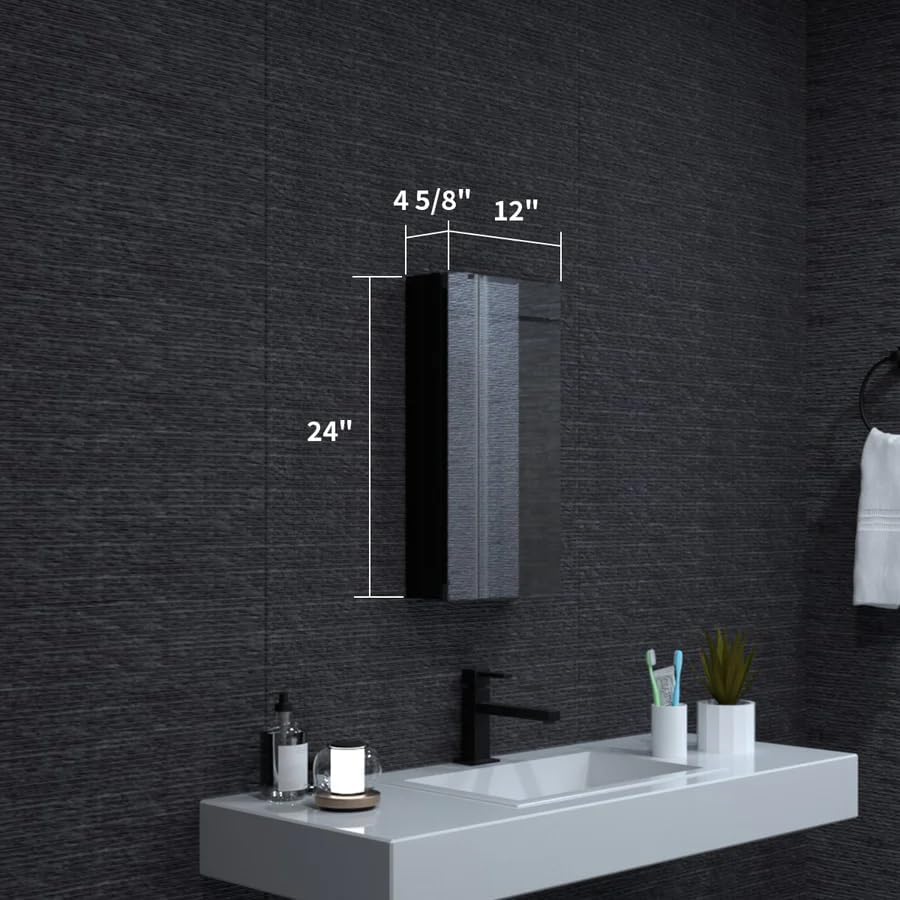
Figure 1: Product Dimensions Overview. This image illustrates the overall width, height, and depth of the medicine cabinet.
Key Features
- Sleek Design: Matte black aluminum frame complements modern bathroom decor.
- Ample Storage: Built-in 2-tier glass shelf system for organized storage.
- Adjustable Shelves: Two 8mm thick glass shelves offer multiple adjustable height options.
- Soft-Close Hinge: Advanced BLUM hinge with damping prevents door slamming for quiet operation.
- Versatile Door Opening: Supports 130° or 170° door opening angles.
- Flexible Installation: Designed for both surface-mount and recessed-mount applications.
- Reversible Door: Can be configured for left-hand or right-hand opening.
- Durable Construction: High-quality copper-free silver mirror and rust-resistant aluminum frame.

Figure 2: Interior View and Features. This image highlights the internal structure, glass shelves, and the durable construction of the cabinet.

Figure 3: BLUM Hinge Detail. This image shows the advanced BLUM hinge designed for soft and silent door closure.
Installation (Setup)
The WELLFOR medicine cabinet offers versatile installation options: surface-mount or recessed-mount, and reversible door opening (left or right).
1. Choose Mounting Method: Surface or Recessed
Decide whether to mount the cabinet directly onto the wall surface or recess it into a wall opening.

Figure 4: Mounting Options. This image illustrates the difference between surface-mounting (01) and recessed-mounting (02).
- Surface-Mount: The cabinet is mounted directly to the wall. Ensure the wall can support the weight.
- Recessed-Mount: A wall opening is required. The cabinet body fits into the wall, with only the mirror frame protruding. Consult a professional if unsure about cutting into walls.
2. Determine Door Opening Direction
The cabinet door can be configured to open from the left or the right, depending on your preference and bathroom layout.

Figure 5: Left/Right Door Opening. This image demonstrates the cabinet door configured for left-hand opening and right-hand opening.
- The hinges can be installed on either side of the cabinet frame to achieve the desired opening direction.
- Refer to the detailed diagrams included with your hardware for specific hinge placement.
3. General Installation Steps (Summary)
- Prepare the Area: Turn off power if working near electrical outlets. Clear the installation area.
- Mark Mounting Points: Use a level and pencil to mark the desired location and mounting holes on the wall according to your chosen mounting method (surface or recessed).
- Drill Pilot Holes: Drill pilot holes at the marked locations. Use appropriate drill bits for your wall material (e.g., drywall, tile, stud). Insert wall anchors if necessary.
- Mount the Cabinet: Secure the cabinet to the wall using the provided screws and hardware. Ensure it is level and securely fastened.
- Install Shelves: Insert the glass shelves into the desired positions using the shelf clips.
- Adjust Door (if needed): Fine-tune hinge adjustments for proper door alignment and soft-close function.
Note: Detailed step-by-step instructions with diagrams are included in the physical instruction sheet provided with your product. This section provides a general overview.
Operation
- Opening/Closing the Door: Gently pull the door open or push it closed. The BLUM soft-close hinges will ensure a smooth and silent operation, preventing abrupt slamming.
- Adjusting Shelves: The glass shelves are adjustable. To reposition a shelf, carefully remove any items, lift the shelf, and move the shelf clips to the desired height. Then, reinsert the shelf. Ensure clips are securely seated before placing items on the shelf.
- Storage: Utilize the two tiers of glass shelving for organizing bathroom essentials. Avoid overloading shelves beyond their capacity.
Care and Maintenance
- Cleaning the Mirror: Use a soft, lint-free cloth and a standard glass cleaner. Spray cleaner onto the cloth, not directly onto the mirror, to prevent liquid from seeping into the edges.
- Cleaning the Frame: Wipe the aluminum frame with a soft, damp cloth. For stubborn spots, a mild, non-abrasive cleaner can be used. Dry thoroughly immediately after cleaning.
- Cleaning Glass Shelves: Remove shelves and wash with mild soap and water, or a glass cleaner. Rinse thoroughly and dry completely before reinserting.
- Avoid Abrasives: Do not use abrasive cleaners, scouring pads, or harsh chemicals, as these can damage the finish and mirror surface.
- Hinge Maintenance: The BLUM hinges are designed for long-term, maintenance-free operation. Avoid applying excessive force to the door.
- Regular Inspection: Periodically check all mounting hardware to ensure it remains tight and secure.
Troubleshooting
| Problem | Possible Cause | Solution |
|---|---|---|
| Door does not close smoothly or slams. | Hinge adjustment needed or obstruction. | Check for any obstructions. Adjust the BLUM hinges according to the detailed instructions provided with the hardware to restore soft-close function. |
| Cabinet feels loose on the wall. | Mounting screws are loose or improper installation. | Carefully re-tighten all mounting screws. If the issue persists, re-evaluate the installation method and ensure appropriate wall anchors were used for your wall type. |
| Shelves are wobbly. | Shelf clips not properly seated or damaged. | Ensure each shelf clip is fully inserted and securely supporting the glass shelf. Replace any damaged clips. |
Specifications
| Brand: | WELLFOR |
| Model Number: | MCA1224-BL |
| Product Dimensions (D x W x H): | 4.625" x 12" x 24" |
| Material: | Aluminum (Frame), Glass (Mirror, Shelves) |
| Color: | Black |
| Mounting Type: | Surface or Recessed |
| Number of Shelves: | 2 (Adjustable Glass) |
| Door Opening Angle: | 130° or 170° |
| Hinge Type: | BLUM Soft-Close |
| Item Weight: | 17 Pounds |
| UPC: | 769047274217 |
Warranty and Support
For warranty information, technical support, or to order replacement parts, please contact WELLFOR customer service. Refer to the contact information provided on your purchase receipt or the WELLFOR official website.
Please have your model number (MCA1224-BL) and purchase date available when contacting support.
Related documentsMCA1224-BL


Ask a question about this manual
Ask about setup, troubleshooting, compatibility, parts, safety, or missing instructions. Manuals+ will review the question and use this page’s manual context to help answer it.