
MOMOHO B21
MOMOHO Karaoke Machine Model B21 User Manual
Your guide to setting up and enjoying your MOMOHO B21 Mini Karaoke Machine.
1. Introduction
Thank you for choosing the MOMOHO B21 Mini Karaoke Machine. This portable Bluetooth speaker with wireless microphones and disco LED lights is designed to provide entertainment for various occasions. This manual will guide you through the setup, operation, and maintenance of your device to ensure an optimal user experience.
2. What's in the Box
Please check the package contents to ensure all items are present:
- Mini Bluetooth Speaker
- 2 Wireless Microphones
- USB-C Charging Cable
- 3.5mm Audio Cable
- User Manual (this document)

Image: All components included in the MOMOHO B21 package.
3. Product Features
3.1 Portable Design
The MOMOHO B21 features a lightweight and compact design with a sturdy strap, making it easy to transport. Its 3000mAh battery supports over 12 hours of continuous use, ideal for travel and outdoor activities.

Image: The compact size of the MOMOHO B21 Karaoke Machine, suitable for various settings.
3.2 High-Definition Stereo Sound & Voice Effects
Equipped with a high-performance audio driver and a built-in 10W speaker, the B21 delivers 3D surround high-fidelity sound. The two wireless microphones offer 6 magic voice effects: reverb, baby voice, original, monster, male voice, and female voice. The microphones also support an accompaniment function.

Image: An internal view of the speaker, illustrating its sound components for premium stereo audio.
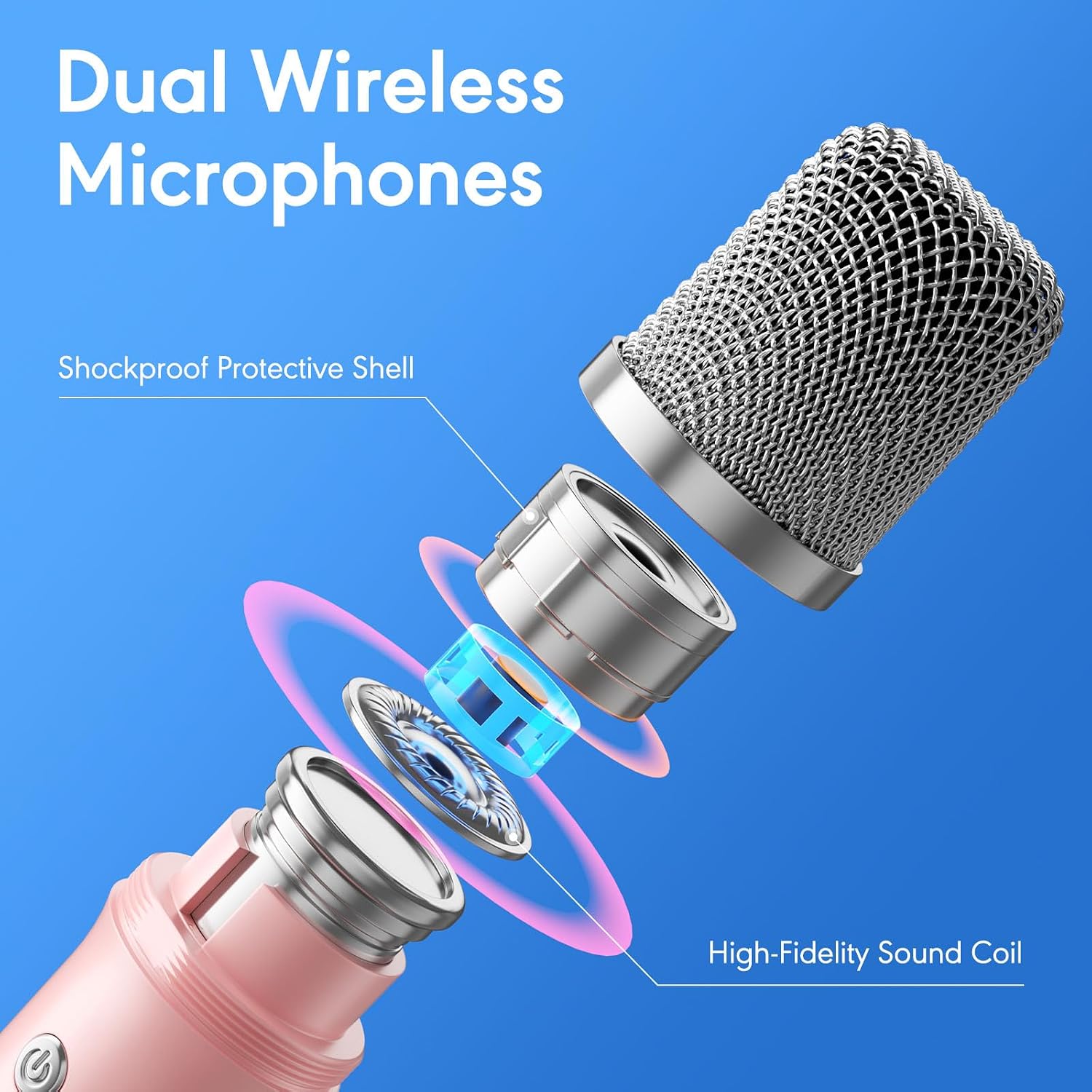
Image: A detailed look at the internal structure of the wireless microphone, emphasizing its sound quality features.
3.3 Multifunctional Bluetooth System
The mini karaoke machine features the latest Bluetooth 5.3 chip for instant pairing, stable transmission, and a range of up to 50 feet. The wireless microphones automatically connect to the speaker upon power-on. It also supports Micro TF card, Type-C input, and AUX ports, ensuring compatibility with mobile phones, TVs, DVDs, iPads, tablets, and PCs.

Image: The speaker and microphones with icons indicating TF card, Type-C, and AUX input options.
3.4 Dynamic Disco LED Lights
The PA system includes colorful disco lights with an independent button for switching between 6 built-in light modes and RGB lighting effects. The lights can change color with the music, creating an immersive and festive atmosphere.

Image: The karaoke machine displaying its dynamic light effects, suitable for group singing.
3.5 TWS Mode
The TWS (True Wireless Stereo) mode allows you to connect two MOMOHO B21 stereo systems simultaneously. This feature supports up to 4 microphones for an enhanced group singing experience with increased presence, power, and volume.
Video: An overview of the MOMOHO Karaoke Machine, demonstrating its sound quality, RGB lighting effects, 6 light modes, 6 voice change options, 50ft Bluetooth range, and TWS mode for connecting two speakers.
4. Setup
4.1 Charging the Device
Before first use, fully charge the speaker and both microphones using the provided USB-C cable. The charging indicator will show the charging status and turn off when fully charged.
4.2 Power On/Off
- Speaker: Press and hold the power button on the speaker to turn it on or off.
- Microphones: Press and hold the power button on each microphone to turn it on or off.
4.3 Bluetooth Pairing
- Turn on the speaker. It will automatically enter Bluetooth pairing mode.
- Enable Bluetooth on your device (e.g., smartphone, tablet).
- Select "MOMOHO B21" from the list of available devices to connect.
- The speaker will indicate a successful connection.
4.4 Microphone Connection
Once the speaker is powered on, the wireless microphones will automatically connect to the speaker. No manual pairing is required for the microphones.
5. Operating Instructions
5.1 Speaker Controls
- Power Button: Long press to turn on/off. Short press to switch input modes (Bluetooth, TF card, AUX).
- Volume Control: Use the dedicated buttons to adjust the speaker's volume.
- Light Mode Button: Press to cycle through the 6 disco LED light modes.
5.2 Microphone Controls
- Power Button: Long press to turn on/off.
- Volume Control: Use the +/- buttons to adjust microphone volume.
- Voice Change Button: Press to cycle through the 6 voice effects: Reverb, Baby Voice, Original, Monster, Male Voice, Female Voice.
- Accompaniment Function: A dedicated button on the microphone allows for accompaniment mode.
5.3 TWS Mode (True Wireless Stereo)
To connect two MOMOHO B21 speakers for a stereo experience:
- Ensure both speakers are powered off.
- Turn on both speakers. They will enter Bluetooth pairing mode.
- On one speaker (this will be the primary), double-press the power button. It will search for the second speaker.
- Once connected, the primary speaker will indicate TWS mode.
- Connect your device via Bluetooth to the primary speaker.
5.4 Input Modes
The speaker supports multiple input sources:
- Bluetooth: Wireless connection to your smart devices.
- Micro TF Card: Insert a TF card with audio files into the designated slot.
- AUX Input: Use the 3.5mm audio cable to connect to devices without Bluetooth.
6. Maintenance
- Cleaning: Wipe the device with a soft, dry cloth. Do not use harsh chemicals or abrasive cleaners.
- Storage: Store the karaoke machine in a cool, dry place away from direct sunlight and extreme temperatures.
- Battery Care: To prolong battery life, avoid fully discharging the battery frequently. Charge the device regularly, even if not in use for extended periods.
7. Troubleshooting
| Problem | Possible Cause | Solution |
|---|---|---|
| Device does not power on | Low battery; Power button not pressed correctly | Charge the device; Press and hold the power button for 3 seconds |
| No sound from speaker | Volume too low; Incorrect input mode; Device not connected | Increase volume; Switch to correct input mode (Bluetooth, AUX, TF); Ensure Bluetooth is paired |
| Microphone not working | Microphone off; Low microphone battery; Microphone not paired | Turn on microphone; Charge microphone; Microphones should auto-pair with speaker when both are on |
| Bluetooth connection unstable | Device too far from speaker; Interference | Move device closer to speaker (within 50ft); Avoid obstacles or other wireless devices |
| TWS mode not connecting | Incorrect pairing steps | Ensure both speakers are off, then turn on and double-press power button on one speaker to initiate TWS pairing. |
8. Specifications
| Feature | Detail |
|---|---|
| Brand | MOMOHO |
| Model Number | B21 |
| Item Weight | 2.2 pounds |
| Product Dimensions | 5.9 x 4 x 6 inches |
| Batteries | 2 Lithium Polymer batteries (included) |
| Battery Type | Lithium Ion |
| Compatible Devices | DVD Player, PC, Smartphone, Tablet, Television, iPad |
| Connector Type | 3.5 mm Jack, USB |
| Speaker Count | 2 |
| Size | Mini |
| Power Source | Battery Powered |
| Special Feature | Composite, PA System, Portable |
9. Warranty and Support
MOMOHO is committed to providing quality products and customer satisfaction. If you encounter any issues or have questions regarding your B21 Karaoke Machine, please contact our customer support team. While specific warranty details are not provided in this manual, we encourage you to reach out for friendly and hassle-free service.
For support, please refer to the contact information provided with your purchase or visit the official MOMOHO website.
Ask a question about this manual
Ask about setup, troubleshooting, compatibility, parts, safety, or missing instructions. Manuals+ will review the question and use this page’s manual context to help answer it.