Introduction
The SYMIK Power Source Charger (PSC) is an intelligent input and output device specifically designed for Ryobi 18V Lithium-Ion batteries. This advanced two-way charger also functions as a portable power station, featuring an OLED screen for comprehensive data display and multiple USB ports for versatile charging and discharging. Its ergonomic and lightweight design makes it an ideal working partner for various applications.

Image: SYMIK PSC unit displaying real-time charging/discharging data on its OLED screen, highlighting its transparent design and port layout.
Setup
- Battery Compatibility: Ensure you are using only Ryobi 18V Lithium-Ion batteries. This device is NOT compatible with Ni-Cd / Ni-MH Batteries.
- Initial Charging of PSC Unit: Before first use, fully charge the SYMIK PSC unit. Connect a USB-C power adapter (not included) to the USB-C1 port on the PSC unit using a compatible USB-C cable. The OLED screen will display charging progress.
- Attaching a Ryobi Battery: Align the Ryobi 18V Lithium-Ion battery with the battery slot on the SYMIK PSC unit and slide it firmly into place until it clicks. Ensure a secure connection.
- Detaching a Ryobi Battery: Press the release latches on the sides of the battery and slide the battery off the PSC unit.
Operating Instructions
1. Intelligent Charging (100W Super-Fast Charging)
- The USB-C1 port supports two charging modes for Ryobi 18V Lithium-Ion batteries: 65W (Max, 5V 3A - 20V 3.25A) and 100W (Max, 5V 3A - 20V 5A).
- To achieve 100W charging, a 100W+ PD 3.0/3.1 Power Adapter and a USB-C cable supporting 100W power are required (not included). The user must also set the unit to 100W mode in the settings menu. By default, charging is limited to 65W for battery longevity.
- Connect the USB-C1 port to a power source. The OLED screen will show the charging wattage and battery percentage.

Image: The SYMIK PSC unit connected to a power adapter via USB-C, actively charging a Ryobi 18V battery, with the OLED screen displaying charging speed.
2. 145W Portable Power Source (Discharging)
- The PSC unit features three output ports:
- USB-A: 18W Max output.
- USB-C1: 100W Max output (also functions as input).
- USB-C2: 45W Max output.
- Maximum combined output power is up to 145W (USB-C1 and USB-C2 combined).
- Connect your electronic devices (laptops, tablets, smartphones, lights, fans, etc.) to the appropriate USB output ports. The OLED screen will display the discharging wattage for each port.
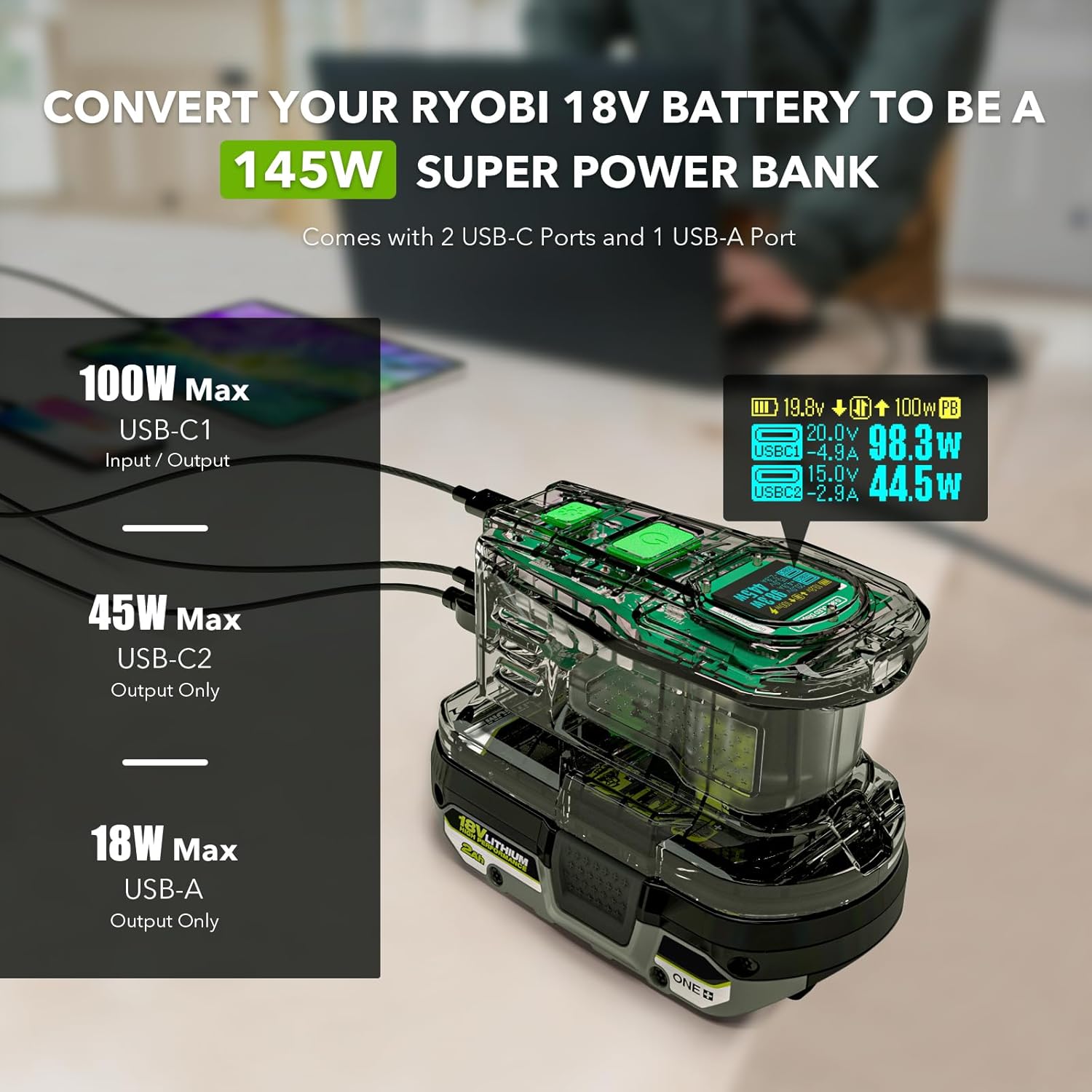
Image: The SYMIK PSC unit connected to and charging multiple devices simultaneously, demonstrating its function as a 145W portable power bank.
3. OLED Screen Display
- The OLED screen provides real-time data on charging/discharging status, battery percentage, wattage, voltage, and LED light data.
- This allows for easy monitoring of power levels and device operation.
4. LED Task Light
- The integrated LED light offers a 1W output with 1-100% brightness adjustment in constant mode.
- It also features multiple strobe light modes, including an SOS distress mode for emergencies.

Image: The SYMIK PSC unit with its LED task light illuminated, illustrating adjustable brightness levels and various strobe light patterns, including SOS.
5. USB-C1 Role Change & Advanced Settings
- The default role of USB-C1 is "Auto". Users can change its role to "Input Only" or "Output Only" via the advanced settings menu. This exclusive feature allows for precise control over power flow.
- The advanced settings menu provides options to adjust parameters such as C2 Output Power Limit, Screen Off After timer, Power Off After timer, Power Off Current limit, Strobe Modes Control, and Reset To Default.

Image: The OLED screen of the SYMIK PSC unit displaying options for USB-C1 role change (Auto, Input Only, Output Only) and various advanced settings for customization.
Maintenance
- Cleaning: Use a soft, dry cloth to clean the unit. Do not use abrasive cleaners or solvents.
- Storage: Store the unit in a cool, dry place away from direct sunlight and extreme temperatures.
- Battery Care: Always ensure Ryobi batteries are properly seated and removed. Avoid dropping the unit or subjecting it to harsh impacts.
Troubleshooting
- Unit Not Charging: Ensure the USB-C power adapter and cable are functioning correctly and support the required wattage. Check the connection to the USB-C1 port.
- Devices Not Charging: Verify that the Ryobi battery is securely attached and has sufficient charge. Check the connections to the output ports. Ensure the USB-C1 port is set to an appropriate output mode if applicable.
- OLED Screen Not Displaying: Press the power button to activate the screen. Check advanced settings for screen timeout options.
- LED Light Not Working: Ensure the unit is powered on and check the LED light settings in the advanced menu.
Specifications
| Model Name | PSC |
| Color | Obsidian Semi Clear |
| USB-C1 Input/Output (Charger Mode) | 65W Mode: 5V 3A, 9V 3A, 12V 3A, 15V 3A, 20V 3.25A 100W Mode: 5V 3A, 9V 3A, 12V 3A, 15V 3A, 20V 5A |
| USB-C2 Output | 5V 3A, 9V 3A, 12V 3A, 15V 3A (45W Max) |
| USB-A Output | 5V 3A, 9V 2A, 12V 1.5A (18W Max) |
| Max Total Output Power | 145W (USB-C1 and USB-C2 combined) |
| LED Light | 1W with 1-100% brightness adjustable, constant mode, strobe modes (SOS) |
| Applicable Battery Type | Ryobi 18V Lithium-Ion Battery ONLY; Not Ni-Cd / Ni-MH Batteries |
| Enclosure Material | Fire Resistant PC Shell |
| Operating Ambient Temperature | 5° to 40° C (41° to 104° F) |
| Product Dimensions | 5.31 x 2.95 x 3.07 inches |
| Item Weight | 8.4 ounces |
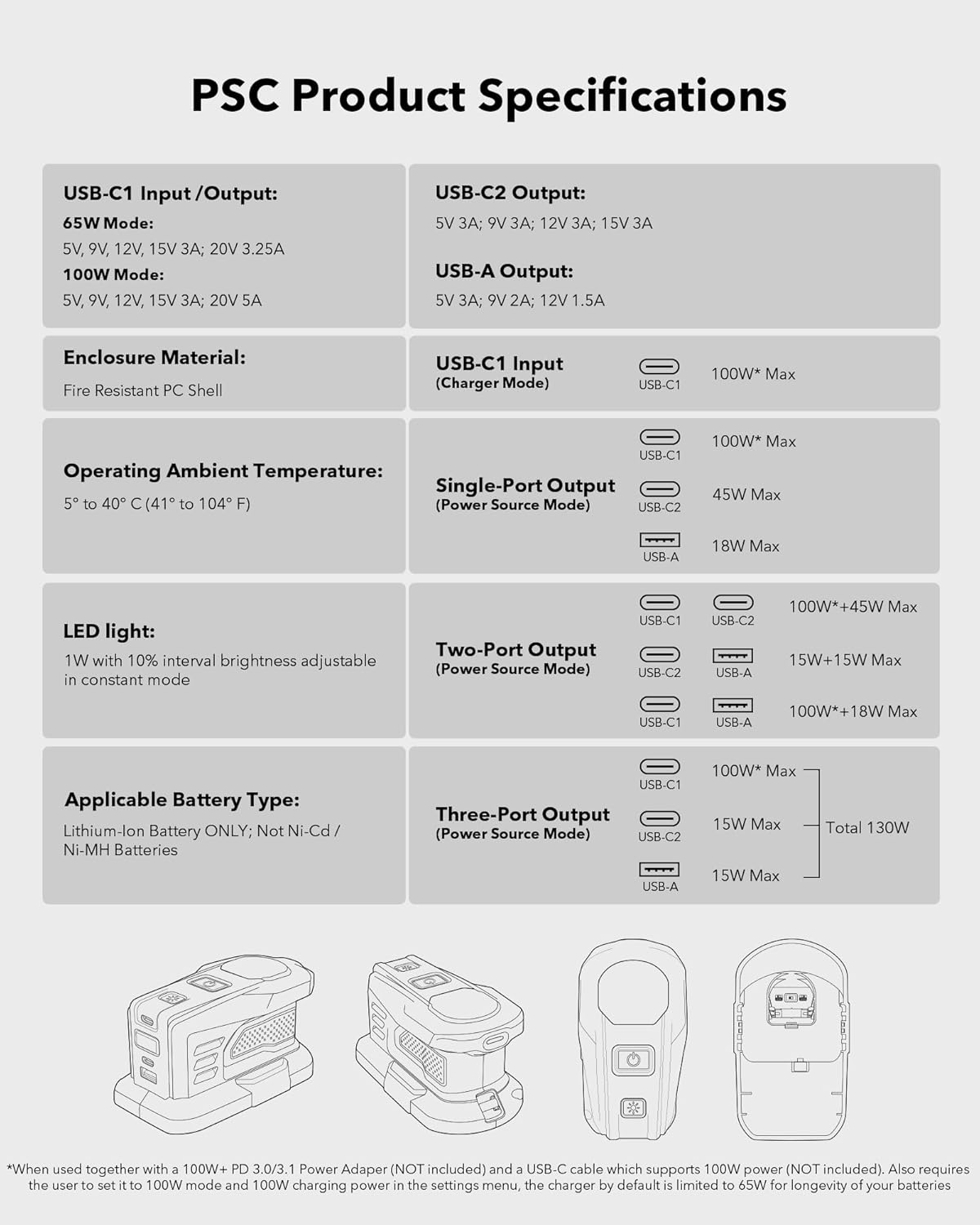
Image: Detailed product specifications for the SYMIK PSC unit, including input/output modes, power ratings, and physical characteristics.
Warranty & Support
For warranty information or technical support, please refer to the product packaging or contact SYMIK customer service directly. Keep your purchase receipt for warranty claims.


