
1. Introduction
This manual provides essential information for the safe and efficient operation of your FORYON CNC Lathe Controller, models XC609MF and XC609T, specifically the 2-Axis variant. This controller is designed for use with various CNC machines, including lathes and turning centers, offering precise control and ease of use.
The controller integrates a human-computer interface with code analysis and utilizes an FPGA for underlying algorithms and control pulse generation. This architecture ensures reliable control and straightforward operation. Its internal operating system is designed for intuitive interaction.

Figure 1.1: Front view of the FORYON CNC Lathe Controller, showing the display screen and English-labeled control buttons.
The XC609MF and XC609T controllers are versatile and can be applied to various CNC machine types, including lathes, CNC routers, pick-and-place machines, and milling machines. The XC609T model is specifically optimized for lathe machine applications.
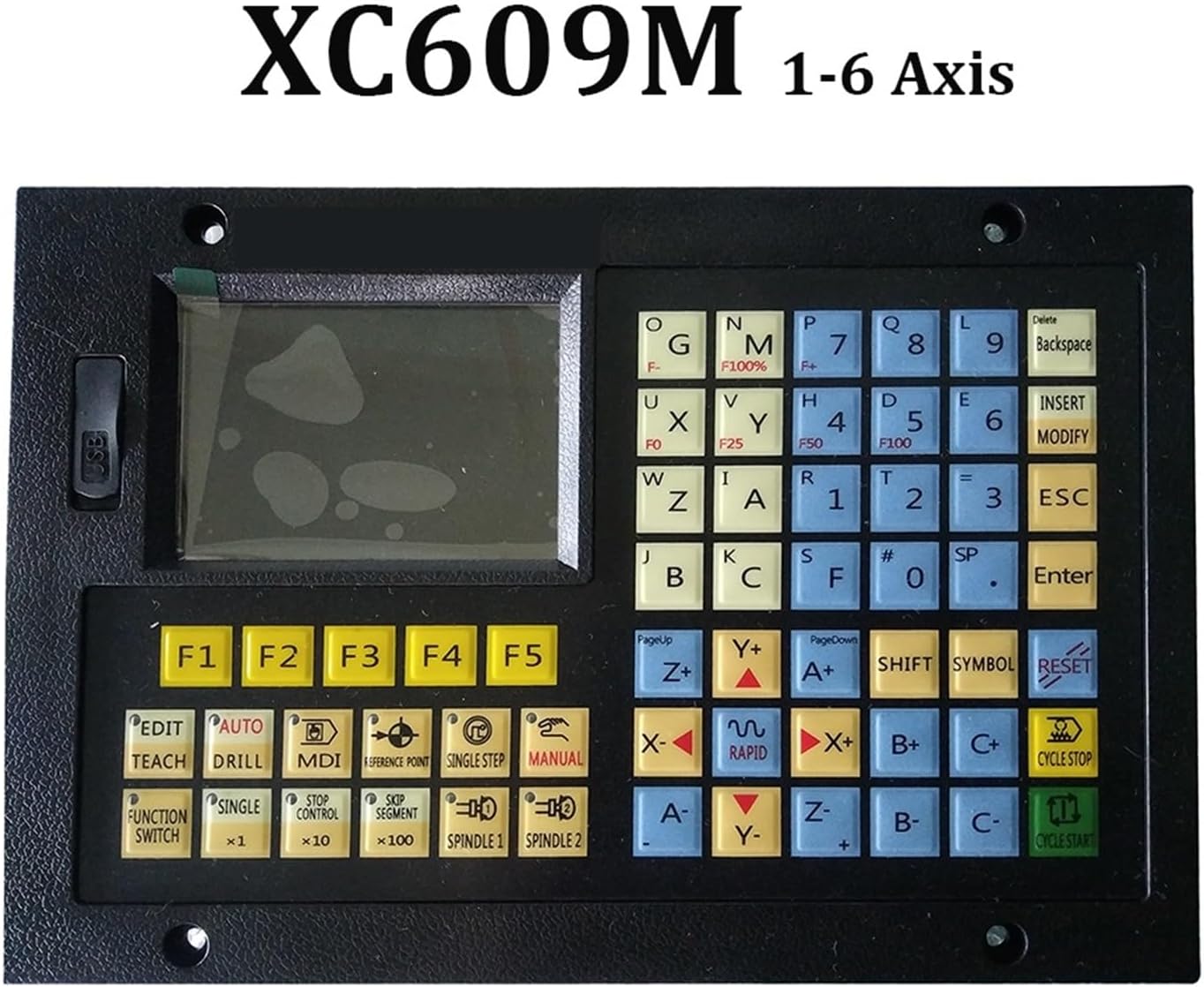
Figure 1.2: The XC609M series controller, indicating its compatibility with 1 to 6 axes configurations.
2. Setup and Installation
Proper installation is crucial for the optimal performance and longevity of your CNC controller. Always ensure power is disconnected before performing any wiring.
2.1 Power Supply Connection
- The controller requires a 24V DC power supply. Connect the positive (+) and negative (-) terminals of the power supply to the corresponding input terminals on the controller.
- Verify the voltage and polarity before applying power to prevent damage.
2.2 Axis Motor Connections
- Connect the stepper or servo motor drivers for each axis (X, Y, Z, etc.) to the designated output ports on the controller.
- Ensure correct wiring for pulse, direction, and enable signals as per your motor driver specifications.
- For the 2-Axis model, connect the primary two axes required for your lathe operation.
2.3 Limit Switch and Emergency Stop Connections
- Connect all necessary limit switches to their respective input terminals on the controller to define the machine's travel limits.
- Wire the emergency stop button to the dedicated E-stop input. This is a critical safety feature and must be correctly installed and tested.
2.4 Spindle Control
- Connect the spindle control signals (e.g., PWM for speed, relay for ON/OFF) to the controller's spindle output terminals.
- Refer to your spindle drive manual for specific wiring requirements.
2.5 Initial Power-Up and Configuration
- After all connections are secure, apply power to the controller.
- The display will illuminate. Follow the on-screen prompts or refer to the detailed programming manual for initial parameter settings, such as axis calibration, motor tuning, and G-code interpretation settings.
- The controller supports both Chinese and English display languages.

Figure 2.1: The XC609M controller, suitable for milling machines, featuring both Chinese and English button labels for user convenience.
3. Operating Instructions
The FORYON CNC controller is designed for convenient operation, allowing users to quickly get started with machining tasks.
3.1 User Interface Overview
- The controller features a user-friendly interface, typically involving a display screen and a keypad.
- Commands can be input via the keypad, allowing for intuitive setting of processing parameters and programs.
- Advanced models may support graphical programming, simplifying complex operations.
3.2 Basic Operation Modes
The controller typically supports several operation modes:
- Manual Mode: For jogging axes, setting tool offsets, and performing manual operations.
- MDI (Manual Data Input) Mode: Allows direct input of G-code commands for immediate execution.
- Automatic Mode: Executes pre-loaded G-code programs for automated machining.
- Edit Mode: For creating, modifying, and saving G-code programs.
3.3 Program Execution
- Load Program: Select and load the desired G-code program from the controller's memory.
- Set Origin/Workpiece Zero: Define the workpiece zero point using manual jogging and the appropriate function.
- Tool Offset: Set or verify tool length and diameter offsets.
- Start Cycle: Initiate the machining process in Automatic mode. Monitor the operation closely.
- Pause/Stop: Use the designated buttons to pause or stop the program if necessary.
The controller's advanced digital control technology ensures high-precision machining by accurately controlling the position and speed of the machining process. This guarantees accuracy and consistency in dimensions, further enhanced by features like error compensation.

Figure 3.1: The XC609T 2-Axis controller, specifically designed for lathe applications, featuring a keypad with Chinese labels.
4. Maintenance
Regular maintenance helps ensure the reliable operation and extends the lifespan of your FORYON CNC controller.
- Cleaning: Periodically clean the controller's exterior, especially the display and keypad, with a soft, dry cloth. Avoid using harsh chemicals or abrasive materials. Ensure no dust or debris accumulates in ventilation openings.
- Environmental Conditions: Operate the controller within its specified environmental conditions (temperature, humidity) to prevent damage. Avoid exposure to excessive dust, moisture, or direct sunlight.
- Cable Inspection: Regularly inspect all connected cables for signs of wear, damage, or loose connections. Secure any loose connections immediately.
- Software Updates: Check the manufacturer's website for any available firmware or software updates. Follow update instructions carefully.
- Backup Programs: Periodically back up your critical G-code programs and controller settings to an external storage device (e.g., USB drive) to prevent data loss. The controller has a storage capacity of 128MB.
5. Troubleshooting
This section provides solutions to common issues you might encounter. For more complex problems, contact technical support.
| Problem | Possible Cause | Solution |
|---|---|---|
| Controller does not power on. | No power supply, incorrect wiring, faulty power supply. | Check 24V power supply connection and ensure it is active. Verify wiring polarity. Test power supply. |
| Motors not moving. | Loose motor connections, incorrect driver settings, E-stop engaged, limit switch triggered. | Check motor and driver wiring. Ensure E-stop is disengaged. Check limit switch status. Verify driver parameters. |
| Inaccurate machining. | Incorrect axis calibration, mechanical backlash, tool offset errors. | Recalibrate axes. Check for mechanical issues in the machine. Verify tool offsets. |
| Display shows error message. | Specific operational error, G-code syntax error. | Note the error code/message and consult the detailed programming manual for specific remedies. Review G-code for syntax. |
6. Specifications
Key technical specifications for the FORYON XC609MF/XC609T 2-Axis CNC Lathe Controller:
- Model Numbers: XC609MF, XC609T (2-Axis variant)
- Application: Lathe and Turning Center
- Instruction Unit: 0.001mm
- Max Feed Rate: 12000mm/minute
- Power Supply: 24V DC
- Storage Capacity: 128MB
- Display Languages: Chinese and English
- Item Weight: Approximately 6.61 pounds (3000 Grams)
- Package Dimensions: 1.18 x 0.79 x 0.39 inches (Note: These dimensions seem unusually small for a controller and might refer to a component or packaging insert. Please refer to actual product for physical dimensions.)
- Manufacturer: FORYON
7. Warranty and Support
Warranty information for the FORYON CNC Lathe Controller is typically provided with the product packaging or available on the official FORYON website. Please retain your proof of purchase for warranty claims.
For technical support, troubleshooting assistance beyond this manual, or inquiries regarding parts and service, please contact FORYON customer service through their official website or the contact information provided with your purchase.
Manufacturer: FORYON