
1. Introduction
Thank you for choosing the Ohniyou 48'' Ceiling Fan with Lights and Remote. This ceiling fan is designed to provide efficient air circulation and versatile lighting options for your indoor spaces. Featuring a reversible DC motor for year-round comfort, 6 adjustable speeds, and a dimmable LED light with 3 color temperatures, this fan offers both functionality and modern design. Please read this manual thoroughly before installation and operation to ensure safe and optimal performance.
2. Safety Information
WARNING: To reduce the risk of fire, electric shock, or personal injury, always follow these basic precautions:
- Read all instructions before installing the fan.
- All wiring must be in accordance with national and local electrical codes. If you are unfamiliar with wiring, consult a qualified electrician.
- Before installation, disconnect power by turning off the circuit breakers at the main fuse box.
- Ensure the installation site allows the fan blades to rotate without obstruction. Maintain a minimum clearance of 7 feet from the floor to the bottom of the blades.
- Do not operate the fan if any part is damaged.
- Do not insert objects into the path of the fan blades.
3. Setup
3.1 Unpacking and Inspection
Carefully remove all components from the packaging. Inspect all parts for any damage. Keep the packaging materials until you are satisfied with the product's operation.

Figure 3.1: Main components of the Ohniyou 48-inch Ceiling Fan, including the fan body, reversible walnut/black blades, and remote control.
3.2 Blade Assembly
The fan includes reversible blades with a walnut finish on one side and a black finish on the other. Choose the desired finish before attaching the blades to the motor housing.

Figure 3.2: Attaching the fan blades to the motor. Ensure screws are tightened securely.
3.3 Mounting Options
This fan supports both downrod mount and angled ceiling installations (up to 15 degrees). Select the appropriate mounting method for your ceiling type. Ensure the mounting bracket is securely fastened to a ceiling joist or a suitable support structure capable of holding the fan's weight.

Figure 3.3: Fan dimensions and available mounting options.
3.4 Electrical Wiring
Connect the fan's electrical wires to your household wiring according to the provided wiring diagram in the full user manual (PDF). It is highly recommended to have a qualified electrician perform the electrical installation to ensure safety and compliance with local codes.
4. Operating Instructions
4.1 Remote Control Functions
The fan is operated via a multifunctional remote control. Ensure 2 AAA batteries (not included) are installed correctly in the remote.

Figure 4.1: Multifunctional Remote Control Layout.
- ALL OFF: Turns off both the fan and light.
- F/R (Forward/Reverse): Changes the direction of blade rotation for summer (downward airflow) or winter (upward airflow) modes.
- Nature: Activates natural breeze simulation by randomly cycling through fan speeds.
- Timer Setting (1h/2h/4h/6h): Sets the fan and light to turn off automatically after the selected duration.
- Fan Speed: Adjusts fan speed from 1 to 6.
- LED Light ON/OFF: Toggles the light on or off.
- LED Light +/-: Dims or brightens the light (10% to 100%).
- Color Temperature (3000K/4500K/6000K): Cycles through warm white (3000K), neutral white (4500K), and cool white (6000K).
- Night Light Mode: Activates a low-brightness light setting.
- Mute Mode: Turns off the remote's beeping sound.
4.2 Reversible DC Motor
The reversible DC motor allows you to change the direction of the fan's rotation, optimizing air circulation for different seasons.
- Summer Mode (Downward Airflow): Blades rotate counter-clockwise, creating a downward breeze that cools the room.
- Winter Mode (Upward Airflow): Blades rotate clockwise, circulating warm air trapped near the ceiling downwards.
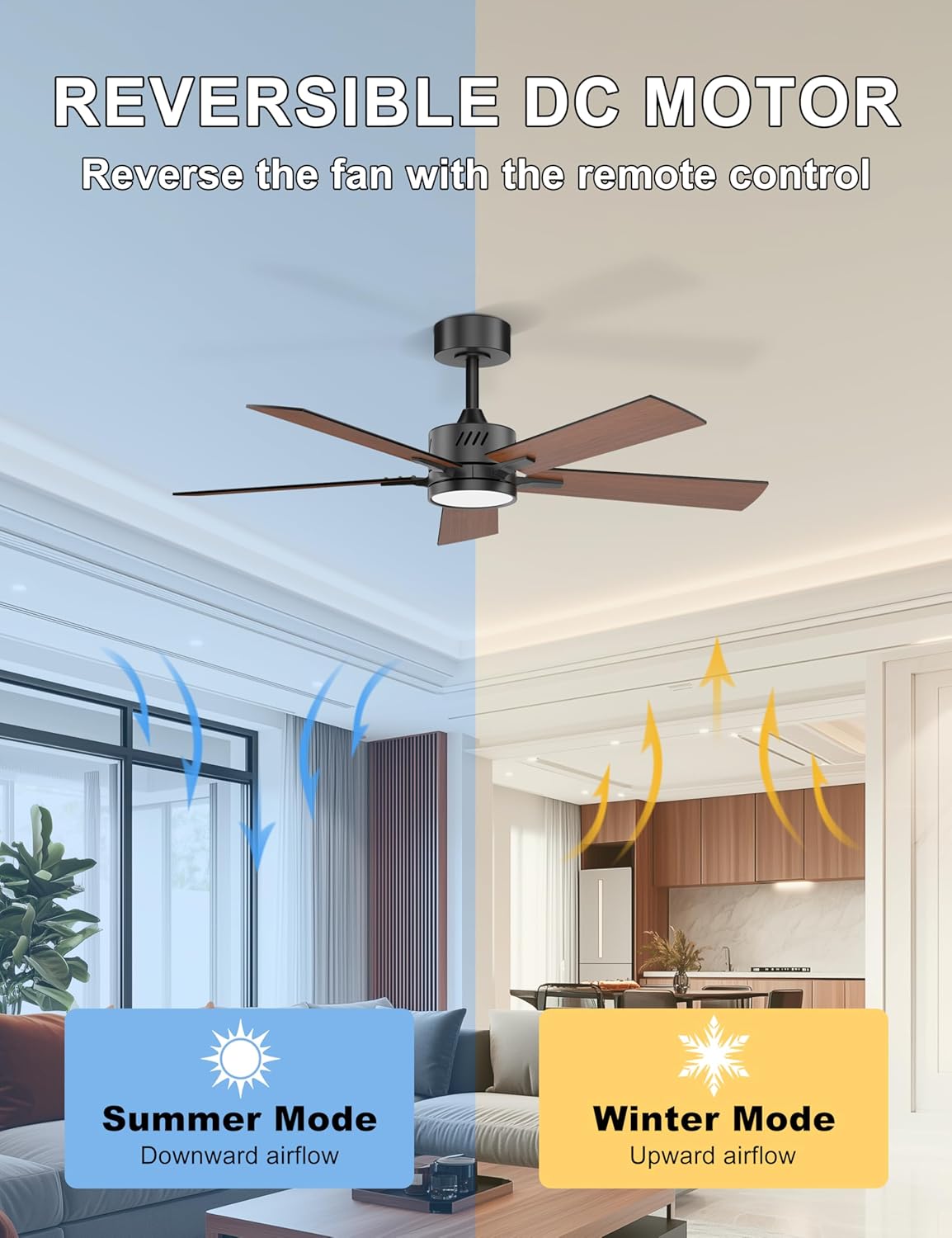
Figure 4.2: Reversible DC Motor for year-round comfort.
4.3 Quiet Operation
The fan's DC motor operates at a low noise level (below 35 dB), ensuring a peaceful environment suitable for bedrooms, nurseries, or quiet study areas.

Figure 4.3: Noise level comparison for quiet operation.
5. Maintenance
5.1 Cleaning
To maintain the fan's appearance and performance, regularly dust the blades and motor housing with a soft, damp cloth. Do not use abrasive cleaners or solvents, as these may damage the finish.
5.2 LED Light Replacement
The integrated LED light kit is designed for long-lasting performance. In the event of a malfunction, contact Ohniyou customer service directly for replacement LED light kits. Do not attempt to replace the LED module with standard bulbs.
6. Troubleshooting
If you experience issues with your Ohniyou ceiling fan, refer to the following common problems and solutions:
| Problem | Possible Cause | Solution |
|---|---|---|
| Fan does not operate. | No power supply; Loose wiring; Remote control issues. | Check circuit breaker; Ensure all connections are secure; Replace remote batteries or re-pair remote. |
| Light does not work. | Loose wiring; LED module failure; Remote control issues. | Check wiring connections; Contact Ohniyou for LED replacement; Check remote batteries. |
| Fan wobbles. | Loose blades; Uneven blade weight; Loose mounting bracket. | Tighten all blade screws; Use balancing kit (if included); Ensure mounting bracket is secure. |
| Remote control not responding. | Low batteries; Remote not paired. | Replace batteries; Refer to the full user manual for remote pairing instructions. |
For more detailed troubleshooting or issues not listed here, please refer to the comprehensive user manual PDF available online or contact Ohniyou customer support.
7. Specifications
| Feature | Detail |
|---|---|
| Brand | Ohniyou |
| Model Name | 097D-Walnut |
| Electric Fan Design | Ceiling Fan |
| Color | Downrod Walnut |
| Style | Downrod Mount |
| Product Dimensions | 48"D x 20"W x 48"H |
| Power Source | DC |
| Wattage | 26 watts |
| Voltage | 120 Volts (AC) |
| Air Flow Capacity | 3586 Cubic Feet Per Minute (CFM) |
| Noise Level | 35 dB |
| Number of Power Levels | 6 |
| Light Type | LED (3 Color Temperature, Dimmable) |
| Blade Material | Engineered Wood |
| Included Components | Light Kit, Remote |
| Indoor/Outdoor Usage | Indoor |
8. Warranty and Support
Ohniyou products are manufactured to high-quality standards. For information regarding product warranty, please refer to the warranty card included with your purchase or visit the official Ohniyou website. For technical support, replacement parts, or any inquiries, please contact Ohniyou customer service. You can also find a detailed User Manual (PDF) for further assistance via the following link: Ohniyou User Manual PDF.


