1. Introduction
This manual provides detailed instructions for the installation, operation, maintenance, and troubleshooting of your SHANGZHAOYUAN B450 AM4-K Motherboard. Designed for AMD Ryzen 1st to 5th generation processors, this motherboard offers robust performance and essential connectivity for your personal computer build.

Figure 1.1: The SHANGZHAOYUAN B450 AM4-K Motherboard alongside its product packaging.
Key Features:
- AMD AM4 Socket: Compatible with AMD Ryzen 1-5th generation CPUs (Ryzen 1000-5000 Series).
- Dual-Channel DDR4: Four memory slots supporting up to 128GB (32GB*4) with speeds up to 3600MHz.
- Gaming Connectivity: Features HDMI-compatible, DP, Gigabit Ethernet, SATA 3.0, NVME M.2, PCIe 3.0 x16, PCIe 2.0 x1, USB 3.0, and USB 2.0.
- Stable Power Supply: 24pin+8pin power interface and 4+2 phase power supply with all-solid capacitors for stable operation.
- BIOS Functionality: Supports TPM 2.0, Secure Boot, Hibernate, XMP, PBO, CPU overclocking, and more.
2. Setup and Installation
2.1 Package Contents
Please verify that all items are present in your package:
- 1 x SHANGZHAOYUAN B450 AM4-K Motherboard
- 1 x SATA Cable
- 1 x I/O Shield
Note: The user manual is not included in the physical package. A CR2032 battery for the CMOS is also not included and must be purchased separately.
2.2 Motherboard Layout
Familiarize yourself with the various components and connectors on your motherboard. This diagram highlights key areas for installation.

Figure 2.1: SHANGZHAOYUAN B450 AM4-K Motherboard Component Layout.
2.3 CPU Installation
The motherboard features an AMD AM4 socket, compatible with Ryzen 1st to 5th generation processors. Carefully align your CPU with the socket, ensuring the golden triangle on the CPU matches the indicator on the socket. Gently lower the CPU into place without force, then secure it with the retention lever.

Figure 2.2: AMD AM4 CPU Socket and Installation.
2.4 Memory (RAM) Installation
This motherboard supports dual-channel DDR4 memory across four slots, with a maximum capacity of 128GB. For optimal dual-channel performance, install memory modules into the black slots first. Ensure the memory modules are correctly oriented and press firmly until the clips on both ends lock into place.

Figure 2.3: Dual-Channel DDR4 Memory Installation.
2.5 Storage Installation (NVMe M.2, SATA)
The motherboard includes two NVMe M.2 slots: one PCIe 3.0 x4 (up to 3700MB/s) and one PCIe 2.0 x2 (up to 831MB/s). Install your M.2 SSDs into the appropriate slots and secure them with the provided screw. For traditional hard drives and SSDs, connect them to the SATA 3.0 ports using SATA cables.
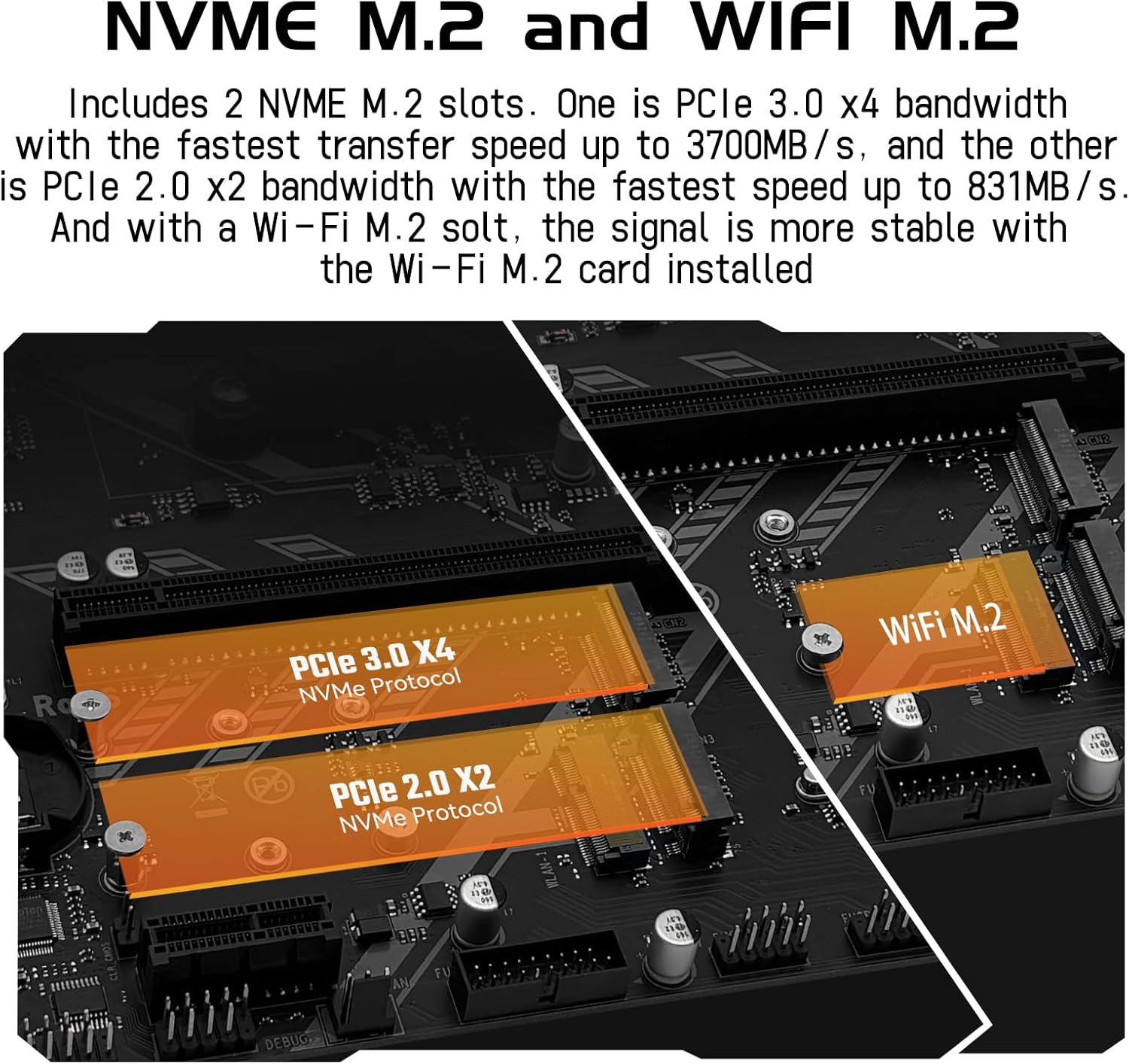
Figure 2.4: NVMe M.2 and WiFi M.2 Slots.
2.6 Expansion Card Installation (PCIe)
The motherboard is equipped with one PCIe 3.0 x16 slot for graphics cards and one PCIe 2.0 x1 slot for other expansion cards. Insert your expansion cards firmly into the corresponding slots until they are fully seated and secured.
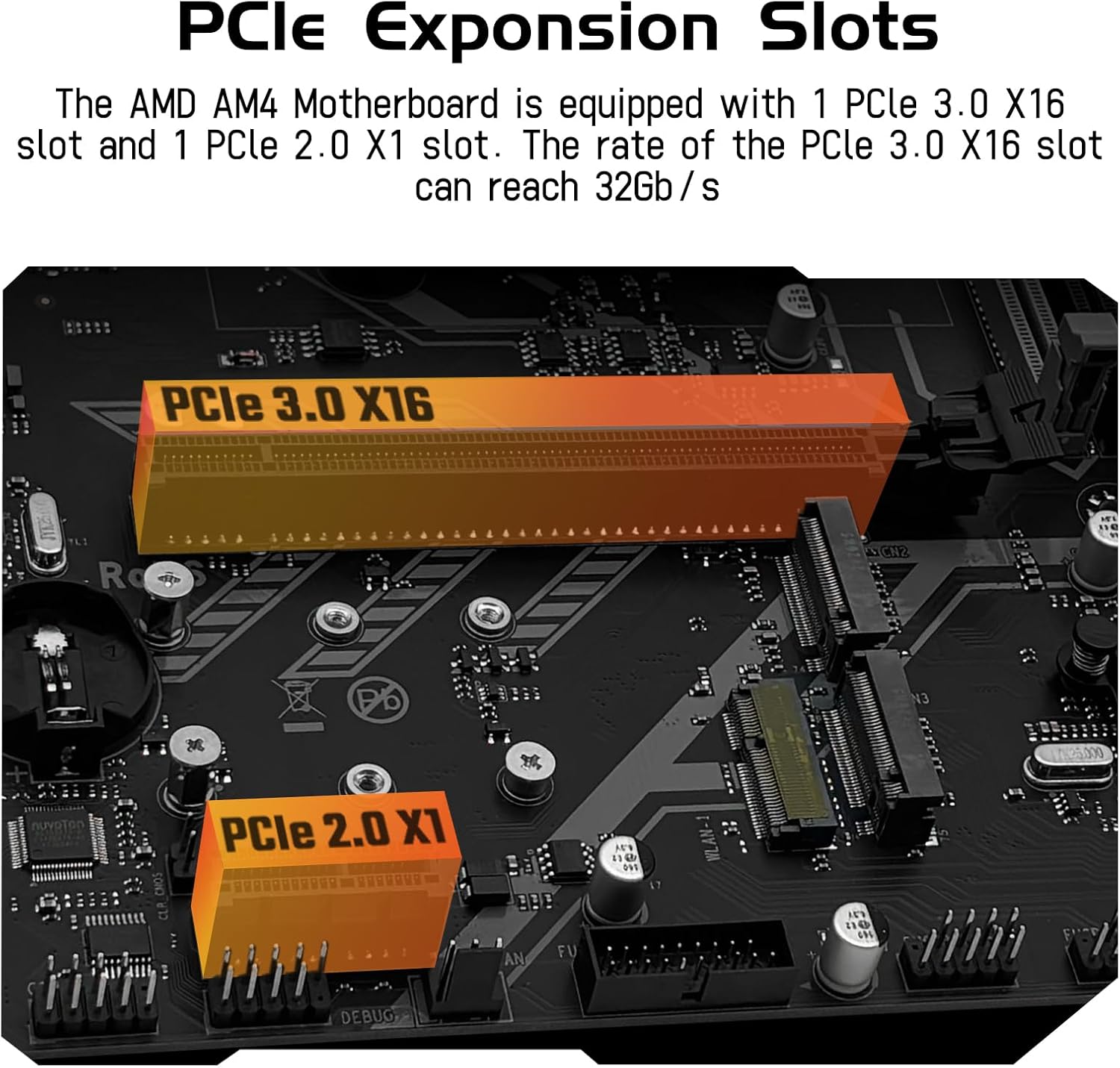
Figure 2.5: PCIe Expansion Slots.
2.7 Connecting Peripherals (I/O)
Connect your display, USB devices, network cable, and audio devices to the appropriate ports on the motherboard's rear I/O panel. Ensure all connections are secure.

Figure 2.6: Motherboard I/O Interfaces.
Important: Please use at least a 500W brand power supply for stable operation of the motherboard and its components.
3. Operating Instructions
3.1 First Boot and BIOS Access
After assembling your system, connect the power supply and press the power button. To enter the BIOS setup utility, press the DEL key quickly and continuously immediately after pressing the power button. The BIOS allows you to configure system settings, boot order, and hardware parameters.
3.2 BIOS Functions
The BIOS provides various functions to optimize your system:
- TPM 2.0 Support: For enhanced security features.
- Secure Boot: Improves system security by preventing unauthorized software from loading during startup.
- Hibernate: Power-saving mode.
- XMP (Extreme Memory Profile): Enables optimized memory timings and frequencies.
- PBO (Precision Boost Overdrive): AMD's automatic overclocking feature for Ryzen CPUs.
- CPU Overclocking: Manual adjustment of CPU frequencies for increased performance.
- Language Switching: Option to switch between Chinese and English (default may be Chinese).
- Wake-on-Web: Allows the system to be woken up remotely via network activity.
- Power On After Power Failure: Configures system behavior after a power outage.
- No Hard Disk Boot: Option for diskless booting.
- Fan Speed Adjustment: Control fan speeds for optimal cooling and noise levels.
3.3 Driver Installation
For optimal performance and functionality, it is recommended to install the latest drivers for your motherboard components. You can use driver management software like Driver Talent, or utilize the built-in driver capabilities of Windows 10, which can often resolve most driver-related issues automatically.
4. Maintenance
4.1 Clearing CMOS
Clearing the CMOS (Complementary Metal-Oxide-Semiconductor) can resolve various boot issues or reset BIOS settings to default. Follow these steps:
- Install the battery and cut off the power supply: Ensure the CR2032 battery is installed, then disconnect the main power cable from your power supply.
- Short the CMOS clear pins: Locate the CMOS clear jumper (often labeled CLR_CMOS or similar) on the motherboard. Use metal tweezers or another conductive object to short the two pins for approximately 5 seconds.

Figure 4.1: How to Clear CMOS.
4.2 General Care
To ensure the longevity and stable operation of your motherboard:
- Keep your computer case clean and free of dust. Regularly use compressed air to clear dust from components and fans.
- Ensure adequate airflow within your computer case to prevent overheating.
- Avoid exposing the motherboard to extreme temperatures or humidity.
5. Troubleshooting
If you encounter issues with your motherboard, consider the following common troubleshooting steps:
- No Display/No Boot: If your system powers on but shows no display, or fails to boot, it is recommended to reset the CMOS (refer to Section 4.1). Also, try using an eraser to gently wipe the metal contacts (fingers) on your memory modules, CPU, and graphics card to ensure good contact.
- No Network Card/No Sound Card: Ensure all drivers are correctly installed. Reinstalling drivers or using Windows 10's automatic driver detection can often resolve these issues.
- BIOS in Chinese: The BIOS may default to Chinese. You can switch the language setting within the BIOS menu. Navigate through the options to find the language setting, which is typically one of the first configurable options.
- System Instability: Ensure your power supply meets the minimum requirement of 500W. Check all power connections to the motherboard (24-pin and 8-pin CPU power).
- M.2 Drive Not Detected: Verify that the M.2 drive is fully seated in its slot and secured. Ensure the drive is NVMe protocol as the board does not support SATA M.2 drives.
If problems persist after attempting these steps, please contact customer support for further assistance.
6. Specifications
Detailed technical specifications for the SHANGZHAOYUAN B450 AM4-K Motherboard:
| Feature | Specification |
|---|---|
| Brand | SHANGZHAOYUAN |
| Model Name | B450 AM4-K |
| CPU Socket | Socket AM4 |
| Compatible Processors | AMD AM4 Socket Ryzen 1-5th gen Processors |
| Chipset Type | AMD B450 |
| RAM Memory Technology | DDR4 |
| Memory Clock Speed | Up to 3600 MHz |
| Memory Storage Capacity | Max 128 GB (32GB*4) |
| PCIe Slots | 1 x PCIe 3.0 x16, 1 x PCIe 2.0 x1 |
| M.2 Slots | 2 x NVMe M.2 (1x PCIe 3.0 x4, 1x PCIe 2.0 x2) |
| SATA Ports | SATA 3.0 |
| USB Ports | USB 3.0, USB 2.0 |
| Video Interfaces | HDMI-compatible, DP, VGA |
| LAN | Gigabit Ethernet |
| Power Interface | 24pin+8pin |
| Item Weight | 1.65 pounds |
| Package Dimensions | 10.85 x 8.74 x 2.2 inches |
7. Warranty Information
Specific warranty terms and conditions for the SHANGZHAOYUAN B450 AM4-K Motherboard are typically provided at the point of purchase or can be found on the official SHANGZHAOYUAN website. Please retain your proof of purchase for any warranty claims.
8. Support
For further assistance, technical support, or inquiries regarding your SHANGZHAOYUAN B450 AM4-K Motherboard, please contact SHANGZHAOYUAN customer service through their official channels. You may also visit the SHANGZHAOYUAN Store on Amazon for additional product information and resources.


