1. Introduction
This manual provides instructions for the GOUYESHO RC112GH/RC112GHW replacement voice remote control. This remote is designed to function with various Thomson OLED, QLED, UHD, and FHD Google Smart Android TV models, offering a direct replacement with voice control capabilities.
2. Package Contents
- 1 x GOUYESHO RC112GH/RC112GHW Bluetooth Remote Control
Note: Batteries and additional instructions are not included in the package. Two AAA batteries are required for operation.

3. Setup
3.1 Battery Installation
- Open the battery compartment cover on the back of the remote control.
- Insert two AAA batteries, ensuring correct polarity (+ and -).
- Close the battery compartment cover securely.
3.2 Bluetooth Pairing Instructions
To enable full functionality, including voice control, the remote control must be paired with your Thomson Smart Android TV via Bluetooth.
- Ensure your TV is powered on.
- On the GOUYESHO remote control, simultaneously press and hold the Back button and the Home button for approximately 3 seconds.
- The indicator light on the remote control will flash, indicating it has entered pairing mode.
- Follow the on-screen prompts on your TV to complete the pairing process. If you skip this step, you can manually pair the remote later via the TV's Settings > Remote controls & accessories menu.
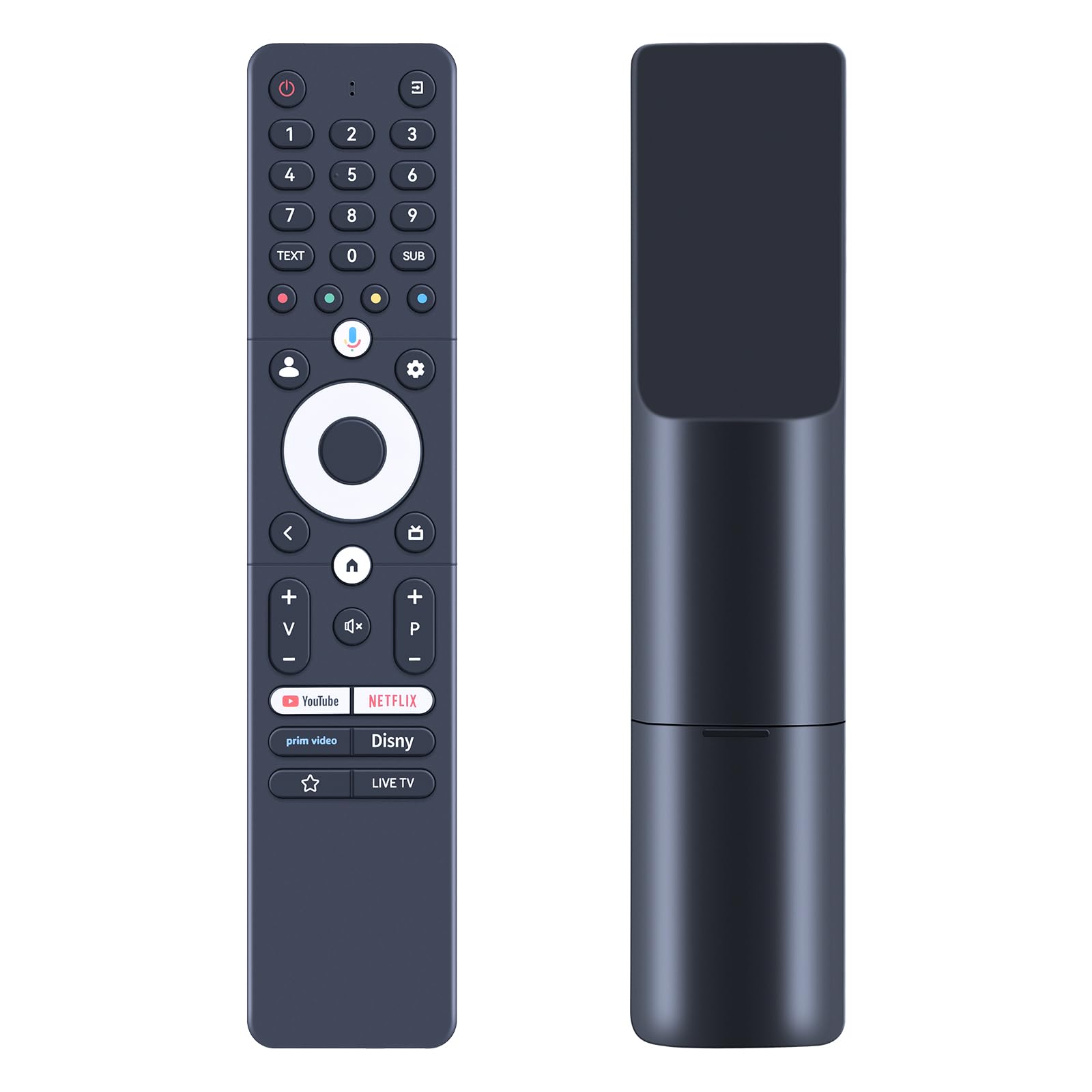
4. Operating Instructions
4.1 Basic Functions
The remote control provides standard functions for navigating your Thomson Smart Android TV, including power on/off, volume control, channel selection, menu navigation, and quick access buttons for popular streaming services.

4.2 Voice Control
After successful Bluetooth pairing, the integrated microphone button allows for voice commands. Press the microphone button and speak clearly into the remote control to issue commands to your TV.
- Example commands include:
- "Set the volume to 12"
- "Turn off the TV"
- "Turn on the movie channel"
- "Fast forward 30 seconds"

4.3 Operating Range and Angle
The remote control operates effectively over a long distance and wide angle, providing flexibility in use.
- Maximum Range: Up to 26 feet (8 meters)
- Multi-angle Control: Approximately 120 degrees

4.4 Button Design and Durability
The remote features sensitive buttons made from durable, environmentally friendly ABS material, designed for a comfortable grip and fast response.

5. Compatibility
This GOUYESHO replacement remote control (RC112GH/RC112GHW) is compatible with the following Thomson OLED, QLED, UHD, and FHD Google Smart Android TV models:
- 32QG4S14, 40QG4S14, 43QG4S14, 50QG4S14, 55QG4S14, 65QG4S14
- 32FG2S14, 40FG2S14, 43FG2S14, 32FG2S14C
- 24HG2S14C, 32HG2S14, 24HQG4S14C, 32HQG4S14
- Compatible with 50UA5S13-2023
Important: This remote control is specifically designed for the listed models and may not be fully compatible with other Thomson TV models or brands. The voice function is only available on compatible models after successful Bluetooth pairing.

6. Specifications
| Brand | GOUYESHO |
| Model Numbers | RC112GH, RC112GHW |
| Color | Marine |
| Connectivity Technology | Bluetooth |
| Special Feature | Ergonomic design |
| Compatible Devices | Thomson Smart Android Televisions |
| Maximum Range | 26 feet (8 meters) |
| Number of Buttons | 10 |
| Controller Type | Button-based control |
7. Troubleshooting
- Remote not responding: Ensure fresh AAA batteries are correctly installed. Attempt to re-pair the remote control with your TV following the Bluetooth pairing instructions (Section 3.2).
- Voice control not working: Verify that the remote is successfully paired via Bluetooth. Check your TV's settings to ensure voice control features are enabled and configured correctly.
- Limited range or intermittent response: Replace batteries with new ones. Ensure there are no obstructions between the remote control and the TV.
- Specific buttons not functioning: Confirm compatibility with your specific TV model. Some buttons may have different functions or may not be supported on all compatible TV models.
8. Warranty and Support
GOUYESHO is committed to product quality and customer satisfaction. If you encounter any issues or have questions regarding your GOUYESHO replacement remote control, please contact our customer support directly. We aim to respond to inquiries within 12 hours on weekdays.
Please refer to your purchase documentation for specific warranty details.