
1. Introduction
This user manual provides detailed instructions for the operation and maintenance of your BAOFENG DM-1702 DMR Radio. The DM-1702 is a dual-mode digital and analog walkie-talkie featuring advanced AES256 encryption, GPS positioning, and a full numeric keyboard. It is designed for reliable communication in various environments, offering clear audio and robust security features.
2. Safety Information
Please read all safety information carefully before using the radio to ensure safe and optimal performance.
- Do not operate the radio in explosive atmospheres (e.g., flammable gases, dust particles, metallic powders).
- Do not expose the radio to direct sunlight for prolonged periods or place it near heating appliances.
- Avoid using the radio in extremely hot, cold, dusty, or damp environments.
- Do not disassemble or modify the radio. Repairs should only be performed by qualified technicians.
- Use only BAOFENG approved batteries and chargers. Improper use may lead to fire, explosion, or injury.
- Keep the radio and accessories out of reach of children.
- This device is not water resistant. Avoid exposure to water or moisture.
3. Package Contents
Verify that all items listed below are included in your package:
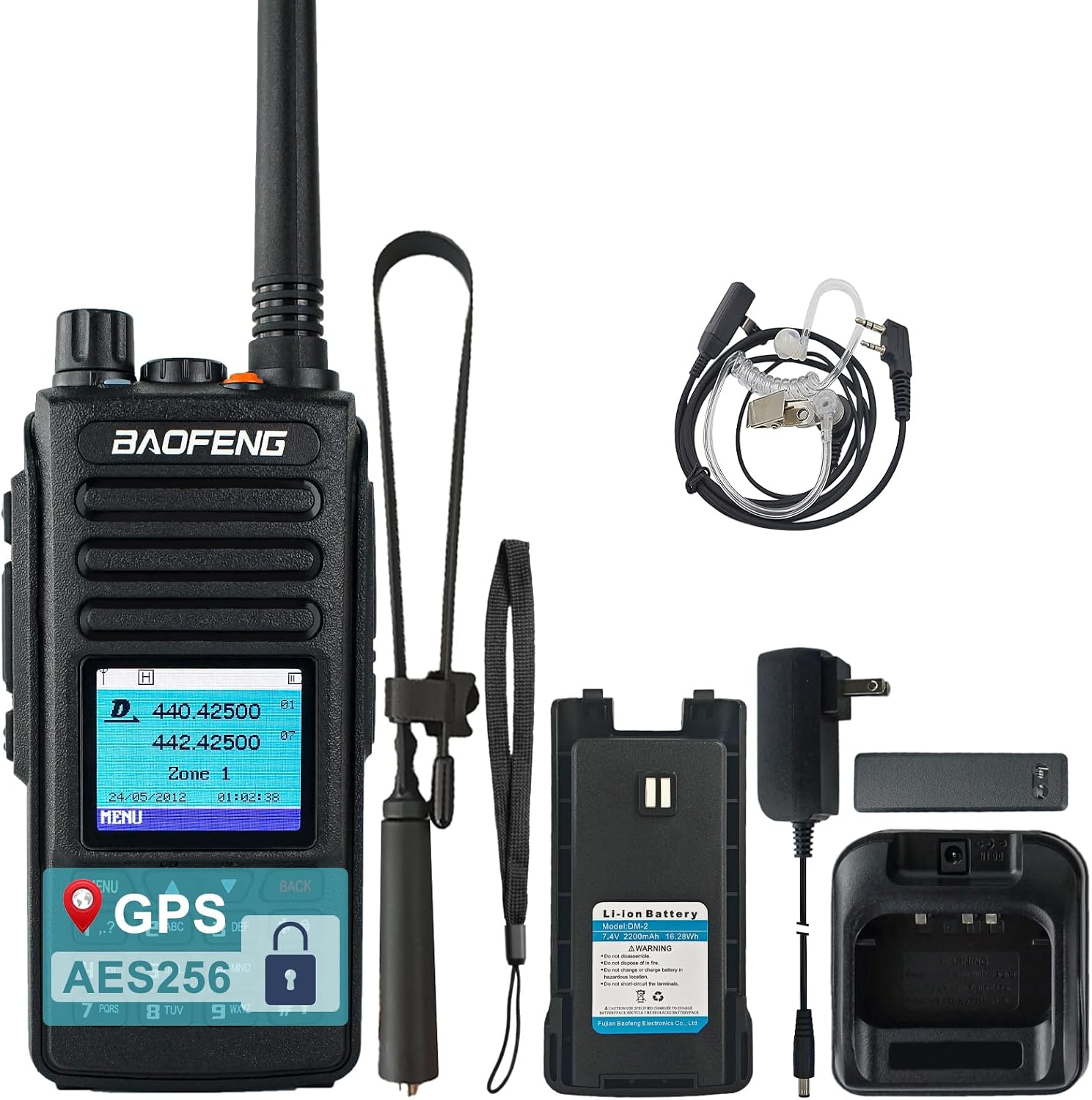
Image: The BAOFENG DM-1702 radio, high gain antenna, 2200mAh battery, charging dock, power adapter, belt clip, lanyard, user's manual, 48cm foldable tactical antenna, and air tube headset.
- BAOFENG DM-1702 GPS Radio (x1)
- High Gain Antenna (x1)
- 2200mAh Battery (x1)
- Charging Dock (x1)
- Power Adapter (x1)
- Belt Clip (x1)
- Lanyard (x1)
- User's Manual (x1)
- 48cm/18.89in Foldable Tactical Antenna (x1)
- Air Tube Headset (x1)
4. Product Overview
Familiarize yourself with the components of your BAOFENG DM-1702 radio.
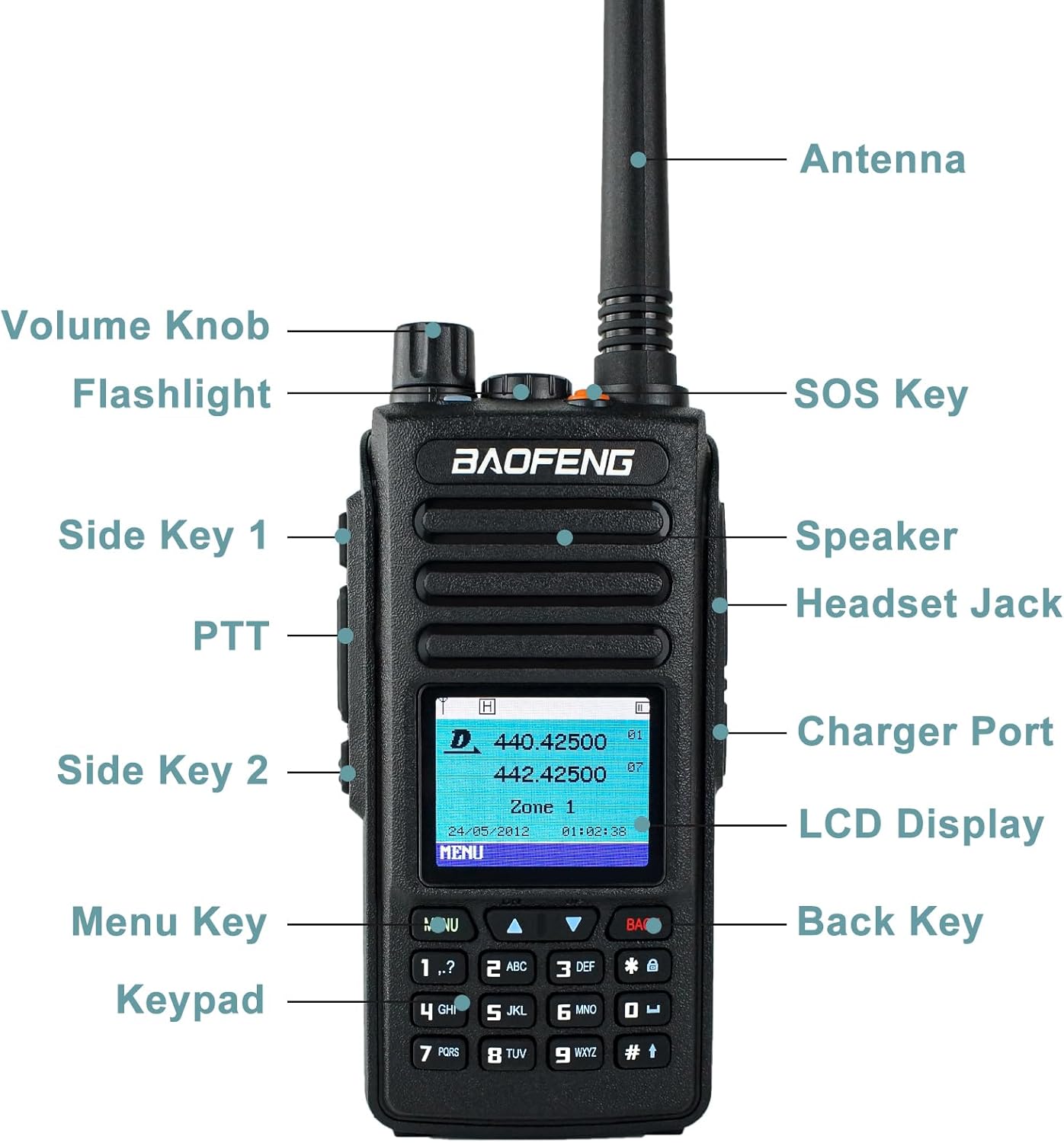
Image: A detailed diagram showing the various parts of the BAOFENG DM-1702 radio, including the Antenna, Volume Knob, SOS Key, Speaker, Headset Jack, Charger Port, LCD Display, Menu Key, Keypad, Back Key, PTT (Push-to-Talk), Flashlight, Side Key 1, and Side Key 2.
- Antenna: For transmitting and receiving signals.
- Volume Knob: Controls power on/off and audio volume.
- SOS Key: Programmable emergency alert button.
- Speaker: Outputs audio.
- Headset Jack: For connecting the included air tube headset or other compatible audio accessories.
- Charger Port: Connects to the charging dock.
- LCD Display: Shows channel information, battery status, menu options, and other radio data.
- Menu Key: Accesses the radio's menu system.
- Keypad: Full numeric keypad for manual frequency entry, channel selection, and menu navigation.
- Back Key: Returns to the previous menu or screen.
- PTT (Push-to-Talk) Button: Press and hold to transmit, release to receive.
- Flashlight: Built-in LED light.
- Side Key 1 & 2: Programmable function keys.
5. Setup
5.1 Battery Installation
- Align the battery pack with the grooves on the back of the radio.
- Slide the battery pack upwards until it clicks into place.
- To remove, push the battery release latch (usually at the bottom of the battery) and slide the battery downwards.
5.2 Antenna Attachment
- Screw the antenna clockwise into the connector on the top of the radio until it is firmly seated.
- Do not overtighten.
5.3 Charging the Battery
- Connect the power adapter to the charging dock.
- Plug the power adapter into an AC outlet.
- Place the radio with the battery installed into the charging dock. Ensure the charging contacts align.
- The charging indicator light on the dock will typically turn red while charging and green when fully charged.
- A full charge takes approximately 4-5 hours.
6. Operating Instructions
6.1 Powering On/Off and Volume Control
- To power on, rotate the Volume Knob clockwise until you hear a click.
- To power off, rotate the Volume Knob counter-clockwise until you hear a click.
- Adjust the volume by rotating the Volume Knob.
6.2 Channel Selection and Frequency Entry
- Use the Up/Down arrow keys on the keypad to navigate through pre-programmed channels.
- In VFO (Frequency) mode, use the numeric keypad to directly enter desired frequencies. Press the Menu key to confirm or save.
6.3 Digital and Analog Dual Mode Operation

Image: The BAOFENG DM-1702 radio with text overlay highlighting its DMR Digital and Analog Dual Mode capabilities.
The DM-1702 supports both Digital Mobile Radio (DMR) Tier I & II and traditional Analog modes. The radio automatically detects the signal type when receiving. When transmitting, ensure you are in the correct mode for your intended recipient.
- Switching Modes: Access the radio's menu to select between Digital and Analog operation for specific channels or VFO. Refer to the detailed menu guide in the full user manual for specific steps.
- Digital Mode (DMR): Offers clearer audio, better spectrum efficiency, and advanced features like private calls and text messaging.
- Analog Mode: Compatible with traditional analog two-way radios.
6.4 GPS Functionality

Image: The BAOFENG DM-1702 radio with a graphic illustrating GPS functionality, including a map and location pins, emphasizing accurate real-time positioning.
The DM-1702 features integrated GPS for precise geographic location tracking and automatic position reporting.
- GPS Activation: GPS is typically active by default. Ensure you have a clear view of the sky for optimal satellite reception.
- Viewing Coordinates: Navigate through the menu to the GPS section to view your current longitude and latitude.
- Position Reporting: The radio can be configured to automatically report its position to other DMR radios or a central dispatch system. Consult the advanced settings in the full manual for setup.
6.5 AES256 Encryption
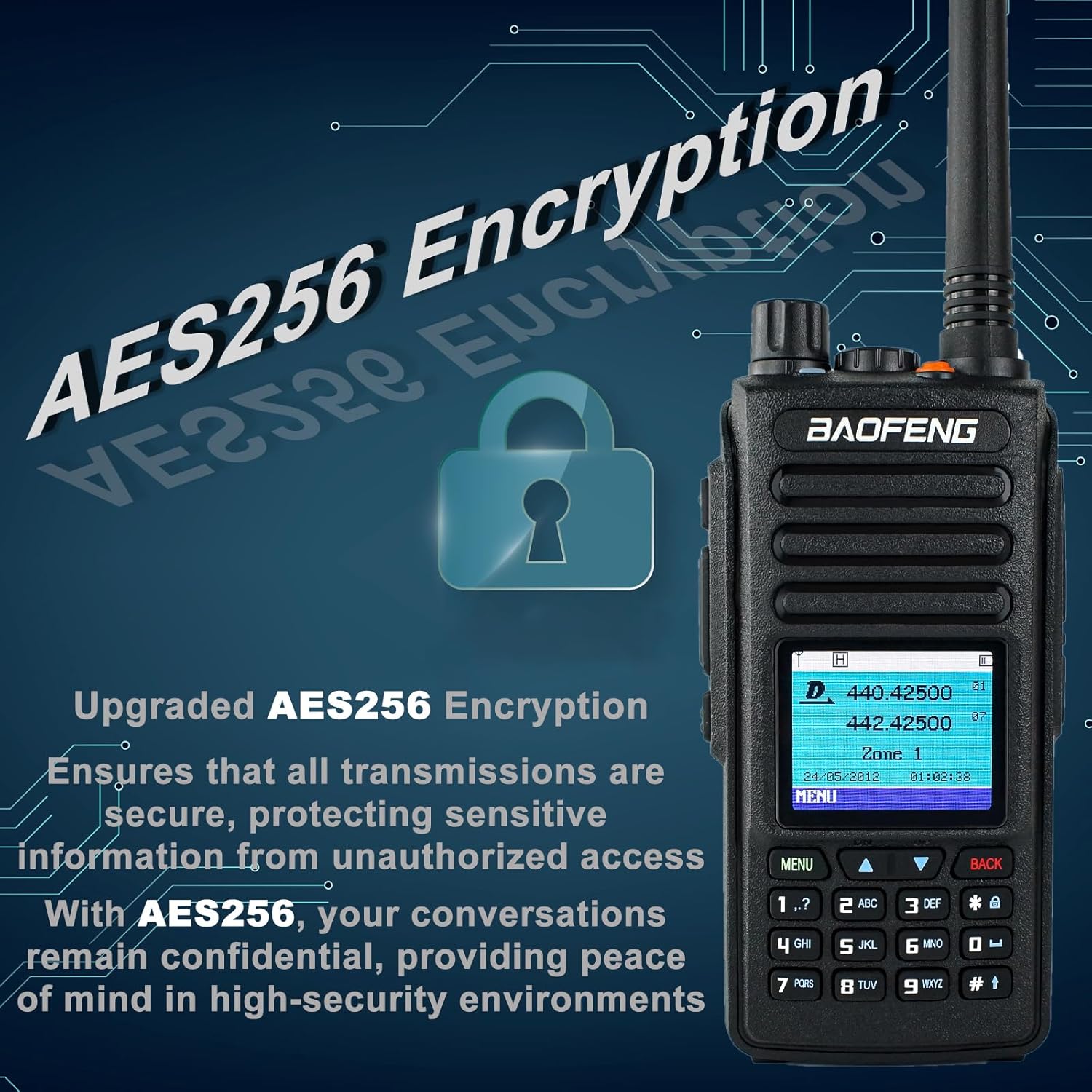
Image: The BAOFENG DM-1702 radio with a lock icon and text highlighting its AES256 Encryption capability, ensuring secure and confidential communications.
The AES256 encryption feature provides a high level of security for your communications, protecting sensitive information from unauthorized interception.
- Enabling Encryption: Encryption settings are typically configured per channel or contact within the radio's menu. Both transmitting and receiving radios must have the same encryption key enabled for secure communication.
- Key Management: Refer to the programming software manual for details on setting and managing encryption keys.
6.6 Short Message Function
The DM-1702 allows you to send short text messages to other DMR radios.
- Access the "Message" menu option.
- Compose your message using the keypad.
- Select the recipient from your contacts or enter their ID.
- Send the message.
6.7 VOX (Voice Operated Transmit) Function
VOX allows you to transmit without pressing the PTT button, by simply speaking into the microphone.
- Activating VOX: Navigate to the VOX setting in the radio's menu.
- Adjusting VOX Level: Set the VOX sensitivity level to prevent accidental transmissions from background noise. A higher level requires louder speech to activate.
7. Maintenance
- Cleaning: Use a soft, damp cloth to clean the radio's surface. Do not use harsh chemicals or abrasive cleaners.
- Battery Care:
- Avoid fully discharging the battery frequently.
- Store the battery in a cool, dry place when not in use for extended periods.
- Recharge the battery at least once every three months if stored.
- Storage: Store the radio in a dry, dust-free environment away from extreme temperatures. Remove the battery if storing for a long time.
8. Troubleshooting
| Problem | Possible Cause | Solution |
|---|---|---|
| Radio does not power on. | Battery is low or not installed correctly. | Charge the battery or re-install it correctly. |
| Cannot transmit or receive. | Incorrect frequency/channel; out of range; antenna not connected. | Verify frequency/channel; move closer to other radios; ensure antenna is securely attached. Check if in correct Digital/Analog mode. |
| Poor audio quality. | Low signal strength; volume too low/high; speaker/microphone obstructed. | Adjust volume; move to an area with better signal; check for obstructions. |
| GPS not acquiring signal. | Indoors or obstructed view of sky. | Move to an open outdoor area with a clear view of the sky. |
9. Specifications
| Feature | Description |
|---|---|
| Model | DM-1702 |
| Operating Voltage | DC 7.4V |
| Frequency Stability | ±1.0ppm |
| Operating Temperature | -30°C ~ 60°C |
| Antenna Impedance | 50Ω |
| Battery Capacity | 2200mAh |
| Output Power | 1W/5W |
| Digital Protocol | Tier I & II |
| Adjacent Channel Power | ≤-65dB (Digital), ≤-60dB (Analog) |
| Storage Channels | Up to 1024 |
| Special Features | AES256 Encryption, GPS, Digital & Analog Dual Mode |
| Dimensions (Approx.) | 4.72in (Height without antenna) x 2.36in (Width) x 1.18in (Depth) |

Image: The BAOFENG DM-1702 radio with approximate dimensions indicated: 4.72 inches height (radio body), 5.7 inches total height (with antenna), 2.36 inches width, and 1.18 inches depth.
10. Warranty and Support
The BAOFENG DM-1702 radio comes with a 1-year warranty provided only through "Shiqun Electronics Co., Ltd".
For technical support, warranty claims, or further assistance, please contact your authorized dealer or "Shiqun Electronics Co., Ltd" directly. Refer to your purchase documentation for specific contact information.
For additional resources and product information, you may visit the official BAOFENG store on Amazon: BAOFENG Store