
1. Introduction
This manual provides detailed instructions for the proper use and maintenance of your novorik Metal Detector, Model 10 inch. This device is designed for detecting various types of metal objects in diverse environments, including beaches, fields, and underwater. It features a retractable design for portability, an advanced DSP chip for enhanced sensitivity, and a waterproof search coil.

Figure 1: novorik Metal Detector, Model 10 inch.
2. Setup and Assembly
The novorik Metal Detector is designed for quick setup with no complex assembly required. It features a retractable and foldable design for ease of transport and storage.
2.1 Unfolding and Adjusting Length
To prepare the detector for use:
- Open the Latch: Locate the latch on the main shaft and open it.
- Pull Out: Extend the lower shaft to the desired length. The detector is adjustable from 30 inches to 48 inches to accommodate various user heights.
- Fasten the Latch: Secure the latch to lock the shaft in place.
- Adjust Search Coil: Ensure the search coil is positioned correctly and tightened.
- Retract Handle: Adjust the retractable handle for comfortable grip.
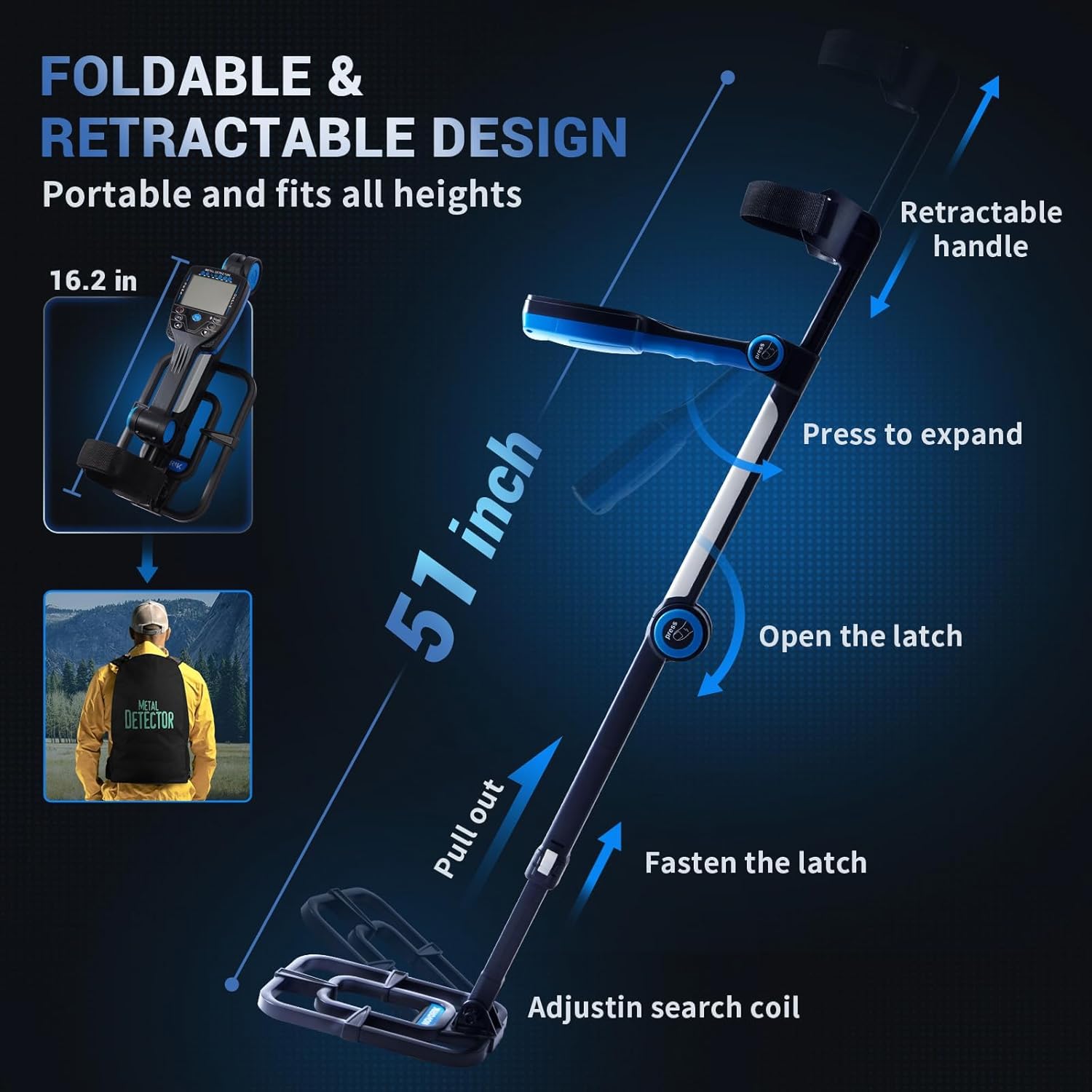
Figure 2: Foldable and Retractable Design for easy setup and adjustment.
2.2 Battery Installation
The detector requires batteries for operation. Install 9-volt batteries by snapping them into the designated compartment. Ensure correct polarity.
3. Operating Instructions
3.1 LCD Display Overview
The large color LCD provides real-time information to assist in detection. Key indicators include:
- Metal Type: Identifies the probable type of metal detected (e.g., Iron, 5¢, 10¢, 25¢, 50¢, Gold, Silver).
- Depth: Indicates the approximate depth of the detected object.
- Recognition: Visual representation of detected targets.
- Sensitivity Level: Shows the current sensitivity setting.
- Operating Mode: Displays the active detection mode.
- Battery Level: Indicates remaining battery power.

Figure 3: Intuitive LCD Display and Control Panel.
3.2 Detection Modes
The detector offers 5 distinct detection modes:
- All Metal Mode: Detects all types of metal. The detector will alert you to any metal object found.
- DISC (Discrimination) Mode: Allows the user to reject unwanted metal types. This mode helps filter out junk metals, focusing on more desirable targets.
- MEMORY Mode: Designed to detect only memorized metal targets. This mode is useful for repeatedly searching for a specific type of metal.
- JEWELRY Mode: Eliminates iron signals and responds primarily to other metals, making it suitable for finding jewelry.
- PP (Pinpoint) Mode: Enables precise positioning of detected metals, helping to narrow down the exact location of a target before excavation.
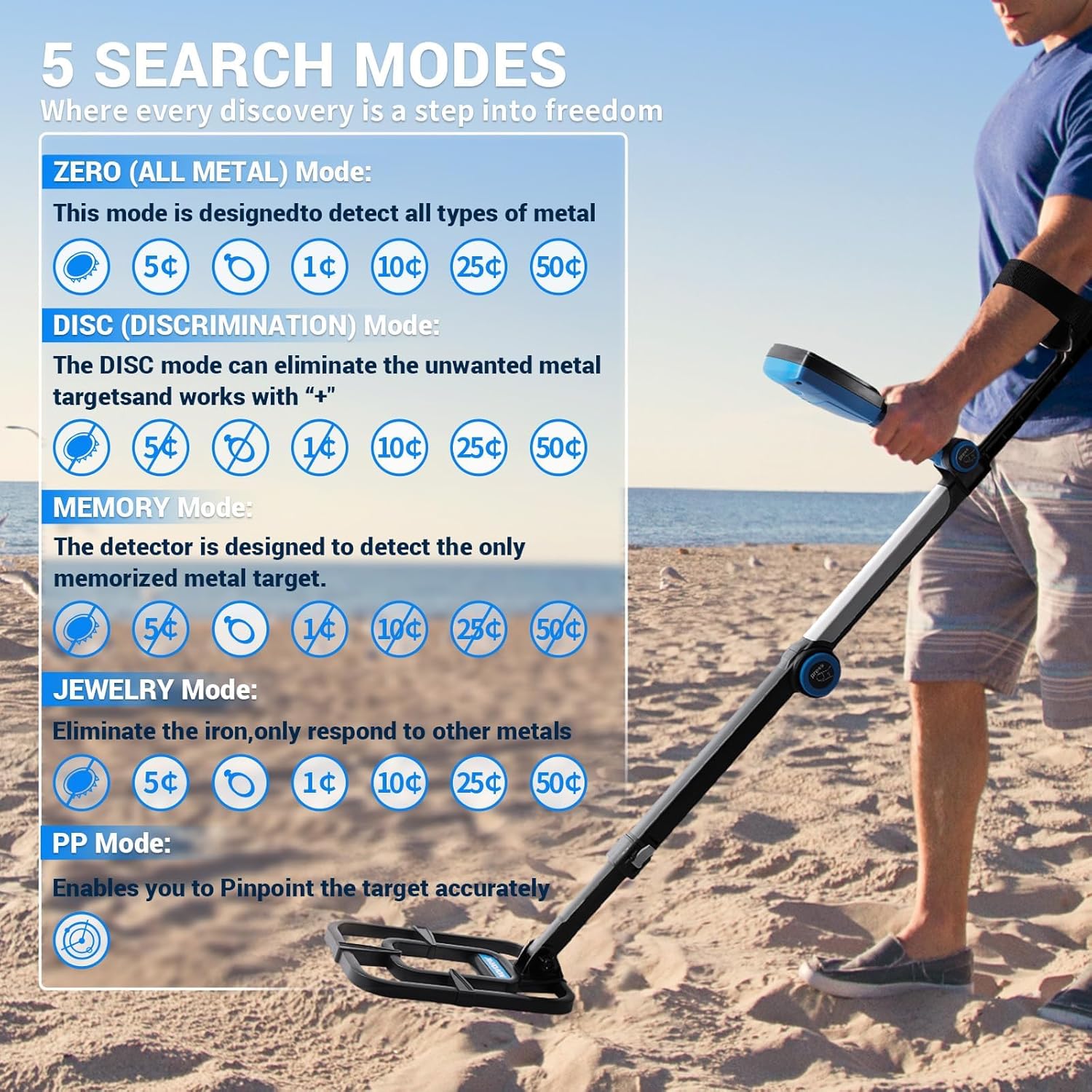
Figure 4: Overview of the 5 Search Modes.
3.3 Detection Depth
The 10-inch IP68 waterproof search coil provides improved detection depth. It can locate a quarter coin up to 10 inches underground, with larger objects detectable at even greater depths, potentially up to 4 feet deep.

Figure 5: Detection Depth Capabilities.
3.4 Recommended Usage Environments
The novorik Metal Detector is suitable for various environments:
- Beaches: Ideal for searching in sand and shallow water.
- Fields: Effective in open grassy areas.
- Rivers: The waterproof coil allows for underwater detection in rivers and streams.
- Forests: Suitable for wooded areas and varied terrain.

Figure 6: Metal Detector in various usage environments.
4. Maintenance
Proper maintenance ensures the longevity and optimal performance of your metal detector.
- Cleaning: After each use, especially in sandy or wet conditions, wipe down the search coil and shaft with a damp cloth. Avoid using abrasive cleaners or solvents.
- Battery Care: Remove batteries if the detector will not be used for an extended period to prevent leakage. Store batteries in a cool, dry place.
- Storage: Store the metal detector in a dry, cool environment. Utilize its foldable design for compact storage.
- Inspection: Periodically check all connections and cables for wear or damage. Ensure the search coil is securely attached.
5. Troubleshooting
Refer to the table below for common issues and their solutions.
| Problem | Possible Cause | Solution |
|---|---|---|
| No power/Detector does not turn on | Dead or incorrectly installed batteries | Replace batteries with fresh ones, ensuring correct polarity. |
| Erratic signals/False readings | High sensitivity setting, electromagnetic interference, mineralized ground | Reduce sensitivity. Move away from power lines or other electronic devices. Switch to a different detection mode (e.g., DISC). |
| Poor detection depth | Low battery, incorrect ground balance, highly mineralized soil | Replace batteries. Adjust ground balance if applicable (refer to specific model features). Try a different search area. |
| No audio response | Volume too low, headphone issue, internal fault | Increase volume. Check headphone connection or try a different pair. If problem persists, contact support. |
6. Specifications
Key specifications for the novorik Metal Detector, Model 10 inch:
| Feature | Detail |
|---|---|
| Brand | novorik |
| Model Number | 10 inch |
| Color | Black |
| Material | Plastic |
| Power Source | Battery Powered (9V batteries required) |
| Adjustable Length | Yes (30" to 48") |
| Display Type | LCD |
| Item Weight | 1300 Grams |
| Item Dimensions (L x W x H) | 51"L x 4.9"W x 16.2"H (extended) |
| Search Coil | 10-inch, IP68 Waterproof |
| Detection Modes | All Metal, DISC, MEMORY, JEWELRY, Pinpoint |
7. Warranty and Support
For warranty information or technical support, please refer to the documentation included with your purchase or contact novorik customer service directly. Keep your purchase receipt as proof of purchase for any warranty claims.
Manufacturer: novorik