1. Introduction
The BAOFENG DM-1702 is a dual-mode digital and analog walkie talkie designed for reliable communication. It supports DMR Tier I & II, features GPS positioning, and incorporates AES256 encryption for secure transmissions. This manual provides essential information for the proper setup, operation, and maintenance of your DM-1702 radio.
2. What's in the Box
Please check the contents of your package to ensure all items are present:
- DMR DM-1702 GPS Radio x1
- High Gain Antenna x1
- 2200mAh Battery x1
- Charging Dock x1
- Power Adapter x1
- Belt Clip x1
- Lanyard x1
- User's Manual x1
- 771 Antenna x1
3. Product Overview
Familiarize yourself with the main components and controls of your BAOFENG DM-1702 radio.
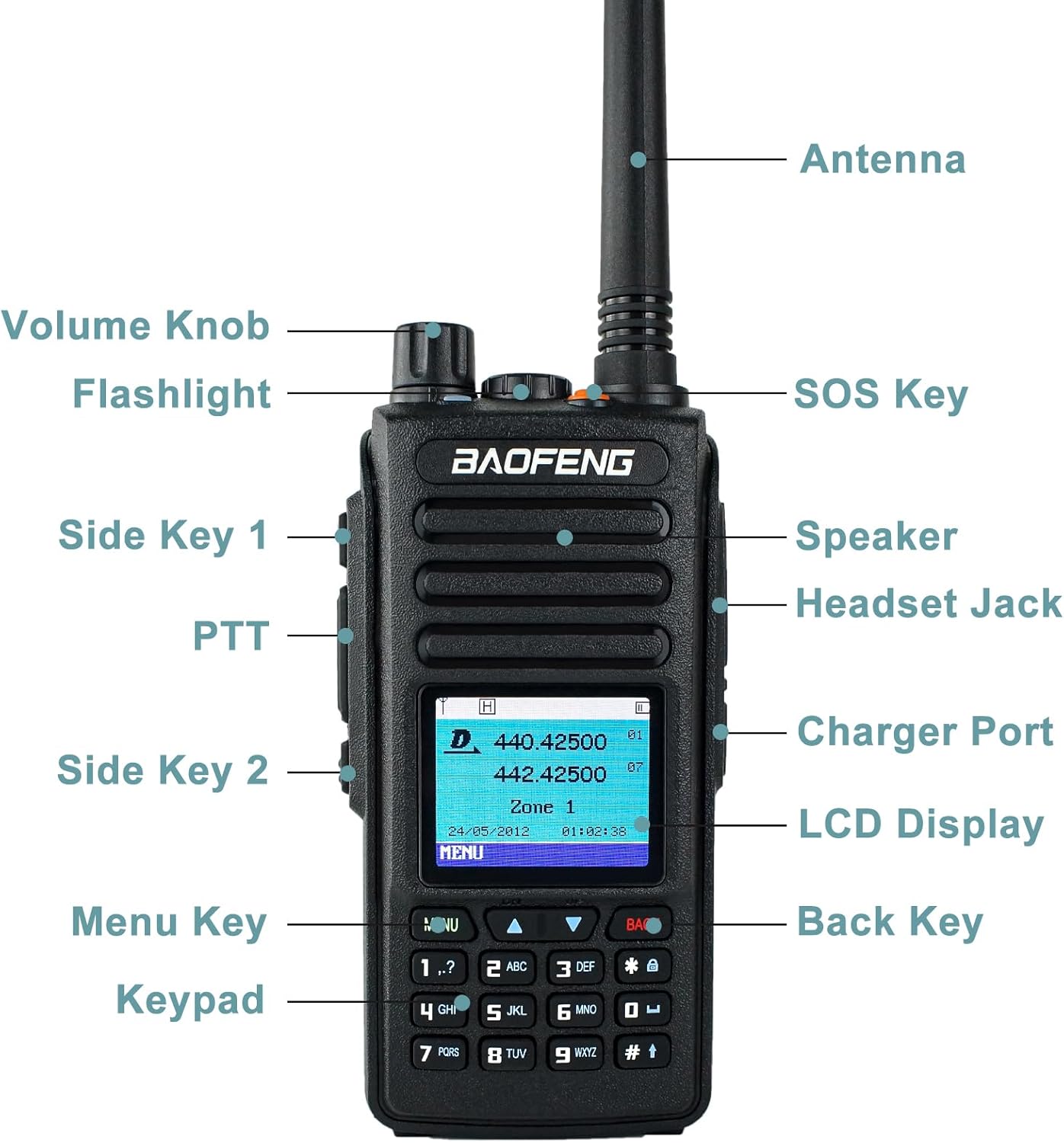
Image: Front view of the BAOFENG DM-1702 radio with key components labeled. These include the Antenna, Volume Knob, SOS Key, Flashlight, Side Key 1, Speaker, PTT (Push-To-Talk) button, Headset Jack, Side Key 2, Charger Port, LCD Display, Menu Key, Back Key, and Keypad.
- Antenna: For transmitting and receiving signals.
- Volume Knob: Controls the audio output level and powers the radio on/off.
- SOS Key: Activates emergency alert functions.
- Flashlight: Provides illumination.
- Side Key 1 & 2: Programmable function keys.
- Speaker: Audio output.
- PTT (Push-To-Talk): Press and hold to transmit, release to receive.
- Headset Jack: For connecting external audio accessories.
- Charger Port: Connects to the charging dock.
- LCD Display: Shows channel information, menu options, and status indicators.
- Menu Key: Accesses the radio's menu system.
- Back Key: Returns to the previous menu or screen.
- Keypad: Full numeric keypad for manual frequency entry and menu navigation.
4. Initial Setup
4.1. Battery Installation
- Ensure the radio is powered off.
- Align the battery pack with the grooves on the back of the radio.
- Slide the battery pack upwards until it clicks into place.
- To remove, press the battery release latch and slide the battery downwards.
4.2. Antenna Attachment
- Screw the antenna clockwise into the connector on the top of the radio until it is firmly seated.
- Do not overtighten.
4.3. Charging the Battery
- Connect the power adapter to the charging dock.
- Plug the power adapter into an AC outlet.
- Place the radio (with battery installed) or the battery pack alone into the charging dock.
- The charging indicator light will show the charging status. A full charge typically takes several hours.
5. Operating Modes
The BAOFENG DM-1702 supports both Digital (DMR Tier I & II) and Analog modes, allowing for flexible communication across various systems.

Image: The BAOFENG DM-1702 radio highlighting its capability for both Digital and Analog communication modes, referred to as 'DMR Radio Dual Mode'.
5.1. Digital Mode (DMR Tier I & II)
Digital Mobile Radio (DMR) offers enhanced audio quality, better spectrum efficiency, and advanced features like individual calls and text messaging. The DM-1702 supports both Tier I (unlicensed, direct mode) and Tier II (licensed, repeater-based) operations.
5.2. Analog Mode
The radio is fully compatible with traditional analog two-way radio systems, allowing seamless integration with existing analog fleets. Mode rotation between digital and analog is designed for smooth transitions.
6. Basic Operation
6.1. Power On/Off and Volume
- To power on, rotate the Volume Knob clockwise until you hear a click.
- To power off, rotate the Volume Knob counter-clockwise until you hear a click.
- Adjust the volume by rotating the Volume Knob.
6.2. Channel Selection
- Use the Up/Down arrow keys on the keypad to navigate through the 1024 available channels.
- Channels can also be selected via the menu or by direct frequency entry using the numeric keypad.
6.3. Transmitting and Receiving
- To transmit, press and hold the PTT button on the side of the radio. Speak clearly into the microphone.
- Release the PTT button to stop transmitting and return to receive mode.
- Ensure you are on the correct channel and mode (digital/analog) for your intended communication.
7. Advanced Features
7.1. GPS Functionality
The DM-1702 is equipped with GPS, providing precise geographic location data. This feature supports automatic position reporting, which is useful for navigation, coordination, and emergency situations.

Image: The BAOFENG DM-1702 radio with a graphical representation of GPS functionality, showing a map and location pins, indicating its Global Positioning System capabilities for accurate real-time positioning.
7.2. AES256 Encryption
For secure communication, the DM-1702 features AES256 encryption. This advanced encryption standard protects your transmissions from unauthorized interception, ensuring privacy for sensitive conversations.
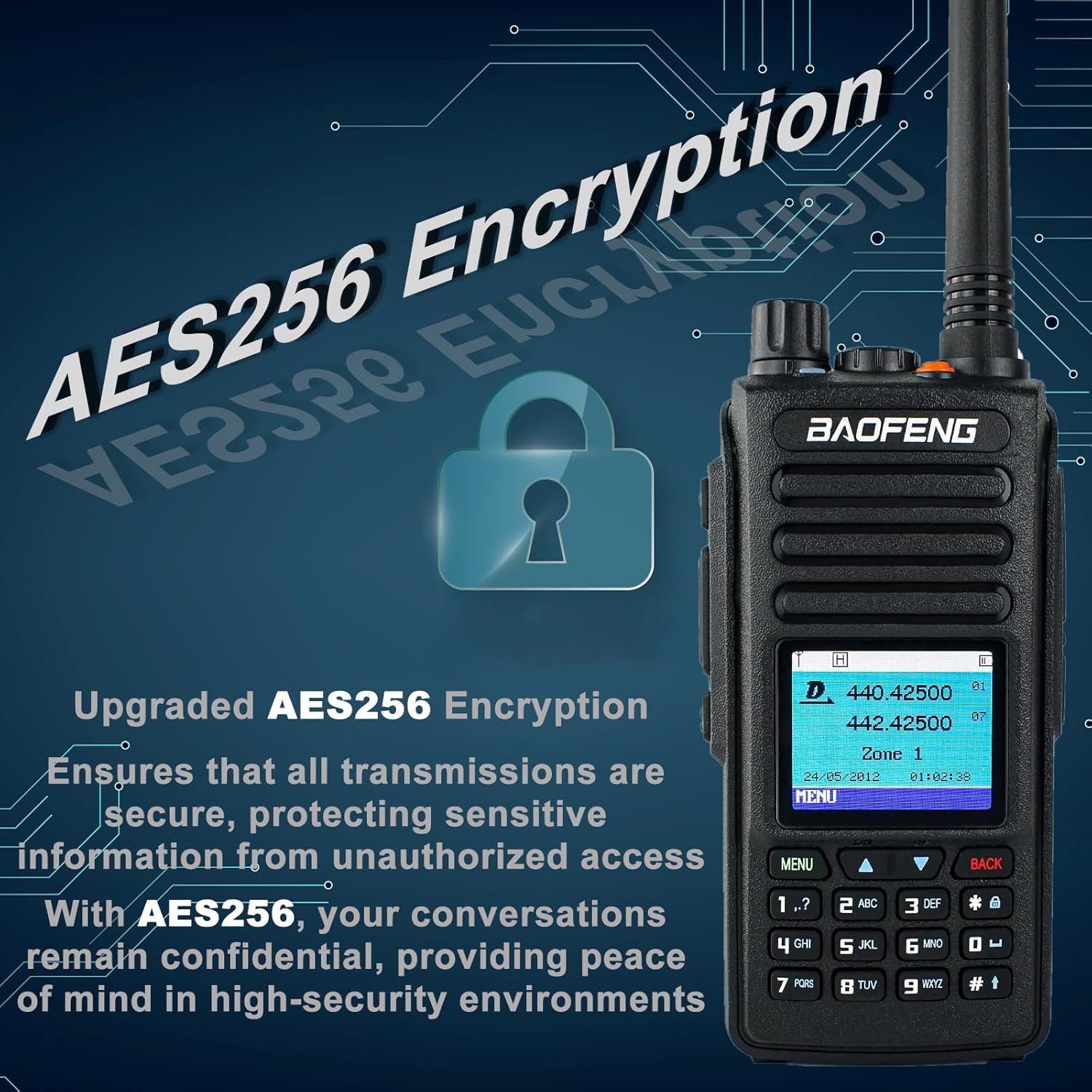
Image: The BAOFENG DM-1702 radio alongside a lock icon and text indicating 'Upgraded AES256 Encryption', emphasizing its secure communication capabilities to protect sensitive information.
7.3. Short Message Function
The radio supports sending short text messages to other compatible devices, providing an alternative communication method when voice calls are not feasible or preferred.
7.4. VOX (Voice Operated Exchange)
VOX allows for hands-free operation. When enabled, the radio will automatically transmit when it detects your voice, eliminating the need to press the PTT button.
8. Specifications
| Feature | Specification |
|---|---|
| Model Number | DM-1702 |
| Brand | BAOFENG |
| Color | Black |
| Number of Channels | 1024 |
| Special Features | AES256 Encryption, DMR Radio, Digital and Analog Dual Mode, GPS, Tier I & II |
| Water Resistance Level | Not Water Resistant |
| Operating Voltage | DC 7.4V |
| Frequency Stability | ±1.0ppm |
| Operating Temperature | -30°C ~ 60°C |
| Antenna Impedance | 50Ω |
| Battery Capacity | 2200mAh |
| Output Power | 1W/5W |
| Digital Standard | Tier I & II |
| Adjacent Channel Selectivity | ≤-65dB (Digital), ≤-60dB (Analog) |
9. Maintenance
9.1. Battery Care
- Charge the battery fully before first use.
- Avoid overcharging or completely draining the battery to prolong its lifespan.
- Store the battery in a cool, dry place when not in use for extended periods.
- Do not expose the battery to extreme temperatures or direct sunlight.
9.2. Cleaning the Radio
- Wipe the radio's surface with a soft, damp cloth.
- Do not use harsh chemicals, solvents, or abrasive cleaners.
- Ensure the radio is dry before use or charging.
9.3. Environmental Considerations
- Operate the radio within the specified temperature range (-30°C to 60°C).
- While robust, the radio is not water-resistant. Avoid exposure to rain or submersion in water.
10. Troubleshooting
If you encounter issues with your DM-1702 radio, refer to the following common problems and solutions:
| Problem | Possible Cause | Solution |
|---|---|---|
| Radio does not power on | Low or dead battery; improperly installed battery. | Charge the battery; ensure battery is correctly installed. |
| Cannot transmit or receive | Incorrect channel/frequency; antenna not attached; out of range; PTT button not pressed correctly. | Verify channel and mode; attach antenna securely; move closer to other radios/repeater; press PTT firmly. |
| Poor audio quality or static | Weak signal; interference; incorrect squelch setting. | Move to an area with better signal; adjust squelch level; utilize digital noise reduction technology. |
| GPS not acquiring signal | Obstructed view of sky; indoors. | Move to an open outdoor area with clear sky view. |
11. Warranty and Support
11.1. Warranty Information
The BAOFENG DM-1702 radio comes with a 1-year warranty. This warranty is provided exclusively through "Shiqun Electronics Co., Ltd". Please retain your proof of purchase for warranty claims.
11.2. Customer Support
For technical assistance, troubleshooting beyond this manual, or warranty inquiries, please contact the seller or authorized service provider. Refer to your purchase documentation for specific contact details.


