
1. Introduction
This manual provides essential information for the safe and effective use of your Sony Alpha ILCE-7M3 Full-Frame 24.2MP Mirrorless Digital SLR Camera. Please read this manual thoroughly before operating the camera and retain it for future reference.
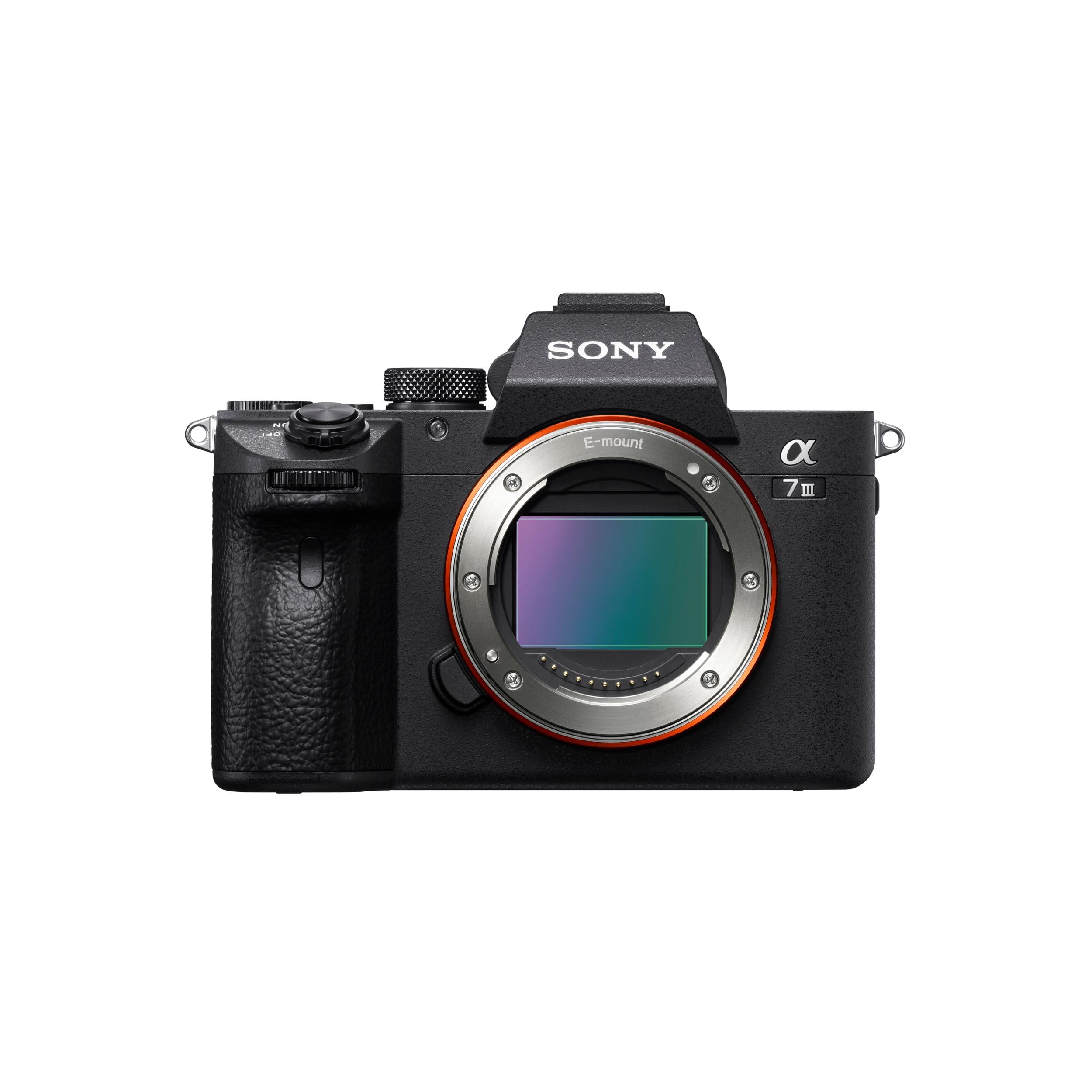
Figure 1: Sony Alpha ILCE-7M3 Camera Body
2. Box Contents
Verify that all items listed below are included in your camera package:
- Rechargeable Battery NP-FZ100
- AC adapter
- Power cord
- Shoulder strap
- Body cap
- Accessory shoe cap
- Eyepiece cup
- Micro USB Cable
3. Setup Guide
3.1. Charging the Battery
- Insert the NP-FZ100 rechargeable battery into the AC adapter.
- Connect the power cord to the AC adapter and then to a wall outlet.
- The charge lamp on the AC adapter will indicate charging status. Charge until the lamp turns off.
3.2. Inserting Battery and Memory Card
- Open the battery insertion slot cover located at the bottom of the camera.
- Insert the charged NP-FZ100 battery with the correct orientation until it locks into place.
- Open the memory card slot cover (the camera has two available memory slots).
- Insert a compatible memory card into the slot until it clicks. Ensure the card is facing the correct direction.
- Close both covers securely.
3.3. Attaching a Lens
The Sony Alpha ILCE-7M3 uses a Sony E-mount. Align the white index on the lens with the white index on the camera body, then rotate the lens clockwise until it clicks into place.
3.4. Camera Overview

Figure 2: Front and Top View of Camera
- 1. ON/OFF (Power) switch/Shutter button
- 2. Front dial
- 3. Infrared remote sensor
- 4. Lens release button
- 5. Wi-Fi/Bluetooth antenna (built-in)
- 6. Microphone
- 7. AF illuminator/Self-timer lamp

Figure 3: Rear and Top View of Camera
- 1. Eyepiece Cup
- 2. Viewfinder
- 3. C3 button (Custom button 3)
- 4. MENU button
- 5. Monitor (For touch operation: Touch panel/Touch pad)
- 6. Eye sensor
- 7. MOVIE (Movie) button
- 8. For shooting: AF-ON (AF On) button
- 9. Rear dial
- 10. For shooting: AEL button
- 11. Multi-selector
- 12. For shooting: Fn (Function) button
- 13. Control wheel
- 14. Access lamp
- 15. For shooting: C4 button (Custom button 4)
- 16. (Playback) button

Figure 4: Top and Side View of Camera
- 1. Multi Interface Shoe*
- 2. Mode dial
- 3. C2 button (Custom button 2)
- 4. C1 button (Custom button 1)
- 5. Exposure compensation dial
- 6. Battery insertion slot
- 7. Tripod socket hole
*For details on compatible accessories for the multi interface shoe and the Multi/Micro USB Terminal, visit the Sony website or consult your Sony dealer or local authorized Sony service facility. Accessories for the Accessory Shoe can also be used. Operations with other manufactures' accessories are not guaranteed.

Figure 5: Side View of Camera Ports
- 1. (Microphone) jack
- 2. Hooks for shoulder strap
- 3. (Headphones) jack
- 4. HDMI micro jack
- 5. USB Type-C terminal
- 6. Charge lamp
- 7. Multi/Micro USB Terminal*
- 8. (N mark)
*For details on compatible accessories for the multi interface shoe and the Multi/Micro USB Terminal, visit the Sony website or consult your Sony dealer or local authorized Sony service facility. Operations with other manufactures' accessories are not guaranteed.
4. Operating Instructions
4.1. Power On/Off
To turn the camera on or off, slide the ON/OFF switch located around the shutter button.
4.2. Basic Photography
Select your desired shooting mode using the Mode dial. Available modes include Automatic, Manual, Aperture Priority, Shutter Priority, Program, and Custom. Press the shutter button halfway to focus, then press fully to capture an image.

Figure 6: High-Resolution Image Capture
4.3. Autofocus (AF) System
The ILCE-7M3 features a wider, faster, and more steadfast AF performance, including 4D FOCUS and tenacious AF/AE tracking. It supports Real-Time Eye Auto Focus for humans and Real Time Animal Eye AF, revolutionizing portraiture and wildlife photography.

Figure 7: Eye AF in Action
4.4. Continuous Shooting
Capture fast-moving subjects with continuous shooting at up to 10 frames per second (fps) with tenacious AF/AE tracking. This allows for capturing critical moments in sports or action photography.

Figure 8: Capturing Action with Continuous Shooting
4.5. Video Recording
The camera supports 4K HDR video recording with high resolution, wide dynamic range, and a wide color gamut. Video capture resolution is 2160p, with frame rates of 24, 30, and 60 fps, using the XAVC format.

Figure 9: Realistic Movies with 4K HDR
4.6. Image Stabilization
Benefit from 5-axis optical in-body image stabilization, which compensates for camera shake, allowing for sharper images and smoother video, especially in low light or with longer focal lengths.
4.7. Image Quality and Low Light Performance
The camera features a back-illuminated 24.2MP full-frame sensor and the enhanced BIONZ X™ Image Processing System, delivering stunning image quality with natural gradations and reduced noise, even in high-resolution images captured in low light conditions.

Figure 10: Enhanced BIONZ X™ Image Processing

Figure 11: Low Noise in High-Resolution Images
4.8. Connectivity
The camera includes built-in Wi-Fi/Bluetooth for easy sharing and remote control. It also features USB Type-C, HDMI micro, microphone, and headphone jacks for versatile connectivity options. One-touch sharing and smooth PC tethering are supported.
4.9. Customization
The ILCE-7M3 offers a customized menu system and programmable C1, C2, C3, and C4 buttons, allowing users to tailor camera controls to their specific shooting preferences.
5. Maintenance
5.1. Cleaning the Camera
- Use a soft, dry cloth to clean the camera body.
- For the lens and sensor, use specialized cleaning tools and solutions designed for camera optics. Avoid touching the sensor directly.
- Do not use organic solvents such as alcohol or thinner to clean the camera.
5.2. Battery Care
- Store the battery in a cool, dry place when not in use.
- Avoid fully discharging the battery for extended periods.
- Charge the battery regularly, even if not in use, to maintain its lifespan.
5.3. Storage
When storing the camera for an extended period, remove the battery and memory card. Store the camera in a dry, dust-free environment, preferably with a desiccant to prevent mold and mildew.
6. Troubleshooting
If you encounter issues with your camera, refer to the following common solutions:
- Camera does not power on: Ensure the battery is fully charged and correctly inserted. Check if the power switch is in the 'ON' position.
- Cannot take pictures: Verify that a memory card is inserted and has sufficient free space. Check the selected shooting mode and focus settings.
- Images are blurry: Ensure the lens is clean. Check focus settings and image stabilization. Use a higher shutter speed or tripod in low light.
- Battery drains quickly: Reduce screen brightness, turn off Wi-Fi/Bluetooth when not in use, and limit continuous shooting. Ensure the battery is not old or damaged.
For more complex issues, consult the comprehensive online help guide available on the Sony support website or contact Sony customer support.
7. Specifications
| Model Name | ILCE |
| Photo Sensor Resolution | 24.2 MP |
| Photo Sensor Size | Full Frame (35mm) |
| Sensor Type | CMOS |
| Image Stabilisation | 5-axis optical in-body image stabilization |
| Compatible Mountings | Sony E |
| Continuous Shooting Speed | 10 FPS |
| Video Capture Resolution | 2160p (4K) |
| Video Capture Format | XAVC |
| Display Type | Tiltable LCD |
| Available Memory Slots | 2 |
| Battery Cell Type | Lithium Ion (NP-FZ100) |
| Item Weight | 650 Grams |
| Connectivity | USB, Wi-Fi, Bluetooth, HDMI micro, Microphone, Headphones |
| Country of Origin | Thailand |

Figure 12: Camera Dimensions and Key Specifications
8. Warranty Information
This Sony Alpha ILCE-7M3 camera comes with a 2 Year Manufacturer Warranty from the date of purchase. Please retain your proof of purchase for warranty claims. The warranty covers manufacturing defects under normal use. It does not cover damage caused by misuse, accidents, unauthorized repairs, or normal wear and tear.
9. Customer Support
For technical assistance, service, or inquiries, please contact Sony customer support:
- Importer Contact Information: Sony India Private Limited, A-18, Mohan Co-operative Industrial Estate, Mathura Road, New Delhi 110044, India
- Toll Free: 1800-103-7799
- Email: Sonyindia.care@ap.sony.com
- Manufacturer Contact Information: Sony Imaging Products & Solutions Inc., 1-7-1 Konan, Minato-KU, Tokyo 108-0075, Japan
You can also visit the official Sony support website for the latest drivers, firmware updates, and detailed FAQs.


