
Tribesigns ZYL-F1893-F1810
Tribesigns L-Shaped Executive Desk with Reversible File Cabinet
Model: ZYL-F1893-F1810
Introduction
This manual provides comprehensive instructions for the assembly, operation, and maintenance of your Tribesigns L-Shaped Executive Desk with Reversible File Cabinet. Please read this manual thoroughly before beginning assembly or use to ensure proper setup and to maximize the lifespan of your product. Keep this manual for future reference.
Important Safety Information
WARNING:
- Always assemble and anchor the desk and file cabinet to the wall or floor to prevent tipping.
- Keep the desk and file cabinet away from heat sources.
- Do not place excessively heavy objects on the file cabinet when it is not anchored.
- Ensure all screws and fasteners are securely tightened before use. Periodically check and re-tighten as needed.
- Keep small parts and packaging materials away from children during assembly.
Setup and Assembly
Your Tribesigns L-Shaped Executive Desk and File Cabinet are designed for straightforward assembly. All necessary parts, tools, and instructions are included in the package. Each part is labeled to assist with quick assembly.
Before You Begin:
- Unpack all components and verify against the parts list provided in your physical instruction booklet.
- Clear a spacious area for assembly. It is recommended to assemble on a soft surface like a mat or blanket to prevent scratches.
- Familiarize yourself with the hardware and tools provided.
Assembly Steps:
- Desk Frame Assembly: Begin by assembling the sturdy iron frame of the L-shaped desk. Connect the main desk sections using the provided fasteners. Ensure all connections are firm.
- Desktop Installation: Carefully place the gray and black finish desktop panels onto the assembled frame. Secure them using the designated screws. The desktop provides a smooth and scratch-resistant surface.
- File Cabinet Assembly: Assemble the file cabinet structure. This unit includes 5 open shelves and 2 drawers. The unique fishbone pattern on the filing cabinet door should face outwards.
- Drawer Installation: Install the two drawers into the file cabinet. These drawers are designed to accommodate letter-sized files. Ensure the drawer glides operate smoothly.
- Caster Wheel Attachment: Attach the four smooth-rolling wheels to the base of the file cabinet. These 360-degree casters allow for easy movement and flexible positioning of the cabinet.
- Connecting Desk and Cabinet (Optional): The file cabinet can be positioned on either side of the desk. Align the cabinet with the desk and secure if desired, or use it as a freestanding unit.
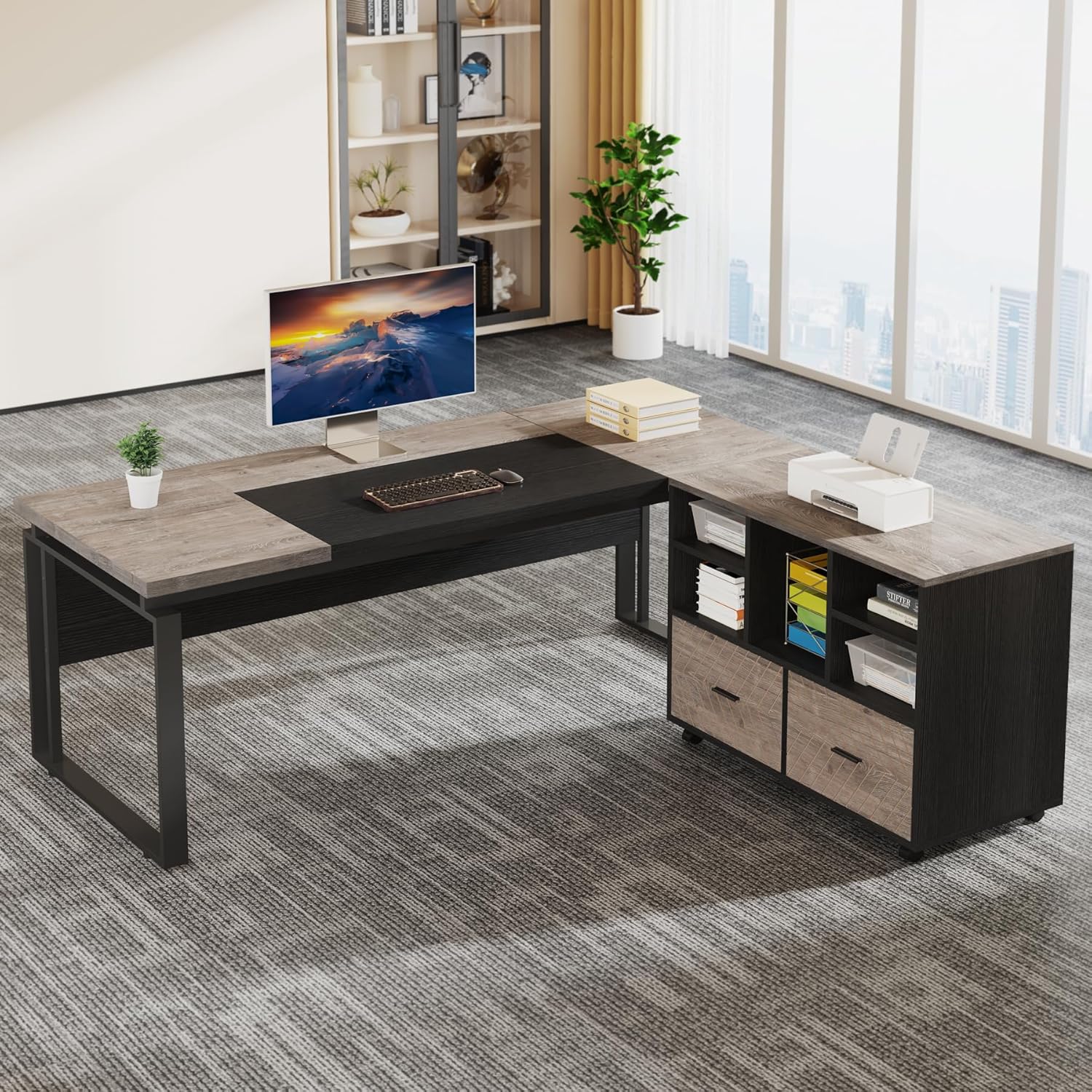
Image: The fully assembled Tribesigns L-Shaped Executive Desk with the reversible file cabinet positioned on the right side, showcasing its modern design and ample workspace.

Image: Detailed dimensions of the L-shaped desk (63"W x 31.49"D x 29.52"H) and the file cabinet (39.37"W x 15.74"D x 29.52"H), illustrating the overall size and individual component measurements.

Image: Close-up view of the file cabinet highlighting its features: five open storage shelves, two spacious drawers for hanging letter-sized files, and four 360-degree rotating casters for mobility.
Operating Instructions
Using the Desk:
The spacious 63-inch L-shaped desktop provides ample room for multiple monitors, laptops, and other office essentials. The design allows for comfortable working arrangements, whether for a single user or multiple workstations in a collaborative environment.

Image: An overhead view of multiple Tribesigns L-shaped desks arranged to form a collaborative workspace, demonstrating their versatility in an office setting.
Using the File Cabinet:
- Storage Drawers: The two bottom drawers are designed for hanging letter-sized files. Pull the drawers out smoothly using the handles. Ensure files are properly aligned to prevent jamming.
- Open Shelves: The five open shelves provide convenient storage for books, binders, office supplies, or decorative items. Organize items to maintain a tidy workspace.
- Mobility: The file cabinet can be easily moved thanks to its four integrated casters. To reposition, simply push or pull the cabinet to the desired location. Ensure the path is clear to avoid obstacles.
- Reversible Design: The file cabinet can be placed on either the left or right side of the L-shaped desk, offering flexibility to suit your office layout.

Image: The L-shaped desk setup with the file cabinet positioned on the left side, demonstrating the reversible nature of the cabinet and its integration with the desk.
Maintenance
- Cleaning: Wipe surfaces with a soft, damp cloth. Avoid harsh chemicals or abrasive cleaners that may damage the finish.
- Hardware Check: Periodically inspect all screws and fasteners to ensure they remain tight. Re-tighten any loose connections to maintain stability and prevent wobbling.
- Drawer Maintenance: If drawers become stiff, apply a small amount of silicone lubricant to the drawer glides. Keep the drawer tracks free of debris.
- Caster Care: Keep caster wheels free of hair and debris to ensure smooth movement.
- Weight Distribution: Distribute weight evenly across the desk and within the file cabinet to prevent strain on components.
Troubleshooting
| Problem | Possible Cause | Solution |
|---|---|---|
| Desk/Cabinet wobbles or is unstable. | Loose fasteners; uneven floor; improper assembly. | Check and tighten all screws. Ensure the desk is on a level surface. Re-check assembly steps. Consider anchoring to a wall if persistent. |
| Drawers stick or do not close smoothly. | Misaligned drawer glides; debris in tracks; overloaded drawer. | Ensure drawer glides are correctly installed and aligned. Clear any debris from the tracks. Reduce the weight in the drawer. |
| Casters do not roll smoothly. | Debris (hair, lint) caught in wheels; damaged caster. | Clean any debris from the caster wheels. If a caster is damaged, contact customer support for replacement. |
| Scratches on surface after assembly. | Assembly on a hard or abrasive surface. | Always assemble on a soft surface like a mat or blanket to prevent scratches. Minor scratches can sometimes be minimized with furniture polish. |
Specifications
| Feature | Detail |
|---|---|
| Brand | Tribesigns |
| Model Number | ZYL-F1893-F1810 |
| Product Dimensions (Desk) | 63"W x 31.49"D x 29.52"H |
| Product Dimensions (File Cabinet) | 39.37"W x 15.74"D x 29.52"H (approximate, derived from image) |
| Color | Gray & Black |
| Style | Modern |
| Base Material | Metal (Iron) |
| Top Material Type | Engineered Wood |
| Number of Drawers | 2 (for letter-sized files) |
| Number of Open Shelves | 5 |
| Item Weight | 151.67 Pounds |
| Assembly Required | Yes (All tools included) |
| Special Features | Reversible File Cabinet, Mobile File Cabinet with Casters |
Warranty Information
The Tribesigns L-Shaped Executive Desk with Reversible File Cabinet comes with a Limited Warranty. For specific details regarding coverage, duration, and claims procedures, please refer to the warranty card included with your product packaging or visit the official Tribesigns website.
Customer Support
Should you encounter any issues, require replacement parts, or have questions not covered in this manual, please contact Tribesigns customer support. You can often find contact information on the product packaging, the official Tribesigns website, or through your point of purchase.
For more information and support, visit the Tribesigns Store on Amazon.
Related documentsZYL-F1893-F1810


Ask a question about this manual
Ask about setup, troubleshooting, compatibility, parts, safety, or missing instructions. Manuals+ will review the question and use this page’s manual context to help answer it.