1. Introduction
Thank you for choosing the K&F CONCEPT LP-E17 USB-C Rechargeable Battery. This product is designed to provide reliable and convenient power for your compatible Canon EOS cameras. Featuring a built-in USB-C port, these batteries offer flexible charging options without the need for a dedicated external charger. Please read this manual carefully to ensure proper usage and optimal performance.

Image 1.1: K&F CONCEPT LP-E17 USB-C Rechargeable Batteries
2. Package Contents
The K&F CONCEPT LP-E17 USB-C Rechargeable Battery package includes the following items:
- 2 x K&F CONCEPT LP-E17 USB-C Rechargeable Batteries
- 2 x USB-C to USB-C Charging Cables
- 1 x Instruction Manual (this document)

Image 2.1: Package Contents
3. Setup: Charging the Battery
The K&F CONCEPT LP-E17 batteries feature a convenient built-in USB-C charging port, eliminating the need for a separate charger.
- Connect the Cable: Insert one end of the provided USB-C to USB-C charging cable into the USB-C port on the battery.
- Connect to Power Source: Connect the other end of the cable to a compatible 5V power source. This can include a wall charger, laptop, car adapter, or power bank.
- Monitor Charging Status: An LED indicator on the battery will illuminate. A red light indicates that the battery is currently charging. A green light indicates that the battery is fully charged.
- Charging Time: A full charge typically takes approximately 2 hours when using a 5V 1.5A power source.

Image 3.1: USB-C Fast Charging

Image 3.2: Various Charging Options
4. Operating: Installing and Using the Battery
These batteries are designed for seamless integration with compatible Canon EOS cameras.
- Camera Off: Ensure your camera is powered off before installing or removing the battery.
- Open Battery Compartment: Locate and open the battery compartment door on your camera.
- Insert Battery: Insert the K&F CONCEPT LP-E17 battery into the compartment, aligning it correctly according to the camera's indicators. Push until it clicks into place.
- Close Compartment: Close the battery compartment door securely.
- Power On: Turn on your camera. The battery is now ready for use.
The 1040mAh capacity provides extended shooting times. Based on tests with a Canon M6, the battery can support approximately 2.5 hours of video recording or capture over 2300 photos. Actual performance may vary depending on camera model, settings, and usage conditions.

Image 4.1: Battery Performance Overview
5. Compatibility
The K&F CONCEPT LP-E17 USB-C batteries are compatible with a wide range of Canon EOS cameras, including but not limited to:
- Canon EOS R100
- Canon EOS R10
- Canon EOS R50
- Canon EOS RP
- Canon EOS R8
- Canon Rebel T8i, T7i, T6i, T6s
- Canon Rebel SL2, SL3
- Canon EOS M3, M5, M6
- Canon EOS 200D, 77D, 750D, 760D, 800D, 8000D
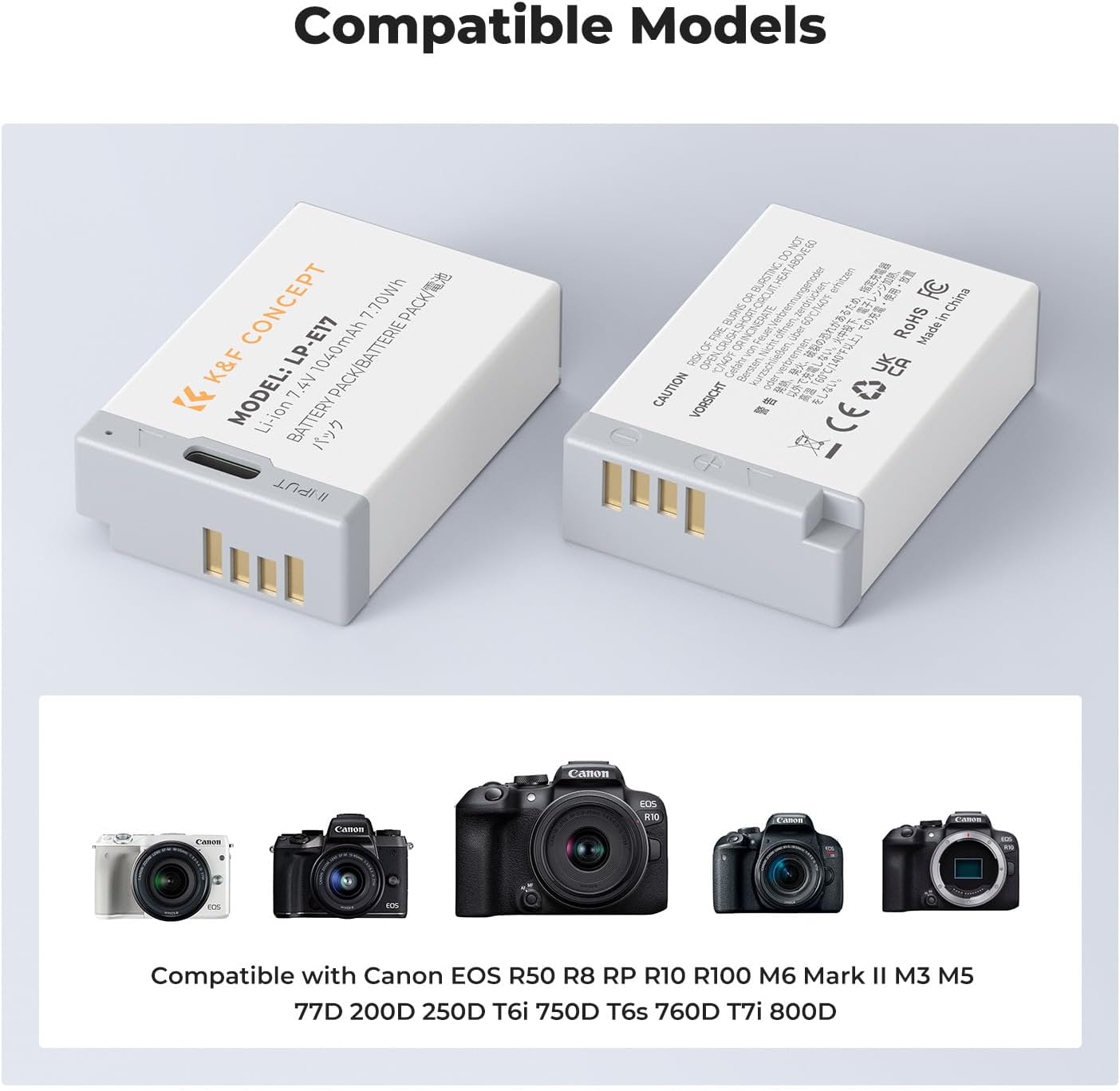
Image 5.1: Compatible Camera Models
6. Safety Precautions
For your safety and to ensure the longevity of the batteries, please observe the following precautions:
- Do not disassemble, crush, or puncture the battery.
- Do not expose the battery to high temperatures (above 60°C / 140°F) or direct sunlight.
- Avoid short-circuiting the battery terminals.
- Keep the battery away from water and moisture.
- Do not dispose of batteries in fire.
- Keep out of reach of children.
- Dispose of used batteries according to local regulations.
These batteries are equipped with multiple circuit protections, including:
- Temperature protection
- Over-voltage protection
- Over-discharge protection
- Over-current protection
- Over-charge protection
- Short-circuit protection
The batteries are CE, FCC, and RoHS certified, ensuring compliance with safety and environmental standards.

Image 6.1: Built-in Safety Features
7. Maintenance and Storage
- Cleaning: Use a dry, soft cloth to clean the battery terminals if necessary. Do not use liquids or abrasive cleaners.
- Storage: Store batteries in a cool, dry place away from direct sunlight and extreme temperatures.
- Long-Term Storage: If storing batteries for an extended period, charge them to approximately 50-70% capacity and recharge every 3-6 months to prevent deep discharge and prolong battery life.
- Avoid Full Discharge: Do not allow batteries to fully discharge for prolonged periods, as this can reduce their lifespan.
8. Troubleshooting
- Battery not charging:
- Ensure the USB-C cable is securely connected to both the battery and the power source.
- Verify that the power source (wall adapter, laptop, power bank) is functioning correctly and providing 5V output.
- Try a different USB-C cable or power source.
- Battery not powering camera:
- Confirm the battery is correctly inserted into the camera's battery compartment and the door is securely closed.
- Ensure the battery has sufficient charge (check the LED indicator on the battery).
- Verify camera compatibility (refer to Section 5).
- Short battery life:
- Battery life can vary significantly based on camera model, usage patterns (e.g., continuous video recording vs. still photos), and environmental conditions.
- Ensure the battery is fully charged before use.
- Extreme cold temperatures can temporarily reduce battery performance.
- Camera battery indicator not showing precise level:
- Some third-party batteries may not communicate precise charge levels to certain camera models. The battery's LED indicator (red for charging, green for full) provides charging status.
- It is advisable to carry a spare charged battery, especially during critical shooting sessions.
9. Specifications
| Feature | Specification |
|---|---|
| Battery Type | Li-ion battery |
| Battery Capacity | 1040mAh 7.4V 7.7Wh |
| USB-C Input | 5V / 1.5A |
| Charging Time | Approx. 2 hours (with 5V/1.5A input) |
| Operating Temperature (Charging) | 0°C ~ 45°C (32°F ~ 113°F) |
| Operating Temperature (Discharge) | -10°C ~ 60°C (14°F ~ 140°F) |
| Product Dimensions | 3.15 x 1.8 x 0.8 inches |
| Item Weight (per battery) | Approx. 2.8 ounces (5.6 ounces for 2-pack) |
| Model Number | KF28.0049S1 |
10. Warranty and Support
K&F CONCEPT products are manufactured to high-quality standards. For any questions, technical support, or warranty inquiries, please contact K&F CONCEPT customer service through the retailer where the product was purchased or visit the official K&F CONCEPT website for support information. Please retain your proof of purchase for warranty claims.


