
MangoKit MS4
Contents
MangoKit MS4 CD Player FM Radio HiFi System User Manual
Model: MS4 | Brand: MangoKit
1. Introduction
The MangoKit MS4 is a versatile all-in-one HiFi system designed to provide a comprehensive audio experience. It integrates a CD player, FM radio, Bluetooth connectivity, USB playback, and an AUX input, all housed within an acoustically engineered wood cabinet. This manual provides detailed instructions for setting up, operating, and maintaining your MS4 system.
What's in the Box:
- 1 x MS4 CD Player System
- 1 x Remote Control
- 1 x NA Mains Power Adapter with Cable
- 1 x User Manual (this document)
2. Product Overview
Familiarize yourself with the main components and features of your MangoKit MS4 system.

Figure 2.1: Front view of the MangoKit MS4 HiFi System with included remote control.

Figure 2.2: The MS4 system showcasing its all-in-one capabilities including CD player, DAB+ Radio, Bluetooth Streaming, and FM Radio.

Figure 2.3: Detailed view of the user-friendly controls, full-color TFT display, and remote control for the MS4 system.

Figure 2.4: Rear panel connections including 3.5mm Aux in, Headphone output, DC 15V power input, and USB Playback port.
3. Setup
3.1 Power Connection
- Ensure the power switch on the rear panel is in the "OFF" position.
- Connect the provided NA mains power adapter cable to the "DC 15V" input port on the rear of the MS4 system.
- Plug the power adapter into a standard wall outlet.
- Flip the power switch on the rear panel to the "ON" position. The unit will power on.
3.2 Antenna Setup
For optimal FM radio reception, fully extend the telescopic antenna located on the rear of the unit. Adjust its position for the best signal quality.
3.3 Initial Power On
Upon first power-on, the system may prompt you to set the time and date. Follow the on-screen instructions using the control knob and buttons on the front panel or the remote control.
4. Operating Instructions
4.1 General Controls
The MS4 features intuitive controls on its front panel and a full-function remote control. The central knob controls volume and navigation, while surrounding buttons manage playback, mode selection, and settings.

Figure 4.1: Detailed view of the control panel, highlighting the volume knob and function buttons.
4.2 CD Player Operation
The MS4 features a convenient slot-in CD player.
- Select "CD Player" mode using the Mode button or the display menu.
- Gently insert a CD into the slot. The system will automatically draw the CD in and begin playback.
- Use the Play/Pause, Skip Forward, and Skip Backward buttons to control playback.
- To eject a CD, press the Eject button (usually indicated by an arrow pointing up from a line).

Figure 4.2: The MS4's slot-in CD player in action, ready for HiFi music enjoyment.
4.3 FM Radio Operation
Enjoy a wide range of FM radio stations with clear digital reception.
- Select "FM Radio" mode.
- Use the tuning controls (usually the navigation buttons or knob) to scan for stations.
- To save a favorite station, press and hold the "Preset" or "Memory" button, then select a preset number using the navigation controls and confirm.
- The system supports up to 40 preset stations for quick access.

Figure 4.3: The MS4 display showing FM radio information, indicating premium reception capabilities.
4.4 Bluetooth Operation
Stream audio wirelessly from your smartphone, tablet, or other Bluetooth-enabled devices.
- Select "Bluetooth" mode on the MS4. The display will show "Bluetooth Searching" or similar.
- On your mobile device, enable Bluetooth and search for available devices.
- Select "MangoKit MS4" from the list to pair. Once connected, you will hear a confirmation sound.
- Begin playing audio on your paired device, and it will stream through the MS4 system.
The MS4 also supports Bluetooth-out, allowing you to connect wireless headphones for private listening.

Figure 4.4: The MS4 as a bedroom companion, featuring dual alarm and sleep timer, along with Bluetooth-out for wireless headphone connection.
4.5 USB Playback
Play MP3 and other digital audio files directly from a USB drive.
- Insert a USB flash drive into the USB port on the rear panel.
- Select "USB Playback" mode.
- The system will automatically detect and display the audio files. Use the navigation controls to browse and select tracks.
4.6 AUX Input
Connect external audio devices using a 3.5mm auxiliary cable.
- Connect one end of a 3.5mm audio cable to the "AUX In" port on the rear of the MS4.
- Connect the other end to the headphone jack or audio output of your external device (e.g., smartphone, MP3 player).
- Select "AUX" mode on the MS4.
- Play audio from your external device.
4.7 Alarm and Timer Functions
The MS4 includes dual alarms and a sleep timer for added convenience.
- Setting Alarms: Press the "Alarm" button to access alarm settings. You can set two independent alarms with options for weekday/weekend modes and choose to wake up to FM radio or a buzzer sound.
- Sleep Timer: Press the "Sleep" button to activate the sleep timer. This allows you to set a duration after which the system will automatically turn off, ideal for falling asleep to music or radio.
5. Maintenance
5.1 Cleaning
- Always unplug the unit from the power outlet before cleaning.
- Use a soft, dry cloth to wipe the exterior surfaces.
- For stubborn marks, lightly dampen the cloth with water. Avoid using abrasive cleaners, waxes, or solvents as they may damage the finish.
- Keep the CD slot and other ports free from dust and debris.
5.2 Cabinet Care
The MS4 features an acoustic wood cabinet. To maintain its appearance, avoid placing the unit in direct sunlight or near heat sources. Protect it from excessive humidity.
6. Troubleshooting
If you encounter any issues with your MangoKit MS4, please refer to the table below for common problems and their solutions.
| Problem | Possible Cause | Solution |
|---|---|---|
| No power | Power cable not connected; Power switch off | Ensure power cable is securely plugged in; Turn the rear power switch to "ON" |
| No sound | Volume too low; Incorrect mode selected; Mute activated | Increase volume; Select correct input mode (CD, FM, Bluetooth, USB, AUX); Deactivate mute function |
| Poor FM reception | Antenna not extended or positioned incorrectly | Fully extend and adjust the telescopic antenna for better signal |
| Bluetooth pairing issues | Device not in pairing mode; Out of range; Already connected to another device | Ensure MS4 is in Bluetooth pairing mode; Move device closer; Disconnect from other devices and try again |
| CD not playing | CD inserted incorrectly; CD is dirty or scratched; Unsupported disc format | Re-insert CD correctly; Clean CD with a soft cloth; Ensure disc is an audio CD (CD-DA) |
| Clock not keeping time | Power interruption; Incorrect time zone/DST setting | Re-set the time and check time zone/DST settings in the menu. Ensure continuous power supply. |
7. Specifications
| Feature | Detail |
|---|---|
| Product Dimensions | 13.77"L x 8.5"W x 5.66"H (350W x 144H x 215D mm) |
| Item Weight | 9.44 pounds |
| Model Number | MS4 |
| Brand | MangoKit |
| Color | Walnut |
| Special Feature | Wood cabinet, HiFi Music CD player, USB player, Wireless Bluetooth 5.3, Bluetooth out connection, FM radio |
| Connectivity Technology | Bluetooth, Auxiliary, USB |
| Tuner Technology | FM (DAB+ optional for European countries) |
| Power Source | Corded Electric |
| Radio Bands Supported | FM |
| Audio Output | 100W (dual stereo speakers) |
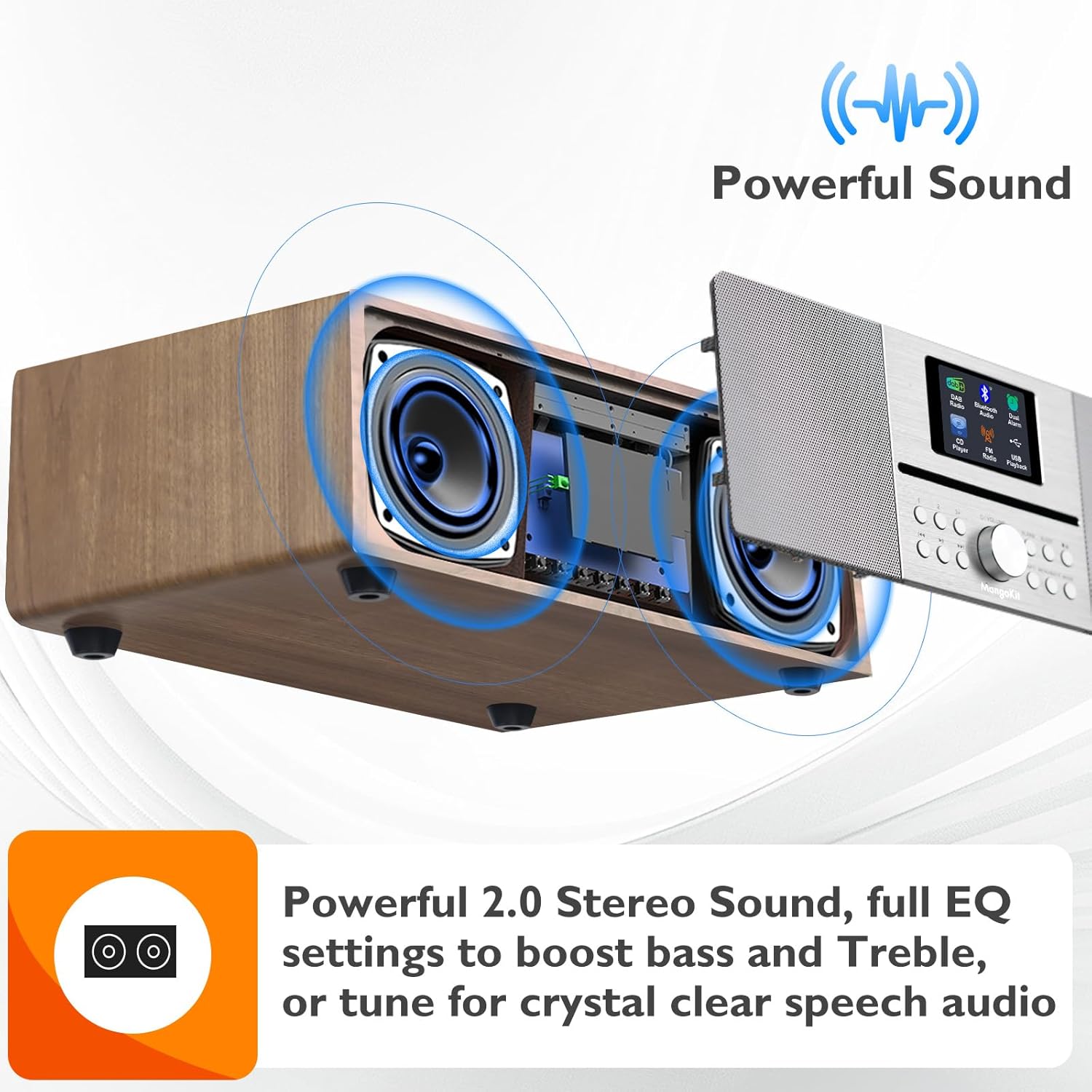
Figure 7.1: Illustration of the powerful 2.0 stereo sound system with full EQ settings for enhanced audio experience.
8. Official Product Video
Video 8.1: An official product video demonstrating the key features and functionalities of the MangoKit MS4 HiFi System, including CD playback, FM radio tuning, Bluetooth connectivity, and alarm settings. It also highlights the various input/output ports and the powerful sound output.
9. Warranty and Support
MangoKit has been producing audio products since 2009. For any product inquiries, technical support, or warranty claims, please refer to the contact information provided in the physical user manual included with your purchase or visit the official MangoKit website. Please retain your proof of purchase for warranty purposes.
Documents and downloads
Ask a question about this manual
Ask about setup, troubleshooting, compatibility, parts, safety, or missing instructions. Manuals+ will review the question and use this page’s manual context to help answer it.