

1. Introduction
Thank you for choosing the Gesnada K200 Portable Karaoke Machine. This device is designed to provide a versatile and enjoyable audio experience, combining a speaker, wireless microphones, and dynamic LED lighting. This manual will guide you through the setup, operation, and maintenance of your new karaoke system.
The K200 features high-quality stereo sound, a full-screen light show, and multiple connectivity options, making it suitable for various indoor and outdoor entertainment needs.
2. Product Components
Please ensure all items listed below are included in your package:
- 1 x Gesnada K200 Karaoke Machine
- 2 x Wireless Microphones
- 1 x Charging Cable (USB-C)
- 1 x AUX Cable
- 1 x User Manual (this document)
- 1 x Shoulder Strap

Image: The Gesnada K200 Karaoke Machine shown with its included accessories: two wireless microphones, a charging cable, an AUX cable, a shoulder strap, and the user manual.
3. Setup Guide
3.1 Charging the Karaoke Machine
Before first use, fully charge the karaoke machine. Connect the provided charging cable to the DC IN port on the machine and a compatible USB power adapter (not included). The charging indicator will show the charging status. A full charge provides 8-10 hours of continuous use.
3.2 Microphone Battery Installation
The wireless microphones require batteries (not included). Open the battery compartment at the bottom of each microphone and insert the required batteries, ensuring correct polarity. The microphones are designed for anti-interference performance.
3.3 Powering On and Microphone Connection
- Press and hold the Power button on the karaoke machine to turn it on.
- Turn on each wireless microphone. They will automatically connect to the karaoke machine.

Image: The Gesnada K200 features integrated microphone clips that can be hidden or deployed for convenient storage and access to the two wireless microphones.
3.4 Bluetooth Pairing
- Ensure the karaoke machine is in Bluetooth mode (indicated by 'BLUE' on the display). If not, press the 'M' button to cycle through modes.
- On your smartphone, tablet, or other Bluetooth-enabled device, search for 'Gesnada K200' in the Bluetooth settings.
- Select 'Gesnada K200' to pair. A confirmation sound will indicate successful pairing.
3.5 TWS (True Wireless Stereo) Functionality
The K200 supports TWS technology, allowing two K200 machines to be paired for a stereo sound experience. To activate TWS:
- Ensure both K200 machines are powered on and in Bluetooth mode, but not yet paired with any device.
- On one of the machines, press and hold the 'M/TWS' button. The machine will search for another K200.
- Once connected, a confirmation tone will sound, and both machines will function as a stereo pair.
- Now, pair your external device (phone, tablet) to one of the K200 machines via Bluetooth.

Image: Two Gesnada K200 Karaoke Machines are shown wirelessly connected via TWS technology, creating a powerful stereo sound system for an immersive home theater experience.
4. Operating Instructions
4.1 Control Panel Overview
The top panel of the K200 features various knobs and buttons for controlling audio, effects, and playback.
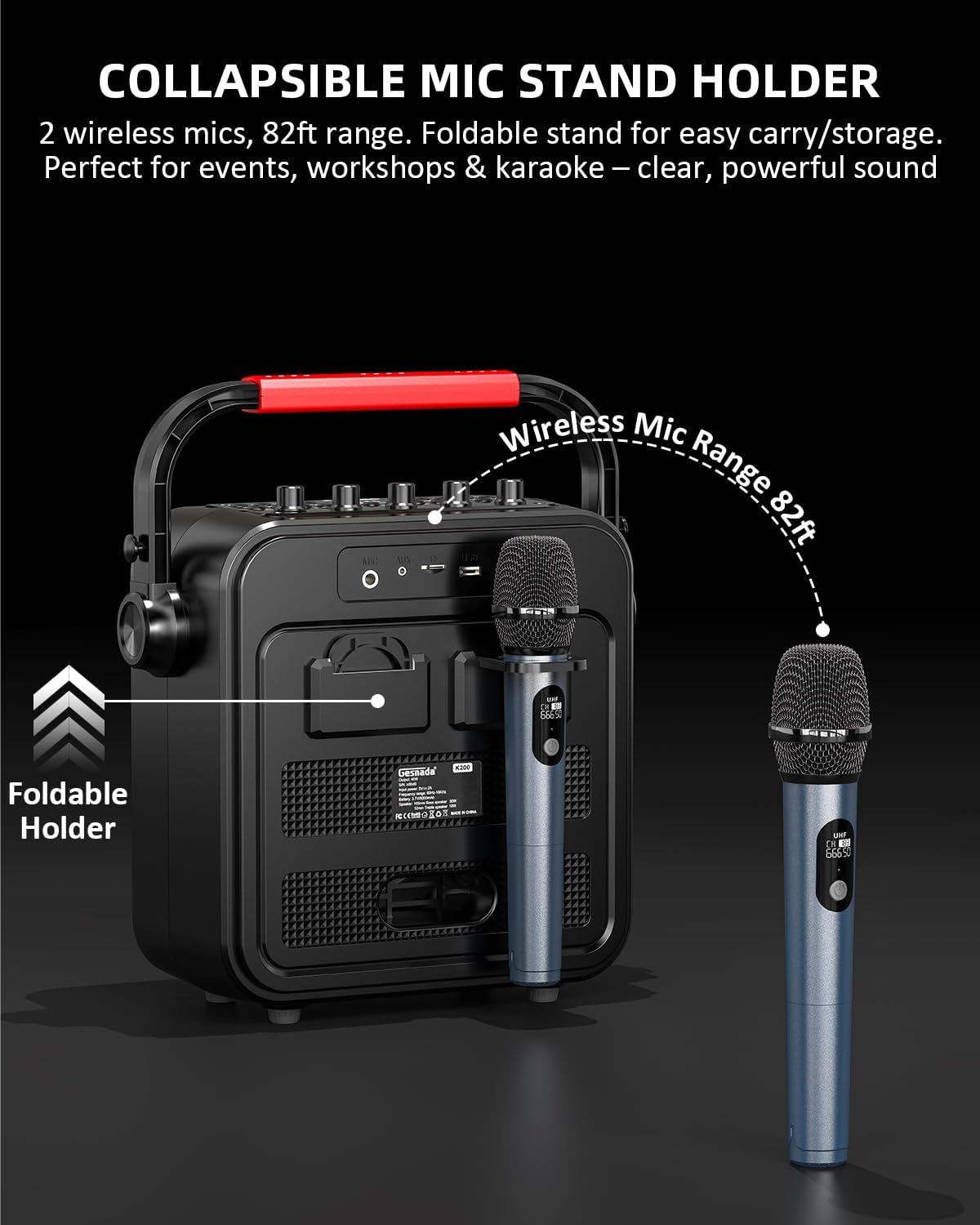
Image: A detailed view of the Gesnada K200 control panel, highlighting knobs for Microphone Volume, Echo, Bass, Treble, and Master Volume, along with multifunctional buttons for sound effects, voice changes, and playback controls.
4.2 Audio Controls
- MIC VOL: Adjusts the volume of the microphones.
- ECHO: Controls the echo effect applied to the microphone audio.
- BASS: Adjusts the low-frequency audio output.
- TREBLE: Adjusts the high-frequency audio output.
- VOLUME: Master volume control for the overall sound output.
4.3 Mode Selection and Playback
- M/TWS Button: Short press to cycle through input modes (Bluetooth, FM Radio, AUX, USB, TF Card). Long press for TWS pairing.
- Play/Pause Button: Starts or pauses audio playback.
- Previous/Next Track Buttons: Skips to the previous or next audio track.
- REC/DEL Button: Initiates recording (requires USB/TF card) or deletes recordings.
4.4 Dynamic LED Lights
The K200 features a full-screen LED light display with 8 different light shows. Press the Light Mode button (snowflake icon) to cycle through the various lighting patterns and effects. The lights synchronize with the music to enhance the atmosphere.

Image: The Gesnada K200 Karaoke Machine showcasing a selection of its 8 dynamic LED lighting modes, which create a vibrant visual experience synchronized with music.
4.5 Voice Effects
The control panel includes buttons for various voice effects to add fun to your performance:
- BRAVO, CLAP, WHISTLE, BLOW, GUNSHOTS, SLAP: Sound effect buttons.
- MALE VOICE, FEMALE VOICE, ELDER VOICE, BABY VOICE: Voice changer effects.
Video: A demonstration of the Gesnada K200 karaoke machine's features, including its two wireless microphones and various sound effects, provided by the seller, Gesnada Audio.
Video: A brief overview of the Gesnada K200 karaoke machine, highlighting its suitability for both adults and children, and its two wireless microphones, presented by the seller, Gesnada Audio.
5. Maintenance
Proper care will extend the life of your Gesnada K200 Karaoke Machine.
- Cleaning: Use a soft, dry cloth to clean the exterior of the machine and microphones. Avoid using abrasive cleaners or solvents.
- Storage: Store the machine in a cool, dry place away from direct sunlight and extreme temperatures.
- Battery Care: If the machine will not be used for an extended period, charge it periodically to maintain battery health. Remove batteries from microphones if storing for long durations.
- Water Exposure: This device is not waterproof. Avoid exposure to water or high humidity.
6. Troubleshooting
If you encounter issues with your Gesnada K200, please refer to the following table:
| Problem | Possible Cause | Solution |
|---|---|---|
| No power | Low battery; Power switch off | Charge the machine; Ensure power switch is ON |
| No sound from speaker | Volume too low; Incorrect input mode; Device not paired | Increase volume; Select correct input mode (Bluetooth, AUX, etc.); Re-pair Bluetooth device |
| Microphone not working | Microphone off; Low microphone battery; MIC VOL too low | Turn on microphone; Replace microphone batteries; Increase MIC VOL |
| Bluetooth connection unstable | Device too far; Interference | Move device closer to machine (within 10 meters); Avoid obstacles or other wireless devices |
| TWS pairing failed | Machines already paired to other devices; Incorrect pairing procedure | Ensure both K200s are unpaired from other devices; Follow TWS pairing steps carefully |
7. Specifications
| Feature | Detail |
|---|---|
| Model | K200 |
| Mounting Type | Tabletop |
| Power Source | Battery Powered (Built-in 6000mAh Lithium Ion) |
| Connectivity Technology | Bluetooth, AUX, USB, TF Card, FM Radio |
| Output Wattage | 40 Watts |
| Speaker Configuration | 1 x 6.5-inch Bass Speaker, 1 x 2-inch Treble Speaker |
| Number of Channels | 2 |
| Item Weight | 8.71 pounds (3.96 Kilograms) |
| Product Dimensions (L x W x H) | 4.92 x 2.24 x 5.16 inches |
| Material | Plastic |
| Color | Black |
| Battery Life | 8-10 hours (approx.) |

Image: The dimensions of the Gesnada K200 Karaoke Machine are shown as 12.5 inches wide, 5.7 inches deep, and 14.2 inches high (including handle), with the wireless microphones measuring 10 inches in length.
8. Warranty and Support
The Gesnada K200 Portable Karaoke Machine comes with a standard manufacturer's warranty. For specific warranty details, please refer to the warranty card included in your packaging or visit the official Gesnada website.
For technical support, troubleshooting assistance, or any inquiries regarding your product, please contact Gesnada customer service through their official channels or the retailer where the product was purchased.
You can find more information and support on the Gesnada Store Page.