Introduction
Thank you for choosing the ANCTOR Twin Size Loft Bed. This manual provides essential information for the safe assembly, operation, and maintenance of your new loft bed. Designed for space-saving efficiency, this bed features an integrated desk, storage shelves, a power outlet, and customizable LED lighting. Please read this manual thoroughly before assembly and retain it for future reference.
Important Safety Information
WARNING: Failure to follow these instructions can result in serious injury or property damage.
- Ensure proper assembly following the provided instructions. All fasteners must be securely tightened.
- Do not exceed the maximum weight capacity of 400 pounds (181 kg) for the bed frame.
- Always use the anti-tipping device to secure the bed frame to the wall for added stability and to prevent accidental tipping.
- Only use a mattress with a recommended thickness of 4-6 inches to ensure the safety guardrail provides adequate protection. The guardrail height is 11.4 inches.
- Regularly inspect all components for wear, damage, or loose connections. Tighten fasteners as needed.
- Keep children away from the assembly area until the bed is fully assembled and secured.
- Do not allow jumping on the bed.
- Ensure the ladder is securely attached before use.

Figure 1: Illustration of the 11.4-inch guardrail height and recommended mattress thickness for safety.
Product Features
The ANCTOR Loft Bed is designed to maximize space and functionality in any room. Key features include:
1. Multifunctional Loft Bed Design
This twin loft bed integrates a sleeping area with a dedicated workspace, making it ideal for small living spaces. The design efficiently utilizes vertical space, providing a comfortable bed above and a functional area below.
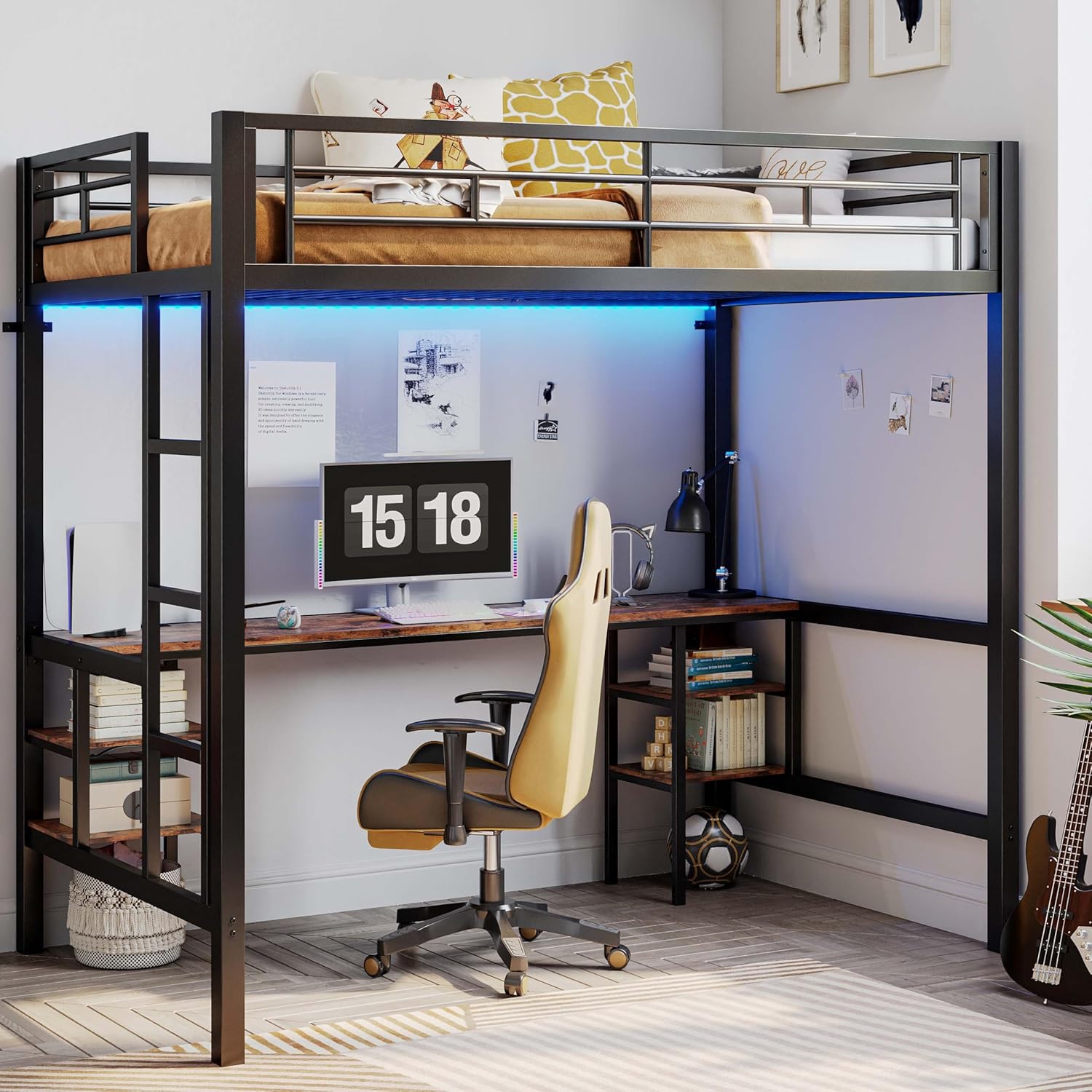
Figure 2: The ANCTOR Loft Bed, showcasing its integrated desk and space-saving design.
2. Integrated Desk with Power Outlet
A spacious desk is built directly into the loft bed frame, providing ample room for studying, working, or creative activities. The desktop includes a convenient power outlet with 110V/12A AC outlets and 5V/2A USB ports, along with a 6.5-foot power cord, ensuring easy access to power for your electronic devices.

Figure 3: Detail of the integrated power outlet on the desk, featuring AC and USB charging capabilities.
3. Ample Storage with 4 Open Shelves
The loft bed frame incorporates four open storage shelves, two on each side of the desk. These shelves are perfect for organizing books, documents, small electronics, and other personal items, helping to keep your workspace tidy and efficient.

Figure 4: The four open storage shelves, providing convenient organization for various items.
4. DIY LED Light Strip
Enhance your room's ambiance with the smart LED light strip. This strip offers a variety of light modes, colors, and brightness levels, allowing you to customize the lighting atmosphere to suit your mood or activity. The LED strip can be controlled via remote or a dedicated mobile application.

Figure 5: The LED light strip, demonstrating its customizable lighting options and control methods.
5. Sturdy Metal Frame Construction
Constructed with a robust square metal frame, this loft bed offers superior strength and stability. The durable design ensures a noise-free experience and can support a maximum load of up to 400 pounds, providing a secure sleeping and working environment.
Setup and Assembly
The ANCTOR Loft Bed is designed for straightforward assembly. Each part is clearly numbered, and all necessary tools are included. We recommend assembling with at least two people to facilitate the process.
Assembly Steps Overview:
- Unpack and Identify Parts: Carefully unpack all components and verify against the parts list provided in your separate assembly manual. Ensure all parts are present and undamaged.
- Assemble Base Frame: Follow the step-by-step instructions in the assembly manual to construct the main base frame of the loft bed.
- Install Desk and Shelves: Attach the desk surface and the four storage shelves according to the diagrams.
- Attach Ladder and Guardrails: Securely fasten the ladder and the safety guardrails to the bed frame. Ensure the guardrails are firm and stable.
- Install Slats: Place and secure the mattress support slats. Ensure slats are firmly in place to reduce friction and noise.
- Mount Anti-Toppling Device: This is a critical safety step. Securely attach the anti-toppling device to the bed frame and then to a sturdy wall using appropriate hardware. This prevents the bed from tipping over.
- Install LED Light Strip: Adhere the LED light strip under the bed frame. If the adhesive is insufficient, consider using zip ties or clips for additional security as noted in some user experiences.
- Connect Power Outlet: Ensure the power outlet unit is properly installed and its power cord is routed safely to a wall outlet.

Figure 6: Key assembly features including the anti-toppling device and secured ladder.
Operating Instructions
Using the Power Outlet:
The integrated power outlet provides convenient access to electricity for your devices. Simply plug your electronics into the 110V/12A AC outlets or use the 5V/2A USB ports for charging smartphones, tablets, and other USB-powered devices. Ensure the bed's main power cord is plugged into a functional wall outlet.
Controlling the LED Light Strip:
The LED light strip can be controlled via the included remote control or a compatible mobile application. Refer to the separate LED light strip manual for detailed instructions on pairing, changing colors, adjusting brightness, and utilizing special modes like music sync or timing functions.
Maintenance
- Cleaning: Wipe down the metal frame and wooden desk/shelves with a soft, damp cloth. Avoid harsh chemicals or abrasive cleaners that could damage the finish.
- Fastener Check: Periodically check all bolts and screws to ensure they remain tight. Re-tighten any loose fasteners to maintain stability and safety.
- LED Strip: If the LED strip adhesive weakens over time, consider reinforcing it with additional adhesive tape, clips, or small zip ties to keep it securely in place.
- Ladder: Ensure the ladder steps are clean and free of debris to prevent slips.
Troubleshooting
| Problem | Possible Cause | Solution |
|---|---|---|
| Bed feels wobbly or unstable. | Loose fasteners; Anti-toppling device not installed or loose. | Tighten all bolts and screws. Ensure the anti-toppling device is securely anchored to the wall. |
| LED light strip falls off. | Adhesive weakening. | Reinforce with stronger adhesive tape, small clips, or zip ties. |
| Power outlet not working. | Not plugged in; Circuit breaker tripped; Damaged unit. | Ensure the bed's power cord is fully plugged into a live wall outlet. Check your home's circuit breaker. If still not working, contact customer support. |
| Noise from bed frame. | Loose connections; Slats rubbing. | Tighten all fasteners. Ensure mattress slats are properly seated and not rubbing against the frame. |
Specifications
| Attribute | Detail |
|---|---|
| Product Dimensions | 78"L x 41.3"W x 71.8"H |
| Color | Black |
| Finish Type | Painted |
| Material | Metal (Frame) |
| Compatible Mattress Size | Twin |
| Recommended Mattress Thickness | 4-6 inches |
| Weight Capacity | Up to 400 lbs |
| Power Outlet | 110V/12A AC Outlet, 5V/2A 2 USB Ports |
| Power Cord Length | 6.5 Feet |
| Assembly Required | Yes |
| Manufacturer | ANCTOR |
Warranty and Support
ANCTOR products are manufactured to high-quality standards. For information regarding warranty coverage, technical support, or replacement parts, please refer to the warranty card included with your purchase or visit the official ANCTOR website. Please have your model number (B0DGFVDVZX) and purchase date ready when contacting support.
For further assistance, you may contact ANCTOR customer service through the retailer's platform where the product was purchased.

