1. Introduction
Thank you for purchasing the suixianbaiyue BS-02 Knight Dictator Commander Aircraft Version Model. This collectible-grade deformation robot is crafted from ABS and alloy materials, offering both durability and intricate detail. It features flexible joints and can transform between a formidable Knight Commander robot mode and a sleek aircraft mode. This manual provides detailed instructions for assembly, transformation, and care to ensure an optimal experience.
2. Safety Information
- Age Recommendation: This model is not suitable for children under 15 years old due to its complex transformation and small parts.
- Transformation Complexity: The transformation process is relatively complex and requires careful attention. Please read all instructions thoroughly or watch the provided transformation videos before attempting to transform the model.
- Material Safety: Made from ABS raw materials and alloy, this product is 100% safe and free from irritating odors.
- Handling: Handle with care to avoid damage to intricate parts and joints.
3. Package Contents
Your suixianbaiyue BS-02 Knight Dictator Commander package should contain the following items:
- BS-02 Knight Dictator Commander model (in either robot or aircraft mode)
- Large shield accessory
- Facial replacement parts
- Axes accessory
- Iron chain luminous arm cannons
- Instruction Manual
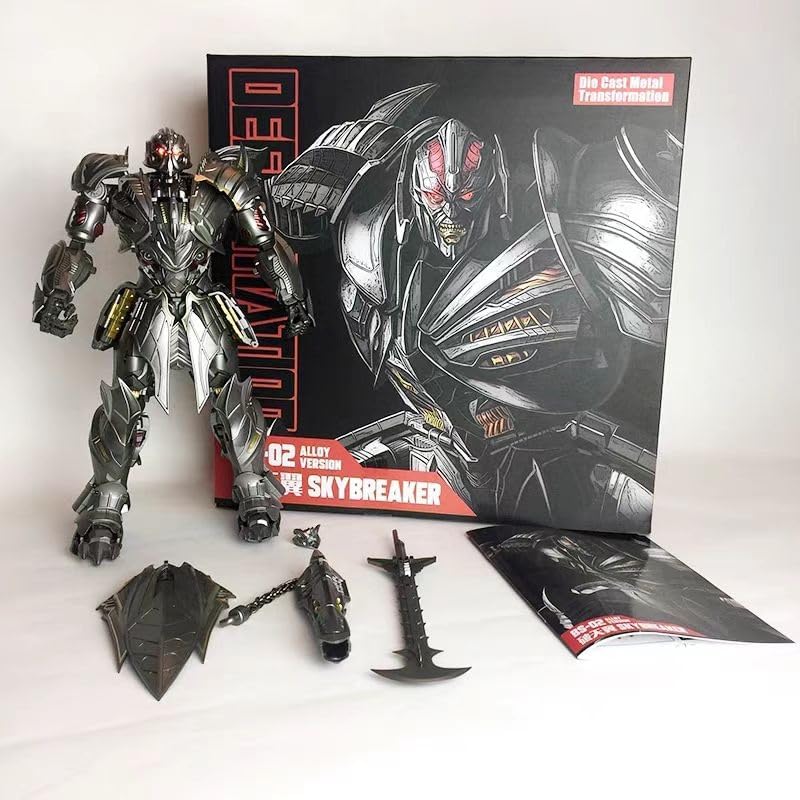
Figure 1: Included accessories and packaging.
4. Transformation Instructions: Robot Mode to Aircraft Mode
Follow these steps to transform your Knight Dictator Commander from robot mode to aircraft mode. Refer to the images and videos for visual guidance.
4.1. Initial Robot Mode
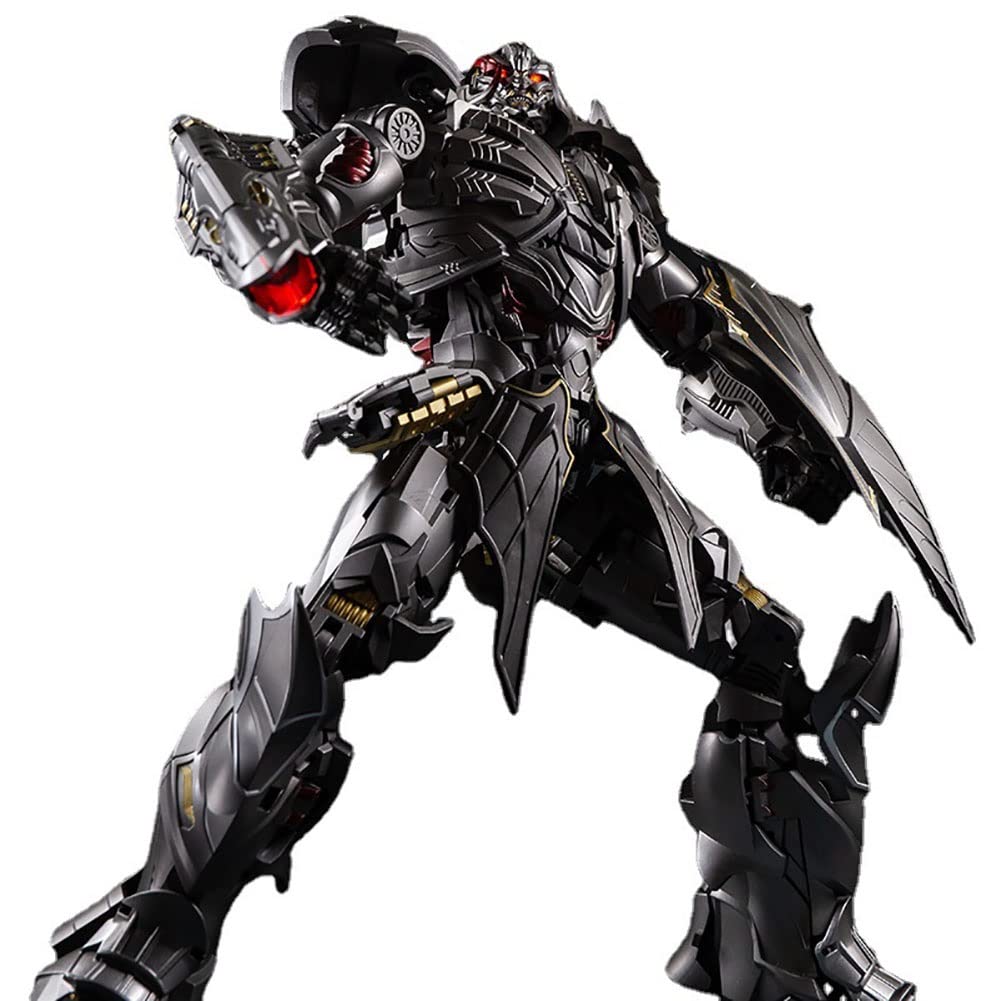
Figure 2: Knight Commander in Robot Mode (Front View).

Figure 3: Knight Commander in Robot Mode (Rear View).
4.2. Transformation Steps
- Begin by carefully detaching any accessories (shield, axe, arm cannons) from the robot figure.
- Fold the robot's hands into the forearms.
- Collapse the chest and torso sections, aligning them to form the central body of the aircraft.
- Extend and reconfigure the legs to form the rear fuselage and tail section of the aircraft. Ensure all joints click securely into place.
- Transform the arms into the wings and engine nacelles. Extend the wing panels and position the engines.
- Adjust any remaining panels and flaps to achieve the complete aircraft form.
Video 1: Detailed transformation from robot to vehicle mode. This video demonstrates the intricate steps involved in converting the figure, highlighting key articulation points and panel movements.
4.3. Aircraft Mode
Once transformed, the model will resemble a powerful aircraft, approximately 39cm long.
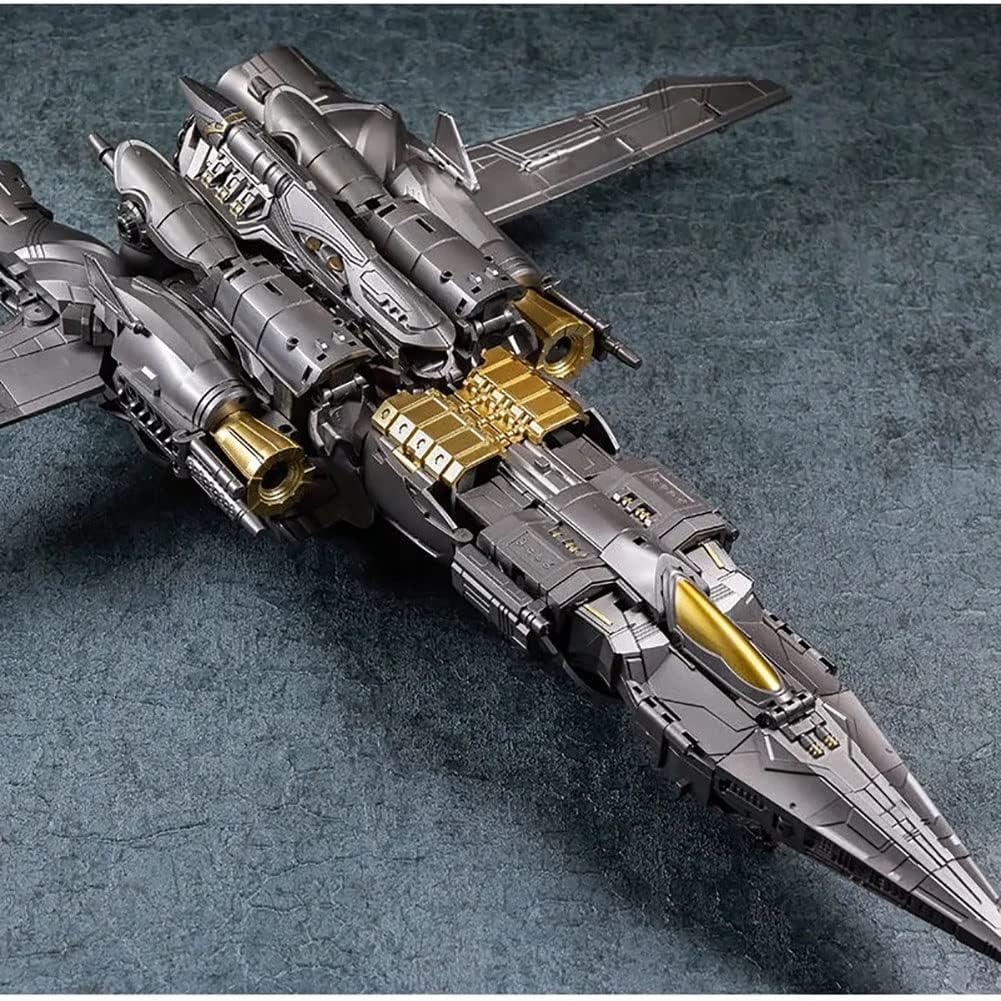
Figure 4: Knight Commander in Aircraft Mode.
5. Transformation Instructions: Aircraft Mode to Robot Mode
To transform your Knight Dictator Commander back into robot mode, reverse the steps outlined above. Pay close attention to the locking mechanisms and joint alignments.
5.1. Initial Aircraft Mode
Figure 5: Knight Commander in Aircraft Mode.
5.2. Transformation Steps
- Carefully unlock and unfold the wing and engine sections to begin forming the robot's arms.
- Separate and extend the rear fuselage and tail sections to form the robot's legs.
- Unfold the central body section to reveal the robot's chest and torso.
- Extend the robot's hands from the forearms.
- Adjust the head and facial replacement parts as desired.
- Reattach accessories such as the shield, axe, and arm cannons.
Video 2: Detailed transformation from vehicle to robot mode. This video provides a step-by-step guide for converting the figure, emphasizing proper alignment and securing of parts.
6. Accessories and Features
The BS-02 Knight Dictator Commander comes with several accessories to enhance play and display:
- Large Shield: Can be attached to the robot's arm for defensive poses.
- Axes: Two axes are included for dynamic combat poses.
- Luminous Eyeballs: The robot's eyes feature a luminous effect for added realism.
- Iron Chain Luminous Arm Cannons: These unique weapons can be attached to the robot's arms.
- Facial Replacement Parts: Allows for customization of the robot's appearance.
- Flexible Joints: The model features full-body gear joints, allowing for a wide range of articulation and dynamic posing.

Figure 6: Robot mode with accessories.

Figure 7: Robot in a dynamic pose.
7. Care and Maintenance
- Cleaning: Use a soft, dry cloth to gently wipe the model. Avoid harsh chemicals or abrasive materials that could damage the paint or finish.
- Storage: Store the model in a cool, dry place away from direct sunlight and extreme temperatures to prevent material degradation or discoloration.
- Joint Care: If joints become stiff, apply a small amount of silicone-based lubricant (specifically designed for plastics) to the joint area. Do not force stiff joints.
- Paint Protection: The model features a large area of metal paint. Avoid scratching or rubbing against rough surfaces to maintain its appearance.
8. Troubleshooting
- Difficulty in Transformation: If you encounter difficulty during transformation, do not force any parts. Re-read the instructions carefully and review the transformation videos. Ensure all previous steps are correctly completed and parts are aligned.
- Loose Joints: Over time, some joints may become slightly loose. This is common with highly articulated figures. Gentle application of clear nail polish or a specialized joint tightener can help restore tightness.
- Missing or Damaged Parts: In the event of missing or damaged parts upon arrival, please contact suixianbaiyue customer support immediately.
9. Specifications
| Attribute | Detail |
|---|---|
| Product Name | BS-02 Knight Aircraft Dictator Commander |
| Brand | suixianbaiyue |
| Model Number | SXBY01 |
| Materials | ABS + Alloy |
| Robot Height | Approximately 32cm |
| Aircraft Length | Approximately 39cm |
| Package Dimensions | 14.96 x 14.96 x 5.91 inches |
| Item Weight | 2.2 pounds |
| Manufacturer Recommended Age | 15+ (as per product description) |
10. Warranty and Support
For any inquiries, support, or warranty claims, please refer to the contact information provided with your purchase or visit the official suixianbaiyue website. Keep your proof of purchase for warranty validation.