
Aroepurt ARO-SSPB-2158
Contents
Aroepurt Case for Senlintech Pad 6 - Instruction Manual
Model: ARO-SSPB-2158
1. Introduction
Thank you for choosing the Aroepurt 360-degree rotating PU leather case for your Senlintech Pad 6 tablet. This case is designed to provide comprehensive protection, versatile viewing options, and convenient features for your device. Please read this manual carefully to ensure proper installation and use.

Image 1.1: Aroepurt Case for Senlintech Pad 6 (Red)
Key Features:
- 360-Degree Rotation: Allows for flexible portrait and landscape viewing.
- Multi-Angle Stand: Provides various viewing angles for comfortable use.
- Durable PU Leather: Premium synthetic leather exterior with a soft, anti-slip interior.
- Full Protection: Guards against scratches, bumps, fingerprints, and dust.
- Precise Cutouts: Ensures full access to ports, speakers, and buttons.
- Integrated Card Slot: Convenient storage for cards or documents.
2. Setup and Installation
Follow these steps to correctly install your Senlintech Pad 6 tablet into the Aroepurt case:
- Verify Compatibility: Before installation, ensure your tablet is a Senlintech Pad 6. The case is specifically designed for this model.
- Insert Tablet: Gently align your tablet with the protective shell inside the case. Press firmly but carefully around the edges until the tablet is securely seated in the shell.
- Check Cutouts: Confirm that all ports, buttons, and the camera lens are perfectly aligned with the case's cutouts. The case features multiple pre-formed camera cutouts to accommodate different camera positions on compatible tablets.

Image 2.1: Tablet Compatibility and Insertion

Image 2.2: Camera Cutout Design
3. Operating Instructions
3.1. Using the 360-Degree Rotating Stand
The case features a unique 360-degree rotating mechanism, allowing you to switch between portrait and landscape orientations effortlessly. Simply rotate the tablet within its frame to achieve your desired viewing mode.
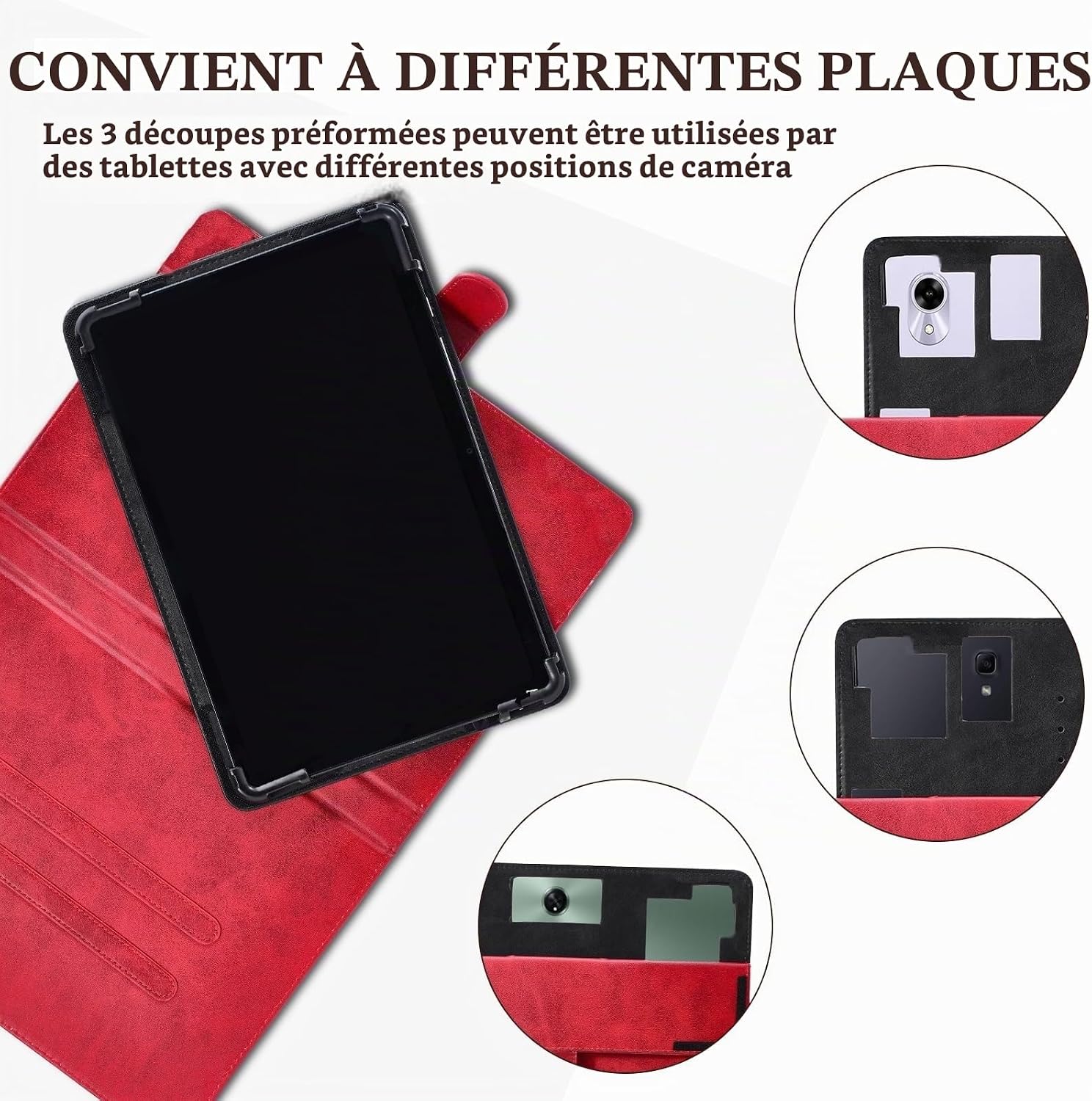
Image 3.1: 360-Degree Rotation and Adjustable Angles
3.2. Activating the Multi-Angle Stand Function
To use the stand function, fold the front cover back and position the tablet's edge into one of the anti-slip grooves on the inside of the cover. This allows for stable, hands-free viewing at multiple angles. The anti-slip band ensures your tablet remains securely in place.

Image 3.2: Multi-Angle Stand with Anti-Slip Feature
3.3. Using the Storage Pocket
The case includes a convenient pocket designed to hold cards, documents, or small notes. This feature adds practicality, allowing you to carry essential items alongside your tablet.
4. Care and Maintenance
To keep your Aroepurt tablet case in optimal condition, follow these maintenance guidelines:
- Cleaning: Wipe the exterior PU leather with a soft, damp cloth. Avoid using harsh chemicals or abrasive cleaners, as these can damage the material.
- Protection: The case is designed to protect against fingerprints, dirt, and scratches. Regularly clean the case to maintain its appearance and protective qualities.
- Storage: When not in use, store the case in a cool, dry place away from direct sunlight or extreme temperatures.
- Water Resistance: This case is not waterproof. Avoid exposing it to water or excessive moisture.
5. Troubleshooting
5.1. Tablet Does Not Fit
If your tablet does not fit securely into the case, please verify that you have the correct model (Senlintech Pad 6). This case is specifically designed for the Senlintech Pad 6. If you have the correct model and still experience issues, ensure the tablet is aligned properly before applying gentle pressure.
5.2. Stand is Not Stable
Ensure the tablet's edge is firmly seated within one of the anti-slip grooves on the case cover. The anti-slip band is designed to provide stability. If the stand still feels unstable, try adjusting the angle or the position of the tablet within the groove.
5.3. Automatic Sleep/Wake Function
Please note that this case does not support the automatic sleep/wake function of the tablet.
6. Specifications
| Feature | Detail |
|---|---|
| Brand | Aroepurt |
| Model Number | ARO-SSPB-2158 Red |
| Compatible Devices | Senlintech Pad 6 |
| Material | Polyurethane (PU Leather) |
| Color | Red |
| Product Dimensions (L x W x H) | 1 x 1 x 1 cm; 70 grams (approximate) |
| Special Features | 360-degree rotation, Multi-angle stand, Card slot, Anti-drop corner protection |
| Water Resistance Level | Not waterproof |
| Package Contents | 1 Tablet Case |
7. Warranty and Support
Specific warranty information for this product is not provided in the available product details. For any warranty claims, technical support, or product-related inquiries, please contact the seller or manufacturer directly through your purchase platform.
Documents and downloads
Ask a question about this manual
Ask about setup, troubleshooting, compatibility, parts, safety, or missing instructions. Manuals+ will review the question and use this page’s manual context to help answer it.