1. Product Overview
The Esfos Smart Cone Christmas Tree is a versatile lighting solution designed for both indoor and outdoor festive decorations. It features 210 multicolor LED lights, a star topper, and offers advanced control options via a mobile application and remote control, including music synchronization, custom light patterns, and timing functions.
This manual provides detailed instructions for assembly, operation, and maintenance to ensure optimal performance and enjoyment of your product.
2. Package Contents
Please verify that all components listed below are present in your package:
- Central Pole Sections
- Base Frame Sections
- Star Topper with LED Lights
- LED Light Strings (14 pieces)
- Ground Stakes (14 pieces)
- Remote Control
- Power Adapter
- Instruction Manual
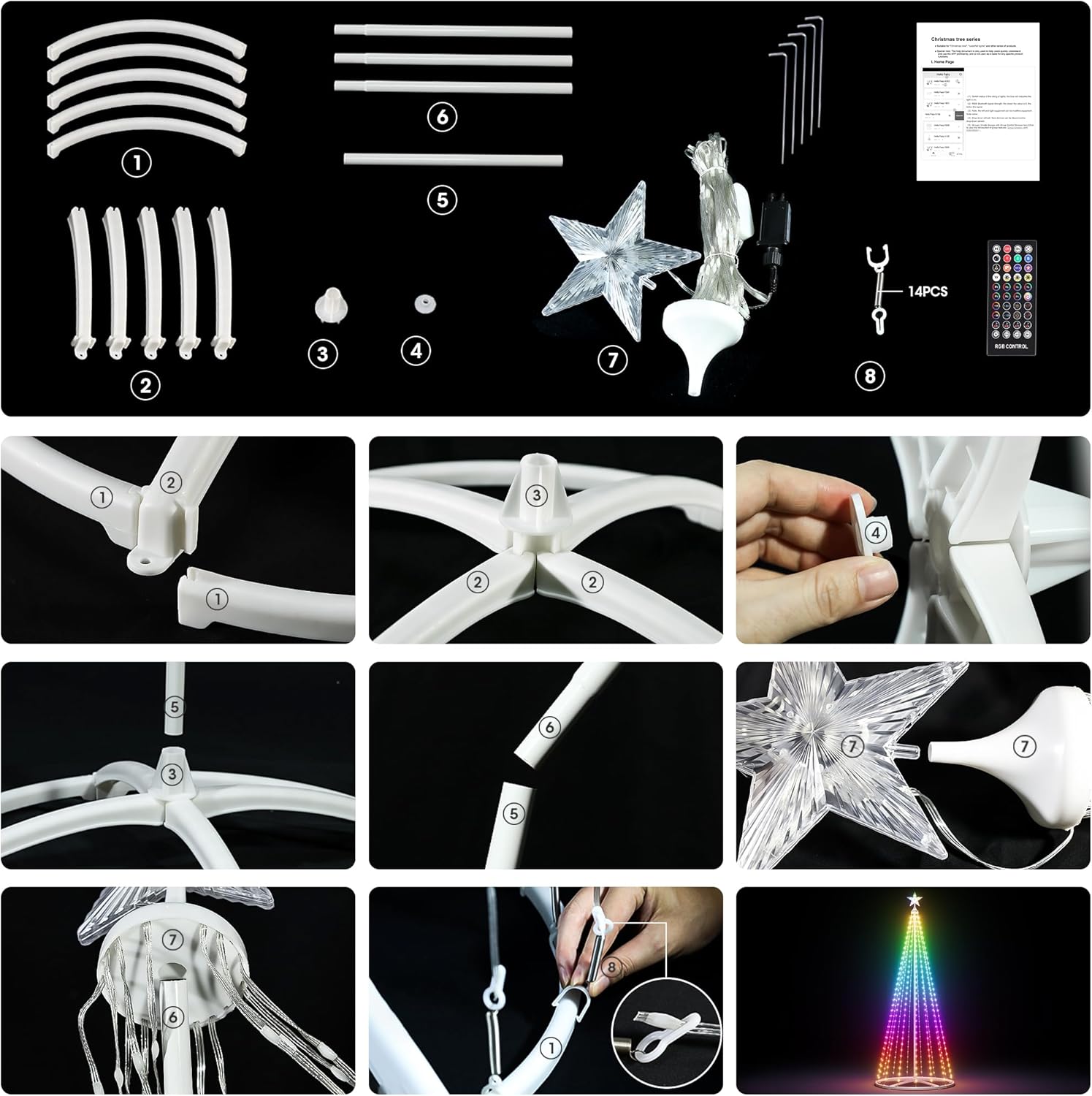
Detailed diagram showing all components and assembly steps for the Esfos Smart Cone Christmas Tree.
3. Setup and Assembly
Follow these steps to assemble your Smart Cone Christmas Tree:
- Assemble the Base: Connect the base frame sections together to form a stable circular base. Ensure all connections are secure.
- Assemble the Central Pole: Connect the central pole sections. Insert the assembled pole into the center of the base.
- Attach the Star Topper: Securely place the star topper onto the top of the central pole.
- Hang the Light Strings: Carefully attach each LED light string from the top ring of the central pole to the corresponding clips on the base frame. Distribute the strings evenly around the tree. It is recommended to attach three light strings per section of the base for even distribution.
- Secure to the Ground (Outdoor Use): For outdoor installation, use the provided ground stakes to firmly secure the base to the ground, preventing movement due to wind.
- Connect Power: Plug the power adapter into a suitable outdoor-rated power outlet.
Video demonstrating the assembly process and initial light patterns of the Christmas tree.
4. Operating Instructions
Your Esfos Smart Cone Christmas Tree can be controlled using the included remote control or a dedicated mobile application.
4.1 Remote Control Operation
The remote control allows for quick access to various functions. Ensure the remote has working batteries and is pointed towards the tree's receiver.

Diagram detailing the functions of each button on the included remote control.
- ON/OFF: Power the tree on or off.
- Pause/Play: Pause or resume current light pattern.
- Color Palette: Select specific colors.
- Light String Pattern Transformation Modes: Cycle through various pre-set light patterns.
- Single LED Color Button: Change the color of individual LEDs.
- Tree-Top Star Control Button: Control the lighting of the star topper.
- Toggle Between Text and Custom: Switch between displaying text or custom patterns.
- Brightness Button: Adjust the overall brightness of the lights.
- Loop the Scene for 30 Seconds: Repeat the current scene for a short duration.
- Text Scene Mode or Customizable: Access text display or custom pattern creation.
- Adjust Music Mode Sensitivity: Fine-tune the responsiveness of music sync.
- LED Brightness Adjustment Buttons: Incrementally adjust LED brightness.
- Timer Function: Set automatic on/off times.
- Four Music Modes: Choose from different music synchronization effects.
4.2 Mobile Application Control
For advanced customization and control, download the dedicated mobile application. Scan the QR code below or visit the provided URL to download the app.

Screenshots of the mobile application interface showing DIY, text, scene, music, and settings options, along with a QR code for download.
App Download Link: http://www.qrtransfer.com/fairylight.html
- DIY Customization: Create your own unique light patterns and designs. Each LED can be controlled individually.
- Text Display: Program custom text messages to scroll or display on the tree.
- Preset Scenes: Access multiple built-in smart scenes and atmospheric lighting effects.
- Music Synchronization: Utilize the high-sensitivity microphone to make the lights change synchronously with the rhythm of music.
- Timing & Dimming: Set schedules for automatic power on/off and adjust brightness levels according to your preference.
Video showcasing the mobile app's features, including text display and music synchronization.
5. Care and Maintenance
To ensure the longevity and optimal performance of your Esfos Smart Cone Christmas Tree, follow these care guidelines:
- Cleaning: Gently wipe the LED lights and frame with a soft, dry cloth. Avoid using harsh chemicals or abrasive cleaners.
- Storage: When not in use, disassemble the tree and store all components in their original packaging or a protective container in a cool, dry place away from direct sunlight and extreme temperatures.
- Inspection: Before each use, inspect the power cord, adapter, and light strings for any signs of damage. Do not use the product if any part is damaged.
- Outdoor Use: While designed for outdoor use, prolonged exposure to severe weather conditions (heavy rain, snow, strong winds) may reduce product lifespan. Consider bringing indoors during extreme weather.
6. Troubleshooting
If you encounter any issues with your Christmas tree, please refer to the following common troubleshooting steps:
- Lights Not Turning On:
- Ensure the power adapter is securely plugged into a working outlet and the tree.
- Check if the ON/OFF button on the remote or app has been pressed.
- Verify that the power outlet itself is functional by plugging in another device.
- Remote Control Not Responding:
- Replace the batteries in the remote control.
- Ensure there are no obstructions between the remote and the tree's receiver.
- Try operating the tree using the mobile application to determine if the issue is with the remote or the tree itself.
- App Connectivity Issues:
- Ensure Bluetooth is enabled on your mobile device.
- Make sure your device is within close proximity to the tree.
- Restart the app and/or your mobile device.
- If issues persist, try reinstalling the application.
- Inconsistent Light Patterns/Colors:
- Check all light string connections to the central pole and base for looseness.
- Ensure the light strings are evenly distributed and not tangled.
- Reset the tree by unplugging it for a few minutes and then plugging it back in.
If these steps do not resolve the issue, please contact customer support for further assistance.
7. Product Specifications
| Feature | Specification |
|---|---|
| Brand | Esfos |
| Model Number | CT01-180 |
| Product Dimensions | 27.6"D x 27.6"W x 72"H (6FT) |
| Material | Plastic |
| Item Weight | 4.2 Pounds |
| Number of LED Lights | 210 |
| Light Color | RGB (Multicolor) |
| Special Feature | Prelit, Music Sync, App & Remote Control |
| Tree Type | Cone |
| Base Type | Stand |
| UPC | 025128675978 |

Close-up view of the Christmas tree's sturdy features including the star top light, LED light strips, metal connecting rod, stable base, and windproof ground nail.
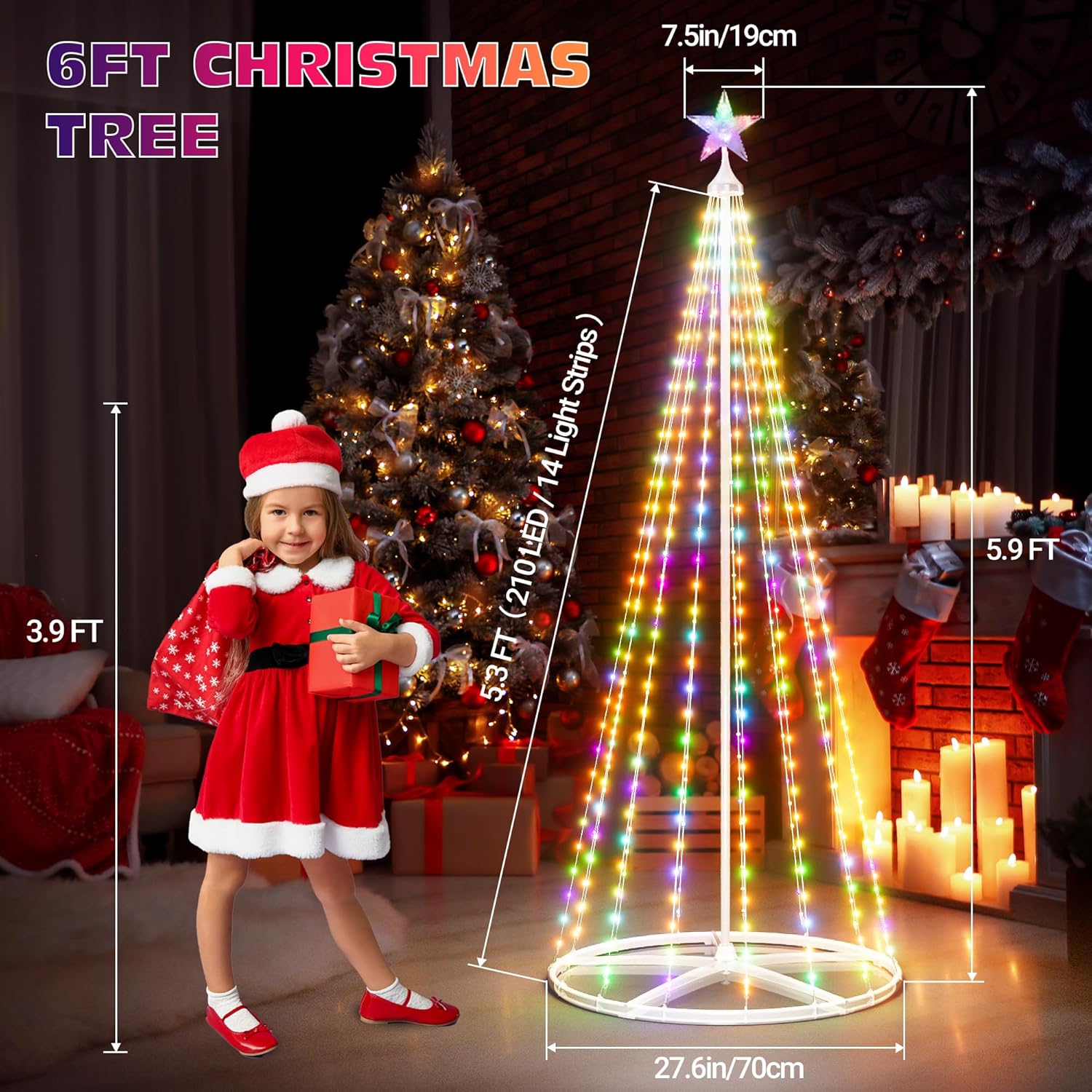
A child standing next to the 6FT Christmas tree, illustrating its dimensions of 5.9 FT height and 27.6 inch base diameter.
8. Warranty and Support
For warranty information or technical support, please contact Esfos customer service. Keep your purchase receipt and model number handy for faster service.
Contact information can typically be found on the product packaging or the official Esfos website.


