
1. Introduction
The Alfine A710 Pro 4D Massage Chair is designed to provide a comprehensive and customizable massage experience. Featuring advanced 4D roller technology, zero gravity recline, SL track coverage, full-body airbags, and integrated heat therapy, this chair aims to deliver deep relaxation and muscle relief. Control options include a touchscreen, shortcut buttons, mobile app, and voice commands, ensuring ease of use for all family members.
2. Safety Instructions
Before using the massage chair, please read and understand all safety instructions. Ensure the chair is placed on a level surface. Consult the user manual for maximum weight capacity and stability considerations. Keep children and pets away from the chair during operation. Do not attempt to disassemble or repair the chair yourself.
Weight Limit: Below 330 pounds (150 kg)
Height Limit: 4.9 feet to 6.2 feet (150 cm to 188 cm)

Figure 2.1: Product dimensions and user limits.
3. Package Contents
Verify that all components are present before beginning assembly:
- Main Unit (Massage Chair Body)
- Footrest Assembly
- Hand Controller / Tablet
- Hand Controller Bracket
- Power Cord
- User Manual
- Accessory Bag (screws, tools)
4. Setup & Installation
4.1 Unboxing
Carefully open the packaging and remove all protective materials. It is recommended to have at least two people for safe unboxing and positioning of the chair.
Video 4.1: Alfine A710 Pro Unboxing Tutorial. This video demonstrates the process of unboxing the massage chair and removing all packaging materials.
4.2 Footrest Installation
Connect the terminals and air pipes between the main unit and the footrest. Align the footrest with the main unit and secure it using the provided buckles. Ensure the buckles are inserted in the correct direction.
Video 4.2: Alfine A710 Pro Installation Tutorial. This video provides a detailed guide on how to install the footrest and connect its components to the main chair unit.
4.3 Hand Controller / Tablet Holder Installation
Rotate the holder clockwise to lock it into position. Once secured, snap the touchscreen controller into the holder.

Figure 4.1: Armrest with shortcut buttons and tablet holder.
4.4 Power Connection
Plug the power cord into the chair's power inlet and then into a wall outlet. Turn on the main power switch located near the power inlet. The chair will automatically return to an upright position.
5. Operating Instructions
The Alfine A710 Pro offers various ways to control your massage experience.
Video 5.1: ALFINE A710pro 4D Massage Chair Using Tutorial. This video guides users through the various functions and controls of the massage chair.
5.1 Turning On/Off
Press and hold the power button on the touchscreen or the armrest shortcut panel for 3 seconds to turn the chair on or off. Upon activation, the chair will automatically recline and perform a body scan.
5.2 Body Scan & Shoulder Position Adjustment
After turning on, the chair will perform an intelligent health detection and body scan to customize the massage. Ensure your back and neck are fully against the backrest and your feet are securely placed in the footrest. You can manually adjust the shoulder position using the up/down arrows on the touchscreen if needed, then press OK to confirm.

Figure 5.1: Health detection and body scanning in progress.
5.3 Operating Modes
The chair offers 20 auto programs and 8 customizable modes. You can also select from 11 manual massage techniques.

Figure 5.2: Overview of manual techniques and auto programs.
5.4 Zero Gravity Modes
The Zero Gravity feature elevates your legs above your heart, reducing spinal pressure and enhancing massage depth. The chair offers multiple zero gravity positions.

Figure 5.3: Zero Gravity recline position for reduced spinal pressure.
5.5 4D Roller Mechanism
Experience advanced 4D technology back mechanical massage, with adjustable width and 5 levels of intensity and speed. The rollers cover from neck to thigh along an SL track.
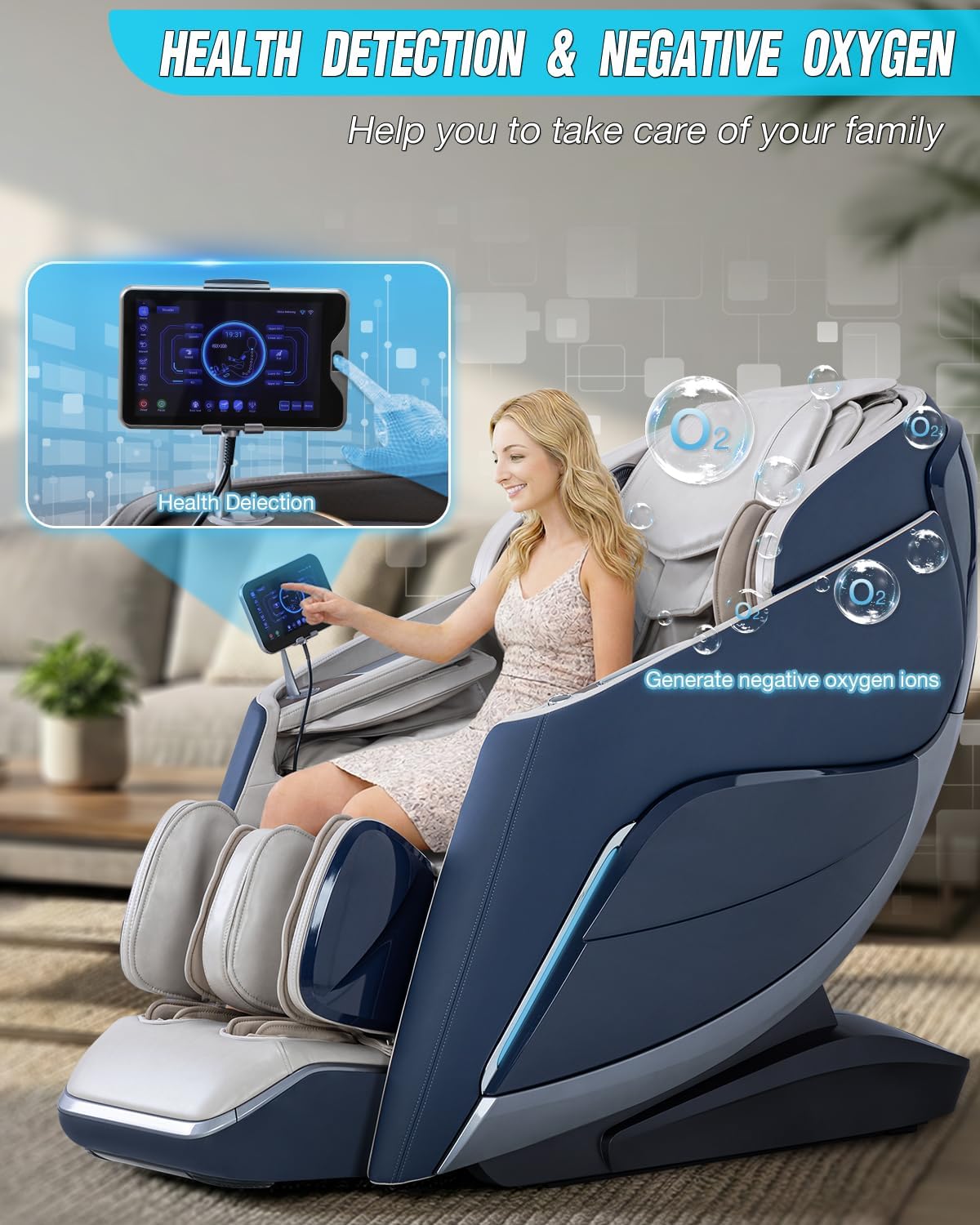
Figure 5.4: 4D roller mechanism with adjustable depth and width.
5.6 Airbag Massage
Full-body airbags with 5-level adjustable intensity and individually controlled zones for shoulders, arms, calves, and feet deliver targeted compression therapy.

Figure 5.5: Airbag massage with adjustable intensity.
5.7 Heat Therapy
The massage chair includes heating functions targeting both the upper and lower back, and features a heating shawl that can also warm your abdomen when draped over it.

Figure 5.6: Heat therapy zones for back and abdomen.
5.8 Calfrest Extension
The electric calfrest extends automatically and includes automatic detection of plantar position for personalized leg and foot massage. It combines 3-speed foot rollers, full-foot air compression, and calf kneading.

Figure 5.7: Electric calfrest extension and foot massage features.
5.9 Control Options
The chair supports remote control, armrest shortcut buttons, a mobile app, and voice control for flexible operation.

Figure 5.8: Various control options for the massage chair.
5.10 Wireless Charging
The chair includes a wireless charging pad for convenient charging of compatible mobile devices.
5.11 Full-Body Stretch
The chair offers a full-body stretch program to help decompress the spine and improve flexibility.

Figure 5.9: Full-body stretch feature.
5.12 Space-Saving Design
The chair features a space-saving design, requiring only 1.97 inches (5 cm) against the wall when fully reclined.

Figure 5.10: Space-saving design with minimal wall clearance.
6. Maintenance
Regular cleaning and proper storage will extend the life of your massage chair.
- Cleaning: Wipe the chair with a soft, damp cloth. Do not use abrasive cleaners or solvents.
- Storage: Store the chair in a cool, dry place away from direct sunlight and extreme temperatures.
7. Troubleshooting
If you encounter any issues, please refer to the following common solutions:
- Chair not turning on: Ensure the power cord is securely plugged in and the main power switch is on.
- Massage rollers not moving: Check if the body scan completed successfully. Adjust shoulder position if necessary.
- Voice control not responding: Ensure the voice control function is enabled in the settings. Speak clearly and directly towards the microphone.
8. Specifications
| Feature | Detail |
|---|---|
| Brand | Alfine |
| Model Name | A710 PRO |
| Product Dimensions | 58.27"D x 33.07"W x 48.03"H |
| Item Weight | 291 pounds |
| Material | Faux Leather |
| Special Feature | Adjustable Lumbar, Big and Tall, Foot Rest, Heavy Duty |
| Form Factor | Recliner |
9. Warranty & Support
Alfine has been researching and developing massage chairs for over 10 years. As a US-based massage chair factory, we have an After-Sale Department to service you in the USA or Canada. We offer 24-hour online customer service. Please contact us at any time for assistance.