1. Important Safety Information
Before operating your iScooter i10Max Electric Scooter, please read and understand all safety instructions. Failure to follow these instructions may result in serious injury or damage to the scooter.
- Always wear a helmet and appropriate safety gear (knee pads, elbow pads) when riding.
- Familiarize yourself with local laws and regulations regarding electric scooter usage.
- Perform a pre-ride inspection: check tire pressure, brake function, and ensure all parts are secure.
- Do not ride in wet conditions, heavy rain, or through puddles. The scooter has an IP54 waterproof rating, but it is not designed for submersion.
- Maintain a safe speed and distance from other vehicles and pedestrians.
- The maximum weight limit for this scooter is 264 lbs (120 kg). Do not exceed this limit.
- Avoid riding on steep inclines exceeding 20 degrees.
- Keep fingers and other body parts away from moving parts.
2. Package Contents
Upon opening the box, please verify that all the following items are included and in good condition:

Image: All components included in the iScooter i10Max package.
- i10Max Electric Scooter *1
- Charger *1
- Storage Bag *1
- Inner Tube *1
- Screws *6
- Allen Wrench *1
- Extension Tube *1
- Product Manual *1
3. Setup
3.1 Assembly
The iScooter i10Max features a one-piece pre-installation design, meaning it comes largely pre-assembled. No complex assembly is required upon receipt.
3.2 Initial Charging
Before first use, fully charge the scooter's battery. Connect the charger to the charging port on the scooter and then to a power outlet. The charging time is approximately 8-9 hours for a full charge.
3.3 Folding and Unfolding
The i10Max is designed for easy portability with a 3-step folding system:

Image: Step-by-step guide to folding the iScooter i10Max.
- Step 1: Unlock - Please unlock the folding device.
- Step 2: Fold - Bend the handlebar down to secure the buckle.
- Step 3: Carry - Lift the scooter once locked. It weighs approximately 46 lbs.
4. Operating Instructions
4.1 Power On/Off
To power on the scooter, press and hold the power button on the display. To power off, press and hold the power button again.
4.2 Riding Modes
The i10Max offers four-speed modes to suit different riding conditions. You can switch between these modes via the scooter's display or the companion app.

Image: Range performance across different speed modes.
- Eco Mode (9 mph): Max range of 50 miles.
- D Mode (15 mph): Max range of 40 miles.
- S Mode (21 mph): Max range of 34 miles.
- Max Speed Mode (28 mph): Max range of 25 miles.
4.3 Smart App Usage
Enhance your riding experience by connecting your i10Max to the dedicated smartphone app. The app provides additional features and controls.

Image: Features available through the Smart KCQ Scooter App.
- Map Navigation: Use the built-in map navigation function for worry-free journeys.
- Riding Records: Track your ride history.
- Headlight Control: Turn headlights on/off.
- Cruise Control: Activate and manage cruise control.
- Riding Mode Switch: Easily change speed modes.
- Lock/Unlock Scooter: Secure your scooter remotely.
- Zero/Non-zero Startup: Configure how the scooter starts.
4.4 Braking System
The i10Max is equipped with a dual braking system for reliable stopping power, including a hand brake drum brake and a hidden electronic brake.

Image: Details of the i10Max's dual braking system.
Apply the brake levers gently and evenly to slow down or stop. Avoid sudden braking, especially at high speeds, to prevent loss of control.
4.5 Turn Signals
The scooter features integrated turn signals to enhance safety by indicating your turning intentions to others. Operate them using the controls on the handlebar.
4.6 Display and Controls
The handlebar features a clear display and intuitive controls for easy operation.

Image: Overview of the i10Max's display and control functions.
- Cruise Control Indicator: Shows when cruise control is active.
- Turning Tip Indicator: Displays turn signal activation.
- Speed Mode: Indicates the current riding mode (Eco, D, S).
- Battery Indicator: Shows remaining battery level.
- Power Button: Used for turning the scooter on/off and navigating display options.
5. Maintenance
5.1 General Care
Regularly clean your scooter with a damp cloth. Avoid using high-pressure water jets or harsh chemicals. Check all screws and bolts periodically to ensure they are tightened.
5.2 Tire Maintenance
The i10Max is equipped with 10-inch pneumatic tires. Maintain proper tire pressure as specified in the specifications section to ensure optimal performance and prevent punctures.

Image: Detail of the 10-inch pneumatic tires.
5.3 Battery Care
To prolong battery life, avoid completely draining the battery. Charge it regularly, even if not in frequent use. Store the scooter in a cool, dry place away from direct sunlight and extreme temperatures.
5.4 Storage
When storing the scooter for extended periods, ensure it is clean and fully charged. Store it indoors in a dry environment to protect electronic components and the battery.
6. Troubleshooting
This section addresses common issues you might encounter with your iScooter i10Max. For problems not listed here, please contact customer support.
| Problem | Possible Cause | Solution |
|---|---|---|
| Scooter does not turn on | Low battery; Power button not pressed correctly; Loose connection | Charge the battery; Press and hold the power button firmly; Check all visible connections. |
| Reduced range or speed | Low tire pressure; Overload (exceeding weight limit); Battery degradation; Riding uphill frequently | Check and inflate tires to recommended pressure; Ensure rider weight is within limits; Fully charge battery; Adjust riding habits. |
| Brakes feel weak | Brake cable loose; Brake pads worn | Adjust brake cable tension; Inspect and replace brake pads if necessary (professional service recommended). |
| Tire goes flat frequently | Puncture; Incorrect tire pressure | Inspect tire for punctures and repair/replace inner tube; Maintain correct tire pressure. |
7. Specifications
Detailed technical specifications for the iScooter i10Max Electric Scooter:
| Feature | Specification |
|---|---|
| Model Name | i10MAX |
| Motor Power | 750W |
| Top Speed | 28 Mph |
| Battery | 54.6V 15.6Ah |
| Maximum Distance Range | 50 Miles |
| Charging Time | 9 Hours |
| Weight Limit | 264 Pounds |
| Wheel Size | 10 Inches |
| Wheel Type | Pneumatic |
| Suspension Type | Dual Suspension |
| Brake Style | Double Braking Systems |
| Frame Material | Aluminum |
| Waterproof Rating | IP54 |
| Included Components | Storage Bag, i10Max Escooter |
| Recommended Uses | Urban commuting |
7.1 Dimensions
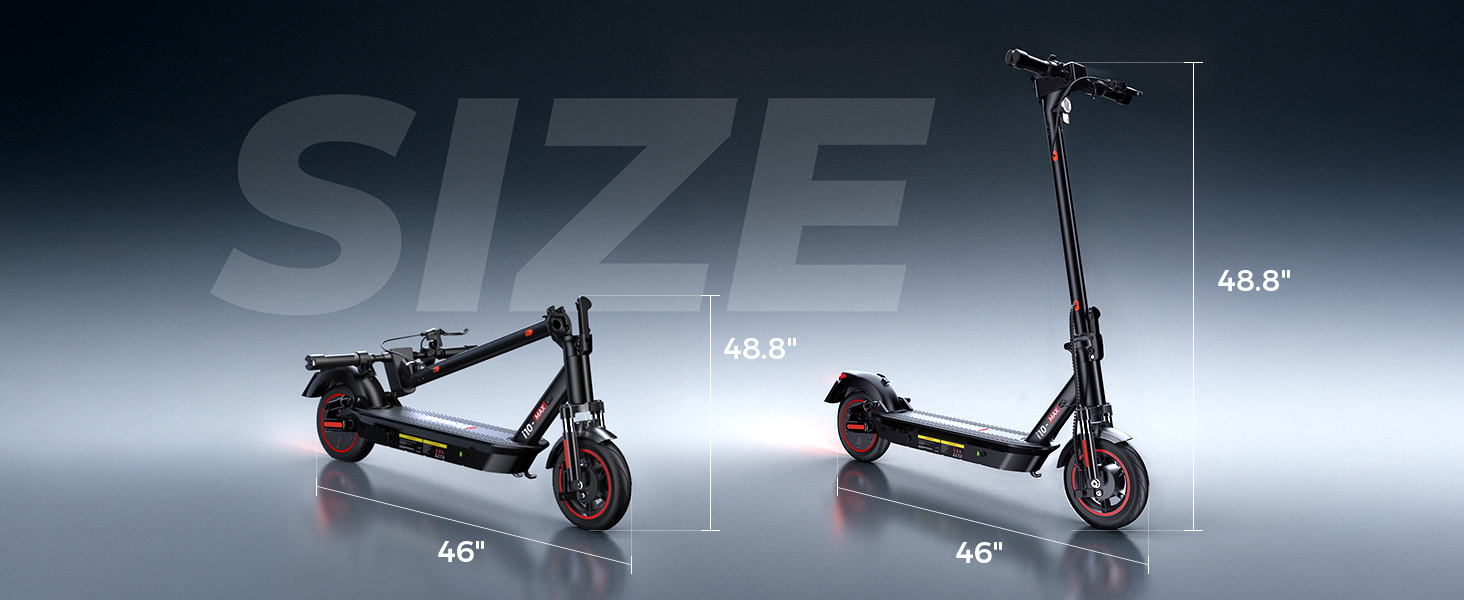
Image: Unfolded and folded dimensions of the i10Max scooter.
- Unfolded Height: Approximately 48.8 inches
- Unfolded Length: Approximately 46 inches
- Folded Length: Approximately 46 inches
8. Warranty and Support
8.1 Warranty Information
The iScooter i10Max comes with a limited warranty. The warranty period is 1 year for the main components and 6 months for specific parts. Please refer to the warranty card included in your package for detailed terms and conditions.
8.2 Customer Support
For any questions, technical assistance, or warranty claims, please contact iScooter customer support:
- Call Center: +1 (855) 916-2366
- Live Chat/Email: support@iscooterglobal.com
iScooter aims to provide excellent after-sale service, with support available within 24 hours.


