
Introduction
Thank you for choosing the Modern Ember Uptown 36-inch Smart Electric Fireplace Insert. This manual provides essential information for the safe operation, installation, and maintenance of your new electric fireplace. Please read this manual thoroughly before installation and use, and retain it for future reference.
This smart electric insert combines powerful heating capabilities with a stylish design and realistic flame effects. It features Wi-Fi connectivity for control via the Tuya app, a remote control, and a digital touch panel. Enjoy customizable flame colors, speeds, and brightness settings, along with a thermostatic supplemental heater designed to warm spaces up to 1000 square feet.

Image: The Modern Ember Uptown 36-inch Smart Electric Fireplace Insert, showcasing its design and flame effects within a modern living space.
Important Safety Information
WARNING: To reduce the risk of fire, electric shock, or injury, read all instructions before using this appliance.
- Keep combustible materials, such as furniture, pillows, bedding, papers, clothes, and curtains at least 3 feet (0.9 m) from the front of the heater and away from the sides and rear.
- Do not insert or allow foreign objects to enter any ventilation or exhaust opening as this may cause an electric shock or fire, or damage the heater.
- Always use a properly grounded, fused, and polarized outlet.
- Do not operate any heater with a damaged cord or plug or after the heater malfunctions, has been dropped or damaged in any manner.
- This appliance is not intended for use by persons (including children) with reduced physical, sensory or mental capabilities, or lack of experience and knowledge, unless they have been given supervision or instruction concerning use of the appliance by a person responsible for their safety.
- Children should be supervised to ensure that they do not play with the appliance.
- Do not use outdoors.
Package Contents
Carefully remove all components from the packaging and check against the list below. Ensure all items are present and undamaged before discarding packaging materials.
- Modern Ember Uptown 36-inch Electric Fireplace Insert
- Remote Control
- Log Set and Crystal Embers
- User Manual (this document)
- Mounting Hardware (if applicable for insert installation)
Setup & Installation
1. Choosing a Location
Select a firm, level location for your fireplace insert. Ensure there is adequate clearance from combustible materials as per safety guidelines. The unit is designed for indoor use only.
2. Electrical Connection
The fireplace insert offers flexible installation options:
- Plug-in Installation: Plug the power cord directly into a standard 120V, 60Hz, 15 Amp grounded outlet. Do not use extension cords or power strips.
- Direct Wire Installation: For a clean, streamlined appearance, the unit can be direct-wired by a qualified electrician. Refer to the wiring diagram in the appendix (if provided in physical manual) or consult a professional.
3. Inserting the Log Set and Crystal Embers
Carefully place the provided resin log set and crystal embers onto the ember bed within the fireplace insert. Arrange them to achieve your desired aesthetic.

Image: Dimensional diagram of the fireplace insert, highlighting its compact design and suitability for various fireplace openings. Note: Trim kit sold separately.
Operating Instructions
Your Modern Ember Uptown fireplace insert can be operated using the included remote control, the digital touch panel on the unit, or via the Tuya Smart app on your mobile device.
1. Remote Control Operation
Ensure 2 AAA batteries are installed in the remote control. Point the remote directly at the fireplace insert for optimal response.

Image: Detailed view of the remote control, indicating buttons for Heat On/Off, Temperature/Flame Increase/Decrease, Flame Color Control, Timer, Flame Brightness, and Flame Speed.
- Power Button (⏻): Turns the fireplace ON or OFF.
- Heat On/Off (♨): Activates or deactivates the heating function.
- Temperature/Flame Increase (+): Increases temperature setting when heat is on, or increases flame intensity/speed when heat is off.
- Temperature/Flame Decrease (-): Decreases temperature setting when heat is on, or decreases flame intensity/speed when heat is off.
- Flame Color Control (◎): Cycles through 5 flame color options.
- Timer (⏷): Sets the operating timer for automatic shut-off.
- Flame Brightness (☀): Adjusts flame brightness through 10 settings.
- Flame Speed (⟳): Adjusts flame speed through 10 settings.
2. Digital Touch Panel Operation
The digital touch panel on the unit provides direct control over all functions. The icons on the panel correspond to the remote control functions.
3. Smart Control (Tuya App / Alexa / WiFi)
The Modern Ember Uptown fireplace insert is Wi-Fi enabled and compatible with the Tuya Smart app and Alexa for voice control.
- Download the Tuya Smart App: Search for "Tuya Smart" in your mobile device's app store and install it.
- Register/Log In: Create an account or log in to your existing Tuya Smart account.
- Add Device: Follow the in-app instructions to add your fireplace insert. This typically involves putting the fireplace into pairing mode (refer to the specific instructions in the app or on the unit's display) and connecting it to your home Wi-Fi network.
- Control Functions: Once connected, you can control all fireplace functions (power, heat, temperature, flame effects, timer) directly from the app.
- Alexa Integration: Enable the "Tuya Smart" skill in your Alexa app and link your Tuya account. You can then use voice commands like "Alexa, turn on the fireplace" or "Alexa, set fireplace temperature to 72 degrees."

Image: Illustration of smart control capabilities, showing the Tuya app on a smartphone and an Alexa voice command bubble, demonstrating remote and voice control options.
4. Flame Effects and Heating
- Flame Colors: Choose from 5 distinct flame colors to match your mood or decor.
- Flame Speed: Adjust the flame movement speed with 10 available settings.
- Flame Brightness: Control the intensity of the flame effect with 10 brightness levels.
- Heating: The thermostatic heater can be set between 64°F and 82°F (18°C to 28°C) in 2° increments. The heater provides supplemental warmth for areas up to 1000 sq ft. The flame effect can be operated independently of the heat function for year-long ambiance.
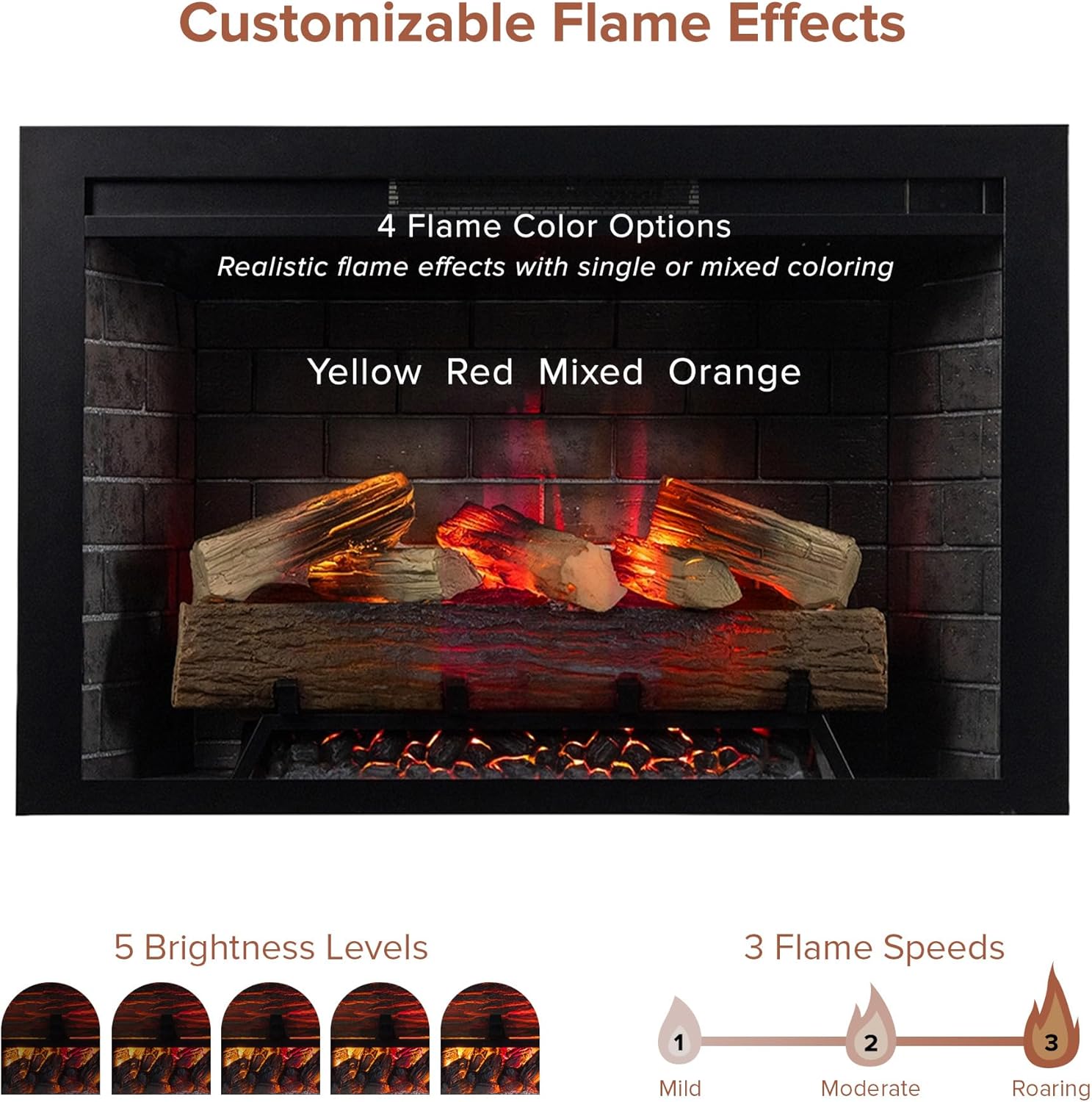
Image: Visual representation of the customizable flame effects, showing different color options, brightness levels, and flame speeds.

Image: Demonstrates the heating capabilities of the fireplace, highlighting its ability to provide supplemental heat for up to 1000 square feet.
Maintenance
Regular maintenance ensures the longevity and optimal performance of your fireplace insert.
- Cleaning: Always unplug the appliance before cleaning. Use a soft, damp cloth to clean the exterior surfaces. Do not use abrasive cleaners or sprays.
- Ventilation Openings: Keep the ventilation openings clear of dust and debris to ensure proper airflow and prevent overheating.
- Light Bulbs: The flame effect uses LED technology, which typically does not require replacement. If issues arise, contact customer support.
- Storage: If storing the unit for an extended period, unplug it and store it in a dry, dust-free location.
Troubleshooting
| Problem | Possible Cause | Solution |
|---|---|---|
| Unit does not turn on. | No power, tripped circuit breaker, loose connection. | Check power cord connection, ensure outlet is functional, reset circuit breaker. |
| No heat output. | Heat function off, temperature setting too low, thermal cut-off activated. | Activate heat function, increase temperature setting, allow unit to cool if overheated. |
| Remote control not working. | Dead batteries, obstruction, remote out of range. | Replace batteries, remove obstructions, ensure remote is pointed at the unit within range. |
| Flame effect not visible or flickering. | Brightness setting too low, internal component issue. | Increase flame brightness. If problem persists, contact customer support. |
| Wi-Fi connection issues. | Incorrect Wi-Fi password, router too far, interference. | Verify Wi-Fi password, move unit closer to router, restart router, re-pair device in Tuya app. |
Specifications
| Feature | Detail |
|---|---|
| Brand | Modern Ember |
| Model Name | EF-TL-36 |
| Product Dimensions | 9.41"D x 39.01"W x 24.91"H |
| Power Source | Corded Electric |
| Material | Metal |
| Installation Type | Plug-in / Direct Wire |
| Heating Coverage | Up to 1000 sq ft |
| Ventilation Type | Vent Free |
| Control Methods | Remote Control, Digital Touch Panel, Tuya Smart App (Wi-Fi), Alexa Voice Control |
| Flame Settings | 5 Colors, 10 Speeds, 10 Brightness Levels |
| Thermostat Range | 64°F to 82°F (18°C to 28°C) |
| Item Weight | 67.9 pounds |
| Batteries Required | 2 AAA (for remote control) |
Warranty Information
This Modern Ember product comes with a Limited Warranty. Please refer to the warranty card included with your purchase or visit the official Modern Ember website for detailed terms and conditions. The warranty typically covers manufacturing defects and material flaws under normal use and service.
Keep your proof of purchase (receipt or invoice) for warranty claims.
Customer Support
If you have any questions, require technical assistance, or need to report a problem with your Modern Ember Uptown 36-inch Smart Electric Fireplace Insert, please contact our customer support team.
- Website: Visit the Modern Ember Store on Amazon (for general product information)
- Email: Refer to your warranty card or product packaging for specific contact email.
- Phone: Refer to your warranty card or product packaging for specific contact phone number.
Please have your model number (EF-TL-36) and purchase date ready when contacting support.


