
1. Introduction
Thank you for choosing the Casanoov EIGER Motorized Sliding Gate with TANKER C600 Motorization. This manual provides essential information for the safe and efficient installation, operation, and maintenance of your new gate system. Please read these instructions carefully before beginning installation or use, and retain them for future reference.
2. Safety Information
Your safety and the safety of others are paramount. Always observe the following safety precautions:
- Read all instructions: Ensure you understand all installation and operating instructions before proceeding.
- Qualified personnel: Installation and electrical connections should only be performed by qualified personnel.
- Keep clear: Do not allow children or pets near the gate during operation. Keep the area around the gate clear of obstructions.
- Emergency stop: Familiarize yourself with the manual release mechanism for emergency situations or power outages.
- Regular inspection: Periodically inspect the gate and motorization system for signs of wear, damage, or misalignment.
- Power disconnection: Always disconnect power to the motor before performing any maintenance or repairs.
3. Package Contents
Verify that all components are present and undamaged before beginning installation. The package typically includes the following:

Figure 3.1: Gate Components and Dimensions. This image illustrates the overall dimensions of the EIGER sliding gate (348 cm width, 178 cm height) and its individual components, including the gate panels, handle, rollers (x4), and a guide rail. It also shows the panel thickness (1.1mm to 1.2mm) and height (160mm).

Figure 3.2: TANKER C600 Motorization Kit. This image displays the complete motorization kit, which includes the TANKER C600 motor unit, two remote controls, a warning light, a pair of safety photocells, and 12 segments of gear rack for the gate's movement.
- EIGER Sliding Gate: Aluminum gate panels (3.5m total width, 1.8m height).
- Gate Hardware: Handle, 4 rollers, guide rail.
- TANKER C600 Motor: Main motor unit.
- Remote Controls: Two units for gate operation.
- Safety Accessories: Warning light, photocells.
- Installation Hardware: Gear rack segments (x12), mounting bolts, keys for manual release.
4. Specifications
| Feature | Specification |
|---|---|
| Product Model | PAC-000184 |
| Gate Type | Sliding Gate |
| Gate Dimensions (L x H) | 348 cm x 178 cm (3.5m x 1.8m) |
| Gate Material | Aluminum |
| Gate Color | Black (Noir) |
| Gate Panel Thickness | 1.1 mm - 1.2 mm |
| Total Weight | 67.1 KG |
| Motorization Model | TANKER C600 |
| Assembly Required | Yes |

Figure 4.1: TANKER C600 Motor Dimensions. This technical drawing provides detailed measurements of the motor unit, including its height (250mm), width (275mm), and depth (248mm), essential for planning the installation space.
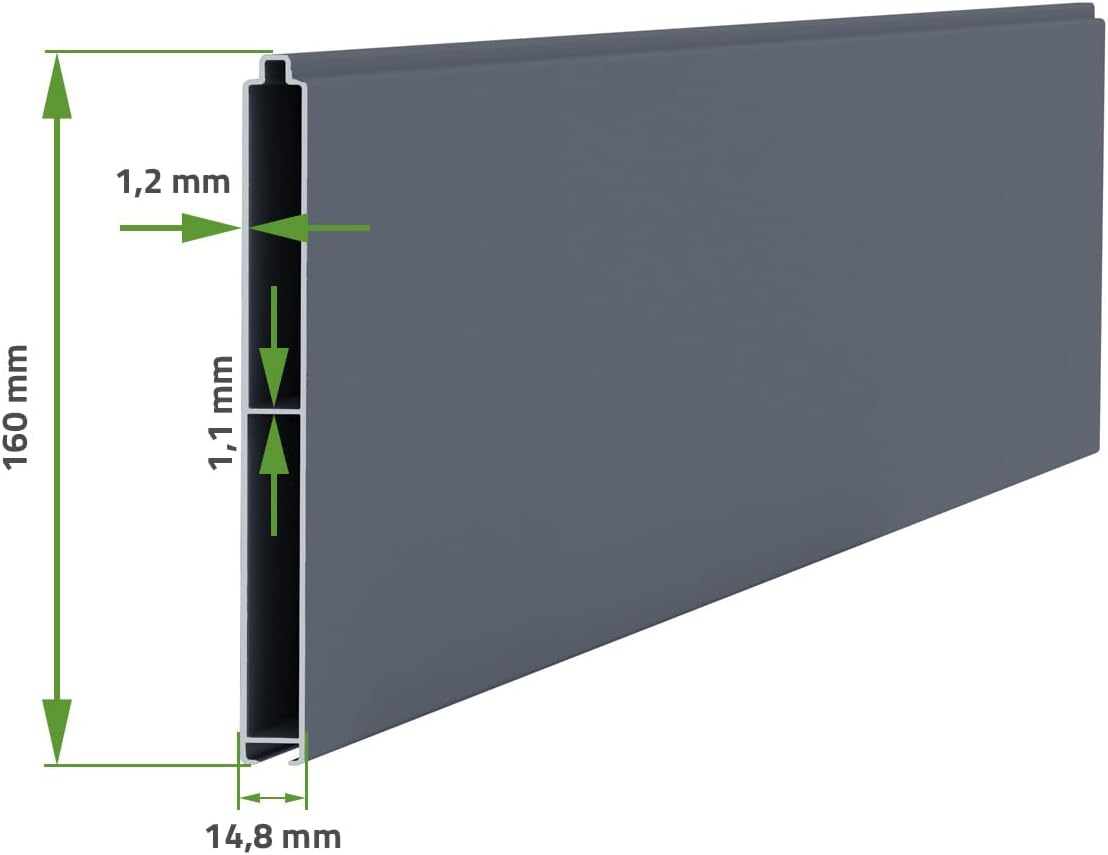
Figure 4.2: Gate Panel Cross-Section. A detailed view of the gate panel's construction, highlighting the aluminum material and precise thickness measurements (1.1mm and 1.2mm) for structural integrity.
5. Setup and Installation
The Casanoov EIGER gate and TANKER C600 motorization are designed for straightforward assembly. Follow these general steps for installation:
- Site Preparation: Ensure the ground is level and stable. A concrete foundation is recommended for the gate track and motor mounting plate.
- Gate Assembly: Assemble the aluminum gate panels according to the provided diagrams. Ensure all connections are secure.
- Track Installation: Install the ground track for the sliding gate, ensuring it is perfectly level and aligned with the gate's path.
- Gate Mounting: Mount the gate onto the rollers and track. Verify smooth sliding motion.
- Motor Mounting: Securely mount the TANKER C600 motor unit on its foundation, ensuring it is correctly positioned relative to the gate's movement path. Refer to Figure 4.1 for motor dimensions.
- Rack Installation: Attach the gear rack segments to the bottom edge of the gate, ensuring proper engagement with the motor's pinion gear. Maintain a small clearance between the rack and the pinion.
- Electrical Connections: Connect the motor to the main power supply and install safety photocells and the warning light as per the electrical diagram (not provided in this manual, refer to specific motor instructions). Ensure all wiring is done by a qualified electrician.
- Limit Switch Adjustment: Adjust the motor's limit switches to define the gate's fully open and fully closed positions.
- Remote Control Pairing: Pair the remote controls with the motor unit according to the motor's specific instructions.

Figure 5.1: Installed EIGER Sliding Gate. This image shows the Casanoov EIGER gate in an operational setting, highlighting its design and how it integrates with a residential property. Proper installation ensures both functionality and aesthetic appeal.
6. Operating Instructions
Once installed, operating your Casanoov motorized gate is simple:
- Remote Control: Press the designated button on your remote control to open or close the gate. A single press typically initiates movement, and another press can stop it.
- Safety Photocells: The photocells detect obstructions in the gate's path. If an obstruction is detected during closing, the gate will stop or reverse. During opening, it will stop.
- Manual Release: In case of a power failure or motor malfunction, use the provided key to unlock the motor and manually slide the gate open or closed. Refer to the motor's specific manual for the exact procedure.
- Warning Light: The warning light will flash during gate operation to alert pedestrians and vehicles.
7. Maintenance
Regular maintenance ensures the longevity and reliable operation of your gate system:
- Cleaning: The aluminum gate requires minimal maintenance. A simple cleaning with soapy water is sufficient to restore its shine. Avoid abrasive cleaners.
- Lubrication: Periodically lubricate the gate rollers, hinges (if any), and the motor's pinion gear with a suitable lubricant to ensure smooth operation.
- Track Cleaning: Keep the gate track clear of debris, leaves, and dirt to prevent obstructions and ensure smooth sliding.
- Component Inspection: Regularly check all bolts, screws, and connections for tightness. Inspect the gear rack for any damage or missing teeth.
- Photocell Check: Ensure the safety photocells are clean and properly aligned. Test their functionality periodically by placing an object in their path during gate operation.
- Remote Control Batteries: Replace remote control batteries as needed.

Figure 7.1: Aluminum Gate Maintenance. This image emphasizes the low maintenance requirements of aluminum gates, stating that a simple cleaning with soapy water is enough to maintain its appearance, contrasting it with iron gates that require anti-corrosion treatment.
8. Troubleshooting
If you encounter issues with your gate system, try these basic troubleshooting steps:
| Problem | Possible Cause | Solution |
|---|---|---|
| Gate does not move | No power to motor Remote control battery flat Manual release engaged | Check power supply and circuit breaker Replace remote control battery Disengage manual release mechanism |
| Gate stops during operation | Obstruction detected by photocells Limit switch misalignment Motor overheating | Clear obstruction, clean photocells Re-adjust limit switches Allow motor to cool down |
| Gate moves slowly or with difficulty | Track obstruction or damage Rollers require lubrication Motor issue | Clean or repair track Lubricate rollers Contact support if motor issue persists |
| Remote control not working | Battery flat Not paired correctly Interference | Replace battery Re-pair remote control (refer to motor manual) Check for sources of interference |
If the problem persists after attempting these solutions, please contact customer support.
9. Warranty and Support
Casanoov is committed to providing quality products and excellent customer service. Our after-sales service, based in France, is available to answer your questions and ensure a serene and satisfying purchasing experience. We offer secure delivery, availability of spare parts if needed, and follow-up guarantee after purchase.
For technical assistance, spare parts, or warranty claims, please contact Casanoov customer support through your purchase platform or the official Casanoov website.