
Pentair 523624
Contents
IntelliCenter Lite Pool/Spa Power Center User Manual
Comprehensive guide for installation, operation, and maintenance of your Pentair IntelliCenter Lite Pool/Spa Power Center with CVA24 Valve Actuators.
Product Overview
The Pentair IntelliCenter Lite Pool/Spa Power Center is designed to provide centralized control over your pool or spa equipment. This system, including two CVA24 Standard Valve Actuators, simplifies the management of water features, allowing for precise adjustments and efficient operation. It offers a robust and user-friendly solution for maintaining your aquatic environment.
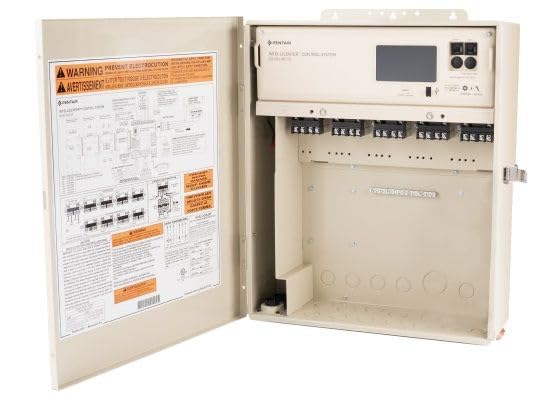
This image displays the IntelliCenter Lite Pool/Spa Power Center with its front panel open. Inside, the main control unit is visible at the top, featuring a display screen and control buttons. Below the control unit are multiple terminal blocks for electrical connections. The inside of the door shows a detailed wiring diagram and safety warnings, essential for proper installation and operation.
Key Features
- Convenient Control: IntelliCenter Lite Pool/Spa Power Center allows easy management of pool/spa equipment and accessories.
- Automated Operation: Includes 2 CVA24 Standard Valve Actuators for automated valve control and water flow regulation.
- Efficient Design: Streamlined system consolidates multiple components into a single, integrated unit.
- Versatile Compatibility: Compatible with a wide range of pool/spa equipment and accessories.
- Reliable Performance: Engineered for dependable and consistent operation in demanding pool/spa environments.
Setup and Installation
Proper installation is crucial for the safe and efficient operation of your IntelliCenter Lite system. It is recommended that installation be performed by a qualified professional.
1. Mounting the Power Center
Select a suitable location for the power center, ensuring it is protected from direct sunlight and extreme weather conditions, and is easily accessible for maintenance. Mount the unit securely to a vertical surface using appropriate fasteners.
2. Electrical Connections
All electrical wiring must comply with local and national electrical codes. Ensure the main power supply is disconnected before making any connections. Refer to the wiring diagram located on the inside of the power center door for specific connection points for pumps, heaters, lights, and other accessories. Connect the main power input to the designated terminals.
3. Connecting CVA24 Valve Actuators
Connect the two CVA24 Standard Valve Actuators to the designated valve actuator ports on the IntelliCenter Lite unit. Ensure proper alignment and secure fastening. These actuators control water flow to various pool/spa features.
4. Initial Power-Up and Configuration
Once all connections are secure, restore power to the unit. Follow the on-screen prompts on the IntelliCenter Lite display to perform initial setup, including setting the date, time, and configuring connected equipment. Refer to the detailed installation manual for specific programming steps.
Operating Instructions
The IntelliCenter Lite system provides intuitive control over your pool and spa functions. Operations are managed through the integrated display and buttons on the power center, or via compatible remote interfaces (if applicable).
1. Navigating the Interface
Use the navigation buttons adjacent to the display screen to scroll through menus and select options. The display provides real-time status updates for all connected equipment.
2. Scheduling Operations
Access the 'Schedules' menu to set up automated run times for pumps, heaters, and lights. You can create multiple schedules for different days or times to optimize energy efficiency and convenience.
3. Manual Control
For immediate adjustments, use the 'Manual Control' option to turn equipment on or off, or to adjust settings like heater temperature. Remember to return to scheduled operation when manual adjustments are no longer needed.
4. Valve Actuator Control
The CVA24 valve actuators automatically direct water flow based on programmed settings or manual commands. Ensure the actuators are properly calibrated during setup to prevent water flow issues.
Maintenance
Regular maintenance ensures the longevity and optimal performance of your IntelliCenter Lite system.
- Keep Clean: Periodically wipe down the exterior of the power center to remove dust and debris. Ensure ventilation openings are clear.
- Inspect Wiring: Annually inspect all electrical connections for signs of wear, corrosion, or looseness. Ensure all terminal screws are tight.
- Check Actuators: Verify that the CVA24 valve actuators move freely and are not obstructed. Lubricate as per manufacturer's recommendations if necessary.
- Software Updates: Check the Pentair website for any available software updates for your IntelliCenter Lite system to ensure you have the latest features and bug fixes.
Troubleshooting
This section provides solutions to common issues you might encounter.
| Problem | Possible Cause | Solution |
|---|---|---|
| System not powering on | No power supply; tripped breaker; loose wiring. | Check main power supply; reset circuit breaker; inspect and secure all electrical connections. |
| Valve actuator not moving | Obstruction; electrical issue; actuator malfunction. | Clear any obstructions; check wiring to actuator; consult a professional for actuator replacement if faulty. |
| Equipment not responding to commands | Incorrect wiring; programming error; equipment fault. | Verify wiring against diagram; check programming settings; test individual equipment components. |
Specifications
| Attribute | Value |
|---|---|
| Product Dimensions | 25 x 15 x 6 inches |
| Item Weight | 20 pounds |
| Manufacturer | Pentair |
| ASIN | B0DG958FQG |
| Item model number | 523624 |
Warranty Information
Pentair products are manufactured to high quality standards and are backed by a limited warranty. Specific warranty terms and conditions may vary. Please refer to the warranty card included with your product or visit the official Pentair website for detailed information regarding coverage, duration, and claims procedures.
Support
For technical assistance, replacement parts, or further inquiries, please contact Pentair customer support or visit their official website.
You can also visit the Pentair Store on Amazon for additional product information and resources.
Ask a question about this manual
Ask about setup, troubleshooting, compatibility, parts, safety, or missing instructions. Manuals+ will review the question and use this page’s manual context to help answer it.