
Introduction
The DEWIN WiFi Intelligent Energy Meter is a sophisticated device designed for comprehensive energy monitoring. It accurately measures total power in both forward and reverse channels, providing insights into energy consumption and production. With its dual-channel measurement capability, users can independently track power usage for two distinct circuits. The meter integrates with mobile applications like Smart Life and Tuya, offering real-time data monitoring and automation features.
Important Notes:
- Always update the software before using the connection application to ensure accurate data measurement.
- Data can only be measured when there is active consumption in the circuit.
- Read these instructions carefully and ensure correct wiring before use to avoid measurement errors.
Setup and Installation
The DEWIN WiFi Intelligent Energy Meter is designed for easy installation on a standard 35mm DIN rail. Follow the steps below for proper setup and wiring.
1. Physical Installation
Mount the energy meter onto a standard 35mm DIN rail. Its compact size allows for convenient placement within electrical panels.

Image: The DEWIN WiFi Intelligent Energy Meter shown being mounted onto a 35mm DIN rail, highlighting its compatibility with standard electrical enclosures.
2. Wiring Diagram
Refer to the wiring diagram below for connecting the meter and current transformers (CTs) to your AC circuit. Ensure all connections are secure and follow local electrical codes.
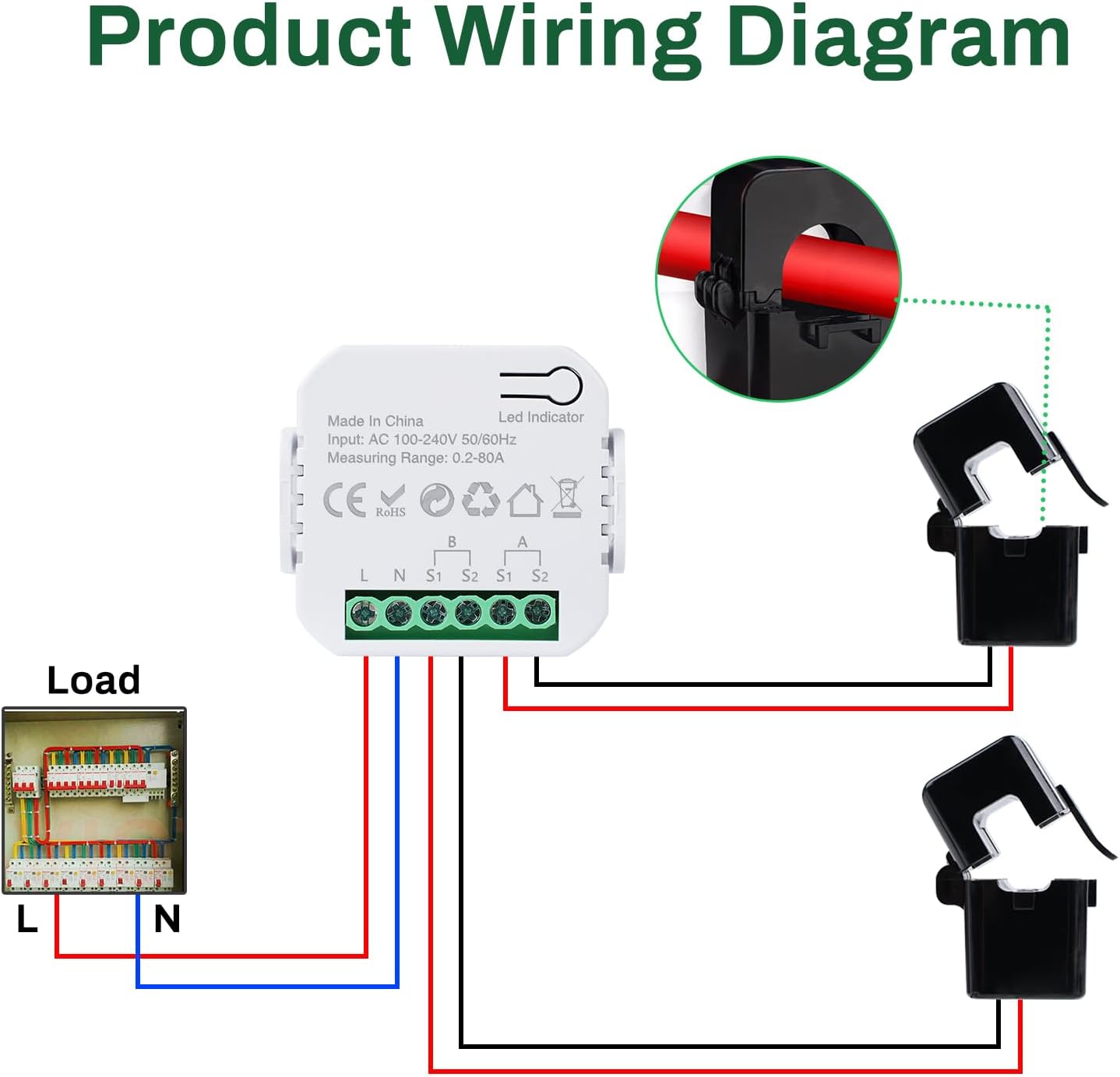
Image: A detailed product wiring diagram illustrating how to connect the DEWIN energy meter to a load and the main power supply using current transformers for channels A and B.
Wiring Steps:
- Connect the Line (L) and Neutral (N) wires from your AC distribution box to the corresponding L and N terminals on the meter.
- For Channel A, connect the current transformer (CT) around the live wire of the circuit you wish to monitor. Connect the CT's S1 and S2 wires to the A-S1 and A-S2 terminals on the meter.
- For Channel B, connect the second current transformer (CT) around the live wire of the second circuit. Connect the CT's S1 and S2 wires to the B-S1 and B-S2 terminals on the meter.
- Ensure that the circuit measured by the CT is in the same phase as the circuit powered by the module.

Image: A diagram illustrating the setup for measuring forward and reverse energy using dual channels, specifically showing integration with a solar panel system and the utility grid.
3. App Connection
The meter works with the 'Smart Life' or 'Tuya' mobile applications. Download the app from your device's app store and follow the in-app instructions to connect your DEWIN WiFi Intelligent Energy Meter. Ensure your WiFi frequency is 2.4 GHz for proper connection.

Image: The DEWIN WiFi Intelligent Energy Meter displaying its compatibility with popular smart home platforms like Tuya, Smart Life App, Google Assistant, and Amazon Alexa.
Operating Instructions
Once installed and connected to the app, the DEWIN WiFi Intelligent Energy Meter provides comprehensive monitoring and control features.
1. Real-time Monitoring
Through the 'Smart Life' or 'Tuya' app, you can monitor various electrical parameters in real-time:
- Total Power Consumption
- Voltage
- Current
- Active Power
- Power Factor
- Frequency

Image: A smartphone screen displaying the app interface for the DEWIN energy meter, showing real-time data such as forward energy, reverse energy, voltage, frequency, total power, and individual channel measurements.
2. Dual-Channel Measurement
The meter independently measures energy consumption for channels A and B. This allows you to differentiate and understand the power usage of specific circuits or appliances connected to each channel, optimizing energy management.
3. Automation Settings
Set custom power or current thresholds within the app. When these predefined thresholds are exceeded, the smart device can be configured to automatically turn on or off, providing intelligent control over your electrical system.
Maintenance
The DEWIN WiFi Intelligent Energy Meter is designed for low maintenance. To ensure optimal performance and longevity:
- Keep the device clean and free from dust. Use a dry, soft cloth for cleaning.
- Avoid exposing the device to extreme temperatures or humidity.
- Regularly check wiring connections to ensure they remain secure.
- Ensure the app software is updated to the latest version for new features and bug fixes.
Troubleshooting
If you encounter issues with your DEWIN WiFi Intelligent Energy Meter, consider the following:
- No Data Measurement:
- Ensure the app software is updated.
- Verify that there is active power consumption in the circuit being monitored.
- Check all wiring connections for correctness and security, especially the current transformers.
- WiFi Connection Issues:
- Confirm your WiFi network is 2.4 GHz.
- Ensure the meter is within range of your WiFi router.
- Restart your router and the energy meter.
- Attempt to re-pair the device with the app.
- Inaccurate Readings:
- Verify that the current transformers are installed correctly and oriented in the right direction.
- Ensure the circuit measured by the CT is in the same phase as the module's power supply.
- The device can be calibrated by adjusting the percentage within the app settings.
Specifications
Below are the technical specifications for the DEWIN WiFi Intelligent Energy Meter:

Image: A visual representation of the product's dimensions and a table summarizing its key technical specifications.
| Parameter | Value |
|---|---|
| Material | ABS |
| Rated Voltage | AC 100-240 V |
| Rated Current | 0.2-80 A |
| Rated Frequency | 50-60 Hz |
| WiFi Frequency | 2.4 GHz |
| Measurement Accuracy | ± 2 % |
| Meter Dimensions | 46 x 46 x 19 mm |
| Protection Rating | IP20 |
Package Contents:
- 1 Smart Electric Meter
- 2 Current Transformers
- 1 English User Manual
- 1 set of Installation Screw Accessories
Warranty Information
This product comes with a standard manufacturer's warranty. Please refer to the specific warranty terms provided at the time of purchase or contact DEWIN customer support for detailed information regarding warranty coverage and duration.
Customer Support
For technical assistance, troubleshooting, or any questions regarding your DEWIN WiFi Intelligent Energy Meter, please contact DEWIN customer support. Contact information can typically be found on the product packaging or the official DEWIN website.