
Introduction
This manual provides essential information for the assembly, operation, and maintenance of your DUMOS Small Standing Desk. Designed for versatility and ergonomic comfort, this mobile workstation allows you to seamlessly transition between sitting and standing positions, enhancing productivity and well-being in various environments such as home offices, living rooms, or bedrooms.

Image: The DUMOS Small Standing Desk in Modern White, featuring a laptop, coffee cup, and notebook on its surface. The desk is on wheels, highlighting its mobility.
Safety Information
Please read and understand all safety instructions before assembling or operating the desk.
- Weight Limit: Do not exceed the maximum weight limit of 33 lbs (15 kg) on the desktop. Overloading can cause instability and damage.
- Stability: Ensure the desk is placed on a flat, stable surface.
- Locking Wheels: Always engage the locks on the wheels when the desk is in a stationary position to prevent unintended movement.
- Pinch Points: Keep hands and fingers clear of moving parts during height adjustment to avoid pinching.
- Children and Pets: Keep children and pets away from the desk during assembly and adjustment.
Package Contents
Verify that all components are present before beginning assembly.
- Desktop Surface
- Main Support Column (with pneumatic lifting mechanism)
- H-shaped Base
- Casters (Wheels) - 4 units
- Assembly Hardware (screws, bolts, washers)
- Installation Tools (wrench, Allen key)
- Instruction Manual
Setup and Assembly
The DUMOS Small Standing Desk is designed for easy assembly. Follow the included step-by-step instructions for a smooth setup.
- Unpack Components: Carefully remove all parts from the packaging and lay them out on a clean, soft surface to prevent scratches.
- Attach Casters to Base: Secure the four casters to the H-shaped base using the provided hardware and tools. Ensure two of the casters with locking mechanisms are positioned for easy access.
- Connect Support Column to Base: Attach the main support column to the assembled H-shaped base.
- Mount Desktop: Secure the desktop surface to the top of the main support column.
- Verify Stability: Once assembled, gently shake the desk to ensure all connections are secure and the desk is stable.
Note: If you encounter any issues during assembly, refer to the detailed installation instructions provided in the package or contact customer support.

Image: A visual representation of the desktop dimensions (25.7" x 19"), highlighting the spacious design. Insets also show the smooth, anti-scratch edges and the desk's compliance with EPA & CARB Safe Air Standards.
Operating Instructions
Height Adjustment
The DUMOS Standing Desk features a pneumatic lifting mechanism for smooth and effortless height adjustment.
- To Raise the Desk: Gently lift the lever located under the desktop on the right side while applying slight upward pressure to the desktop. The desk will rise smoothly. Release the lever at your desired height.
- To Lower the Desk: Gently lift the lever located under the desktop on the right side while applying slight downward pressure to the desktop. The desk will lower smoothly. Release the lever at your desired height.
The desk can be adjusted to any height between 28.54 inches (sitting mode) and 42.52 inches (standing mode).
Mobility and Locking
The desk is equipped with four silent casters for easy movement and two lockable wheels for stability.
- To Move the Desk: Unlock the two lockable casters by pressing the lever upwards. Gently push the desk to its desired location.
- To Secure the Desk: Once the desk is in position, press the levers on the two lockable casters downwards until they click into place. This will prevent the desk from rolling.
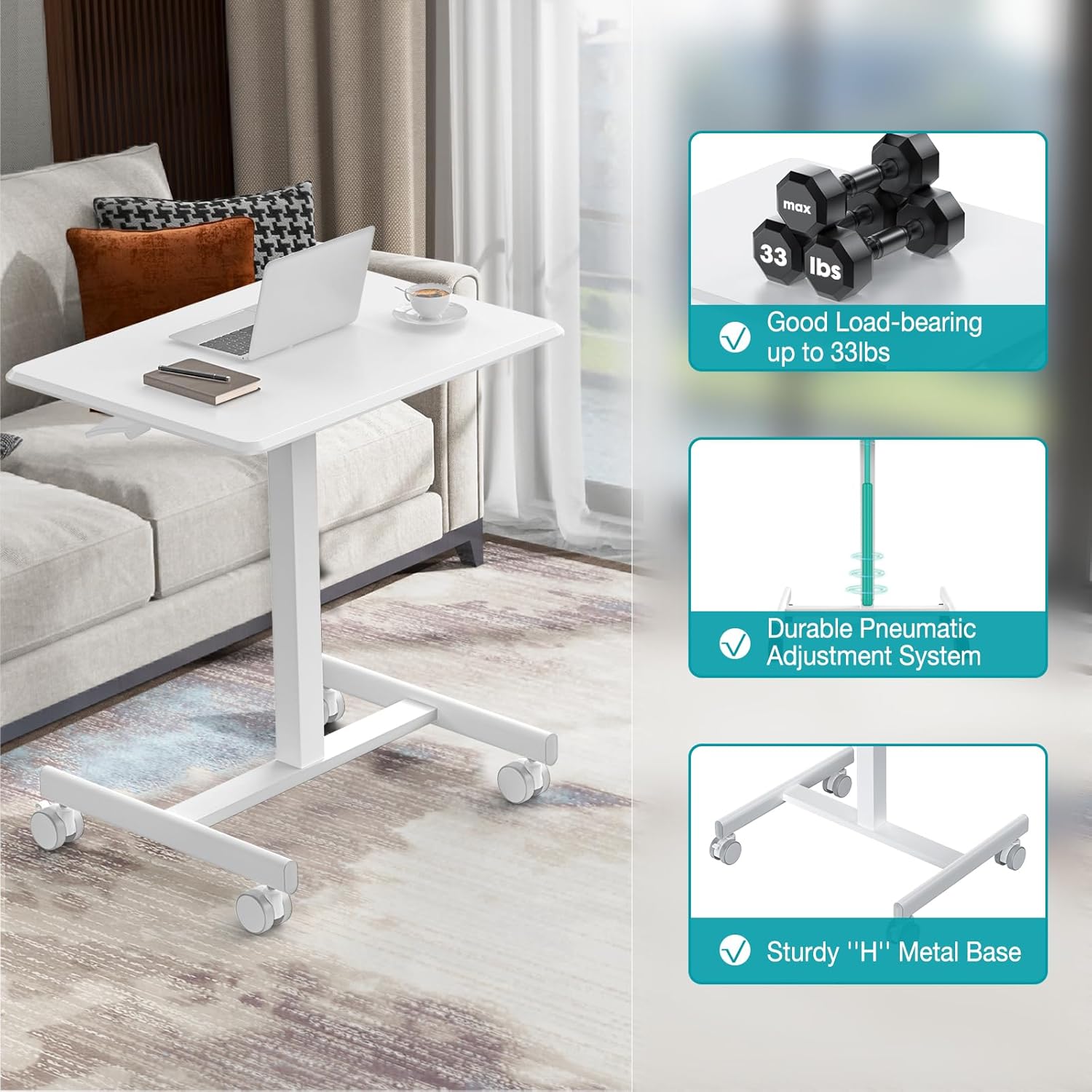
Image: The DUMOS Standing Desk positioned beside a sofa, demonstrating its use in a home setting. Accompanying graphics illustrate its 33 lbs load capacity, the durable pneumatic adjustment system, and the robust H-shaped metal base.

Image: A woman using the DUMOS Standing Desk with her laptop while seated on a sofa, illustrating the desk's ergonomic design for comfortable sitting positions and its space-saving features.
Maintenance
Proper care will ensure the longevity and optimal performance of your DUMOS Standing Desk.
- Cleaning the Desktop: The MDF desktop material is durable and easy to clean. Use a soft, damp cloth with a mild cleaner to wipe the surface. Avoid abrasive cleaners or harsh chemicals that could damage the finish.
- Caster Maintenance: Periodically check the casters for any accumulated dust or debris and clean them to ensure smooth rolling. Ensure the locking mechanisms are functioning correctly.
- Hardware Check: Occasionally inspect all screws and bolts to ensure they are tight. Retighten if necessary to maintain stability.
- Pneumatic System: The pneumatic system is designed for maintenance-free operation. Avoid attempting to disassemble or lubricate the gas lift mechanism.
Troubleshooting
If you encounter any issues with your DUMOS Standing Desk, refer to the following common problems and solutions.
| Problem | Possible Cause | Solution |
|---|---|---|
| Desk does not adjust height smoothly. | Obstruction in the lifting mechanism or excessive weight. | Ensure no objects are obstructing the column. Reduce weight on the desktop to below 33 lbs. |
| Desk is wobbly or unstable. | Loose assembly hardware or uneven surface. | Check and tighten all screws and bolts. Ensure the desk is on a flat, level surface. |
| Casters do not roll smoothly or lock. | Debris in casters or faulty locking mechanism. | Clean any debris from the caster wheels. Ensure the locking lever is fully engaged or disengaged. If a caster is faulty, contact customer support. |
| Desk does not stay at desired height. | Pneumatic cylinder issue. | Ensure the adjustment lever is fully released. If the problem persists, contact customer support. |
Specifications
| Feature | Detail |
|---|---|
| Brand | DUMOS |
| Model Number | DMM011234 |
| Product Dimensions (D x W x H) | 19"D x 25.7"W x 42.5"H |
| Adjustable Height Range | 28.5 Inches (Min) - 42.5 Inches (Max) |
| Color | Modern White |
| Desktop Material | Wood (MDF) |
| Base Material | Metal |
| Lifting Mechanism | Pneumatic |
| Maximum Weight Capacity | 33 Pounds (15 kg) |
| Mobility | 4 Casters (2 lockable) |
| Assembly Required | Yes |
| UPC | 722898009926 |

Image: A comprehensive diagram illustrating the full product dimensions, including the adjustable height range (28.5" to 42.5"), desktop size (19"D x 25.7"W), and base measurements.
Warranty and Support
DUMOS products are manufactured to high-quality standards. While specific warranty details are not provided in this manual, please retain your proof of purchase for any warranty claims.
For technical support, missing parts, or any questions regarding your DUMOS Small Standing Desk, please contact DUMOS customer service. Refer to the contact information provided with your purchase or visit the official DUMOS website for assistance.
Online Support: Visit the DUMOS Store on Amazon