
Godox LP600Bi
Contents
Godox LP600Bi LED Video Light Panel Instruction Manual
Model: LP600Bi
Introduction
The Godox LP600Bi LED Video Light Panel is a versatile lighting solution designed for various photography and videography applications. This bi-color panel light offers adjustable color temperature from 2800K to 6500K and brightness control from 0% to 100%. With a high CRI/TLCI rating of 96+, it ensures accurate color rendition. This manual provides detailed instructions for setting up, operating, and maintaining your LP600Bi light panel.
What's in the Box
Verify that all components are present in your package:
- LP600Bi Panel Light (x2)
- Barndoor (x2)
- Light Stand (x2)
- Power Adapter (x2)
- Power Cord (x2)
- Carry Bag (x1)
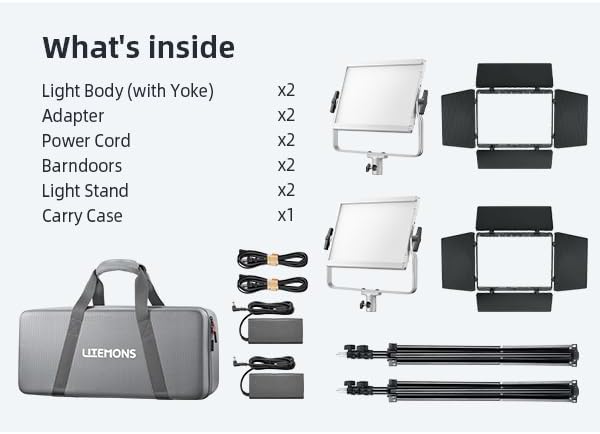
The image above displays the complete contents of the Godox LP600Bi 2-Pack kit. It includes two LP600Bi panel lights, each with a barndoor, two light stands, two power adapters with their respective power cords, and a single carry bag designed to hold all items for transport.
Setup
1. Assembling the Light Panel
- Unpack the LP600Bi panel light and barndoors from the carry bag.
- Attach the barndoors to the front of the light panel. Ensure they are securely fastened.
2. Mounting on the Light Stand
- Extend the light stand to the desired height and ensure its legs are fully spread for stability.
- Mount the LP600Bi light panel onto the top stud of the light stand. Tighten the mounting knob to secure the light.
- Adjust the angle of the light panel using the tilt mechanism on the yoke.
3. Powering the Light
The LP600Bi offers two power options:
- AC Power: Connect the power adapter to the DC input port on the light panel, then plug the power cord into a standard electrical outlet.
- NPF Batteries (Optional): For portable operation, insert two compatible NPF-type batteries (purchased separately) into the battery slots on the back of the light panel. The light requires two batteries to operate.
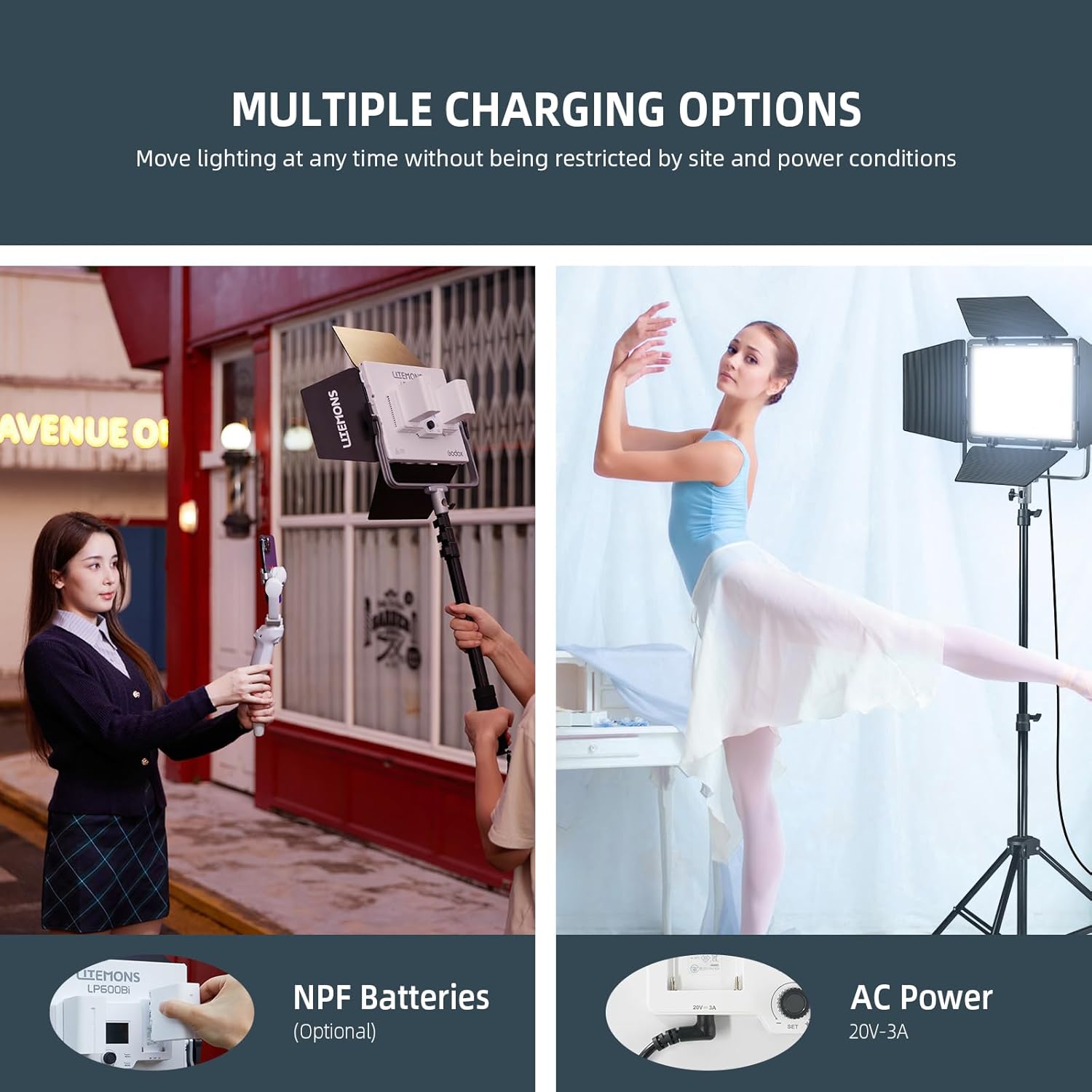
This image demonstrates the two primary power methods for the LP600Bi light panel. On the left, NPF batteries are shown inserted into the rear battery slots, enabling wireless operation. On the right, the AC power adapter is connected, providing continuous power from a wall outlet.
Operating Instructions
1. Basic Controls
The LP600Bi features a control panel on the back with dials and buttons for direct adjustments:
- Power Button: Press to turn the light on or off.
- Brightness Dial: Rotate to adjust the light intensity from 0% to 100%.
- Color Temperature Dial: Rotate to change the color temperature between 2800K (warm) and 6500K (cool).
- LCD Display: Shows current brightness, color temperature, and other settings.

This image illustrates the LP600Bi's capability to provide bright, adjustable lighting. It highlights the light's output of 9020 Lux at 0.5m at 5600K and its wide color temperature range, allowing users to select between warm (2800K) and cool (6500K) lighting, as well as adjust brightness from 0% to 100%.
2. Godox Light App Control
The LP600Bi can be controlled wirelessly via the Godox Light App, available for smartphones. This allows for convenient remote adjustment of settings.
- Download the "Godox Light" app from your device's app store.
- Ensure Bluetooth is enabled on your smartphone.
- Open the Godox Light app and follow the on-screen instructions to connect to your LP600Bi light panel.
- Once connected, you can adjust brightness, color temperature, and access special effects directly from the app.

This image demonstrates the wireless control capability of the LP600Bi via the Godox Light app. A smartphone screen shows the app interface, allowing users to adjust light settings remotely, enhancing convenience during shoots.
3. Special Effects Modes
The LP600Bi includes 11 built-in special effects to simulate various dynamic lighting scenarios. These can be accessed via the control panel or the Godox Light App.
- Flash
- Lightning
- Cloudy
- Broken Bulb
- TV
- Candle
- Fire
- Firework
- Welding
- SOS
- Explosion

This graphic illustrates the 11 distinct scene effects that can be simulated with the LP600Bi light panel. Each icon represents a different effect, such as Flash, Lightning, and Fire, allowing users to create dynamic and realistic lighting scenarios for their productions.
Features and Applications
- Bi-Color Range: Adjust color temperature from 2800K to 6500K to match ambient light or create specific moods.
- High Color Accuracy: CRI/TLCI 96+ ensures natural and accurate color reproduction.
- 360° Rotatable Design: The light panel can be freely rotated 360 degrees for flexible positioning.
- Lightweight and Portable: With a slim body and included carry bag, the LP600Bi is designed for easy transport and setup.

This diagram illustrates the LP600Bi's 360-degree rotatable design, allowing for precise light positioning. It also emphasizes the light's lightweight construction (34.7 oz) and compact dimensions (10.4"x7.9"x2.7"), making it highly portable and adaptable for various shooting environments.

This image showcases the versatility of the Godox LP600Bi light panel across various applications. It depicts the light being used for outdoor vlogging, live streaming, product photography, and portrait photography, demonstrating its adaptability to different creative needs and environments.
Maintenance
- Cleaning: Use a soft, dry cloth to clean the light panel and barndoors. Avoid using abrasive cleaners or solvents.
- Storage: When not in use, store the light panel and accessories in the provided carry bag to protect them from dust and damage.
- Battery Care: If using NPF batteries, ensure they are charged regularly and stored in a cool, dry place. Remove batteries if the light will not be used for an extended period.
- Cable Inspection: Periodically check power cords and adapters for any signs of wear or damage. Replace if necessary.
Troubleshooting
| Problem | Possible Cause | Solution |
|---|---|---|
| Light does not turn on. | No power supply; batteries depleted or incorrectly inserted; power cable loose. | Ensure AC adapter is properly connected or NPF batteries are charged and correctly inserted. Check power cable connections. |
| Cannot connect to Godox Light App. | Bluetooth off; app not updated; light not in pairing mode; interference. | Ensure Bluetooth is enabled on your device. Update the app. Restart the light and app. Try pairing again. |
| Brightness or color temperature cannot be adjusted. | Control panel locked; app connection issue. | Check if the control panel is locked (refer to device manual for specific lock function). Re-establish app connection. |
| Light flickers or output is unstable. | Low battery power; faulty power supply; environmental interference. | Charge or replace batteries. Try a different power outlet or adapter. Move away from potential sources of interference. |
Specifications
| Feature | Detail |
|---|---|
| Model | LP600Bi |
| Color Temperature Range | 2800K - 6500K |
| Brightness Adjustment | 0% - 100% |
| CRI/TLCI | 96+ |
| Max Illuminance | 9020 Lux (at 0.5m, 5600K) |
| Power Output | 65W |
| Control Method | On-board controls, Godox Light App |
| Power Supply | DC-powered (AC adapter included), NPF battery (optional) |
| Dimensions | 10.4 x 7.9 x 2.7 inches (approximate panel size) |
| Item Weight | 2.2 lbs (per light panel) |
Warranty and Support
For warranty information and technical support, please refer to the official Godox website or contact your authorized dealer. Keep your purchase receipt as proof of purchase for warranty claims.
Official Godox Website: www.godox.com
Ask a question about this manual
Ask about setup, troubleshooting, compatibility, parts, safety, or missing instructions. Manuals+ will review the question and use this page’s manual context to help answer it.