
1. Introduction
This manual provides comprehensive instructions for the safe and effective operation, installation, and maintenance of your Datewink 19x15W Moving Head Light, Model ZQ02102. This professional stage lighting fixture features 19x15W RGBW 4-in-1 LEDs, an additional RGB outer ring light strip, and offers Beam, Wash, Strobe, and Zoom effects. It supports DMX512 control and sound-activated modes, making it suitable for various event settings.
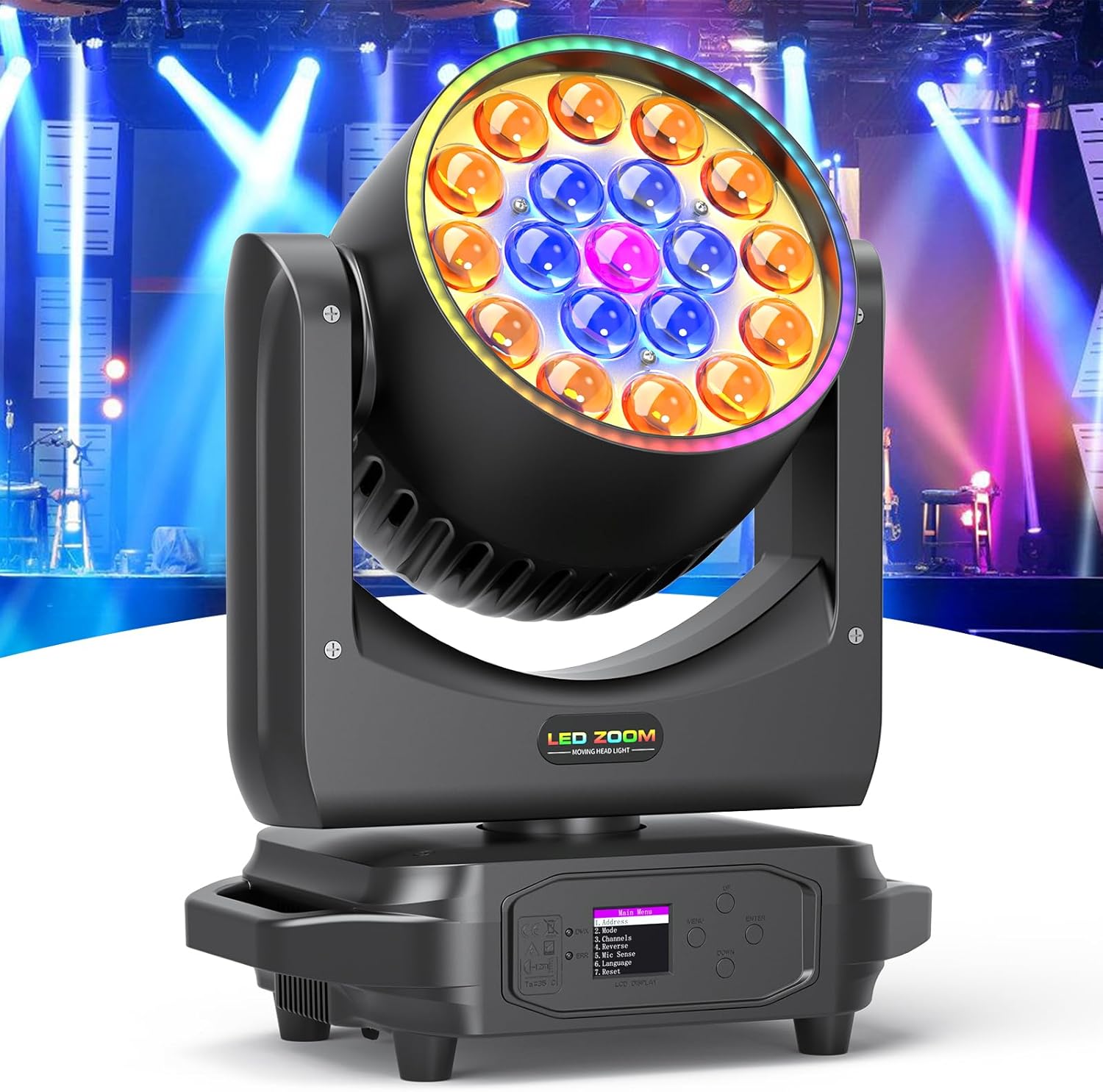
Image 1.1: Front view of the Datewink 19x15W Moving Head Light.
2. Safety Instructions
Please read and understand all safety instructions before installing or operating this device. Failure to comply may result in electric shock, fire, or personal injury.
- Electrical Safety: Ensure the power supply voltage matches the device's requirements. Always connect to a grounded power outlet. Disconnect power before any service or maintenance.
- Installation: Install the fixture in a well-ventilated area, away from heat sources. Ensure secure mounting to prevent accidental falls. Maintain a minimum distance of 0.5 meters from flammable materials.
- Operation: Do not look directly into the light source when the fixture is operating, as it can cause eye damage. Avoid operating in wet or damp conditions.
- Maintenance: Refer all servicing to qualified personnel. Do not attempt to repair the device yourself.
3. Product Overview
The Datewink ZQ02102 Moving Head Light is designed for dynamic stage and event lighting. It integrates multiple lighting technologies for versatile effects.
3.1 Key Features
- Light Source: 19x15W RGBW 4-in-1 LEDs for main beam/wash, plus 60x0.8W RGB 3-in-1 5050 LEDs for an outer ring light strip.
- Effects: Beam, Wash, Strobe, and Zoom (10°-60°).
- Movement: Pan 540° (X-axis) and Tilt 220° (Y-axis).
- Control Modes: DMX512 (17/25 channels), Sound Activated, Auto, Master/Slave.
- Brightness: Total luminous flux of 4500lm.
3.2 Components
Familiarize yourself with the main components of the moving head light:

Image 3.1: Illustration of the 19 RGBW 4-in-1 main LEDs and the 60 RGB 3-in-1 outer ring LEDs.

Image 3.2: Key internal components including optical lens, cooling fan, rotary arm, and control system.
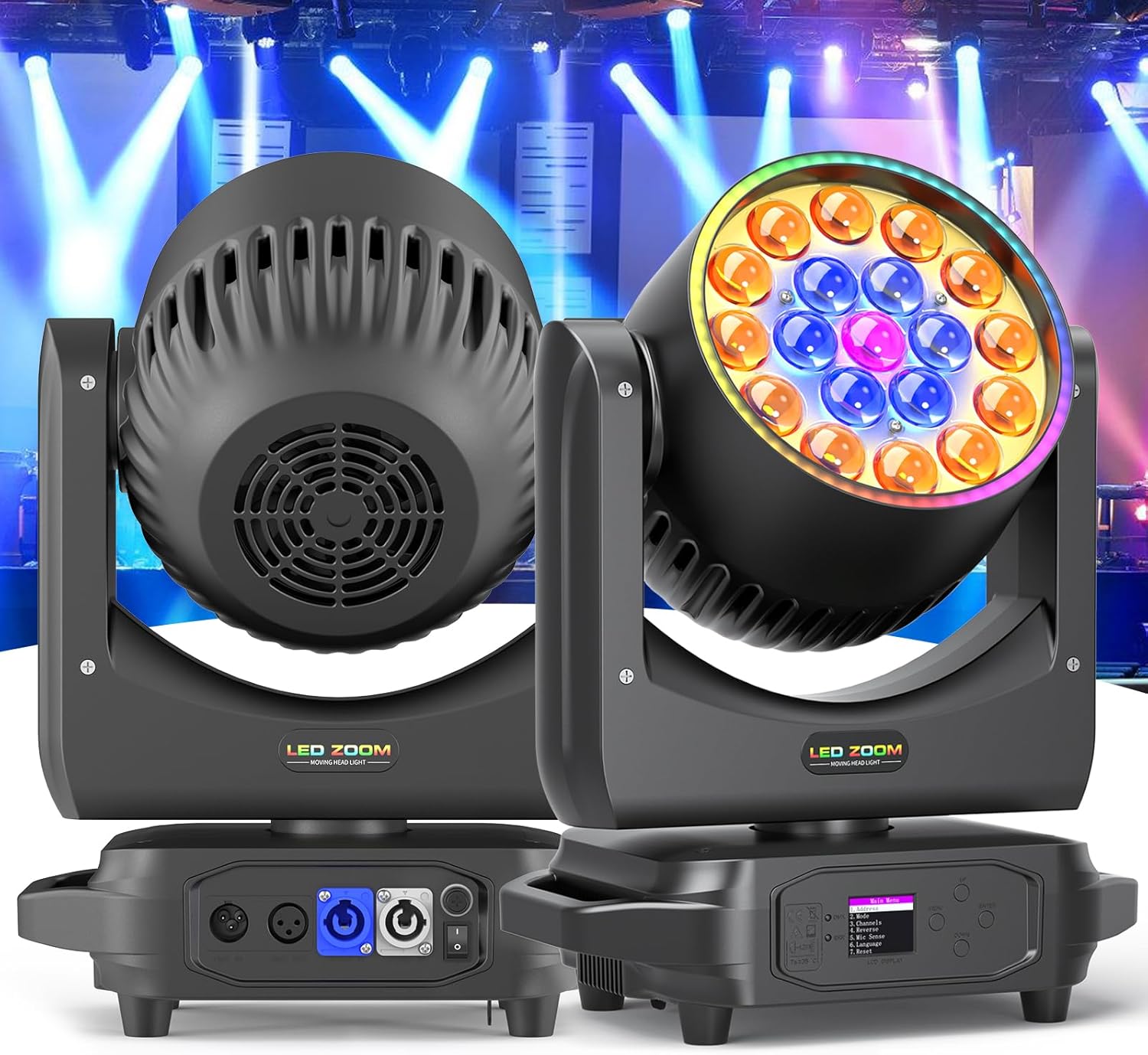
Image 3.3: Rear view showing the LCD display, control buttons (Menu, Up, Enter, Down), DMX IN/OUT ports, Power IN/OUT, and power switch.
4. Setup
4.1 Unpacking
Carefully remove the fixture from its packaging. Verify that all components listed in the packing list are present and undamaged. The package should contain:

Image 4.1: Contents of the product package, including the moving head light, power cord, hook accessory, and user manual.
- 1 x Datewink Moving Head Light
- 1 x Power Cord
- 1 x Hook Accessory
- 1 x User Manual
4.2 Mounting
The fixture can be mounted in various positions: ceiling, wall, floor, or desk. Always use appropriate mounting hardware and ensure the mounting surface can support the weight of the fixture (approximately 15.62 lbs / 7.08 kg).

Image 4.2: Examples of mounting configurations and the Pan (X-axis 540°) and Tilt (Y-axis 220°) movement capabilities.
- Overhead Mounting: Use the included hook accessory and safety cables. Ensure all clamps and fasteners are securely tightened.
- Floor/Desk Placement: Place the fixture on a stable, level surface. Ensure adequate ventilation around the unit.
4.3 Power Connection
Connect the provided power cord to the "POWER IN" port on the rear of the fixture and then to a suitable grounded power outlet. Use the "POWER OUT" port to daisy-chain power to other compatible fixtures if needed, respecting the maximum power load.
4.4 DMX Connection
For DMX control, connect a DMX controller to the "DMX IN" port using a 3-pin DMX cable. To control multiple fixtures, connect the "DMX OUT" of the first fixture to the "DMX IN" of the next, and so on. Ensure the last fixture in the chain has a DMX terminator connected to its "DMX OUT" port for stable signal transmission.
5. Operating Instructions
5.1 Control Panel
The fixture features an LCD display and four buttons for navigation and settings:
- MENU: Access the main menu or go back to the previous menu level.
- UP: Navigate up through menu options or increase values.
- DOWN: Navigate down through menu options or decrease values.
- ENTER: Confirm selection or enter a submenu.
Note: Upon initial power-up, the display might be in Chinese. Navigate the menu to find the language setting and change it to English for easier operation.
5.2 Operating Modes
The Datewink ZQ02102 supports several operating modes:
- DMX512 Mode: For professional control, connect to a DMX controller. The fixture supports 17 or 25 DMX channels, allowing precise control over pan, tilt, color, dimmer, strobe, zoom, and outer ring effects. Refer to the DMX channel chart in the appendix (if applicable, or state it's in the full manual) for detailed channel functions.
- Sound Activated Mode: The fixture responds to ambient sound, creating dynamic light shows synchronized with music. Adjust sensitivity via the control panel.
- Auto Mode: Pre-programmed light shows run automatically. Select from various built-in programs using the control panel.
- Master/Slave Mode: Link multiple fixtures together. Set one unit as "Master" and others as "Slave" to synchronize their operation.
5.3 Light Effects
The fixture offers a range of effects:
- RGBW Color Mixing: The 4-in-1 LEDs allow for smooth and even color mixing, producing a wide spectrum of colors.
- Zoom Function: Electronically adjust the beam angle from 10° (narrow beam) to 60° (wide wash) for varied coverage.
- Outer Ring Effects: The 60 RGB LEDs in the outer ring can create auxiliary effects such as running, jumping, gradient, and chasing patterns, independently or in conjunction with the main light.

Image 5.1: Visual representation of the adjustable zoom effect, from a narrow 10° beam to a wide 60° wash.

Image 5.2: Examples of various RGBW 4-in-1 light effects and the dynamic patterns achievable with the outer ring LEDs.
6. Maintenance
Regular maintenance ensures optimal performance and extends the lifespan of your fixture.
- Cleaning: Periodically clean the lenses and exterior casing with a soft, lint-free cloth. Do not use abrasive cleaners or solvents. Ensure the fixture is powered off and cool before cleaning.
- Fan and Vents: Keep cooling fans and ventilation openings clear of dust and debris to prevent overheating.
- Inspection: Regularly check power cables, DMX cables, and mounting hardware for any signs of wear or damage. Replace damaged components immediately.
7. Troubleshooting
If you encounter issues, refer to the following common problems and solutions:
| Problem | Possible Cause | Solution |
|---|---|---|
| Fixture does not power on. | No power supply; faulty cable; power switch off. | Check power connection, test cable, ensure power switch is on. |
| No light output. | Dimmer channel at 0; fixture in blackout mode; internal fault. | Check DMX dimmer settings; verify operating mode; contact support if fault persists. |
| No DMX control. | Incorrect DMX address; faulty DMX cable; no DMX terminator; DMX controller issue. | Verify DMX address setting; check DMX cable connections; use a DMX terminator; test with another DMX controller. |
| Movement (Pan/Tilt) is erratic or non-responsive. | DMX signal issue; motor calibration needed; physical obstruction. | Check DMX signal; perform a reset or calibration via menu; ensure no obstructions. |
8. Specifications
| Feature | Detail |
|---|---|
| Model Number | ZQ02102 |
| Brand | Datewink |
| Light Source | 19x15W RGBW 4-in-1 LEDs + 60x0.8W RGB 3-in-1 5050 LEDs (Outer Ring) |
| Brightness | 4500 lumen total output |
| Beam Angle | 10°-60° (Zoom) |
| Pan Movement | 540° |
| Tilt Movement | 220° |
| Control Modes | DMX512 (17/25 channels), Sound Activated, Auto, Master/Slave |
| Power Source | Corded Electric |
| Wattage | Approx. 285 Watts (19x15W LEDs) |
| Material | Aluminum |
| Finish Type | Powder Coated |
| Product Dimensions | 12.59"L x 8.81"W x 15.74"H (32.35cm L x 22.5cm W x 40cm H) |
| Item Weight | 15.62 pounds (7.08 kg) |
| Manufacturer | Shenzhen Zhuoqiong Technology Co., Ltd. |

Image 8.1: Physical dimensions and weight of the Datewink Moving Head Light.
9. Warranty and Support
For warranty information, technical support, or service inquiries, please contact your retailer or the manufacturer directly. Keep your purchase receipt as proof of purchase.


