1. Introduction
The thingsend XZ-DS01-TH2D is a robust LoRaWAN-enabled wireless temperature and humidity sensor designed for a wide range of industrial and scientific applications. This device offers long-range data transmission, a built-in battery with an extended lifespan, and straightforward installation for reliable environmental monitoring. Its design prioritizes ease of use and durability, making it suitable for demanding environments.

Figure 1: The XZ-DS01-TH2D LoRaWAN Temperature & Humidity Sensor unit.
2. Product Features
- Plug and Play Operation: Designed for easy installation and immediate use, powered by a dry battery.
- Configurable Inspection Period: Data inspection and transmission intervals are user-settable.
- Automatic Registration: The sensor automatically registers with compatible LoRaWAN concentrators.
- Extended Battery Lifespan: Equipped with a built-in battery offering up to 5 years of operation.
- Long-Range Wireless Transmission: Capable of transmitting data wirelessly up to 5 kilometers (Line of Sight).
- Centralized Data Acquisition: Supports centralized data collection with multi-mode output options.
- IP67 Rated: Industrial-grade protection against dust and water ingress.
3. Setup Instructions
The XZ-DS01-TH2D sensor is designed for quick deployment. It comes with a pre-installed ER26500 3.6V (Li-SOCI2) battery. Follow these steps for initial setup:
- Unpack the Sensor: Carefully remove the sensor unit and its antenna from the packaging.
- Attach the Antenna: Securely screw the provided antenna onto the designated port on the sensor unit. Ensure it is finger-tight to establish a reliable connection.
- Placement: Position the sensor in the desired monitoring location. Ensure the sensor's probe is exposed to the environment where temperature and humidity measurements are required.
- Power On: The sensor is typically active upon battery installation. No external power switch is usually present.
- Gateway Connection: Ensure a compatible LoRaWAN gateway (e.g., XZ-DSG1, XZ-DSG2, XZ-DS-MUS) is powered on and configured within the sensor's transmission range. The sensor will automatically attempt to register with the gateway.
Once connected, the sensor will begin its operational cycle of detecting and transmitting data.
4. Operating Instructions
4.1. Work Process
The XZ-DS01-TH2D sensor operates by periodically detecting environmental temperature and humidity data. By default, it transmits this data every 5 minutes. Users can configure this transmission interval to any value between 1 and 240 minutes to suit specific monitoring requirements.
4.2. Data Protocol Example
The sensor transmits data in a structured protocol. An example of the transmitted data string is:
GID:12345, TYPE:TMP, ID:1, STAT:11000000, T:14.5°C, H:92.8%, ST:1M, V:3.01v, SN:2, RSSI: -79dBm, E:160.2020, N:110.2020, Time:2024-2-4 14:20:39
Explanation of the data fields:
- GID: Gateway ID (e.g., 12345)
- TYPE: Sensor Type (T&H for Temperature + Relative Humidity sensor)
- ID: Sensor Address (e.g., 1)
- STAT: Sensor Status word (e.g., 11000000)
- BIT7=1: Trigger reporting
- BIT6=0CH, 1CH: Channel information
- BIT5=1: Repeater enabled
- BIT4=1: Invalid data
- BIT3: Reserved
- BIT2=1: Data searching network
- BIT1=0: Low speed, 1: High speed
- BIT0=1: Start
- T: Environmental Temperature (e.g., 14.5°C)
- H: Humidity (e.g., 92.8%)
- ST: Acquisition Interval (e.g., 1 minute)
- V: Battery Voltage (e.g., 3.01V)
- SN: Transmitting Sequence Number (e.g., 2)
- RSSI: Signal Strength (e.g., -79dBm)
- E: Eastern Longitude (e.g., 160.2020)
- N: Northern Latitude (e.g., 110.2020)
- Time: Timestamp (e.g., 2024-2-4 14:20:39)
5. Maintenance
5.1. Battery Replacement
The XZ-DS01-TH2D sensor is powered by a replaceable ER26500 3.6V (Li-SOCI2) battery, which provides an estimated lifespan of 5 years under typical operating conditions. When the battery voltage (V) reported in the data protocol indicates a low level, it is recommended to replace the battery to ensure continuous and reliable operation. To replace the battery, carefully open the sensor housing, remove the old battery, and insert a new ER26500 battery, observing correct polarity. Ensure the housing is securely closed to maintain its environmental protection rating.
5.2. General Care
To ensure optimal performance and longevity of your sensor, keep the unit clean and free from excessive dust or debris. Periodically inspect the sensor probe for any obstructions. Ensure the sensor housing remains sealed to maintain its IP67 rating, protecting it from water and dust ingress.
6. Troubleshooting
If you encounter issues with your XZ-DS01-TH2D sensor, consider the following troubleshooting steps:
- No Data Transmission:
- Check the battery voltage (V) in the last received data packet. If low, replace the battery.
- Ensure the sensor is within the effective transmission range of a compatible LoRaWAN gateway.
- Verify that the LoRaWAN gateway is powered on, properly configured, and connected to the network.
- Confirm the antenna is securely attached to the sensor.
- Inaccurate Readings:
- Check the sensor's physical placement. Ensure the probe is not obstructed or exposed to localized heat/cold sources that do not represent the general environment.
- Verify that the operating temperature and humidity are within the sensor's specified technical parameters.
- Intermittent Data:
- Signal strength (RSSI) may be weak. Consider repositioning the sensor or gateway to improve line of sight or reduce interference.
- Check for potential sources of radio interference in the vicinity.
If these steps do not resolve the issue, please refer to the support section for further assistance.
7. Technical Specifications

Figure 2: Physical dimensions of the XZ-DS01-TH2D sensor and its antenna.
| Parameter | Value |
|---|---|
| Temperature Measurement Range | -40°C ~ 80°C |
| Temperature Accuracy | <±0.3°C (0°C ~ 65°C) & <±1°C (<0°C, >65°C) |
| Humidity Measurement Range | 0 ~ 100% RH |
| Humidity Accuracy | <±3% (10% - 90%) & <±4.5% (<10%, >90%) |
| Transmission Interval | 5 minutes (default), user-settable 1 ~ 240 minutes |
| Operating Temperature | -40°C ~ 80°C |
| Working Frequency | 433MHz / 480MHz / 868MHz / 915MHz / 925MHz (customized) |
| Sensitivity | <-136dBm |
| Transmitting Power | <17dBm |
| Transmitting Current | <120mA |
| Receiving Current | <20mA |
| Transmission Distance | >5 KM (Line of Sight) |
| Battery Life | 5 years @ 8700mAH, 1pc ER26500 3.6V (Li-SOCI2) battery (replaceable and included) |
| Included Components | Sensor; Antenna |
8. Application Areas
The XZ-DS01-TH2D sensor is suitable for a variety of applications requiring precise temperature and humidity monitoring:
- Environmental and meteorological monitoring
- Medical and health care facilities
- Energy and chemical industries
- Storage and transportation logistics
- Cold storage and cold-chain transportation
- Constant temperature and humidity production workshops
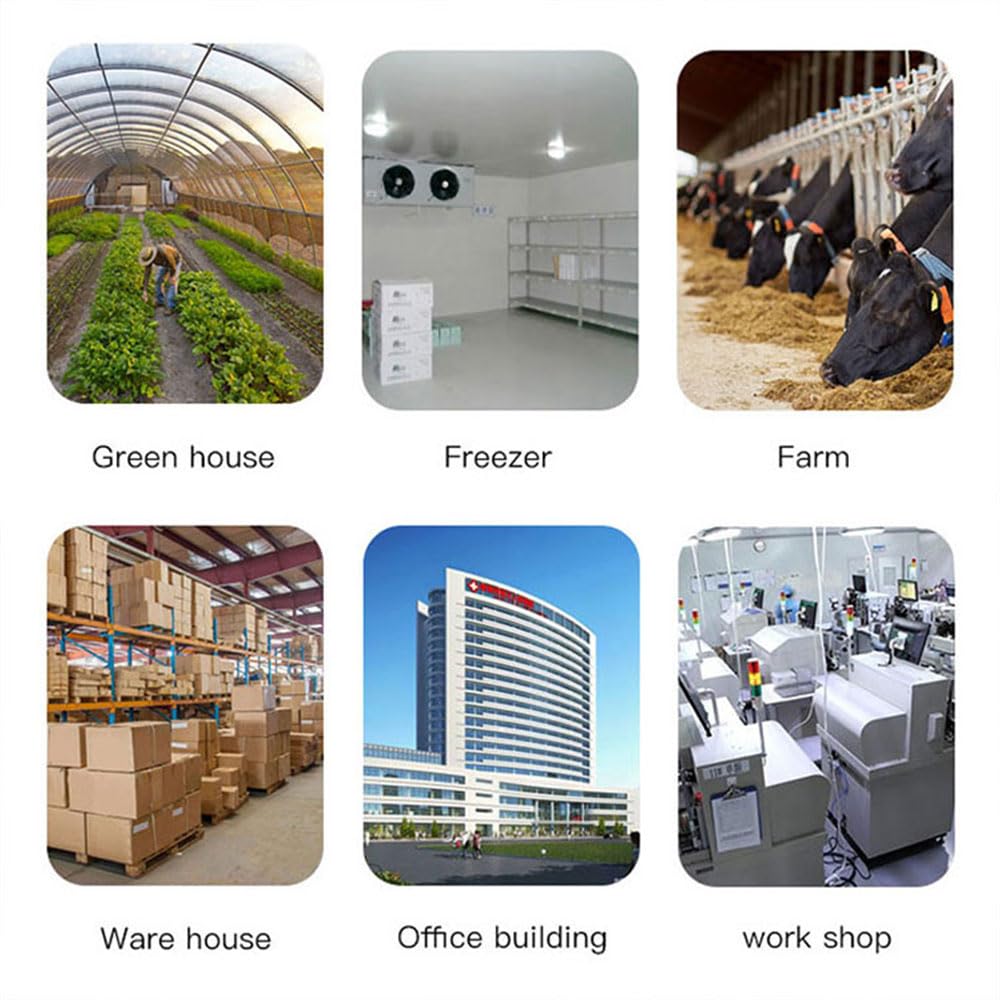
Figure 3: Illustrative examples of environments where the sensor can be applied.
9. Gateway Options
The XZ-DS01-TH2D sensor requires a compatible LoRaWAN gateway to transmit data to a monitoring system. thingsend offers three types of gateways:
9.1. RJ45 Network Gateway XZ-DSG1
The XZ-DSG1 is an easy-to-install network gateway that uses DC power. It supports dynamic and static IP addresses, adapts to public networks, and features automatic routing for repeaters. It offers wireless transmission over 5km and can centrally acquire data from more than 100 sensors.

Figure 4: XZ-DSG1 WAN Gateway system architecture.
9.2. USB Serial Gateway XZ-DSG2
The XZ-DSG2 is a plug-and-play USB serial gateway powered by DC. It connects via Micro USB to a serial port (9600bps) and supports automatic routing for repeaters. It provides wireless transmission up to 5000m and can manage data from over 100 sensors.

Figure 5: XZ-DSG2 Serial Gateway system architecture.
9.3. Modbus Gateway XZ-DS-MUS
The XZ-DS-MUS Modbus Gateway receives LoRa sensor data, stores it in a configured space, and allows reading out via a serial port using the MODBUS protocol. One XZ-DS-MUS gateway can work with up to 30 sensors.
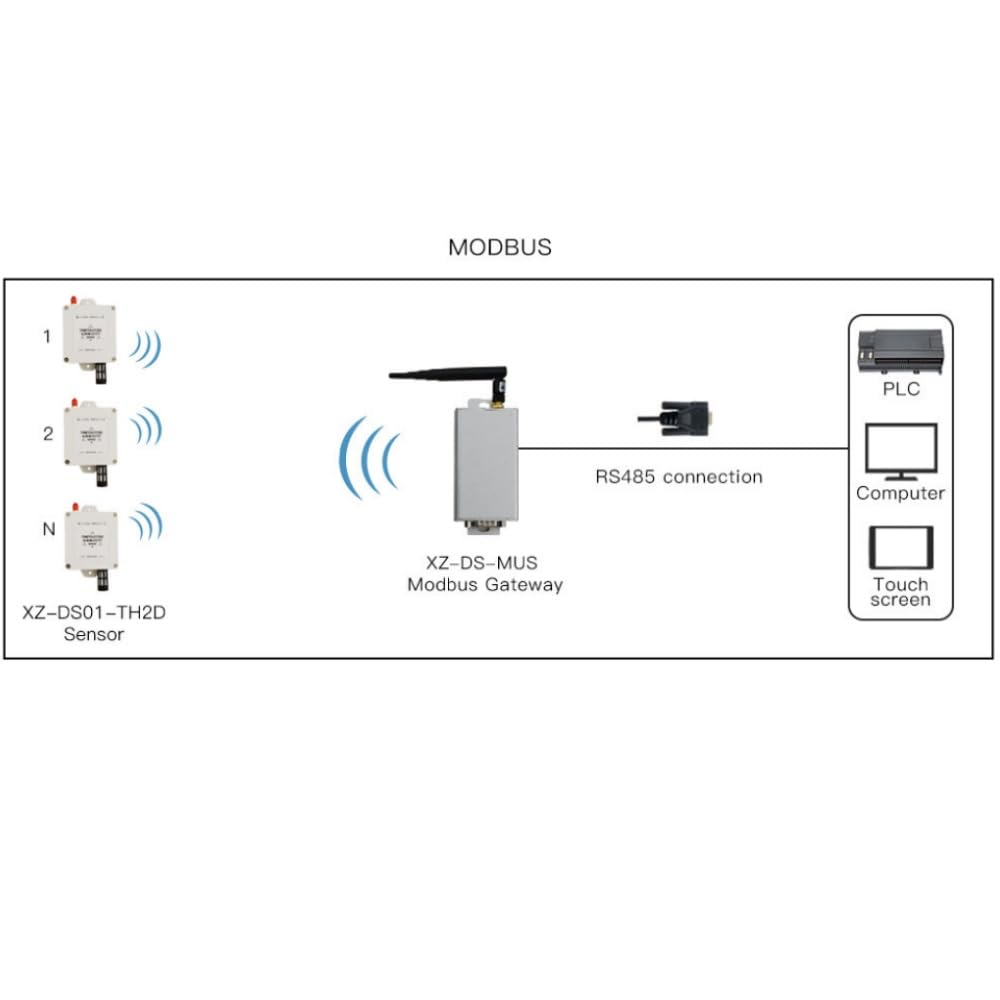
Figure 6: XZ-DS-MUS Modbus Gateway system architecture.
10. Warranty Information
This product is covered by a standard manufacturer's warranty. For detailed information regarding warranty terms, conditions, and duration, please refer to the warranty card included with your product packaging or visit the official thingsend website. Proof of purchase may be required for warranty claims.
11. Customer Support
For technical assistance, troubleshooting, or any other inquiries regarding your XZ-DS01-TH2D sensor, please contact thingsend customer support. You can typically find contact information on the official thingsend website or through the retailer from whom you purchased the product. Please have your product model number (XZ-DS01-TH2D) and any relevant purchase details ready when contacting support.


