
1. Introduction
Thank you for choosing the CuPiLo CPL-1148 Cordless 3D Kneading Neck and Back Massager with Heat. This device is designed to provide targeted relief for muscle tension and fatigue in various body areas. Please read this manual thoroughly before use to ensure safe and effective operation.
2. Safety Instructions
- Ensure the product is fully charged before its initial use.
- The massager cannot be operated while charging. Please use it after it is fully charged.
- The device features an automatic shut-off after a 10-minute cycle to prevent overuse and overheating. To continue massage, press the power button again.
- This massager is intended for general use and should not replace professional medical advice or treatment.
- Consult a healthcare professional before use if you have any pre-existing medical conditions, are pregnant, or have any concerns.
- Do not immerse the device in water or use it in excessively humid environments.
- Keep out of reach of children. This product is not intended as a toy.
- Do not use if the device is damaged or malfunctioning.
3. Product Features
- 4D Shiatsu Kneading Nodes: Advanced nodes mimic professional masseur techniques for deep tissue relief.
- Soothing Heat Function: Provides gentle warmth (approximately 100.4℉) to relax muscles and enhance circulation.
- Cordless and Rechargeable: Equipped with a 2000mAh battery, offering 2-3 hours of cordless massage on a full charge.
- Portable Design: Lightweight and compact, with an adjustable strap for easy transport and versatile use.
- Simple Controls: Easy-to-use buttons for power, mode selection, and heat activation.
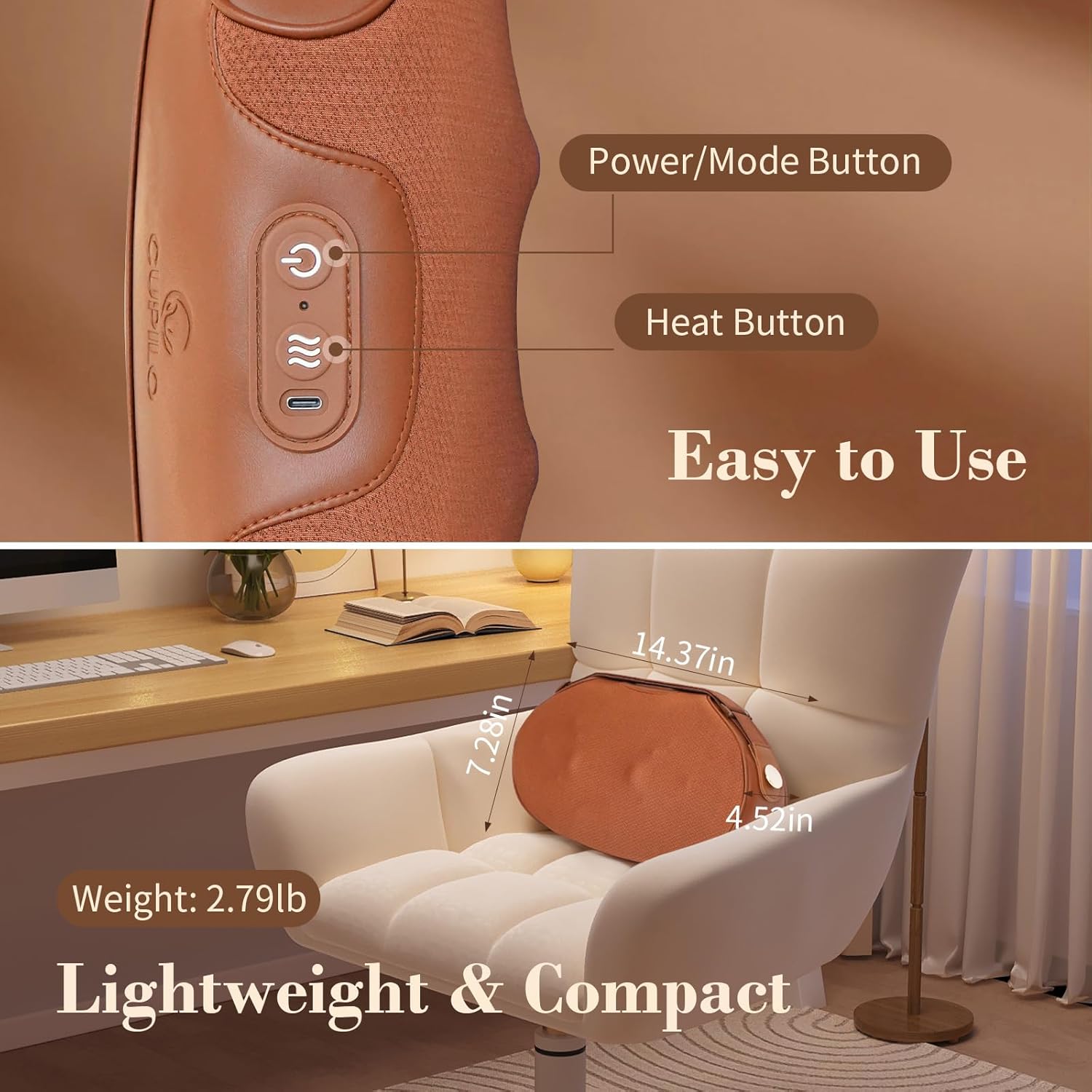
Figure 1: Control panel and dimensions of the CuPiLo CPL-1148 massager.
4. Setup
4.1 Charging the Device
- Locate the USB-C charging port on the device (refer to Figure 1).
- Connect the provided USB-C cable to the massager and the USB-A end to a compatible power adapter (not included) or a USB port.
- The indicator light will show charging status (red light breathing slow flash for charging, white indicator light steady on for fully charged).
- Charge fully before first use. A full charge takes approximately 3 hours.
4.2 Attaching the Adjustable Strap
The massager comes with an adjustable strap for securing it to a chair or for easier portability. Attach the strap to the designated loops on either side of the massager. Adjust the length as needed for comfortable positioning.

Figure 2: The CuPiLo massager's portable design with an adjustable strap.
5. Operating Instructions
5.1 Power Button (Mode Button)
- Long Press: Press and hold the power button for a few seconds to turn the massager ON or OFF.
- Short Press: Once the massager is ON, short press the power button to cycle through the massage modes:
- Mode 1: Low speed, forward rotation.
- Mode 2: Medium speed, reverse rotation.
- Mode 3: High speed, forward rotation for 1 minute, then reverse rotation for 1 minute, repeating the cycle.
5.2 Heat Button
- Short Press: Short press the heat button to turn the heating function ON or OFF.
- Indicator Light: Red indicator light steady on for heating ON, white indicator light steady on for heating OFF.
5.3 Recommended Usage Areas
The versatile design allows for use on various body parts:
- Neck: Position the massager behind your neck while seated or reclined.
- Upper & Lower Back: Place the massager against your back, adjusting its position to target specific areas of tension.
- Legs & Calves: Rest your legs or calves on the massager for soothing relief.
- Arms: Position the massager to target arm muscles.

Figure 3: Versatile application of the massager on different body parts.
Video 1: Official CuPiLo demonstration of the low back massager with heat, showing its features and use.
6. Maintenance
- Cleaning: Wipe the massager with a soft, slightly damp cloth. Do not use abrasive cleaners or immerse the device in water.
- Storage: Store the massager in a cool, dry place away from direct sunlight and extreme temperatures.
- Battery Care: To prolong battery life, avoid fully discharging the battery frequently. Charge it regularly, even if not in use for extended periods.
7. Troubleshooting
| Problem | Possible Cause | Solution |
|---|---|---|
| Massager does not turn on. | Low battery or not charged. | Charge the massager fully using the provided USB-C cable. Ensure the charging indicator light is steady white when fully charged. |
| Heat function is not working. | Heat function is turned off. | Short press the heat button to activate. The indicator light should turn red. |
| Massage nodes stop moving after 10 minutes. | Automatic shut-off feature activated. | This is a safety feature. Press the power button again to restart the massage cycle. |
| Weak massage intensity. | Incorrect mode selected or insufficient pressure. | Short press the power button to cycle through modes (low, medium, high). Adjust your body position to apply more pressure if desired. |
8. Specifications
| Feature | Detail |
|---|---|
| Product Dimensions | 7.28 x 14.37 x 4.5 inches |
| Weight | 3.62 Pounds |
| Item Model Number | CPL-1148 |
| Batteries | 1 Nonstandard Battery (included) |
| Battery Capacity | 2000mAh |
| Power Source | Battery Powered |
| Massage Therapy Technique | Shiatsu |
| Heat Temperature | Approximately 100.4℉ |
| Auto-off Timer | 10 Minutes |
| Material Type | Faux Leather |
| Water Resistance Level | Not Water Resistant |
9. Warranty and Support
For warranty information and customer support, please refer to the product packaging or contact the manufacturer directly through their official website. Keep your purchase receipt for any warranty claims.


