
1. Important Safety Information
Please read all instructions and safety warnings carefully before using this battery. Failure to follow these instructions may result in electric shock, fire, or serious injury.
- DO NOT attempt to disassemble, open, or service the battery pack.
- REPLACE ONLY with the battery pack designated for this product.
- DO NOT crush, puncture, short external contacts, or dispose of in fire or water.
- DO NOT store above 60°C (140°F).
- NEW BATTERY PACK MUST BE FULLY CHARGED BEFORE USE.
- The warranty is void if the label is removed.
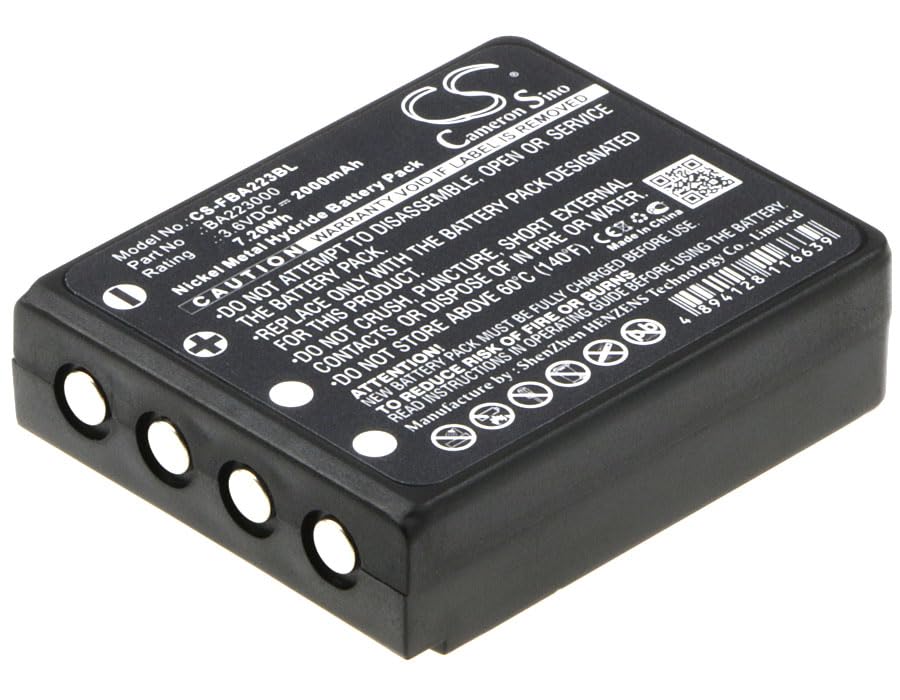
Image 1.1: Top view of the BCXY CS-FBA223BL battery, showing the product label with model number, voltage, capacity, and critical safety warnings. This view highlights the main identification and warning information.
2. Product Overview
The BCXY CS-FBA223BL is a rechargeable NiMH battery designed as a replacement for various HBC Radiomatic and Spectrum A devices. It provides reliable power with built-in protection features.
2.1 Compatibility
This battery is compatible with the following models:
- Radiomatic Micron 6
- Radiomatic Eco Micron 4
- Spectrum A FUB9NM
- Radiomatic Micron 4
It replaces battery part numbers including:
- BA209062, Fub9NM, BA209000, BA223000, BA209060, BA209001, BA209061, FUB6, PM237745002, BA223030
Before purchase and installation, please confirm the compatible model and battery part number carefully.
3. Setup and Installation
Follow these general steps for installing your new battery. Refer to your device's original instruction manual for specific installation procedures.
- Initial Charge: Fully charge the new battery before its first use. This ensures optimal performance and longevity.
- Power Off Device: Ensure your device is completely powered off and disconnected from any power source before attempting battery replacement.
- Remove Old Battery: Carefully open the battery compartment of your device and remove the old battery. Dispose of old batteries responsibly according to local regulations.
- Insert New Battery: Align the new BCXY CS-FBA223BL battery with the contacts in the compartment. Ensure it is seated firmly and correctly.
- Secure Compartment: Close and secure the battery compartment.
- Power On: Power on your device to confirm proper installation.

Image 3.1: Bottom view of the BCXY CS-FBA223BL battery, illustrating the four metallic contact points essential for proper connection and power transfer within the compatible device.
4. Operating Instructions
Once installed and fully charged, the battery operates as the power source for your compatible device. The battery is rechargeable and designed for repeated use.
4.1 Charging
Use only the charger specified by your device manufacturer. Overcharging or using incompatible chargers can damage the battery and void its warranty. The battery features overcharge protection for enhanced safety.
4.2 Usage Environment
This battery is suitable for both indoor and outdoor use, as indicated by the product specifications. Avoid exposing the battery to extreme temperatures, direct sunlight, or moisture.
5. Maintenance and Storage
Proper maintenance and storage can extend the life of your battery.
- Regular Charging: For optimal performance, avoid completely draining the battery frequently. Recharge it before it is fully depleted.
- Cleaning: Keep the battery contacts clean and free from dust or debris. Use a dry, soft cloth for cleaning.
- Storage: If storing the battery for an extended period, ensure it is partially charged (around 50%) and stored in a cool, dry place, away from direct sunlight and extreme temperatures. Do not store above 60°C (140°F).
- Disposal: When the battery reaches the end of its life, dispose of it according to local regulations for NiMH batteries. Do not dispose of in household waste or fire.
6. Troubleshooting
If you encounter issues with your battery, consider the following common troubleshooting steps:
- Battery Not Charging:
- Ensure the charger is correctly connected and functioning.
- Verify that the battery contacts and device contacts are clean and free of obstruction.
- Confirm the charger is compatible with your device and this battery.
- Short Battery Life:
- Ensure the battery has been fully charged before use.
- Check for any background processes or settings on your device that might be consuming excessive power.
- Battery capacity naturally degrades over time with repeated charge cycles.
- Device Not Powering On:
- Re-install the battery to ensure it is properly seated.
- Confirm the battery is charged.
- Test the device with another known-good battery if available, or test the battery in another compatible device if possible.
If problems persist, consult your device's original manual or contact the manufacturer for further assistance.
7. Specifications
| Feature | Specification |
|---|---|
| Model Number | CS-FBA223BL |
| Battery Cell Composition | NiMH (Nickel Metal Hydride) |
| Voltage | 3.6V |
| Capacity | 2000mAh |
| Watt-Hours (Wh) | 7.2Wh |
| Dimensions (L x W x H) | 60.7 x 47.55 x 18.0mm (2.39 x 1.87 x 0.71 inches) |
| Weight | 125.0g |
| Reusability | Rechargeable |
| Certifications | ISO9001, RoHS, CE, UN38.3, MSDS |
| Recommended Uses | Indoor/Outdoor |
8. Warranty and Support
This battery is manufactured with strict quality control standards. The warranty is void if the product label is removed or if the battery is disassembled or serviced by unauthorized personnel.
For specific warranty details or technical support, please refer to the documentation provided with your purchase or contact the seller directly. Ensure you have your product model number (CS-FBA223BL) and purchase information available when seeking support.