1. Product Overview
The WAVLINK AX3000 Outdoor WiFi 6 Extender (Model WN588HX3) is a high-performance device designed to expand and enhance wireless network coverage in outdoor environments. It supports the latest WiFi 6 (802.11ax) standard, offering dual-band connectivity and robust features for stable and fast internet access.
What's in the Box
- 1 × AX3000 WiFi 6 Outdoor Access Point
- 6 × 7dBi Antennas
- 1 × 54V Power Adapter
- 1 × PoE Converter
- 1 × Ethernet Cable
- 1 × Main Body Holder
- 4 × Plastic Cable Ties
- 1 × Wrench
- Mounting Screws and Plugs (PWM M3×5×6MM Screw - 6 × KA M3×20×5.2MM Screws - 6 × Φ6.5x25MM Screw Plugs)
- 1 × Quick Start Guide

Image: The complete package contents, including the main unit, antennas, power adapter, PoE converter, cables, mounting hardware, and documentation.
2. Key Features
- AX3000 Dual Band Speed: Provides up to 2402 Mbps on 5GHz and 573 Mbps on 2.4GHz for a combined 3000Mbps.
- Extended Outdoor Coverage: Equipped with 6x7dBi omnidirectional antennas and two built-in high-power amplifiers to enhance WiFi coverage and penetration.
- High Device Capacity: Supports simultaneous connection of up to 256+ devices.
- Multiple Operating Modes: Supports Mesh, AP, Router, Repeater, and AP+Repeater modes.
- Power over Ethernet (PoE): Compatible with both 802.3AF/AT active PoE and passive PoE for flexible power options.
- Robust Outdoor Design: Features an IP67 waterproof enclosure, 15kV ESD protection, and 6kV lightning protection for reliable operation in harsh weather conditions.
- MU-MIMO and Beamforming: Technologies for improved efficiency and targeted signal delivery.

Image: An infographic highlighting the main features of the AX3000 extender, including its speed, antenna configuration, MU-MIMO capability, and PoE support.

Image: The AX3000 access point shown in an outdoor setting, with a breakdown of its 5GHz (2402 Mbps) and 2.4GHz (573 Mbps) speeds, and icons for 4K streaming, security cameras, and email.
3. Setup
Physical Installation
The WAVLINK AX3000 can be installed using either pole-mounting or wall-mounting methods. Ensure the device is placed in a location with minimal obstructions for optimal signal propagation. It is recommended to install the device 2-3 meters higher than the ground for better performance.
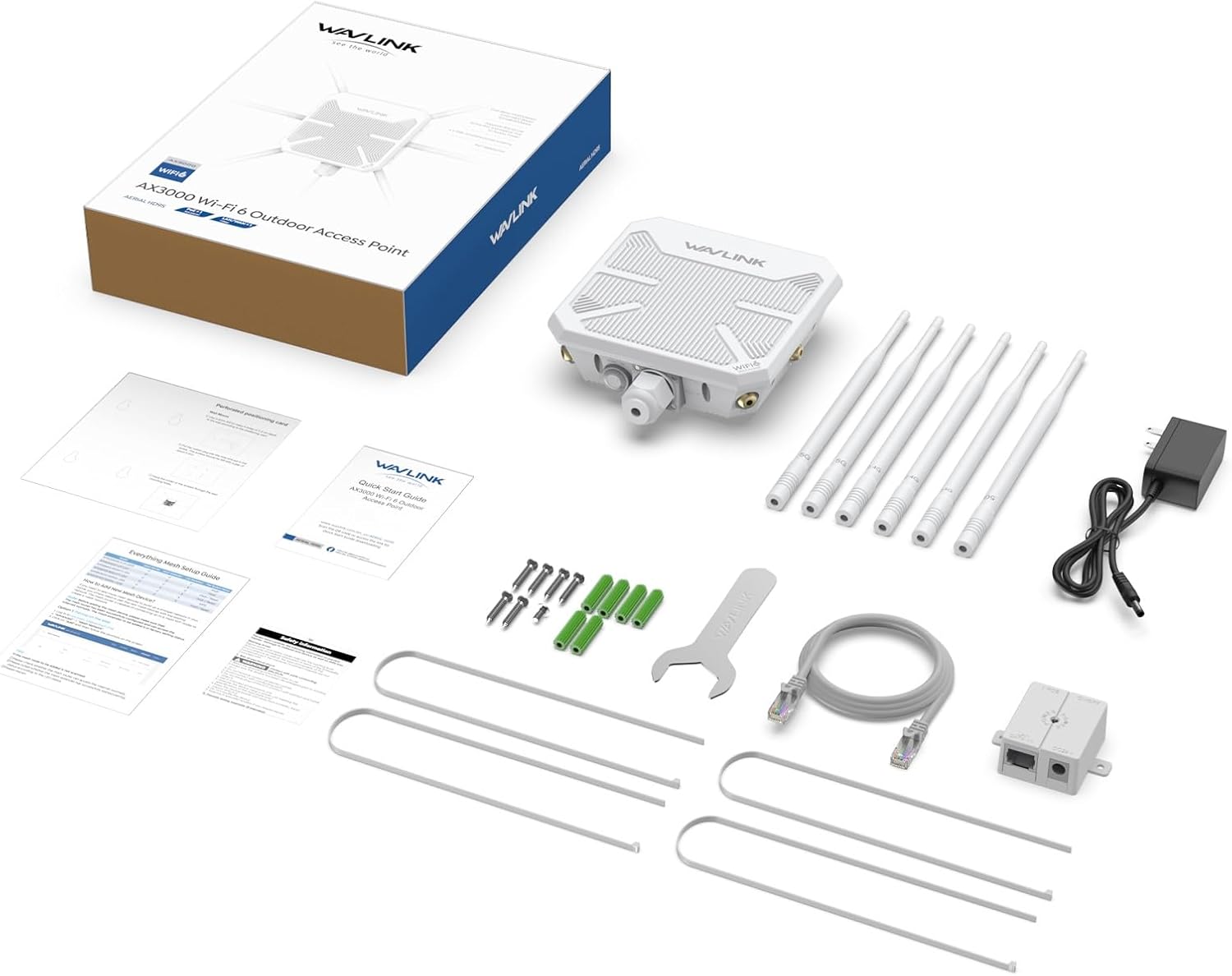
Image: Demonstrates the two primary physical installation options: mounting the device on a pole or directly onto a wall.
Power over Ethernet (PoE) Connection
The device supports both active (802.3AF/AT) and passive PoE. The included PoE converter is not waterproof and should be protected from the elements. For optimal performance, use CAT5E or above Ethernet cable within a 100m/328ft range.
- Active PoE: Connect the device to a PoE switch using an Ethernet cable.
- Passive PoE: Connect the power adapter to the PoE box, then connect the AX3000 device to the PoE port of the PoE box using an Ethernet cable.

Image: A visual guide illustrating how to connect the device using either an Active PoE switch or a Passive PoE setup with the included converter.
Initial Configuration Access
To access the setup page for initial configuration, connect your computer or phone to the device via Ethernet or its default Wi-Fi network. Then, open a web browser and navigate to 192.168.30.1. The default password for initial login is typically 'ADMIN'.
4. Operating Modes
The WAVLINK AX3000 supports various operating modes to suit different network requirements:
- AP/Router Mode: Converts a wired internet connection into a wireless network. Ideal for new network setups or extending an existing wired network wirelessly.
- Repeater Mode: Extends the coverage of an existing wireless network by repeating its signal.
- AP+Repeater Mode: Combines the functions of an Access Point and a Repeater, allowing for both wired and wireless extension.
- Mesh Mode: Creates a seamless Wi-Fi network with a single network name and password, allowing devices to roam freely without losing connection.

Image: A visual representation of the four main operating modes and how the device integrates into different network configurations.
AP/Router Mode Diagram

Image: Illustrates the connection for AP/Router mode, where the device connects to a modem/router and provides wireless access to multiple devices.
Repeater Mode Diagram

Image: Shows the setup for Repeater mode, where the device extends the signal from an existing router to cover a wider area.
AP+Repeater Mode Diagram

Image: Depicts the AP+Repeater mode, combining an access point with a repeater for extended coverage and connectivity.
Mesh Mode Diagram

Image: Illustrates the Mesh mode, where multiple devices create a unified, seamless Wi-Fi network.
5. Connectivity and Coverage
The AX3000 extender is designed to provide extensive wireless coverage and support a large number of connected devices. Without any obstruction, the device offers a coverage range of 1-90 meters at 2.4GHz and 1-200 meters at 5GHz. Note that at a distance of 300 meters, the network speed at 5GHz will be significantly reduced. It can connect up to 256 devices simultaneously.

Image: Highlights the device's capability for strong signal and wide coverage, indicating a range of up to 300 meters and support for over 256 devices.

Image: A top-down view of the extender, clearly showing its six antennas and their respective 2.4G and 5G band designations.
6. Environmental Durability
The WAVLINK AX3000 is built to withstand various outdoor conditions, ensuring reliable performance year-round. Its robust design includes:
- IP67 Waterproof Enclosure: Protects against dust ingress and water immersion.
- Operating Temperature: -20–50 ℃ (-4–122 ℉)
- Storage Temperature: -30–70 ℃ (-22–158 ℉)
- 15kV ESD Protection: Guards against electrostatic discharge.
- 6kV Lightning Protection: Provides defense against lightning strikes.
It is recommended to install a ground wire to prevent static electricity or lightning from damaging the device.

Image: The extender is depicted in different outdoor settings, emphasizing its ability to function reliably across a range of temperatures and its protection against environmental hazards.

Image: The device is shown mounted on a pole during rainfall, demonstrating its waterproof capabilities in adverse weather.
7. Technical Specifications
| Specification | Detail |
|---|---|
| Model Number | WN588HX3 |
| Product Dimensions | 2.36 x 9.45 x 12.6 inches |
| Item Weight | 2.2 pounds |
| Wireless Standard | WiFi 6 (802.11ax) |
| Frequency Bands | Dual Band (2.4GHz & 5GHz) |
| Max Data Rate | 3000Mbps (573Mbps on 2.4GHz, 2402Mbps on 5GHz) |
| Antennas | 6 x 7dBi Omnidirectional |
| PoE Support | Active (802.3AF/AT) & Passive PoE |
| Environmental Protection | IP67 Waterproof, 15kV ESD, 6kV Lightning Protection |
| Operating Temperature | -20–50 ℃ (-4–122 ℉) |
8. Troubleshooting Common Issues
This section addresses frequently asked questions and common issues users may encounter with the WN588HX3.

Image: A detailed Q&A section providing solutions for issues such as advertised distance not being reached, inability to repeat existing WiFi, and PoE compatibility.
Why the WiFi signal does not reach the advertised distance?
- Ensure there are no obstructions between the WAVLINK device and the target area. Obstacles can significantly limit performance.
- Install the WAVLINK device 2-3 meters higher than the ground for better performance.
- Confirm that the 2.4G antennas are installed on the 2.4G connectors and 5G antennas on the 5G connectors.
Why the device cannot repeat the existing WiFi signal?
- If your phone connects to the device but redirects to a webpage (Captive Portal), it means the WiFi signal is coming from a Captive Portal network, which cannot be repeated directly.
- When attempting to repeat an existing WiFi signal, ensure you enter the correct WiFi password.
- For 5G signal repetition, try to reduce wireless interference on the 5G channel.
- Ensure the MAC filter of the host router is disabled and DHCP is enabled.
9. Support and Warranty Information
Customer Support
For any questions or technical assistance, please contact WAVLINK support:
- Phone Support: +18889730883 (UTC-5) Mon - Fri 9 AM - 6 PM
- Email Support: Contact@wavlink.com
- Website: www.wavlink.com
Solutions are typically provided within 8 hours, with lifelong technical support available. If special characters are needed for firmware, search for '588HX3' in Firmware on the Wavlink website to upgrade to the latest firmware.
Warranty
All WAVLINK products include a 90-day free return and refund service, and a 12-month warranty.