
Adam Equipment ABW 4
Adam Equipment ABW 4 Aqua Washdown Scale User Manual
Model: ABW 4
Introduction
This manual provides essential information for the proper setup, operation, and maintenance of your Adam Equipment ABW 4 Aqua Washdown Scale. Designed for environments requiring frequent cleaning, this scale offers precise weighing capabilities with robust IP67 protection and NSF certification for food safety. Please read this manual thoroughly before using the scale to ensure optimal performance and longevity.
Safety Precautions
- Always operate the scale on a stable, level surface to ensure accurate readings.
- Avoid exposing the scale to extreme temperatures or sudden temperature changes.
- Do not overload the scale beyond its maximum capacity of 9lb / 4kg.
- Ensure the AC adapter is properly connected and the power source is stable.
- While the scale is IP67 rated for water immersion, avoid prolonged submersion beyond specified limits (up to 1 meter for up to 30 minutes).
- Keep the display and keypad clean and free from debris.
Product Components
The Adam Equipment ABW 4 Aqua Washdown Scale consists of the following main components:
- Weighing Pan: Removable 9.6" x 7.1" (245x180mm) grade 304 stainless steel pan.
- Display: Bright LED display with 0.8" (20mm) high digits, visible from front and rear.
- Keypad: Intuitive color-coded keys for various functions.
- Base Unit: Durable ABS plastic construction with adjustable feet.
- AC Adapter: For main power supply and battery charging.
- Rechargeable Battery: Internal battery for portable operation.

Figure 1: Angled view of the Adam Equipment ABW 4 Aqua Washdown Scale, showing the stainless steel pan and LED display.
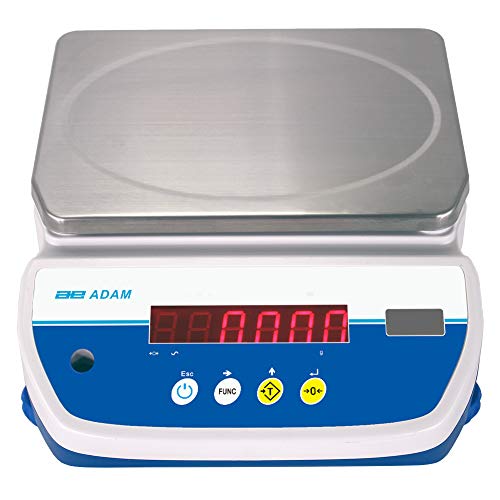
Figure 2: Front view of the scale, highlighting the LED display and control buttons.
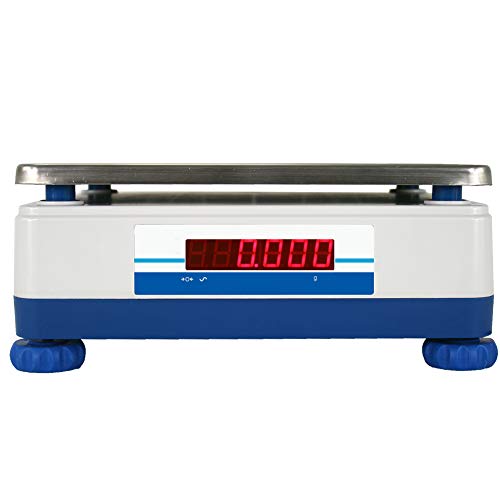
Figure 3: Rear view of the scale, showing the secondary LED display for dual-operator use.
Setup Instructions
- Unpacking: Carefully remove the scale and all accessories from the packaging. Retain packaging for future transport or storage.
- Placement: Place the scale on a firm, level, and stable surface, away from vibrations, drafts, and direct heat sources.
- Leveling: Adjust the four adjustable feet located at the bottom of the scale until the bubble in the spirit level (if present, or visually confirm levelness) is centered. This ensures accurate weighing.
- Pan Installation: Gently place the stainless steel weighing pan onto the pan support. Ensure it is seated correctly and does not wobble.
- Power Connection: Connect the supplied AC adapter to the power input port on the scale and then plug it into a suitable electrical outlet. The internal rechargeable battery will begin charging. Allow approximately 12 hours for the initial full charge.
- Initial Power On: Press the Power button () to turn on the scale. The display will perform a self-test and then show "0.000" or "0.0000" depending on the unit.
Operating Instructions
Basic Weighing
- Ensure the scale is powered on and displays "0.000". If not, press the Zero button () to zero the display.
- Place the item to be weighed gently onto the center of the weighing pan.
- Wait for the reading to stabilize (indicated by a stability indicator on the display, typically a small circle or arrow).
- Read the weight displayed on the LED screen.
Changing Weighing Units
The ABW 4 scale supports multiple weighing units including kilograms (kg), grams (g), pounds (lb), ounces (oz), and pounds:ounces (lb:oz).
- With the scale displaying "0.000", press the FUNC button repeatedly to cycle through the available weighing units.
- Stop pressing when your desired unit is displayed.
Tare Function
The tare function allows you to subtract the weight of a container, so only the net weight of the contents is measured.
- Place the empty container onto the weighing pan. The display will show its weight.
- Press the Tare button (, often labeled "0+" or similar). The display will return to "0.000" with a "T" or "NET" indicator.
- Add the material to be weighed into the container. The display will show only the weight of the material.
- To clear the tare, remove the container from the pan. The display will show a negative value. Press the Tare button again to return to "0.000".
Checkweighing
Checkweighing allows you to set upper and lower weight limits and the scale will indicate if the current weight is within, below, or above these limits using LED indicators.
- Refer to the full instruction manual for detailed steps on setting checkweighing limits. This typically involves entering a setup mode using the FUNC button.
- Once limits are set, place items on the pan. The scale's LED indicators will change color (e.g., red for low, green for OK, yellow for high) to provide visual feedback.
Parts Counting
The parts counting function allows you to count a large number of identical items by weighing a small sample.
- Refer to the full instruction manual for detailed steps on setting up parts counting, which involves placing a known quantity of items (e.g., 10, 20, 50) as a sample.
- Once the sample is registered, adding more items will display the count rather than the weight.
Percentage Weighing
Percentage weighing displays the current weight as a percentage of a reference weight.
- Refer to the full instruction manual for detailed steps on activating and using the percentage weighing function.
Maintenance and Cleaning
Regular maintenance ensures the longevity and accuracy of your ABW 4 scale.
- Cleaning: The ABW 4 is IP67 rated, allowing for frequent washdown. Use mild detergent and water. Avoid abrasive cleaners or solvents that could damage the plastic housing or display. Ensure the pan is removed for thorough cleaning.
- Drying: After cleaning, ensure the scale is thoroughly dried before use or storage.
- Pan Care: The stainless steel pan can be washed separately. Ensure it is clean and dry before placing it back on the scale.
- Battery Charging: Recharge the internal battery regularly. If the scale will not be used for an extended period, charge the battery fully and then store the scale in a cool, dry place. Recharge every few months to maintain battery health.
- Calibration: The scale features external calibration. Regular calibration using certified weights is recommended to maintain accuracy, especially after relocation or significant temperature changes. Refer to the full instruction manual for detailed calibration procedures.

Figure 4: The ABW 4 scale is designed for easy cleaning due to its IP67 washdown rating.
Troubleshooting
| Problem | Possible Cause | Solution |
|---|---|---|
| Scale does not turn on. | No power, discharged battery, faulty AC adapter. | Check AC adapter connection. Charge battery for at least 12 hours. Try a different power outlet. |
| Inaccurate readings. | Scale not level, pan not seated correctly, drafts, vibrations, need for calibration, overloaded. | Level the scale. Re-seat the pan. Move scale to a stable environment. Perform external calibration. Do not exceed max capacity. |
| Display shows "Err" or "OL". | Overload condition. | Remove excess weight from the pan immediately. Ensure weight is within capacity. |
| Display unstable/fluctuating. | Vibrations, drafts, unstable surface, electromagnetic interference. | Move scale to a more stable location. Ensure no fans or air vents are blowing on the scale. Check for nearby electronic devices causing interference. |
| Battery not holding charge. | Battery nearing end of life, not charging properly. | Ensure AC adapter is working. If battery life is significantly reduced, contact customer support for replacement options. |
Technical Specifications
| Parameter | Value |
|---|---|
| Model | ABW 4 |
| Maximum Capacity | 9lb / 4kg |
| Readability | 0.001lb / 0.0005kg |
| Repeatability | 0.002lb / 1g |
| Linearity | 0.002lb / 1g |
| Weighing Pan Size | 9.6" x 7.1" / 245x180mm |
| Weighing Units | kg, g, lb, oz, lb:oz |
| Stabilization Time | 1 second |
| Calibration | External calibration |
| Display | LED with 0.8" / 20mm high digits (Front and Rear) |
| Weighing Applications | Weighing, Parts counting, Percentage weighing, Checkweighing |
| Construction | ABS plastic housing, 304 stainless steel pan |
| Protection Rating | IP67 (Dust and Water Immersion) |
| Certifications | NSF Certified |
| Overall Dimensions (LxWxH) | 10.0" x 11.4" x 4.1" / 255x290x105mm |
| Power Supply | 12VDC 800mA AC adapter, Internal rechargeable battery |
| Battery Life | Up to 55 hours (on full charge) |

Figure 5: Top-down view of the scale, showing the pan and display layout.

Figure 6: Side view of the scale, illustrating its compact design and adjustable feet.
Warranty and Support
Adam Equipment provides reliable support for its products. For warranty information, technical assistance, or service, please contact Adam Equipment directly.
- Manufacturer: Adam Equipment
- Support: Adam Equipment offers technical support, repairs, and calibration services from their local USA office or through their extensive network of dealers.
- Online Resources: Visit the official Adam Equipment website for the most up-to-date manuals, FAQs, and support contact information.
Related documentsABW 4


Ask a question about this manual
Ask about setup, troubleshooting, compatibility, parts, safety, or missing instructions. Manuals+ will review the question and use this page’s manual context to help answer it.