
Introduction
Thank you for choosing the Yunir 4K 64MP Digital Camera. This compact and versatile camera is designed for capturing high-quality photos and videos, featuring a 64MP sensor, 4K video recording, 18x digital zoom, and a convenient 3-inch flip screen. This manual provides essential information on how to set up, operate, maintain, and troubleshoot your camera to ensure optimal performance.

Image: Angled view of the Yunir 4K 64MP Digital Camera, showcasing its compact design.
Safety Information
- Do not expose the camera to water or moisture. This camera is not water-resistant.
- Avoid dropping the camera or subjecting it to strong impacts.
- Keep the camera away from strong magnetic fields.
- Use only the specified battery type (Lithium-ion, model BL 5C) and charger.
- Do not attempt to disassemble or modify the camera.
- Store the camera in a cool, dry place when not in use.
Setup
1. Package Contents
Before use, please verify that all components are present:
- Yunir 4K 64MP Digital Camera
- USB Cable
- Wrist Strap
- Cleaning Cloth
- Lithium-ion Battery (BL 5C)
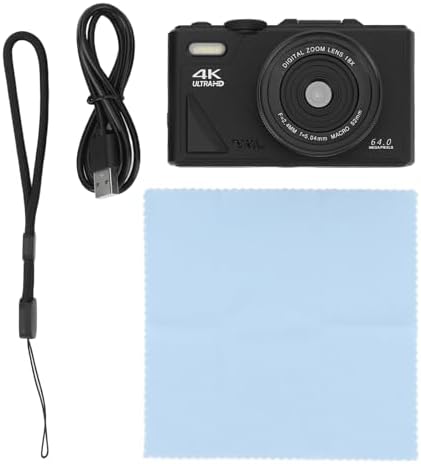
Image: The Yunir 4K 64MP Digital Camera shown with its included accessories: a wrist strap, USB cable, and cleaning cloth.
2. Battery Installation
- Open the battery compartment cover located on the bottom of the camera.
- Insert the Lithium-ion battery (model BL 5C) into the compartment, ensuring the correct polarity.
- Close the battery compartment cover securely.
3. Memory Card Installation
The camera supports SD cards up to 256 GB. A memory card is required to store photos and videos.
- Locate the SD card slot, usually next to the battery compartment.
- Insert the SD card with the metal contacts facing the correct direction until it clicks into place.
- To remove, gently press the card until it pops out.
4. Charging the Battery
Connect the camera to a power source using the provided USB cable. The charging indicator light will show the charging status. Ensure the battery is fully charged before first use.
Operating the Camera
1. Power On/Off
Press and hold the power button (usually located on the top or side of the camera) to turn the camera on or off.
2. Using the 3-inch Flip Screen
The camera features a 3-inch IPS flip screen, allowing for easy self-portraits and vlogging. Simply flip the screen upwards to view yourself while recording or taking photos.

Image: The camera's 3-inch flip screen displaying an image, with text indicating 64MP resolution, 4K video, and the flip-up screen feature.

Image: A close-up of the camera's rear, showing the flip-up screen displaying a vibrant image of a child outdoors.
3. Taking Photos
This camera captures detailed images with its 64 MP high-resolution sensor.
- Autofocus: The camera features autofocus technology, including face detection, to ensure sharp images.
- Shooting Modes: Select from various modes such as Automatic, Portrait, Landscape, and Sport to optimize settings for different scenes.
- Continuous Shooting: Capture a sequence of photos rapidly by enabling continuous shooting mode.
- White Balance: Adjust white balance settings (e.g., Auto) to ensure accurate color reproduction under different lighting conditions.

Image: The camera positioned in the foreground, with a blurred background showing a family enjoying an outdoor activity, illustrating its use for capturing moments.
4. Recording Videos
Record smooth, stable HD videos with 4K (3840 x 2160 Pixel) resolution at 30 FPS.
- 18x Digital Zoom: Use the W/T (Wide/Telephoto) button to zoom in or out digitally, capturing close-ups or distant objects.
- Image Stabilization: Digital image stabilization helps reduce blur caused by camera shake.
- Video Pause Function: Pause and resume video recording to save editing time and memory.
- Time-Lapse & Slow Motion: Utilize these functions for creative video effects.
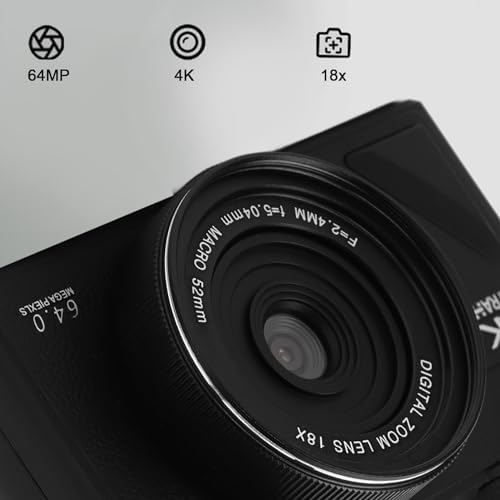
Image: A detailed close-up of the camera lens, highlighting its key specifications: 64MP resolution, 4K video capability, and 18x digital zoom.
5. Webcam Function
The camera can function as a webcam for live streaming and video calls. Connect it to your computer via the USB cable, and select the camera as your video input device in your streaming or video conferencing software.
6. Connectivity
The camera supports USB connectivity for data transfer and charging. It also features Wi-Fi for wireless connection to compatible devices.
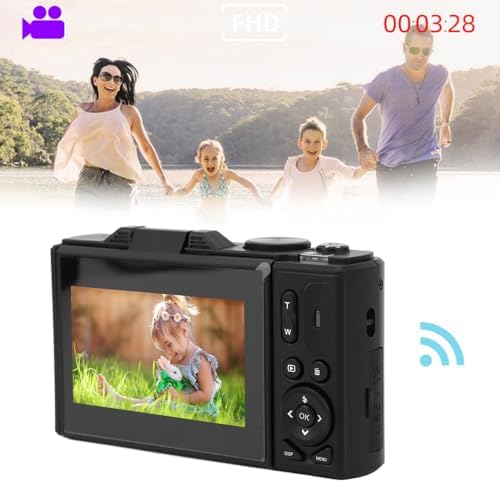
Image: The camera displaying a Wi-Fi symbol on its screen, indicating wireless connectivity, with a family in the background.
Maintenance
1. Cleaning the Camera and Lens
- Use the provided cleaning cloth or a soft, lint-free cloth to gently wipe the camera body and screen.
- For the lens, use a specialized lens cleaning solution and cloth to avoid scratches.
- Do not use harsh chemicals or abrasive materials.
2. Battery Care
- Charge the battery regularly, even if the camera is not in frequent use, to maintain battery health.
- Avoid fully discharging the battery repeatedly.
- Remove the battery if the camera will not be used for an extended period.
3. Storage
When not in use, store the camera in a protective case or bag to prevent dust and scratches. Keep it in a cool, dry environment away from direct sunlight and extreme temperatures.
Troubleshooting
| Problem | Possible Cause | Solution |
|---|---|---|
| Camera does not turn on. | Battery is low or not inserted correctly. | Charge the battery. Reinsert the battery correctly. |
| Images are blurry. | Lens is dirty. Autofocus failed. Insufficient light. | Clean the lens. Ensure proper lighting. Re-focus. |
| Cannot record video. | Memory card is full or not inserted. | Delete unnecessary files or insert a new memory card. Ensure card is inserted correctly. |
| Camera not recognized by computer. | USB cable issue. Driver not installed. | Try a different USB port or cable. Ensure camera is in the correct mode for connection. |
Specifications
| Feature | Detail |
|---|---|
| Brand | Yunir |
| Model Name | Yunir93y5xg4osa-12 |
| Effective Photo Resolution | 64 MP |
| Video Recording Resolution | 4K (3840 x 2160 Pixel) |
| Frame Rate | 30 FPS |
| Digital Zoom | 18x |
| Screen Dimensions | 3 Inch (IPS Flip Screen) |
| Autofocus Technology | Face Recognition |
| Image Stabilization | Digital |
| Supported File Formats | JPEG, MP4 |
| Memory Storage Capacity | Up to 256 GB (SD Card) |
| Battery Type | Lithium-ion (Model BL 5C, 1150 mAh) |
| Connectivity Technology | USB, Wi-Fi |
| Special Features | Webcam Function, Time-lapse, Slow Motion, Continuous Shooting |
| Water Resistance Level | Not Water Resistant |
| Package Dimensions | 14.8 x 12.8 x 6.2 cm; 435 g |
| Country of Origin | China |
Warranty and Support
For warranty information and customer support, please refer to the documentation provided with your purchase or contact the retailer. Keep your proof of purchase for any warranty claims.