
1. Introduction
This manual provides detailed instructions for the setup, operation, and maintenance of your TAOLOON P6max Smart Watch. Please read this manual thoroughly to ensure proper use and to maximize the functionality of your device.

Image 1.1: TAOLOON P6max Smart Watch. This image shows the watch face displaying the time, date, and step count, along with a side view highlighting the flashlight feature.
2. Product Features
- Integrated Flashlight: Equipped with three side lights for enhanced illumination. These lights also serve as visual alerts for calls, messages, and high heart rate warnings.
- Bluetooth Calling & Notifications: Supports making and answering calls directly from the watch, playing music, and receiving notifications for messages and social media alerts.
- 1.96-inch HD Touch Screen: Features a high-definition TFT color display with adjustable brightness and a resolution of 240*286. Offers customizable watch faces via the 'FitCloudPro' app.
- Comprehensive Health Monitoring: Includes 24-hour heart rate, blood oxygen, and sleep tracking. Provides sedentary and hydration reminders.
- 100+ Sports Modes: Tracks various activities such as running, basketball, football, walking, cycling, and exercise bike, providing real-time data.
- Long Battery Life: 300mAh battery offering up to 15 days standby time and 4-7 days of typical daily use.
- IP67 Water Resistance: Designed to withstand splashes, rain, and handwashing.
3. Getting Started (Setup)
3.1. Package Contents
Verify that your package contains the TAOLOON P6max Smart Watch, a watch band, and a magnetic USB charging cable.

Image 3.1: Package Contents and Product Dimensions. This image illustrates the watch's physical dimensions and lists the items included in the box: the watch, two watch bands, a charging cable, and an operating guide.
3.2. Charging the Watch
- Connect the magnetic charging cable to the charging contacts on the back of the watch.
- Plug the USB end of the cable into a standard USB power adapter (not included) or a computer's USB port.
- The watch screen will display a charging indicator. A full charge typically takes approximately 2 hours.

Image 3.2: Magnetic Charging and Water Resistance. This image shows the watch connected to its magnetic charger, indicating the charging process. It also highlights the IP67 waterproof rating with icons for rain, sweat, and handwashing.
3.3. App Installation and Pairing
- Download the 'FitCloudPro' app from your smartphone's app store (compatible with iOS 12.0+ and Android 8.0+).
- Ensure Bluetooth is enabled on your smartphone.
- Open the 'FitCloudPro' app, create an account if prompted, and follow the on-screen instructions to add your device.
- Select the TAOLOON P6max from the list of available devices to initiate pairing. Confirm the pairing request on both your phone and the watch.
4. Operating Your Smart Watch
4.1. Basic Navigation
- Touch Screen: Swipe up, down, left, or right to navigate through menus and functions. Tap to select.
- Side Button: Press the side button to wake the screen, return to the main watch face, or access the app menu. A quick double-press may reveal a secondary menu or specific functions.
4.2. Bluetooth Calls and Message Notifications
Once paired with your smartphone, the watch can handle calls and display notifications.
- Making/Receiving Calls: Use the watch's dial pad or contact list to make calls. Incoming calls will display on the watch, allowing you to answer or reject them.
- Message Alerts: The watch will vibrate and flash upon receiving messages from supported apps (e.g., SMS, WhatsApp, Facebook).
- Do Not Disturb Mode: Activate this mode via the watch settings or the app to prevent interruptions during specific times.
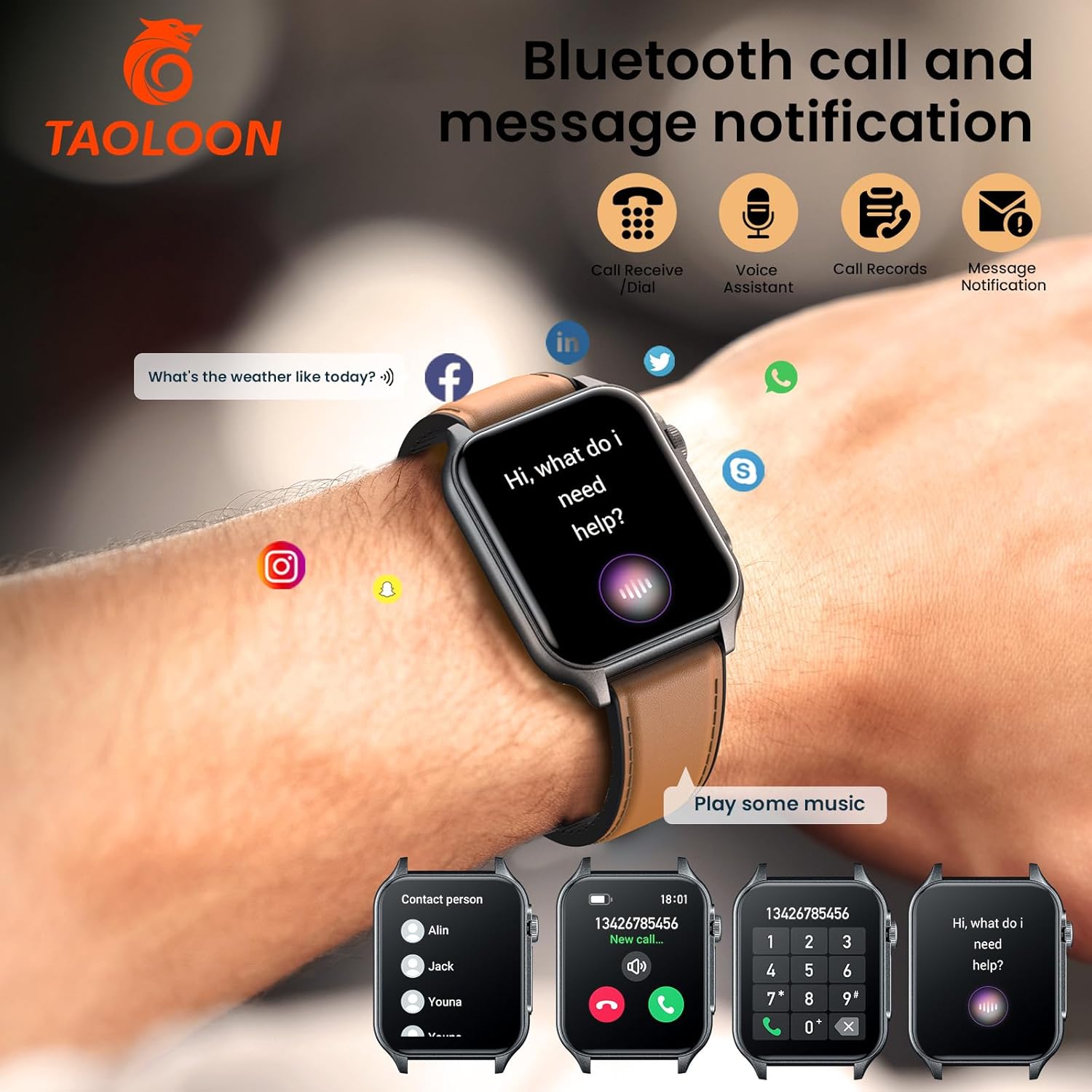
Image 4.1: Bluetooth Call and Message Notification. This image illustrates the watch's capabilities for handling calls, using a voice assistant, accessing call records, and receiving notifications from various messaging and social media applications.
4.3. Flashlight Function
To activate the flashlight, scroll down on the main watch interface. The three side lights will illuminate, providing a convenient light source.

Image 4.2: Large HD Screen and Flashlight. This image emphasizes the watch's 1.96-inch high-definition display and the three integrated flashlight lights on its side, along with display specifications.
4.4. Music Control and Voice Assistant
Control music playback on your smartphone directly from the watch. You can also use the integrated voice assistant for various commands.
4.5. Customizing Watch Faces
Through the 'FitCloudPro' app, you can access over 100 personalized watch faces or upload your own photos to customize the display.
5. Health Monitoring
The TAOLOON P6max Smart Watch is equipped with sensors to track key health metrics.
- Heart Rate Detection: Monitors your heart rate continuously throughout the day. The watch will flash to alert you if your heart rate exceeds a preset threshold.
- Blood Oxygen Detection: Measures your blood oxygen saturation levels.
- Sleep Detection: Tracks your sleep patterns, including duration and quality, providing insights into your rest.
- Reminders: Set up sedentary reminders to encourage movement and drinking water reminders to maintain hydration.

Image 5.1: 24/7 Health Index Monitoring. This image displays the watch's ability to monitor heart rate, blood oxygen levels, and sleep patterns, with visual representations of each metric.
6. Sports Modes
The watch supports over 100 outdoor and indoor sports modes to help you track your fitness activities.
- Select your desired sport mode from the watch's menu.
- The watch will record data such as steps, calories burned, heart rate, distance, and exercise time.
- Synchronize the watch with the 'FitCloudPro' app to view detailed reports and track your progress.

Image 6.1: 110+ Exercise Modes. This image shows the watch interface for activity tracking, displaying metrics such as kilometers, steps, BPM, and calories. It also illustrates various sports icons and people engaged in different activities.
7. Maintenance
7.1. Water Resistance
The TAOLOON P6max Smart Watch has an IP67 water resistance rating. This means it is resistant to splashes, rain, and can be worn during handwashing. It is not suitable for swimming, showering with hot water, or diving.
7.2. Cleaning
Wipe the watch and strap regularly with a soft, dry cloth. If necessary, use a slightly damp cloth and then dry thoroughly. Avoid using harsh chemicals or abrasive materials.
7.3. Battery Care
To prolong battery life, avoid fully discharging the watch frequently. Charge the watch when the battery level is low. Store the watch in a cool, dry place when not in use for extended periods.
8. Troubleshooting
- Watch not turning on: Ensure the watch is fully charged. If the issue persists, try connecting it to the charger for a few minutes.
- Cannot pair with smartphone: Make sure Bluetooth is enabled on your phone and the watch. Ensure the 'FitCloudPro' app is installed and updated. Try restarting both devices.
- Inaccurate step tracking: Ensure the watch is worn snugly on your wrist. Calibrate the step tracker in the 'FitCloudPro' app if available. Note that smartwatches may not be as accurate as dedicated medical devices.
- Weather data not updating: Check your phone's network connection and ensure the 'FitCloudPro' app has location permissions enabled. Synchronize the app with the watch.
- Battery life shorter than expected: Frequent use of features like Bluetooth calls, flashlight, and continuous health monitoring can reduce battery life. Adjust settings or reduce usage of power-intensive features. Ensure the watch is fully charged.
- Notifications not appearing: Verify that notifications are enabled in both the watch settings and the 'FitCloudPro' app. Check your phone's app permissions for 'FitCloudPro'.
9. Specifications
| Brand | TAOLOON |
| Model Number | P6max |
| Screen Size | 1.96 Inches (2.0 Inches stated in some descriptions) |
| Display Resolution | 240*286 |
| Connectivity | Bluetooth |
| Battery Capacity | 300 mAh |
| Water Resistance | IP67 |
| Compatibility | Android 8.0+ / iOS 12.0+ |
| Item Weight | 4.2 ounces |
10. Warranty and Support
For warranty information and customer support, please refer to the documentation provided with your purchase or contact the retailer. Protection plans may be available for extended coverage.