
iDOO I-E-02
iDOO Electric Composter User Manual
Model: I-E-02
Introduction
The iDOO Electric Composter is designed to efficiently process kitchen food waste into a reduced, odorless material suitable for disposal or further composting. This manual provides comprehensive instructions for the safe and effective operation and maintenance of your composter.

Figure 1: iDOO Electric Composter with its lid open, showing food scraps being added to the internal bucket.
Important Safety Information
Please read and understand all safety warnings before operating the iDOO Electric Composter. Failure to follow these instructions may result in electric shock, fire, or serious injury.
- Always unplug the machine before cleaning.
- Do not put in food that is too hard or large, as this may cause damage or excessive noise.
- Allow the machine to cool down completely before handling any internal components.
- Replace the carbon filter every 3 months to maintain optimal odor absorption.
- Do not compost meat, dairy, or oily foods, as these are not suitable for this type of composting process and can cause issues.
- Keep the machine away from heat sources and direct sunlight.
- Always use the machine on a stable, level surface to prevent tipping.
- The product has a timer function that allows the machine to run at a time you need, potentially during off-peak electricity hours.
- The child lock design prevents accidental operation by children.
Product Overview and Components
The iDOO Electric Composter (Model I-E-02) features a compact design with a wooden top, making it suitable for kitchen counters. Key components include:
- Main Unit: Houses the motor, heating elements, and control panel.
- Inner Bucket: A removable 3L capacity bucket for food waste.
- Lid: Features a child lock mechanism and a heating element for drying.
- Carbon Filter Compartment: Located on the side, for odor absorption.
- Control Panel: Power button, cycle indicator, and timer settings.

Figure 2: Visual representation of the iDOO Composter's ability to reduce food waste volume by 90% within 6-10 hours.
Setup
- Unpack: Carefully remove all components from the packaging.
- Placement: Place the composter on a stable, level surface away from heat sources and direct sunlight. Ensure there is adequate space around the unit for ventilation, especially where steam may be released.
- Install Carbon Filter: Open the carbon filter compartment on the side of the unit. Pour all three colors of activated carbon particles into the box. Close the compartment securely.
- Insert Inner Bucket: Place the 3L inner bucket into the main unit, aligning it correctly.
- Connect Power: Plug the power cord into a suitable electrical outlet.

Figure 3: Step 1 - Unlock the Child Lock and press the Push Button to open the lid.

Figure 4: Step 2 - Put food waste into the bucket.
Operating Instructions
- Add Food Waste: Open the lid by unlocking the child lock and pressing the push button. Place suitable food scraps into the 3L inner bucket. Do not overfill.
- Close and Lock: Close the lid firmly and engage the child lock by turning the knob to the locked position.
- Start Cycle: Press the On/Off button to begin the composting process. The unit will automatically go through drying, grinding, and cooling phases. The cycle typically takes 6-10 hours.
- Timer Function: Utilize the timer function to customize the start time, allowing you to run the composter during off-peak electricity hours to save energy costs.
- Cycle Completion: Once the cycle is complete, the indicator light will change. Unlock the lid and remove the processed material.
What Can Be Composted?
The iDOO Electric Composter is designed for a variety of organic waste. Suitable items include:
- Fruit and vegetable scraps
- Fruit pits
- Soft bones (e.g., fish bones)
- Soft shells (e.g., eggshells)
- Starches (e.g., bread, pasta)
- Coffee grounds & Nuts
- Houseplants
Note: Avoid excessively hard or large food items to prevent damage and noise during grinding.
Composting Process Overview
The iDOO Smart Kitchen Composter transforms food scraps into dry compost fertilizer through a three-stage process:
- Dry On High Heat: Food waste is heated to remove moisture.
- Grind With Sharp Blade: Thick aluminum blades grind the dried waste into a fine powder.
- Cooling Rapidly: The processed material is cooled down.

Figure 5: The three-step process of the iDOO Electric Composter: drying, grinding, and cooling.

Figure 6: Step 4 - Press the On/Off button to start processing.
Maintenance
- Cleaning: The inner bucket is independently usable and can be removed for cleaning. The unit also features a one-touch self-cleaning function. Always unplug the machine before manual cleaning.
- Carbon Filter Replacement: The upgraded carbon filter has a higher odor-absorbing capacity. Replace the carbon filter every 3 months or after approximately 720 hours of use to maintain effective odor control.
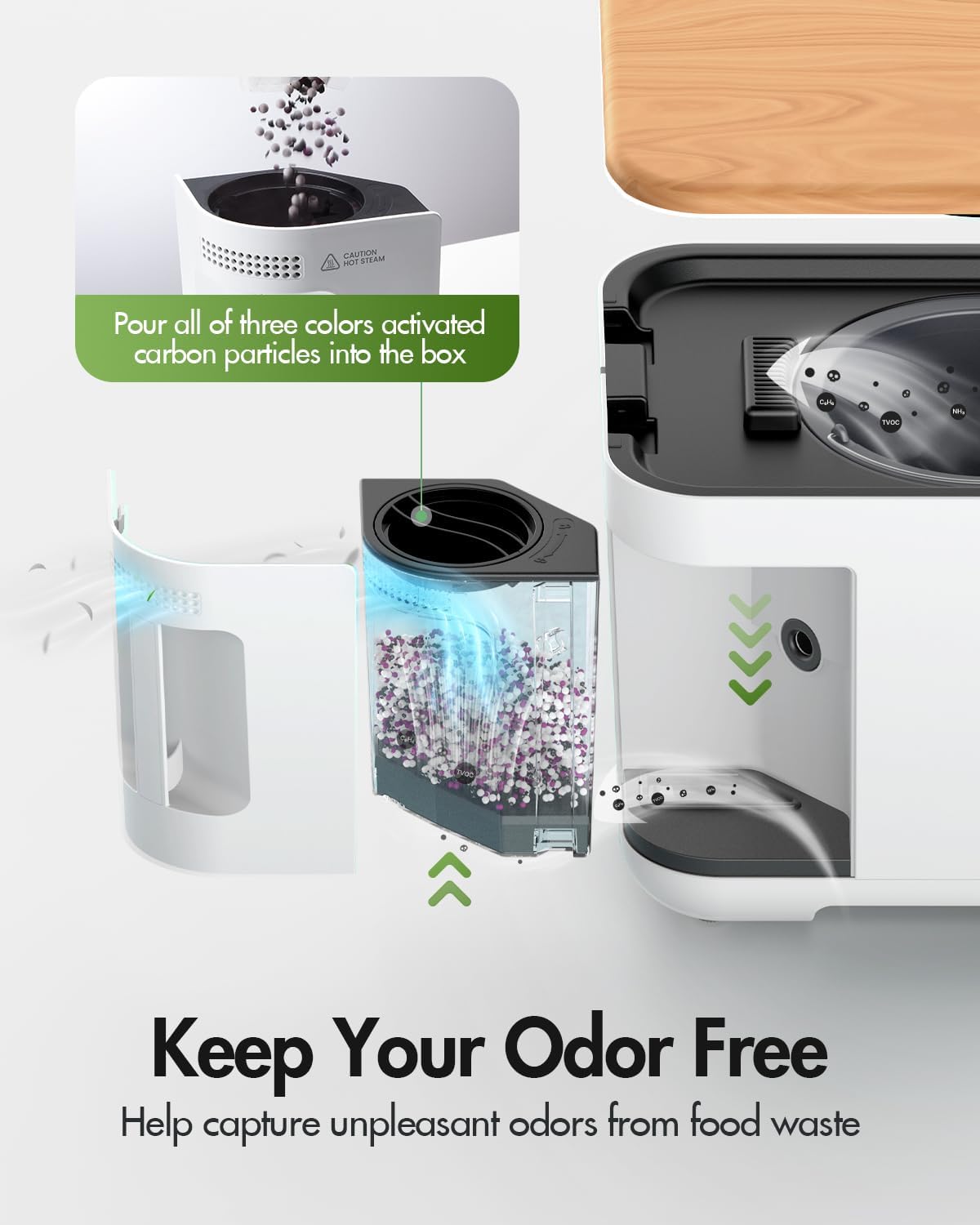
Figure 7: Instructions for pouring activated carbon particles into the filter box to maintain odor control.

Figure 8: The auto-cleaning mode simplifies maintenance of the inner bucket.
Troubleshooting
If you encounter issues with your iDOO Electric Composter, consider the following common points:
- Unusual Noise: Ensure that no excessively hard or large food items have been placed in the composter. Remove any such items if present.
- Odor Persistence: Check if the carbon filter needs replacement. Filters should be changed every 3 months or after 720 hours of use. Ensure the filter compartment is properly sealed.
- Composting Incomplete: Verify that the lid is securely closed and the child lock is engaged. Ensure the inner bucket is correctly seated. Avoid adding items not recommended for composting (e.g., meat, dairy, oily foods).
- Unit Not Starting: Check if the unit is properly plugged into a working power outlet. Ensure the lid is fully closed and locked.
For issues not covered here, please refer to the manufacturer's official support channels.
Specifications
| Feature | Detail |
|---|---|
| Brand | iDOO |
| Model Name | iDOO I-E-01 (Note: Product title specifies I-E-02) |
| Capacity | 3 Liters |
| Color | White |
| Material | Aluminium |
| Product Dimensions | 13.7 x 12.01 x 11.02 inches |
| Item Weight | 21.7 pounds |
| Manufacturer | iDOO |
Warranty and Support
For warranty information, product registration, or technical support, please visit the official iDOO website or contact their customer service. Keep your purchase receipt for any warranty claims.
You can find more information and support by visiting the iDOO Store on Amazon.
Ask a question about this manual
Ask about setup, troubleshooting, compatibility, parts, safety, or missing instructions. Manuals+ will review the question and use this page’s manual context to help answer it.