
1. Introduction
This manual provides instructions for the installation, operation, and maintenance of your Lamshaw 3D Full Coverage PET Soft Screen Protector. This product is designed to protect the screen of compatible smartwatches from scratches, drops, and daily wear.

Image showing the Lamshaw screen protector packaging, three individual screen protectors, and a smartwatch with a blue band, illustrating the product and its intended use.
2. Package Contents
- 3 x Lamshaw 3D Full Coverage PET Soft Screen Protectors
- Installation accessories (e.g., wet wipes, dry wipes, dust removal stickers - specific items may vary)
3. Compatibility
This screen protector is compatible with the following smartwatch models:
- QCOQ 1.96" P98 Smart Watch
- CASCHO P98 Smart Watch
- P98 Smart Watch (generic 1.96" models)
Note: The smartwatch itself is not included with this product.
4. Setup (Installation Guide)
Follow these steps for proper installation of the screen protector:
- Clean the Watch Screen: Use the provided wet wipe to thoroughly clean the smartwatch screen. Follow with the dry wipe to ensure the screen is completely dry and free of dust or smudges.
- Remove Protective Film: Gently pull the tab to remove the first protective film from the screen protector. Avoid touching the adhesive side of the protector to prevent fingerprints or dust.
- Align and Apply: Carefully align the screen protector with the smartwatch screen. Once aligned, gently place the protector onto the watch screen. Do not press the middle of the protector firmly at this stage.
- Remove Air Bubbles: Starting from one side, gently push the protector to adhere it to the watch screen, working your way across. This action helps to squeeze out any air. If bubbles remain, gently lift the nearest corner of the protector to release the air, then slowly re-apply it. Continue pushing gently until all air bubbles are removed and the screen protector fits perfectly.
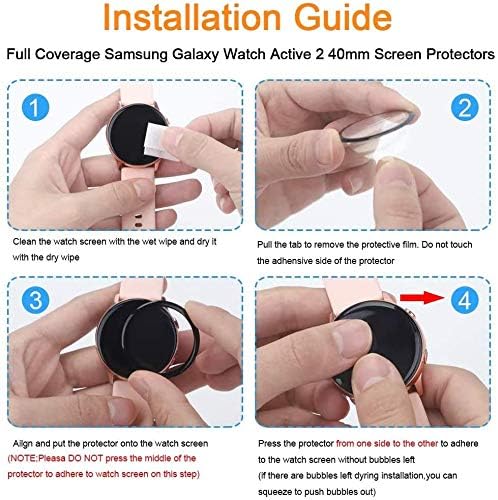
Four-step visual installation guide for applying the screen protector to a smartwatch.
5. Operating (Features)
The Lamshaw 3D Full Coverage PET Soft Screen Protector offers several key features designed to enhance your smartwatch experience:
- 3D Full Coverage: Provides edge-to-edge protection for your smartwatch screen.
- High Definition Clarity: Optically transparent material ensures a clear visual experience without diminishing screen quality.
- Touch Sensitivity: Maintains the original touch response of your smartwatch screen, allowing for smooth and accurate interaction.
- Flexible Film: Constructed from a flexible material that offers strong resistance against impacts without cracking.
- Shatter-proof & Anti-Scratch: Designed with an upgraded explosion-proof and scratch-resistant structure to protect against drops, scratches, and bumps.
- Bubble-Free Application: Engineered for easy installation with minimal air bubbles.
- Lightweight Design: Adds minimal bulk to your smartwatch.

Infographic detailing the key features of the screen protector.

Demonstration of the screen protector's touch sensitivity and protective qualities.

Illustration of the flexible film technology.

Visual representation of the shatter-proof 'cobweb structure' protection.

Depiction of the lightweight nature of the screen protectors.
6. Maintenance
To ensure the longevity and clarity of your screen protector:
- Clean the screen protector regularly with a soft, lint-free cloth.
- Avoid using harsh chemicals or abrasive materials, as these can damage the protector's surface.
- If the protector becomes heavily scratched or damaged, replace it with a new one from the pack to maintain optimal protection and visual clarity.
7. Troubleshooting
Air Bubbles After Installation
If air bubbles are present after installation:
- Gently lift the corner of the screen protector closest to the bubble.
- Slowly re-apply the protector, using a soft card or your finger to push the air out towards the edge.
- Ensure the screen is free of dust before re-application, as dust particles can cause persistent bubbles.
Screen Protector Not Adhering Properly
If the screen protector does not adhere well:
- Ensure the smartwatch screen was thoroughly cleaned and dried before application. Any residue can prevent proper adhesion.
- Verify that the correct side of the protector is being applied.
- Apply gentle, even pressure across the entire surface during installation.
8. Specifications
| Brand | Lamshaw |
| Compatible Devices | QCOQ P98, CASCHO P98, P98 Smartwatch (1.96 Inches) |
| Material | Plastic (PET Soft Film) |
| Item Hardness | 6H |
| Special Features | Anti-Shatter, Anti-Scratch, 3D Full Coverage, Touch Sensitive, HD Clear |
| Finish Type | Clear |
| Water Resistance Level | Not Water Resistant |
| Product Dimensions | 0.5"L x 0.5"W x 0.5"H (approximate, for individual protector) |
| Item Weight | 0.528 ounces (total package) |
9. Warranty and Support
For information regarding warranty coverage or technical support, please refer to the product packaging or contact the manufacturer directly through their official channels. Keep your purchase receipt for warranty claims.